Zum Hauptinhalt springen
Echtzeit-Radar & Feeds
Alle RSS Feeds ➔
👥 Community & Social
Windows Tipps & SecurityGrafikkarte vor Überhitzung schützen: So geht’s(25.09.2026 um 08:00 Uhr)
••••••••••
Windows Tipps & SecurityGrafikkarte vor Überhitzung schützen: So geht’s(25.09.2026 um 08:00 Uhr)
••••••••••
Intelligence View
⚡ tsecurity.de Intelligence

"Auto-Healing Linux: From Health Checks to AI-Powered Fixes"

📌 Introduction This guide will help you create a professional system health monitor that: ✅ Checks critical server metrics ✅ Generates beautiful reports ✅ Sends email alerts with actionable insights ✅ Runs automatically on schedule 🔧 Prer…

0
↗ Quelle (dev.to)
Reagiere als Erste:r — dein Feedback zählt!

📌 Introduction

This guide will help you create a professional system health monitor that:


✅ Checks critical server metrics

✅ Generates beautiful reports

✅ Sends email alerts with actionable insights

✅ Runs automatically on schedule


🔧 Prerequisites


✅ Any Linux system (Tested on RHEL, Ubuntu, Raspberry Pi)

✅ Terminal access with sudo privileges

✅ Python 3 (for email functionality)

✅ Optional: ChatGPT/Gemini access for AI enhancements


🛠️ Step 1: Create the Health Check Script

AI-Generated Base Script
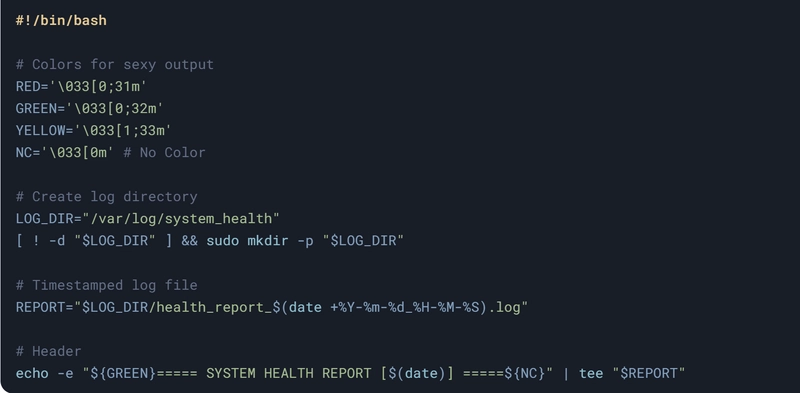


Image description


Disk Health Check


Image description


Memory Check


Image description


CPU Load


Image description


📧 Step 2: Add Email Notifications

Python Email Script
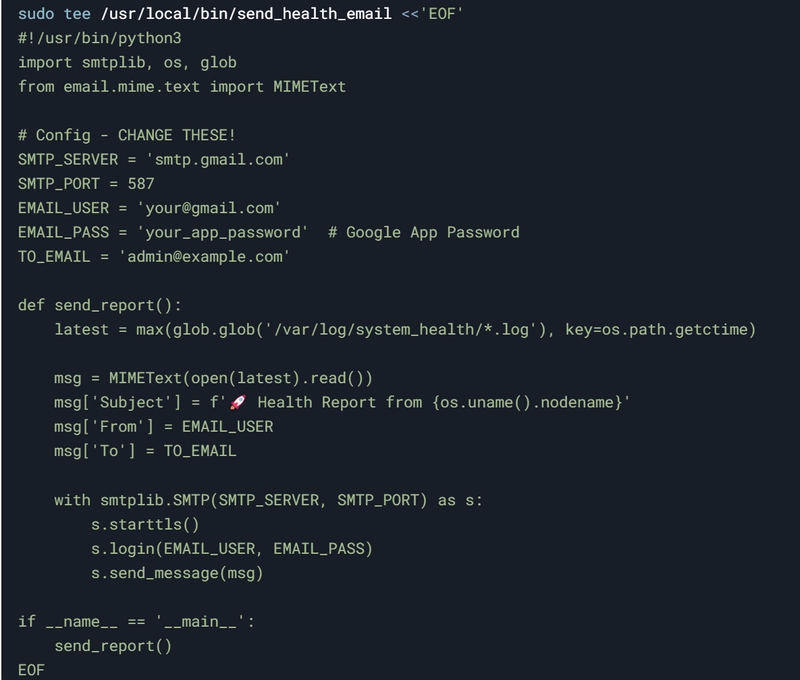


Image description


NOTE: Create Gmail App Password


Go to: https://myaccount.google.com/apppasswords

Select "Mail" and "Other (Custom Name)"

Name it "RHEL Healthcheck"

Copy the generated 16-digit password

Paste it in the script above replacing your_app_password

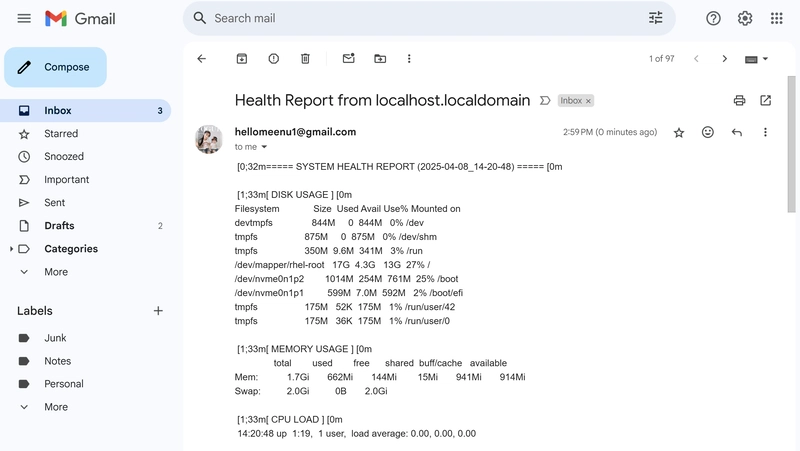
I connected with my Gmail as below Screenshot:



Image description


Step 3. Make the Script Executable



Image description


Image description


Image description

Image description


⏰ Step 4: Automate with Cron

3.1 Daily Reports



Image description


3.2 Critical Alerts


Image description


🎨 Step 4: Enhancements

4.1 AI-Powered Recommendations
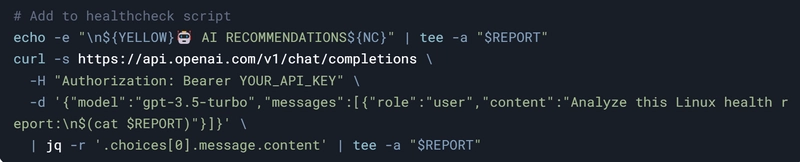


Image description


4.2 HTML Reports


Image description


🚀 Final Output Examples

Email Subject Lines:


📊 [NORMAL] Server Health - CPU 15% | Disk 60%


🚨 [ALERT] High Memory Usage - 92% used!


Sample AI Analysis:



Image description


📢 Pro Tips


Test First: Run /usr/local/bin/healthcheck manually

Debug: Check /var/log/syslog for cron errors

Slack Alerts: Replace email with Slack webhooks for team notifications


Troubleshooting Steps:
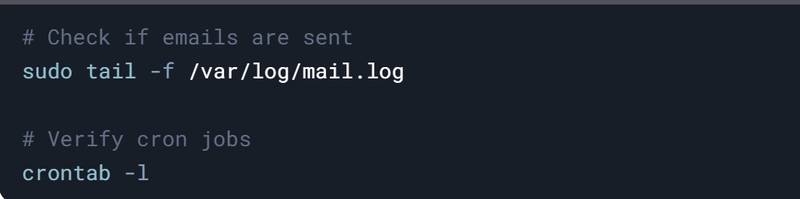


Image description


#30DaysLinuxChallenge #CloudWhisler

DevOps #Linux #RHCSA #Opensource #AWS #CloudComputing


Catch out by My LinkedIn profile

https://www.linkedin.com/in/rajpreet-gill-4569b4161/

1. Sofort-Triage & Abwehrmaßnahmen

SOC Incident Playbook: Remote Code Execution (RCE) Defense
Syntax validiert (0 Fehler)
title: Detect Exploitation - "Auto-Healing Linux: From Health Checks to AI-Powered Fixes"
id: f991971e-faeb-4800-81ea-8d650369c961
status: experimental
description: Automatisch generierte SIEM-Erkennungsregel basierend auf CTI Intelligence
references:
  - https://tsecurity.de/
author: iShareStuff CTI Automated Detection Engine
date: 2026-09-27
logsource:
  category: network_connection
  product: any
detection:
  selection:
      CommandLine|contains:
        - 'exploit'
  condition: selection
falsepositives:
  - Legitime administrative Zugriffe oder Penetrationstests
level: high
tags:
  - attack.initial_access
Syntax validiert (0 Fehler)
rule CTI_Threat_Indicator {
    meta:
        author = "iShareStuff CTI Automated Detection Engine"
        date = "2026-09-27"
        description = "YARA Signature for "
    strings:
        $str = "\"Auto-Healing Linux: From Heal" ascii wide
    condition:
        any of them
}
Syntax validiert (0 Fehler)
index=security sourcetype IN ("cisco:asa", "pan:traffic", "zeek_conn", "suricata", "WinEventLog:Security")
("Auto-Healing Linux From Health Checks to")
| stats count earliest(_time) as first_seen latest(_time) as last_seen by src_ip, dest_ip, dest_host, signature
| eval first_seen=strftime(first_seen, "%Y-%m-%d %H:%M:%S"), last_seen=strftime(last_seen, "%Y-%m-%d %H:%M:%S")
| sort - count
Syntax validiert (0 Fehler)
message: "*Auto-Healing Linux From Health Checks to*"
Syntax validiert (0 Fehler)
CommonSecurityLog
| where Message has "Auto-Healing Linux From Health Checks to"
| summarize EventCount = count(), FirstSeen = min(TimeGenerated), LastSeen = max(TimeGenerated) by SourceIP, DestinationIP, DestinationPort, Activity
| extend DetectionRule = "iShareStuff-CTI-Compiled"
| sort by EventCount desc

2. Cyber Threat Intelligence & Forensik

CTI Threat Relationship Graph3 Knoten / 2 Relationen
CVE / Incident Software MITRE ATT&CK CWE Weakness IoC
🎯
MITRE ATT&CK Matrix Navigator 14 Taktiken
Reconnaissance
-
Resource Development
-
Initial Access
Execution
Persistence
-
Privilege Escalation
Defense Evasion
Credential Access
-
Discovery
-
Lateral Movement
-
Collection
-
Command and Control
Exfiltration
-
Impact
tsecurity.de Cognitive Threat RAG
Fokus-Vektor:

Analyse für identifizierte Bedrohung auf Basis von Live-CTI (ENISA EUVD): CVSS 0.0 · EPSS 0.0% · CISA KEV: nein. Handlungsableitung aus den verlinkten Hersteller-Quellen.

🛡️ Angriffsfläche & Exposure

Netzwerk/Remote-Zugriff ohne Vorauthentifizierung möglich.

⚡ Empfohlene Sofortmaßnahmen
  • 1. Perimeter-Inspektion: Relevante Portfreigaben und exponierte Endpunkte unverzüglich scannen.
  • 2. Patch-Applikation: Hersteller-Hotfix einspielen oder betroffene Daemons in isolierte DMZ-Segmente überführen.
  • 3. Telemetrie & EDR-Alerts: Prozessaufrufe und Child-Processes auf anomale Shell-Spawns überwachen.
Ähnliche Beiträge
🔍 Verwandte News

Auch interessante Nachrichten "Auto-Healing Linux: From Health Checks to AI-Powered Fixes"

Thematisch verwandte Begriffe: AutoHealing, Linux, From, Health · 6 Treffer

Laden...

Videos werden geladen ...

Laden...

Beiträge werden geladen ...

Laden...

Videos werden geladen ...

Laden...

Beiträge werden geladen ...

Laden...

Videos werden geladen ...

Laden...

Beiträge werden geladen ...

Laden...

Videos werden geladen ...

Laden...

Beiträge werden geladen ...

Laden...

Videos werden geladen ...

💬 Kommentare werden geladen…
Zum Aktualisieren ziehen
ZERO-DAY CVE-2026-100620 | Capgo CLI (npm package @capgo/cli) through 7.98.2 is affected by an ove…
Advisory →
tsecurity.de Icon
Offline-Lesen, Eilmeldungen & 0ms Ladezeit

Installiere tsecurity.de direkt auf deinen Home-Bildschirm für das ultimative Vollbild-Magazinerlebnis ohne Browser-Leisten.

Nächster Beitrag