



Table of Contents
- Introduction to MongoDB
- Installation & Database Creation
CRUD Operations (You are here).- Embedded Documents and Arrays
Introduction to CRUD Operations in MongoDB
CRUD (Create, Read, Update, Delete) operations are the fundamental building blocks for interacting with a MongoDB database. MongoDB provides various methods to insert, query, update, and delete documents within collections.
| Operation | Method | Description |
|---|---|---|
| Create | insertOne(data, options) | Inserts a single document into a collection. |
insertMany(data, options) | Inserts multiple documents into a collection. | |
| Read | find(filter, options) | Retrieves documents matching a filter. |
findMany(filter, options) | Retrieves multiple documents based on criteria. | |
| Update | updateOne(filter, data, options) | Updates a single document that matches the filter. |
updateMany(filter, data, options) | Updates multiple documents that match the filter. | |
replaceOne(filter, replacement, options) | Replaces a single document entirely. | |
| Delete | deleteOne(filter, options) | Deletes a single document matching the filter. |
deleteMany(filter, options) | Deletes multiple documents that match the filter. |
I. CREATE Operations in MongoDB
Note: Since we already have a database called flights from our previous lesson, these examples will be inserted into this database.
If the specified collection doesn’t exist, MongoDB will automatically create it when inserting documents.
To add documents to a collection, MongoDB offers the following methods:
db.collection.insertOne()

db.collection.insertMany()
Insert operations in MongoDB always target a single collection at a time, ensuring data integrity and structure.
1. Practical Example: Inserting a Single Document
This method inserts a single object into the database.
db.passengers.insertOne({"name": "Jennifer", "age": 21, "seat": 34})
2. Practical Example: Inserting Multiple Documents
This method inserts an array of objects into the database.
   db.passengers.insertMany([

     { "name": "Michael", "age": 30, "seat": 12 },

     { "name": "Sarah", "age": 25, "seat": 18 },

     { "name": "David", "age": 40, "seat": 22 },

     { "name": "Emily", "age": 28, "seat": 7 },

     { "name": "James", "age": 35, "seat": 15 }

   ])
II. Find Data(Retrieving) Operations in MongoDB
In MongoDB, we can retrieve documents from a collection using two methods: find() and findOne().
1. Fetching Multiple Documents with find()
The find() method is used to retrieve multiple documents that match a given condition. If no condition is specified, it will return all documents in the collection.
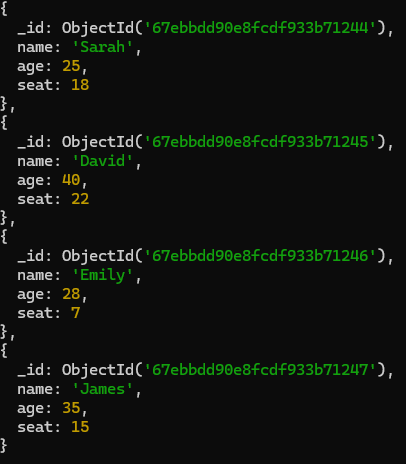
Example: Retrieve all passengers
db.passengers.find()
Your results should look like this:
2. Fetching a Single Document with findOne()
To fetch only a single document, we use findOne(). This method returns the first document that matches the query. If no filter is provided, it returns the first document found in the collection.
db.passengers.findOne()
Note: findOne() always returns only the first document, even if multiple documents match the query.
3. Filtering Data in Queries
To refine the results, we can provide a query object in the find() or findOne() method to match specific conditions.
Example 1: Find all passengers aged 30
db.passengers.find({ age: 30 })
4. Selecting Specific Fields (Projection)
In MongoDB, when using the find() method, you can specify which fields to include or exclude in the results using a projection object.
1means include the field.
0means exclude the field.
Example 1: Include only name and seat fields
db.passengers.find({}, { name: 1, seat: 1 })
This will return documents with only the name and seat fields, and the _id field will be included by default.
Example 2: Exclude _id field while including name and seat
db.passengers.find({}, { _id: 0, name: 1, seat: 1 })
This will return only the name and seat fields, excluding the _id field.
III. Updating Documents in MongoDB
To update existing documents, MongoDB provides the updateOne() and updateMany() methods.
- The first parameter is a query object to define which document(s) should be updated.
- The second parameter is an update object that specifies the new data to update.
1. updateOne()
The updateOne() method updates only the first document that matches the given query.
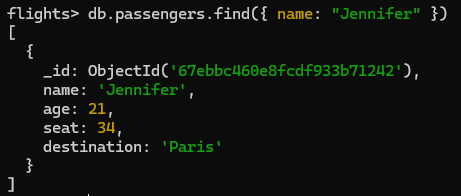
Example: Add a new field destination to Jennifer's document
Find the document first (optional)
db.passengers.find({ name: "Jennifer" })
- Update the document using
updateOne()
We'll use the $set operator to add the destination field with a value, for example, "Paris":
db.passengers.updateOne(

  { name: "Jennifer" },

  { $set: { destination: "Paris" } }

)
After updating the document, if you query the passengers collection to find Jennifer's document again, it will include the newly added field destination.
2. updateMany()
If you want to update multiple documents at once, you can use updateMany(). It will update all documents that match the query.
** Example: Update the seat numbers**
For example, if all passengers with seat: 34 should now be assigned seat: 30, you can do this:
Find the document first (optional)
db.passengers.find({ seat: 34 })
- Use
updateMany()to update all passengers with seat 34:
db.passengers.updateMany(

{ seat: 34 },

{ $set: { seat: 40 } }

)
- Check the updated passengers:
db.passengers.find({ seat: 40 })
3. replaceOne() – Replace a Document
The replaceOne() method replaces the entire document that matches the query with a new document. This is different from updateOne(), where you only update specific fields in the document.
Example:
Let's say you want to replace the document for the passenger named "Jennifer" with a completely new document. Here's how you would do it:
db.passengers.replaceOne(

{ name: "Jennifer" },

{ name: "Jennifer", age: 22, seat: 45, destination: "New York" }

)
In this case:
The first parameter ({ name: "Jennifer" })specifies the query to find the document.
The second parameter ({ name: "Jennifer", age: 22, seat: 45, destination: "New York" })is the new document that will replace the existing one.
Important Notes:
replaceOne()will completely replace the existing document with the new one.If the fields you do not include in the new document, they will be removed from the document.
Unlike
updateOne(), it does not modify only specific fields but replaces the whole document.
IV. Delete Documents in MongoDB
To remove documents from a MongoDB collection, you can use the following methods:
deleteOne(): Deletes a single document that matches the query.deleteMany(): Deletes all documents that match the query.
deleteOne() – Remove One Document
The deleteOne() method deletes the first document that matches the query.
Example: To delete a passenger named "Jennifer" from the flights.passengers collection, you can use:
db.passengers.deleteOne({ name: "Jennifer" })
This will remove only the first document that matches the name "Jennifer".
deleteMany() – Remove Multiple Documents
Example: To delete all passengers who have the destination "Paris" from the flights.passengers collection:
db.passengers.deleteMany({ destination: "New York" })
How to Perform CRUD Operations Visually in DbSchema
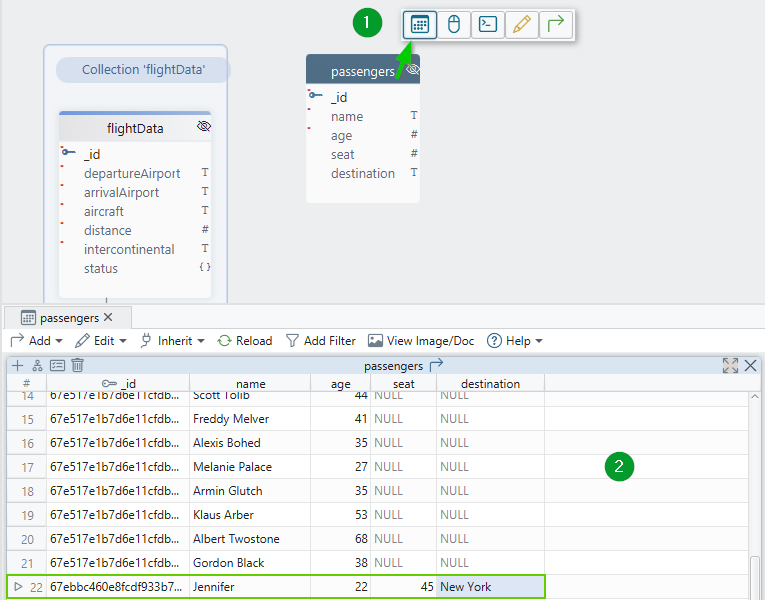
Once you're connected to your MongoDB flights database in DbSchema, you'll be able to view the collections created during the previous lessons. In this case, we're working with the passengers collection, which already has data and fields defined.
1. Access the Data Editor
- First, click on the
passengerstable in the DbSchema interface. - Select "Data Editor" from the options that appear. This will open a grid view, almost like an Excel table, showing the data in your
passengerscollection.
2. Visualizing the Data
- In the Data Editor, you can see your data as it is stored. This view makes it easy to work directly with your MongoDB data without needing to write any queries.
3. Adding a New Field (Like the CREATE operation in MongoShell)
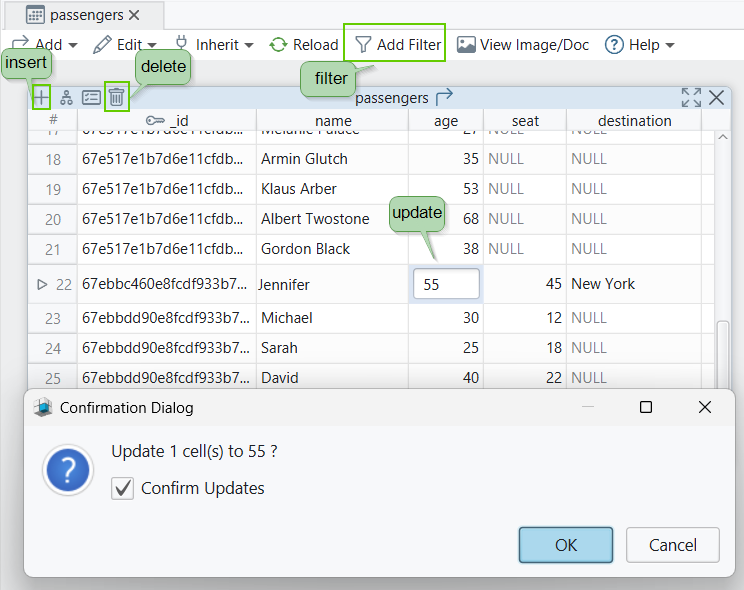
- To add a new field to a document, simply click the "+" button.
- Enter the data you want to add in the new field, and then click the Save icon to save your changes.
- (In MongoShell, this would be similar to using the
insertOne()orinsertMany()methods to insert a new document with additional fields into the collection.)
- (In MongoShell, this would be similar to using the
4. Filtering Data (Like the FIND operation in MongoShell)
- If you want to view only specific data, right-click on the Data Editor grid and select "Filter".
- This allows you to set filters for certain fields, making it easy to narrow down the results and find the exact data you're looking for.
- (In MongoShell, this would be like using the
find()orfindOne()methods with query parameters to filter the data.)
- (In MongoShell, this would be like using the
5. Updating Data (Like the UPDATE operation in MongoShell)
- You can modify any field's data directly in the grid. For example, you can update the name, age, destination, and other fields visually.
- Once you make changes, just click Save to update the record in the MongoDB collection.
- (In MongoShell, this would be similar to using the
updateOne()orupdateMany()methods to update existing documents.)
- (In MongoShell, this would be similar to using the
6. Modifying the Collection (DDL - Like ALTER operations in MongoShell)
- If you need to modify the collection itself (e.g., add, update, or delete fields in the structure), you can do this directly from the diagram view in DbSchema. This allows you to visually change the schema of your MongoDB collection.
- (In MongoShell, this would be equivalent to using commands like
db.collection.update()for modifying documents or usingdb.createCollection()for creating new collections.)
- (In MongoShell, this would be equivalent to using commands like
7. Deleting Data (Like the DELETE operation in MongoShell)
- To delete an entry (or data) from the collection, click the bin icon or right-click on a record and choose "Delete Record".
- This will remove the document from the collection.
- (In MongoShell, this would be similar to using the
deleteOne()ordeleteMany()methods to delete documents from the collection.)
- (In MongoShell, this would be similar to using the
This is how you can manage all the CRUD operations in a simple and efficient way using DbSchema.
It's a Data Manipulation Language (DML) process where you work directly with the data (insert, update, delete).
However, if you're modifying the structure of the collection (like adding or removing fields), this involves Data Definition Language (DDL) operations, which can also be done visually in DbSchema.
With DbSchema's visual interface, you can handle MongoDB's CRUD operations without writing complex queries. This makes it a lot easier to manage your database, especially if you're just starting with MongoDB!
Next Lesson
Understanding Embedded Documents & Arrays in MongoDB.
Next Lesson
SOCIAL SHARE CARD GENERATOR