




SQL stands for Structured Query Language, which is a domain specifi language used to communicate with relational databases i.e database that stores records a structured/tabular format with rows and columns. Some of the common databases are MySQL(personal favorite), Oracle, Postgres, MongoDB etc. SQL is mainly used for CRUD operations:
Create- This operation adds new records to a table
Read- Retrieve data from a table
Update- modifies existing records
Delete- removes records from a table.
BASIC SQL CONCEPTS
DATABASE-It’s a container that holds all related data, including tables, schemas, indexes, procedures, and more.
SCHEMA-A schema is a logical container within a database that organizes database objects like tables, views, indexes, and stored procedures.
TABLE-Main object of a schema.
ROWS- These are the data entries.
COLUMNS- Field names.
Don't worry let me put everything into perspective using an analogy that you can easily grasp, a database can have multiple schemas and each schema contains tables which in turn have rows and columns. Take for example you have a schema called Argentina which has the tables like goalkeepers, defenders, midfielders, attackers and each table has rows and columns. Like the attackers table has columns(fields) like Jersey_No, Player_Name, Goals_scored, Age, Club and Rows(data entries) 10, Leo Messi, 22, 35, Inter Miami.
DATA TYPES
Data types tells SQL what type of data you're storing in a column.
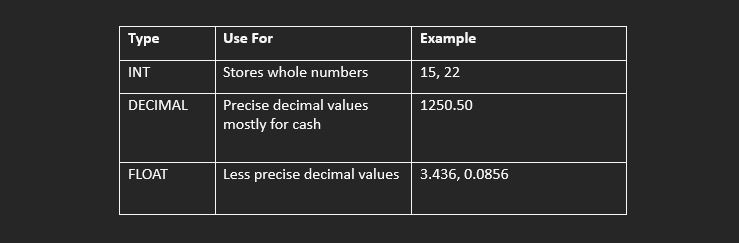
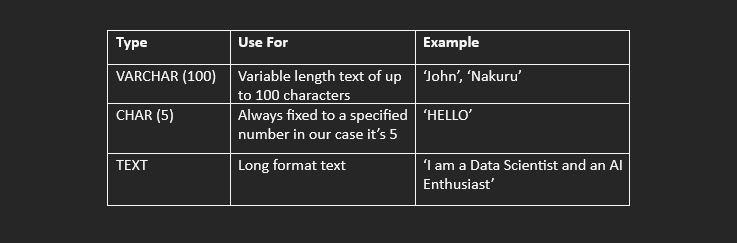
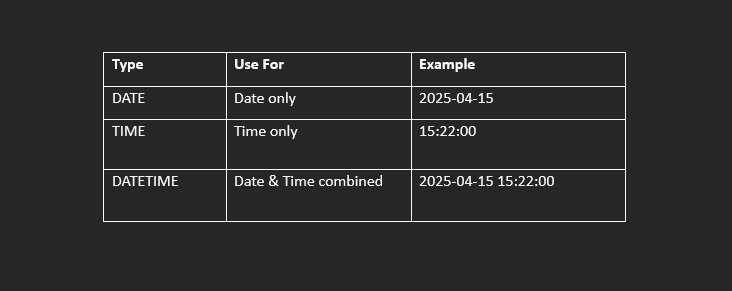
Main data types includes:
1. NUMERIC DATA TYPE
2. String/Text Data Type
3. Date & Time Data Type
4. Boolean Data Type
Used for True/False values
CORE SQL COMMANDS
Now here comes the fun part, let's dive right into it.
1.The first query is CREATE: This query is used for the creation of schema and tables. The below query create a schema called ARGENTINA

Now we have a schema but it is empty next we have to create tables

A Defenders Table

A Midfielders Table

An Attackers Table

2.Next is the 'SHOW' query which used to show tables in a database.

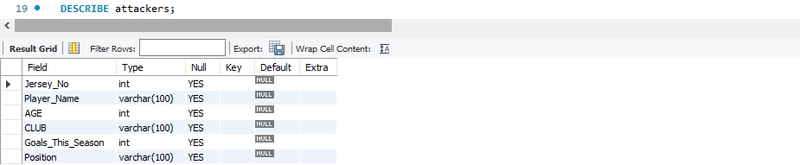
3.DESCRIBE table_name : this query is used to describe a table showing the column names, their data types and constraints Eg 'Not Null'
4.INSERT INTO table_name : used to add data into a table, INSERT INTO table_name('specify the column names separated with commas' Jersey_No, Player_Name, AGE, CLUB, Total_Goals) VALUES ("quotation marks for text" 10,'Messi',35,28)

5.SELECT: this query is used together with FROM to get data in a specified table, in our case if we want to get all the data we inserted in the attackers table we can SELECT ALL(*) FROM TABLE_NAME
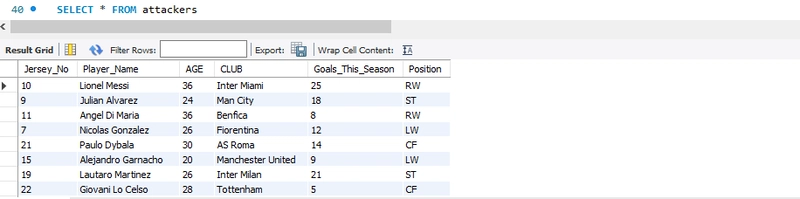
6.WHERE: used to filter the kind of data we're getting, lets say for example you want to get all attackers who play at LW, we use SELECT * FROM attackers, where position = 'lw';

7.ORDER BY: used for sorting out results, we can sort the one above from youngest to oldest LW, ORDER BY AGE ASCENDING(ASC), we don't really need to write ASCENDING as that is the default order.
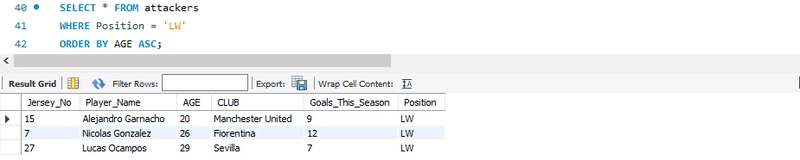
-If we don't specify how we want our data to be sorted by it will be automatically be sorted in ascending format

-Lets sort the same data in descending order

8.Aggregate functions lets one analyze a whole group of rows at once
They inclue:
a)COUNT()- Counts how many rows there're. Exercise, Count how many attackers do we have? SELECT COUNT(*) AS Total_Attackers, from attackers

b)SUM() - Adds up numeric values, try find total goals scored this season by the attackers

C)AVG() - Averages numeric values, what is the average age of an attacker

d)MAX() - Finds the highest number, find the age of the oldest player

e)MIN() - Finds the smallest number, can you find the least goals scored by a single player?

In the next article of Intermediate SQL Functions we will cover semi-complex Concepts like HAVING, CASE, COALESCE(), NULLIF(), IN, NOT IN, BETWEEN, EXISTS, UNION, UNION ALL, Subqueries, Aliasing (AS), I will also show you how to export your answers to Power BI to make powerful visualizations.
On se reverra
SOCIAL SHARE CARD GENERATOR