



This article aims to explain React's unidirectional data flow and answer the question: are there any ways to work around it?
And based on this subject, I will take a look at different libraries and methods for sharing data and communication between components.
But first, I'd like to explain my understanding of data flow in React.
As I said, React has a one-way data flow. This means the data can only move from top to bottom — and by this, I mean whenever you have some data or state that you want to share between multiple components, you should lift that state up to the nearest parent component and then pass it down via props.
For better understanding, we can think of React data management like a river system:
Data starts at a main source (the parent) and flows to branches (the children).
Child components cannot push water back to the main river.
Only one direction is possible unless special mechanisms (like lifting state up) are used.
We can say that in a React application, the main source is the Root component, which acts as the entry point for rendering the entire React component tree.
So, if the Root component (which is usually the App.tsx file in our project) is the source of all other components, this is the best — and only — place to store global states.
This is where we use tools like Redux, Context, or other global providers.
Then, from the Root, we can access the other components or branches of the React application system.
And since routing needs to be defined at the top level of the app, the Root component is the suitable place for wrapping the React Router, allowing the application to handle different pages and navigate between them.
With this understanding of the React component tree, let's explore some different ways to access and store data in React.
Rather than discussing libraries or methods like Redux or Context (which I assume you’re already familiar with), I will focus on other patterns and systems that we can create to manage data accessibility.(Let’s just say workarounds!)
Publish-Subscribe pattern
This pattern is a suitable approach for communication between components / pages in any hierarchical location.
create a functionality for emitting or publishing an event:
First, we need to create a variable that stores the eventName along with the value of that event. A Map constructor would be a great choice for this responsibility.

For enlightenment this is inside the EventTypes:
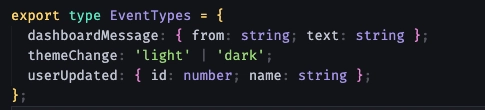
This way we have a more strict way for setting event names and values.
Now let's create an emit function for publishing events:
This function receives a key (which must be one of the keys defined in EventTypes) and a value (strictly typed based on the related type in EventTypes).
The reason for this pattern is to prevent typos and to ensure a better DX.
By using EventTypes as a source of truth, we can't accidentally use a random string as an event name or pass an incorrect value (payload). This way we can work with events very easier across the app.

Create another functionality for listening or subscribing to an event:
At this step we create a variable to store the event that we want to listen to by calling the subscription function.

The subscribers variable also is a Map constructor, it takes an eventName as a key and a callback as a value. This callback function is responsible for accessing the data that we emitted somewhere in the app.
Now it's time to create a subscription function:
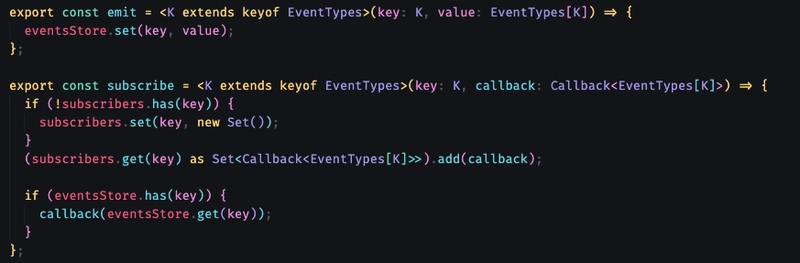
As we said,the subscribe function takes an eventName as a key and a callback, which receives the exact data stored in eventStore for that key as its parameter.
In both emit and subscribe functions, we use TypeScript generics to tell the compiler which event is being used and what type of data it should expect, ensuring everything stays typed and consistent.
Let’s explain inside of the function:
In the first condition we check if the subscribers store is empty. If it is, we add the eventName as a key and initialize its value by a Set constructor.
We used Set for ensuring that the same callback isn’t added multiple times for the same eventName.
In the next line we’re trying to reach the event by passing that key parameter to the subscribers store and then add the callback (second parameter) to it as a value.
First We initialized a subscriber with a Set constructor. Then we added the receiving callback to it.
Adding the key and its callback to the subscribers store allows us to unsubscribe/clear the event after it's been published.
In the last condition, we check if the eventStore already contains a value for the given key. If it does, we immediately call the callback with that value.
Last part - Unsubscribing from the event:

Before explaining the code, let’s talk about the purpose of unsubscribing from an event. Why should an event be cleared or removed after it has been published?
The answer is easy and short: to avoid memory leaks!
With unsubscribing an event, we’re actually removing the reference to that callback, and this will help garbage collection work properly.
Also, if we don't unsubscribe from an event, the logic might be triggered multiple times when only a single response was expected, which can lead to unexpected behavior in the app.
In our unsubscribe function, we first check if the key exists in the subscribers store. If it does, we simply delete that entry from the store.
That’s the whole idea behind the pub-sub pattern. Now, let’s see it in action!
Using Emit method for creating an event
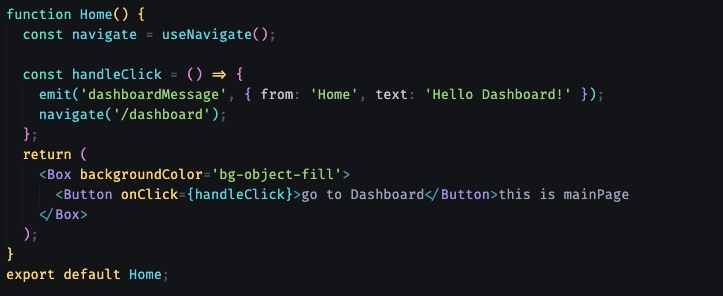
Imagine this is our home page and we want to navigate users to the dashboard page and also inform the page about some data.
When the user clicks on the Button, the emit function will be called, an eventName with a payload will be created and stored in the eventsStore. Then we navigate the user to the dashboard page.
Using subscribe/unsubscribe for listening/clearing an event

In the Dashboard page, we wrap our subscribe function inside a useEffect hook to ensure that everything is properly mounted before the event is received.
We call the subscribe function with a callback, where the data parameter represents the exact value that was emitted earlier from the Home page using the emit function.
In the cleanup part we use the unsubscribe method to clear the event after we reach it.
The reason that we must call these two methods inside the
useEffectis that we must be sure that the component is fully mounted and its state is ready and accessible. Also if we callsubscribedirectly in the component we trigger it after each render and that could cause duplicated responses and memory issues.
This pattern helps us establish faster communication between components or pages. We can improve it further by creating a custom hook like useEventEmitter, which handles component mounting internally, so we don’t have to use useEffect every time we want to listen to an event.
you can see the eventEmitter.ts in my github repo.
Also, feel free to check out these articles if you're interested in exploring this pattern further:
Implementing a Pub-Sub Based State Management Tool in React
pub-sub pattern in react
Leveraging React Event Emitter for Seamless Component Communication
*In the next article I will talk about another way of communication between components. *
Mohan KhademHosseini
SOCIAL SHARE CARD GENERATOR