



Introduction
Secure Shell (SSH) is a critical protocol for securely accessing remote servers. While password authentication is common, SSH key-based authentication offers stronger security and convenience.
Take Bob, a DevOps engineer, who needs to:
- Automate deployments between his company’s servers (devapp01 and caleston-lp10)
- Secure database backups without password prompts
- Prevent brute-force attacks on production systems
In this blog, we’ll explore how SSH keys solve these challenges by covering:
Why This Works
- Personalizes the tech by tying it to a real user (Bob)
- Sets clear stakes (security, automation needs)
- Teases practical outcomes readers will learn
Alternative Version (Shorter)
"When Bob, a sysadmin, tried to automate server logins between devapp01 and caleston-lp10, password prompts broke his scripts. SSH keys fixed this — and here’s how you can use them too."
Index:
#Why SSH keys are better than passwords
#How to generate and use SSH keys
#Real-world scenarios
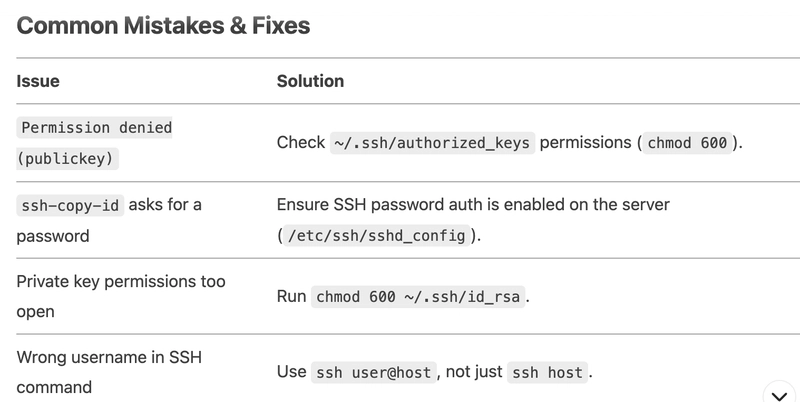
#Common mistakes
Why Use SSH Keys Instead of Passwords?
1. Security Risks of Password Authentication
Brute-force attacks: Hackers can repeatedly guess passwords.
Phishing & keyloggers: Passwords can be stolen.
Human error: Weak or reused passwords are common.
2. Advantages of SSH Key Authentication
No passwords needed– Eliminates brute-force risks.
Cryptographically secure – Uses RSA/ECDSA keys (virtually unbreakable).
Convenience – No need to remember passwords; ideal for automation.
Step-by-Step: Setting Up SSH Key Authentication
1. Generate an SSH Key Pair
Run on your local machine (e.g., devapp01):
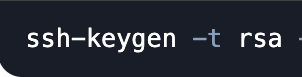
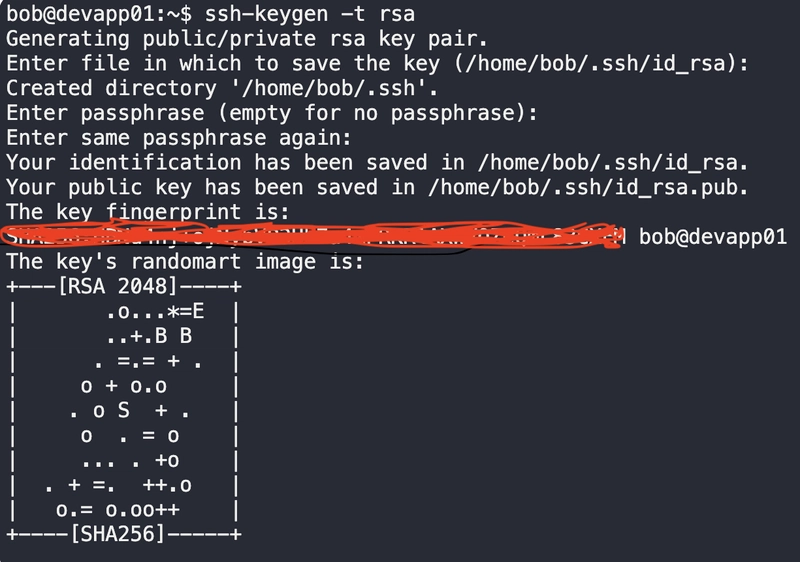
Then, You will get public ans private keys.
Private key(id_rsa) → Keep this secure (never share!).
Public key (id_rsa.pub) → Add to remote servers.
2. Copy the Public Key to the Remote Server (caleston-lp10)
Option A: Using ssh-copy-id (Recommended)

(You’ll enter the password one last time.)
Option B: Manual Setup
1.Display your public key:

2.On the remote server (caleston-lp10):

3. Test Passwordless Login:
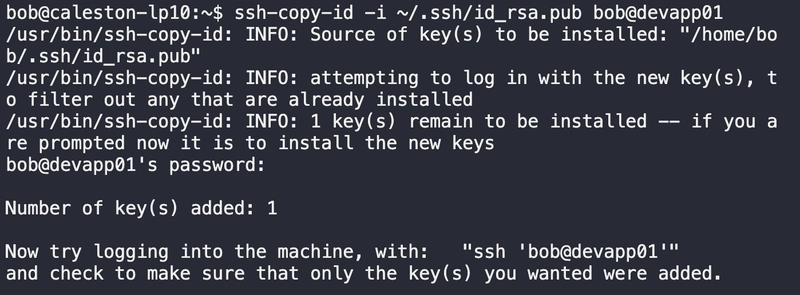
✅ Success? You’re logged in without a password!
Bob established a secure SSH connection from the remote server (devapp01) to the home server (caleston-lp10) without password prompts — confirming key-based authentication works correctly."

Real-World Scenarios
1. Automating Server Deployments (CI/CD Pipelines)
Problem: CI/CD tools (GitHub Actions, Jenkins) need secure server access.
Solution: Store the private key in secrets and use SSH for deployments.
2. Managing Cloud Servers (AWS, GCP, Azure)
Problem: Cloud VMs require secure remote access.
Solution: Add your public key during VM creation (~/.ssh/authorized_keys).
3. Securing Database Backups
Problem: Automating mysqldump to a remote server.
Solution: Use SSH keys in cron jobs for passwordless scp/rsync.
Conclusion
SSH key authentication is more secure, efficient, and automation-friendly than passwords. By following this guide, you can:
✔ Eliminate password-based attacks
✔ Automate server access securely
✔ Simplify cloud and CI/CD workflows
#30DaysLinuxChallenge #CloudWhisler
DevOps #Linux #RHCSA #Opensource #AWS #CloudComputing
Catch out by My LinkedIn profile
https://www.linkedin.com/in/rajpreet-gill-4569b4161/