



Benefiting from the cross-platform nature of Dynamsoft Capture Vision, we created flutter_ocr_sdk to enable MRZ recognition across Android, iOS, Web, Windows, and Linux. With the latest version of Dynamsoft Capture Vision, the plugin now supports VIN scanning as well, offering unified APIs across all platforms. In this article, we’ll cover how to add VIN capabilities to the existing Flutter plugin and how to build a cross-platform MRZ and VIN scanner app for Android, iOS, Web, Windows, and Linux.
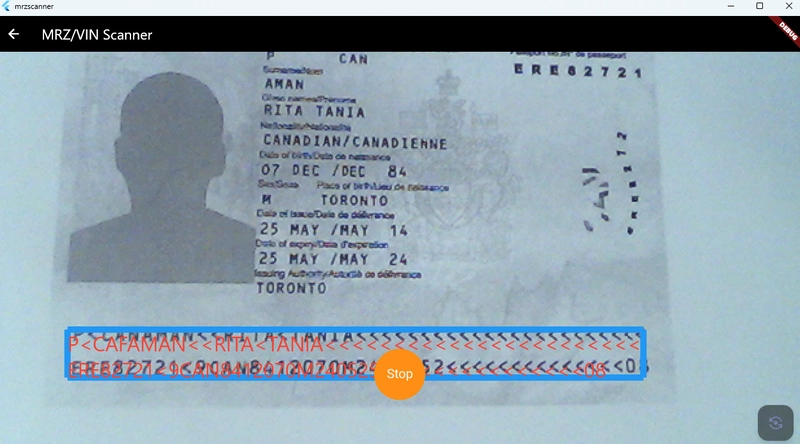
Flutter MRZ/VIN Scanner Demo
Android
iOS
Web
Windows
Linux
Integrating Dynamsoft Capture Vision SDKs
In the following sections, we’ll walk through how to integrate Dynamsoft Capture Vision SDKs for each supported platform.
Desktop Integration
Download and unzip the Dynamsoft Capture Vision C++ SDK.
Due to the 100MB size limitation on pub.dev, we compress the model and template files into a zip archive and download it at runtime on on Windows and Linux.
import 'dart:io';

import 'package:path/path.dart' as p;

import 'package:http/http.dart' as http;

import 'package:archive/archive.dart';


const _zipUrl =

    'https://github.com/yushulx/flutter_ocr_sdk/releases/download/v2.0.0/resources.zip';


const _zipName = 'resources.zip';


Future<void> download() async {

  final execDir = Directory(p.dirname(Platform.resolvedExecutable));


  final targetDir =

      Platform.isWindows ? execDir : Directory(p.join(execDir.path, 'lib'));

  targetDir.createSync(recursive: true);


  final cacheDir =

      Directory(p.join(Directory.systemTemp.path, 'flutter_ocr_sdk'));

  cacheDir.createSync(recursive: true);

  final zipCacheFile = File(p.join(cacheDir.path, _zipName));


  if (!zipCacheFile.existsSync()) {

    stdout.writeln('Downloading resources.zip to ${zipCacheFile.path} …');

    final resp = await http.get(Uri.parse(_zipUrl));

    if (resp.statusCode != 200) {

      stderr.writeln('Failed to download ($_zipUrl): HTTP ${resp.statusCode}');

      exit(1);

    }

    zipCacheFile.writeAsBytesSync(resp.bodyBytes);

    stdout.writeln('✅ Cached zip in temp.');

  } else {

    stdout.writeln('✅ Using cached zip: ${zipCacheFile.path}');

  }


  final bytes = zipCacheFile.readAsBytesSync();

  final archive = ZipDecoder().decodeBytes(bytes);

  for (final file in archive) {

    final outPath = p.join(targetDir.path, file.name);

    if (file.isFile) {

      final outFile = File(outPath);

      outFile.createSync(recursive: true);

      outFile.writeAsBytesSync(file.content as List<int>);

    } else {

      Directory(outPath).createSync(recursive: true);

    }

  }


  stdout.writeln('✅ Resources unpacked to: ${targetDir.path}');

}
Windows
Copy
*.h,*.liband*.dllfiles to your Flutter project Windows directory.
flutter_ocr_sdk/windows/include
flutter_ocr_sdk/windows/lib.flutter_ocr_sdk/windows/bin
Update
CMakeLists.txtin thewindowsdirectory:
cmake_minimum_required(VERSION 3.14)


set(PROJECT_NAME "flutter_ocr_sdk")

project(${PROJECT_NAME} LANGUAGES CXX)


set(PLUGIN_NAME "flutter_ocr_sdk_plugin")


link_directories("${PROJECT_SOURCE_DIR}/lib/")


list(APPEND PLUGIN_SOURCES

  "flutter_ocr_sdk_plugin.cpp"

  "flutter_ocr_sdk_plugin.h"

)


add_library(${PLUGIN_NAME} SHARED

  "include/flutter_ocr_sdk/flutter_ocr_sdk_plugin_c_api.h"

  "flutter_ocr_sdk_plugin_c_api.cpp"

  ${PLUGIN_SOURCES}

)


apply_standard_settings(${PLUGIN_NAME})


set_target_properties(${PLUGIN_NAME} PROPERTIES

  CXX_VISIBILITY_PRESET hidden)

target_compile_definitions(${PLUGIN_NAME} PRIVATE FLUTTER_PLUGIN_IMPL)


target_include_directories(${PLUGIN_NAME} INTERFACE

  "${CMAKE_CURRENT_SOURCE_DIR}/include")


target_compile_options(${PLUGIN_NAME} PRIVATE /wd4121 /W3 /WX-)


target_link_libraries(${PLUGIN_NAME} PRIVATE flutter flutter_wrapper_plugin "DynamsoftCorex64" "DynamsoftLicensex64" "DynamsoftCaptureVisionRouterx64" "DynamsoftUtilityx64")


set(flutter_ocr_sdk_bundled_libraries

  "${PROJECT_SOURCE_DIR}/bin/"

  PARENT_SCOPE

)
Linux
Copy
*.h,*.sofiles to your Flutter project Linux directory.
flutter_ocr_sdk/linux/includeflutter_ocr_sdk/linux/lib
Update
CMakeLists.txtin thelinuxdirectory:
cmake_minimum_required(VERSION 3.10)


set(PROJECT_NAME "flutter_ocr_sdk")

project(${PROJECT_NAME} LANGUAGES CXX)


set(PLUGIN_NAME "flutter_ocr_sdk_plugin")


link_directories("${CMAKE_CURRENT_SOURCE_DIR}/lib")


add_library(${PLUGIN_NAME} SHARED

  "flutter_ocr_sdk_plugin.cc"

)


apply_standard_settings(${PLUGIN_NAME})


set_target_properties(${PLUGIN_NAME} PROPERTIES

  CXX_VISIBILITY_PRESET hidden)

target_compile_definitions(${PLUGIN_NAME} PRIVATE FLUTTER_PLUGIN_IMPL)


target_include_directories(${PLUGIN_NAME} INTERFACE

  "${CMAKE_CURRENT_SOURCE_DIR}/include")

target_link_libraries(${PLUGIN_NAME} PRIVATE flutter "DynamsoftCore" "DynamsoftLicense" "DynamsoftCaptureVisionRouter" "DynamsoftUtility")

target_link_libraries(${PLUGIN_NAME} PRIVATE PkgConfig::GTK)


set_target_properties(${PLUGIN_NAME} PROPERTIES

  INSTALL_RPATH "$ORIGIN"

  BUILD_RPATH "$ORIGIN"

)


set(flutter_ocr_sdk_bundled_libraries

  ""

  PARENT_SCOPE

)


install(DIRECTORY

  "${PROJECT_SOURCE_DIR}/../linux/lib/"

  DESTINATION "${CMAKE_INSTALL_PREFIX}/lib/"

)
Mobile Integration
Android
Add the following dependencies in android/build.gradle:
dependencies {

    implementation "com.dynamsoft:dynamsoftcapturevisionbundle:2.6.1003"

    implementation "com.dynamsoft:dynamsoftmrz:3.4.20"

    implementation "com.dynamsoft:dynamsoftvin:3.4.20"

}
The dynamsoftcapturevisionbundle contains the core engine, while dynamsoftmrz and dynamsoftvin provide models for MRZ and VIN recognition respectively.
iOS
Add the following dependencies in ios/flutter_ocr_sdk.podspec:
s.dependency 'DynamsoftVIN', '3.4.20'

s.dependency 'DynamsoftMRZ', '3.4.20'

s.dependency 'DynamsoftCaptureVisionBundle', '2.6.1004'
Web Integration
Include the JavaScript library in index.html:
API Overview and Implementation
The Flutter plugin provides the following four methods:
| Method | Description | Parameters | Return Type |
|---|---|---|---|
Future<int?> init(String key) | Initializes the OCR SDK with a license key. | key: License string | Future<int?> |
Future<List<List<OcrLine>>?> recognizeBuffer(Uint8List bytes, int width, int height, int stride, int format, int rotation) | Performs OCR on a raw image buffer. | bytes: RGBA image buffer width, height: Image dimensions stride: Row bytes format: Pixel format index rotation: 0/90/180/270 | Future<List<List<OcrLine>>?> |
Future<List<List<OcrLine>>?> recognizeFile(String filename) | Performs OCR on an image file. | filename: Path to the image file | Future<List<List<OcrLine>>?> |
Future<int?> loadModel({ModelType modelType = ModelType.mrz}) | Loads the OCR model by type (mrz or vin). | modelType: Optional, defaults to ModelType.mrz | Future<int?> |
To switch between MRZ and VIN scanning, call loadModel with the appropriate ModelType before using the recognition methods. Both recognizeBuffer and recognizeFile return a list of recognized lines, each containing either MRZ or VIN data.
The OcrLine class is defined as follows:
import 'mrz_result.dart';

import 'vin_result.dart';


class OcrLine {

  int confidence = 0;

  String text = '';


  int x1 = 0, y1 = 0, x2 = 0, y2 = 0, x3 = 0, y3 = 0, x4 = 0, y4 = 0;


  MrzResult? mrzResult;

  VinResult? vinResult;


  @override

  String toString() {

    String result = '';

    result += 'Confidence: $confidence\n';

    result += 'Text: $text\n';

    result += 'x1: $x1\n';

    result += 'y1: $y1\n';

    result += 'x2: $x2\n';

    result += 'y2: $y2\n';

    result += 'x3: $x3\n';

    result += 'y3: $y3\n';

    result += 'x4: $x4\n';


    if (mrzResult != null) {

      result += mrzResult.toString();

    }


    if (vinResult != null) {

      result += vinResult.toString();

    }


    return result;

  }

}


class MrzResult {


  String? type;

  String? nationality;

  String? surname;

  String? givenName;

  String? docNumber;

  String? issuingCountry;

  String? birthDate;

  String? gender;

  String? expiration;

  String? lines;


  MrzResult(

      {String? type,

      String? nationality,

      String? surname,

      String? givenName,

      String? docNumber,

      String? issuingCountry,

      String? birthDate,

      String? gender,

      String? expiration,

      String? lines})

      : this.type = type ?? 'N/A',

        this.nationality = nationality ?? 'N/A',

        this.surname = surname ?? 'N/A',

        this.givenName = givenName ?? 'N/A',

        this.docNumber = docNumber ?? 'N/A',

        this.issuingCountry = issuingCountry ?? 'N/A',

        this.birthDate = birthDate ?? 'N/A',

        this.gender = gender ?? 'N/A',

        this.expiration = expiration ?? 'N/A',

        this.lines = lines ?? 'N/A';


  @override

  String toString() {

    if (type == null || type!.isEmpty) return "No results";


    String result = '';


    result += 'Type: $type\n\n';

    result += 'Nationality: $nationality\n\n';

    result += 'Surname: $surname\n\n';

    result += 'Given name: $givenName\n\n';

    result += 'Passport Number: $docNumber\n\n';

    result += 'Issue Country: $issuingCountry\n\n';

    result += 'Date of birth: $birthDate\n\n';

    result += 'Gender: $gender\n\n';

    result += 'Expiration: $expiration\n\n';


    return result;

  }


  Map<String, dynamic> toJson() => {

        'type': type ?? '',

        'nationality': nationality ?? '',

        'surname': surname ?? '',

        'givenName': givenName ?? '',

        'docNumber': docNumber ?? '',

        'issuingCountry': issuingCountry ?? '',

        'birthDate': birthDate ?? '',

        'gender': gender ?? '',

        'expiration': expiration ?? '',

        'lines': lines,

      };


  factory MrzResult.fromJson(Map<String, dynamic> json) {

    return MrzResult(

      type: json['type'],

      nationality: json['nationality'],

      surname: json['surname'],

      givenName: json['givenName'],

      docNumber: json['docNumber'],

      issuingCountry: json['issuingCountry'],

      birthDate: json['birthDate'],

      gender: json['gender'],

      expiration: json['expiration'],

      lines: json['lines'],

    );

  }

}


class VinResult {

  String? vinString;

  String? wmi;

  String? region;

  String? vds;

  String? checkDigit;

  String? modelYear;

  String? plantCode;

  String? serialNumber;


  VinResult({

    String? vinString,

    String? wmi,

    String? region,

    String? vds,

    String? checkDigit,

    String? modelYear,

    String? plantCode,

    String? serialNumber,

  })  : vinString = vinString ?? 'N/A',

        wmi = wmi ?? 'N/A',

        region = region ?? 'N/A',

        vds = vds ?? 'N/A',

        checkDigit = checkDigit ?? 'N/A',

        modelYear = modelYear ?? 'N/A',

        plantCode = plantCode ?? 'N/A',

        serialNumber = serialNumber ?? 'N/A';


  @override

  String toString() {

    return "VIN String: " +

        vinString! +

        "\n" +

        "WMI: " +

        wmi! +

        "\n" +

        "Region: " +

        region! +

        "\n" +

        "VDS: " +

        vds! +

        "\n" +

        "Check Digit: " +

        checkDigit! +

        "\n" +

        "Model Year: " +

        modelYear! +

        "\n" +

        "Manufacturer plant: " +

        plantCode! +

        "\n" +

        "Serial Number: " +

        serialNumber!;

  }


  Map<String, dynamic> toJson() => {

        'vinString': vinString,

        'wmi': wmi,

        'region': region,

        'vds': vds,

        'checkDigit': checkDigit,

        'modelYear': modelYear,

        'plantCode': plantCode,

        'serialNumber': serialNumber,

      };


  factory VinResult.fromJson(Map<String, dynamic> json) {

    return VinResult(

      vinString: json['vinString'],

      wmi: json['wmi'],

      region: json['region'],

      vds: json['vds'],

      checkDigit: json['checkDigit'],

      modelYear: json['modelYear'],

      plantCode: json['plantCode'],

      serialNumber: json['serialNumber'],

    );

  }

}
Dart Method Implementation
init()initializes the SDK with a license key. It should be called before any recognition methods. For Windows and Linux, it also downloads the model and template files if they are not already present.
@override

  Future<int?> init(String key) async {

    if (Platform.isLinux || Platform.isWindows) {

      await download();

    }

    return await methodChannel.invokeMethod<int>('init', {'key': key});

  }
loadModel()sets the OCR mode by loading the appropriate template:
enum ModelType { mrz, vin }


@override

Future<int?> loadModel({ModelType modelType = ModelType.mrz}) async {

  String templateName = "ReadPassportAndId";


  if (modelType == ModelType.vin) {

    templateName = "ReadVINText";

  }


  int ret = await methodChannel

      .invokeMethod('loadModel', {'template': templateName});

  return ret;

}
recognizeFile()performs OCR on an image file. It takes the file path as a parameter and returns a list of recognized lines.
@override

Future<List<List<OcrLine>>?> recognizeFile(String filename) async {

  List<dynamic>? results = await methodChannel.invokeMethod('recognizeFile', {

    'filename': filename,

  });


  if (results == null || results.isEmpty) return [];


  return _resultWrapper(results);

}
recognizeBuffer()performs OCR on a raw image buffer. It takes the image data, dimensions, stride, pixel format, and rotation as parameters. The method returns a list of recognized lines.
@override

Future<List<List<OcrLine>>?> recognizeBuffer(Uint8List bytes, int width,

    int height, int stride, int format, int rotation) async {

  List<dynamic>? results =

      await methodChannel.invokeMethod('recognizeBuffer', {

    'bytes': bytes,

    'width': width,

    'height': height,

    'stride': stride,

    'format': format,

    'rotation': rotation

  });


  if (results == null || results.isEmpty) return [];


  return _resultWrapper(results);

}
Platform-Specific Code
Dynamsoft Capture Vision provides both synchronous (capture()) and asynchronous (startCapturing()) recognition APIs. On the web, both are asynchronous.
Desktop (Windows/Linux)
CCaptureVisionRouter *cvr = new CCaptureVisionRouter;

CFileFetcher *fileFetcher = new CFileFetcher();


// File

fileFetcher->SetFile(filename);


// Buffer

CImageData *imageData = new CImageData(stride * height, buffer, width, height, stride, getPixelFormat(format), rotation);

fileFetcher->SetFile(imageData);


// Start capturing

char errorMsg[512] = {0};

int errorCode = cvr->StartCapturing(modelName.c_str(), false, errorMsg, 512);

if (errorCode != 0)

{

    printf("StartCapturing: %s\n", errorMsg);

}
Android & iOS
Android
// File

final Result r = result;

    mExecutor.execute(new Runnable() {

      @Override

      public void run() {

        ArrayList<ArrayList<HashMap<String, Object>>> ret = null;

        CapturedResult results = null;

        try {

            results = mRouter.capture(fileName, templateName);

            ret = wrapResults(results);

        } catch (Exception e) {

            Log.e(TAG, e.toString());

        }


        final ArrayList<ArrayList<HashMap<String, Object>>> finalResults = ret;

        mHandler.post(new Runnable() {

          @Override

          public void run() {

            r.success(finalResults);

          }

        });


      }

    });


// Buffer

final Result r = result;

    mExecutor.execute(new Runnable() {

      @Override

      public void run() {

        ArrayList<ArrayList<HashMap<String, Object>>> ret = null;

        CapturedResult results = null;


        try {

            ImageData imageData = new ImageData();

            imageData.bytes = bytes;

            imageData.width = width;

            imageData.height = height;

            imageData.stride = stride;

            imageData.format = format;

            imageData.orientation = rotation;

            results = mRouter.capture(imageData, templateName);

            ret = wrapResults(results);

        } catch (Exception e) {

            Log.e(TAG, e.toString());

        }

        final ArrayList<ArrayList<HashMap<String, Object>>> finalResults = ret;

        mHandler.post(new Runnable() {

          @Override

          public void run() {

            r.success(finalResults);

          }

        });


      }

    });
iOS
// File

DispatchQueue.global().async {

            let filename: String = arguments.value(forKey: "filename") as! String

            let res = self.cvr.captureFromFile(filename, templateName: self.templateName)

            result(self.wrapResults(result: res))

        }


// Buffer

DispatchQueue.global().async {

            let buffer: FlutterStandardTypedData =

                arguments.value(forKey: "bytes") as! FlutterStandardTypedData

            let width: Int = arguments.value(forKey: "width") as! Int

            let height: Int = arguments.value(forKey: "height") as! Int

            let stride: Int = arguments.value(forKey: "stride") as! Int

            let format: Int = arguments.value(forKey: "format") as! Int

            let rotation: Int = arguments.value(forKey: "rotation") as! Int

            let enumImagePixelFormat = ImagePixelFormat(rawValue: format)

            let imageData = ImageData.init()

            imageData.bytes = buffer.data

            imageData.width = UInt(width)

            imageData.height = UInt(height)

            imageData.stride = UInt(stride)

            imageData.format = enumImagePixelFormat!

            imageData.orientation = rotation

            let res = self.cvr.captureFromBuffer(imageData, templateName: self.templateName)

            result(self.wrapResults(result: res))

        }
Web
@JS()

@anonymous

class CapturedItem {

  external int get type;

  external String get text;

  external String get formatString;

  external Location get location;

  external int get angle;

  external Uint8List get bytes;

  external int get confidence;

}


@JS()

@anonymous

class CapturedResult {

  external List<CapturedItem> get items;

}


@JS('CVR.CaptureVisionRouter')

class CaptureVisionRouter {

  external static PromiseJsImpl<CaptureVisionRouter> createInstance();

  external PromiseJsImpl<CapturedResult> capture(dynamic data, String template);

}


// File

CapturedResult capturedResult = await handleThenable(_cvr!.capture(file, modelName));


// Buffer

final dsImage = jsify({

      'bytes': bytes,

      'width': width,

      'height': height,

      'stride': stride,

      'format': format,

      'orientation': rotation

    });


CapturedResult capturedResult = await handleThenable(_cvr!.capture(dsImage, modelName));
Updating the Example for MRZ and VIN Recognition
Add
ToggleButtonsto switch between MRZ and VIN modes inhome_page.dart:
return Scaffold(

  body: Column(

    children: [

      title,

      description,

      Center(

        child: ToggleButtons(

          borderRadius: BorderRadius.circular(10),

          isSelected: [isMrzSelected, !isMrzSelected],

          selectedColor: Colors.white,

          fillColor: Colors.orange,

          color: Colors.grey,

          children: const [

            Padding(

              padding: EdgeInsets.symmetric(horizontal: 20),

              child: Text('MRZ'),

            ),

            Padding(

              padding: EdgeInsets.symmetric(horizontal: 20),

              child: Text('VIN'),

            ),

          ],

          onPressed: (index) {

            setState(() {

              isMrzSelected = (index == 0);

              if (isMrzSelected) {

                switchModel(ModelType.mrz);

              } else {

                switchModel(ModelType.vin);

              }

            });

          },

        ),

      ),

      ...

    ],

  ),

);
Request a trial license key for Dynamsoft Capture Vision and set it in
global.dart:
Future<int> initSDK() async {

  int? ret = await detector.init(

      "LICENSE-KEY");


  if (ret == 0) isLicenseValid = true;

  return await detector.loadModel(modelType: model) ?? -1;

}
Run the app on the target platform:
cd example

flutter run -d chrome    # Run on Web

flutter run -d linux     # Run on Linux

flutter run -d windows   # Run on Windows

flutter run              # Run on default connected device (e.g., Android)
SOCIAL SHARE CARD GENERATOR