Zum Hauptinhalt springen
Echtzeit-Radar & Feeds
Alle RSS Feeds ➔
👥 Community & Social
IT Security NachrichtenOnePlus/OxygenOS: Schad-App erhält Root-Zugriff ohne Berechtigungen(24.09.2026 um 23:38 Uhr)
•
IT Security NachrichtenRyuk Member Karen Vardanyan Sentenced to Two Years in U.S. Prison(24.09.2026 um 22:50 Uhr)
•••••
Hacking & PentestingRyuk Member Karen Vardanyan Sentenced to Two Years in U.S. Prison(24.09.2026 um 22:50 Uhr)
•
AI & KI NachrichtenWhy the U.N. Still Matters(24.09.2026 um 23:00 Uhr)
•••
IT Security NachrichtenOnePlus/OxygenOS: Schad-App erhält Root-Zugriff ohne Berechtigungen(24.09.2026 um 23:38 Uhr)
•
IT Security NachrichtenRyuk Member Karen Vardanyan Sentenced to Two Years in U.S. Prison(24.09.2026 um 22:50 Uhr)
•••••
Hacking & PentestingRyuk Member Karen Vardanyan Sentenced to Two Years in U.S. Prison(24.09.2026 um 22:50 Uhr)
•
AI & KI NachrichtenWhy the U.N. Still Matters(24.09.2026 um 23:00 Uhr)
•••
Intelligence View
⚡ tsecurity.de Intelligence

A Beginner's Guide To Using The Brite App

Brite is a tool designed to help you boost your productivity. Brite saves you the stress of switching between multiple productivity apps by offering 20+ productivity apps in one tool. This guide helps new users get started with the app,…

0
↗ Quelle (dev.to)
Reagiere als Erste:r — dein Feedback zählt!

Brite is a tool designed to help you boost your productivity. Brite saves you the stress of switching between multiple productivity apps by offering 20+ productivity apps in one tool.


This guide helps new users get started with the app, from creating tasks to setting reminders and organizing work.


System Requirements


Brite is accessible via web and mobile platforms and requires an internet connection.
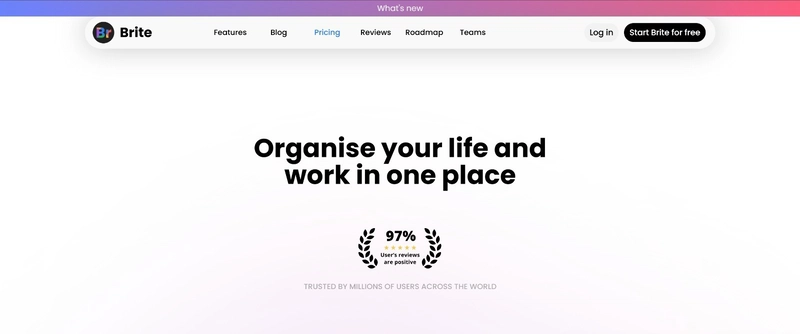
IMG-20250422-WA0008


Get Started With Brite


Download Brite on the App store or Google Playstore, and signup with your email address.
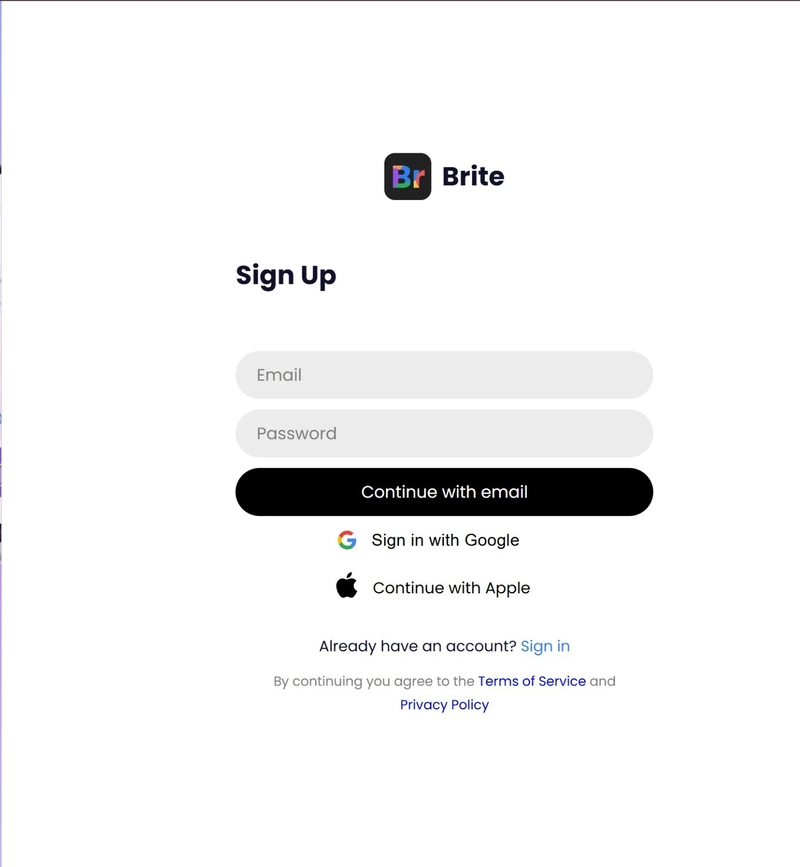


IMG-20250422-WA0009


The dashboard provides a quick overview of your calendar, habits, private tasks, notes, quotes and diary.
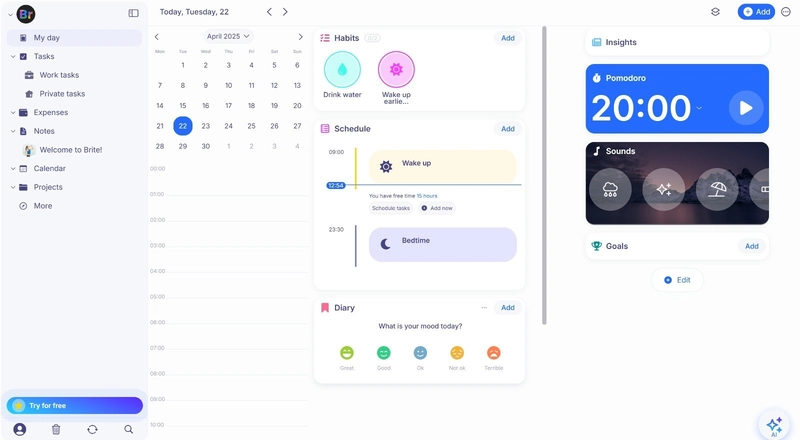
Brite Dashboard


Core Features


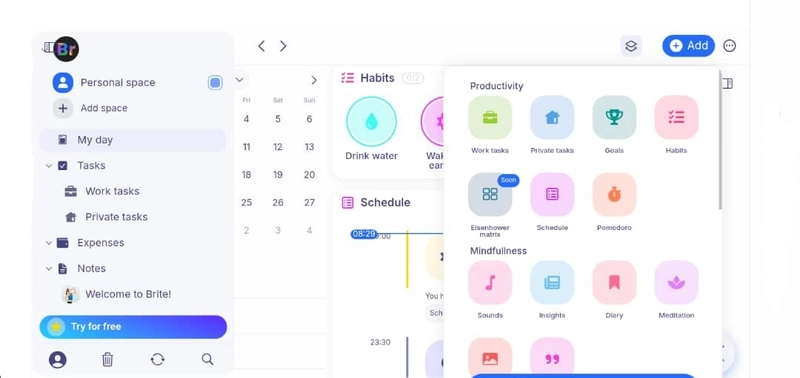
  • Productivity tools:
    Brite Productivity Tools


  1. Work Task: Create tasks related to your professional goals.

  2. Private Task: Set personal tasks for daily life management.

  3. Goals: Define and track goals with deadlines.

  4. Habits: Build and monitor new habits.

  5. Schedule: Organize events, tasks, sleep time, and more.

  6. Pomodoro: Use the timer to focus in 25-minute intervals


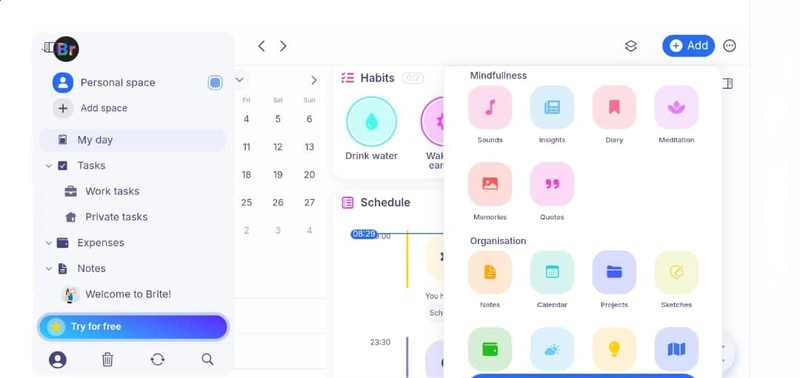
  • Mindfulness Tools:
    Brite Mindfulness Tools


  1. Sounds: Listen to relaxing sounds for focus or rest.

  2. Insights: Discover tips and app updates to enhance productivity.

  3. Diary: Reflect and record daily thoughts or milestones.

  4. Meditation: Practice guided meditations.

  5. Memories: Save meaningful moments.

  6. Quotes: Read motivational quotes to stay inspired


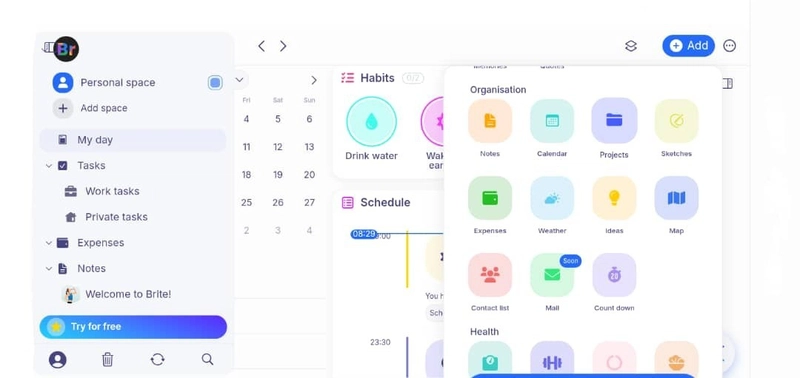
  • Organization Tools:
    Brite Organization Tools


  1. Notes: Jot down quick thoughts or plans.

  2. Calendar: Set and manage reminders and appointments.

  3. Projects: Outline current or upcoming projects.

  4. Sketch: Draw or visualize ideas.

  5. Expense: Track daily and monthly spending.

  6. Weather: Stay informed on daily weather.

  7. Ideas: Save random or creative ideas.

  8. Map: Access location-based insights.

  9. Contact List: Manage important contacts.

  10. Countdown: Track time left to significant dates


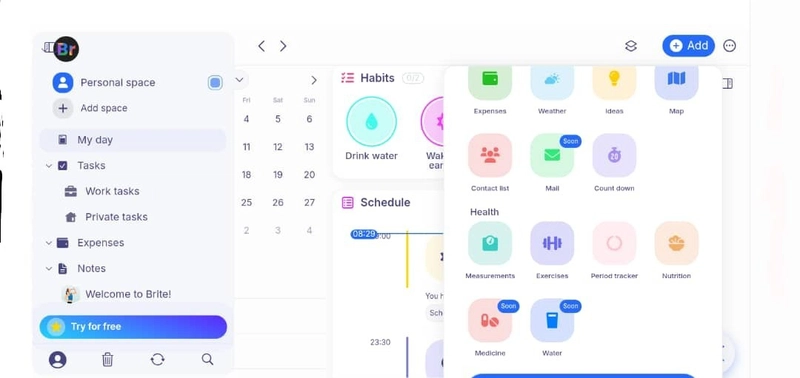
  • Health Tools:
    Brite Health Tools


  1. Measurements: Monitor body stats and progress.

  2. Exercise: Log your physical activities.

  3. Period Tracker: Track menstrual cycles.

  4. Nutrition: Plan and log meals.


Advanced Feature


Collaborative Spaces:

Brite allows you to create spaces for collaboration with friends, family or coworkers. Within each space, members can:


  • Share tasks and assign responsibilities.

  • Collaborate on notes and ideas.

  • Coordinate events and schedules.


These spaces are ideal for managing group projects, planning events, or staying accountable within productivity groups.


Creating a Collaborative Space


Follow these steps to set up a new space:
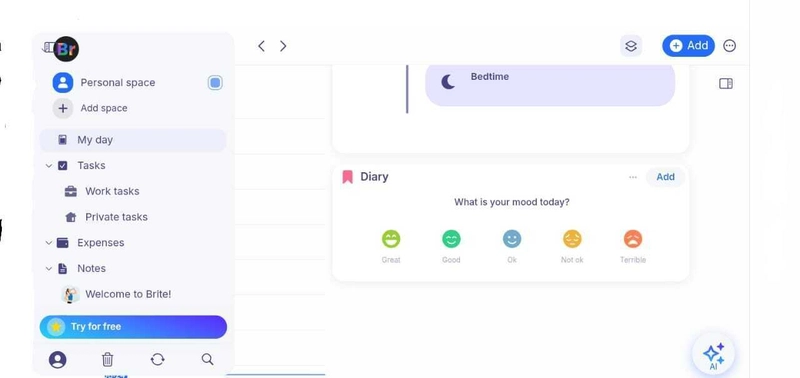
Brite Spaces


  • Open the Brite App: Navigate to the home screen.

  • Tap the “Spaces” Tab: Located at the top left of your desktop or bottom left of your mobile device.

  • Select “Add Space”: You’ll be prompted to name the space and add a description.

  • Invite Members: Enter email addresses of collaborators to send invites.

  • Start Collaborating: Add shared tasks, upload notes, and manage timelines together.


### Integrations with Third-Party Apps

Brite supports integration with popular third-party calendar applications to ensure seamless scheduling and organization across platforms.


Supported Calendar Integrations:
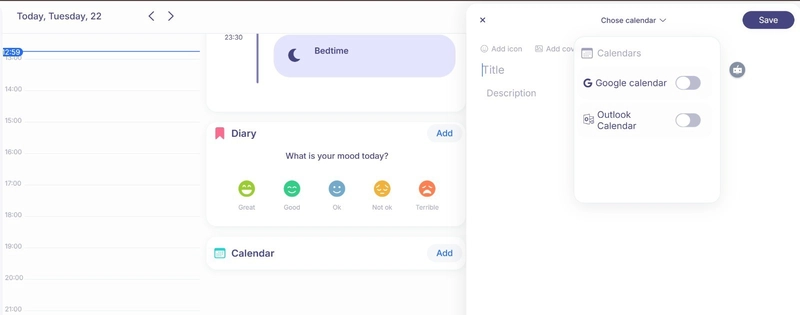
Brite Integrations


  • Google Calendar

  • Apple Calendar

  • Outlook Calendar


Key Capabilities


  • Two-Way Sync: Updates you make in Brite or the external calendar will be reflected in both systems in real time.

  • Selective Sync: Choose specific calendars you want to link to avoid clutter.

  • Unified View: View and manage all calendar events from a single interface inside Brite.


Billing & Subscription:


Brite offers flexible subscription plans to cater to various productivity needs. You can choose between a free version with essential features and a premium version that unlocks all features.
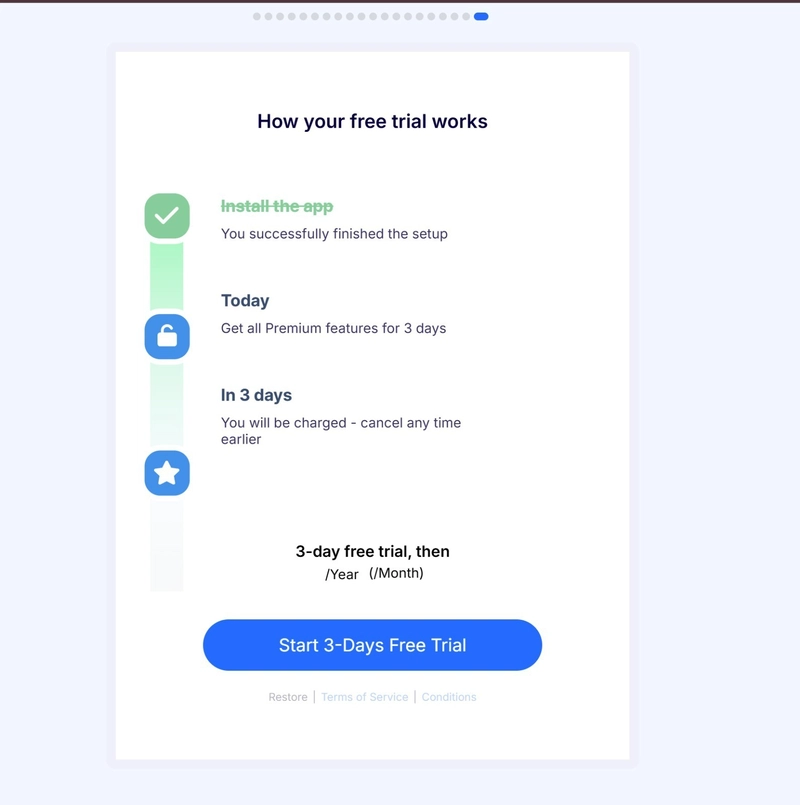
Brite Pricing


Free Plan Includes:


  • Access to core tools: Tasks, Calendar, Habits, Notes, and more.

  • Up to 3 active habits

  • Up to 5 projects

  • Basic calendar views (Schedule and Day)

  • Access to a selection of mood diaries and meditation guides


Premium Plan:


  • Monthly: $4.50

  • Annually: $39.99 (equivalent to $3.29/month)


Features:


  • Unlimited habits and projects

  • Advanced calendar views (Week and Month)

  • Kanban view for project management

  • Unlimited task reminders

  • Full access to all mood diaries and meditation guides

  • Priority customer support


FAQs


  1. Can I use Brite without an internet connection?

  2. Brite requires an internet connection for full functionality. Some offline access may be available depending on your device, but syncing will resume once you're back online.

  3. How do I reset my password?

  4. On the login screen, select “Forgot Password?” and follow the instructions sent to your registered email.

  5. Can I switch between devices?

  6. Yes. Your data syncs across devices as long as you’re signed in with the same account.

  7. How do I cancel my subscription?

  8. Go to Account Settings > Subscription, then follow platform-specific instructions (App Store, Play Store, or Web).

  9. Is there a limit to how many tasks or projects I can create?

  10. Yes, limits apply on the free plan. Premium users enjoy unlimited access.


Troubleshooting


Here are quick solutions to common issues:

Issue: App not loading

Solution:


  • Ensure your internet connection is stable.

  • Restart the app.

  • Update to the latest version.


Issue: Unable to log in

Solution:


  • Double-check your credentials.

  • Reset your password if necessary.

  • Ensure your account hasn’t been deactivated.


Issue: Tasks or data not syncing across devices

Solution:


  • Check internet connection.

  • Refresh the app.

  • Ensure the same account is used on all devices.


Issue: Missing features

Solution:


  • Confirm your subscription plan.

  • Reinstall the app or clear cache (for mobile users).


Support


If you experience issues that cannot be resolved using the troubleshooting tips, Brite offers support with detailed articles .


You can also reach out directly via email, X(formerly Twitter) and Instagram

CTI Threat Relationship Graph3 Knoten / 2 Relationen
CVE / Incident Software MITRE ATT&CK CWE Weakness IoC
SOC Incident Playbook: Vulnerability Remediation & Verification
1 Warnungen
title: Detect Exploitation - A Beginner's Guide To Using The Brite App
id: 4000eb7c-d5e8-4d4f-bc1c-5c54fe3fac72
status: experimental
description: Automatisch generierte SIEM-Erkennungsregel basierend auf CTI Intelligence
references:
  - https://tsecurity.de/
author: iShareStuff CTI Automated Detection Engine
date: 2026-09-24
logsource:
  category: network_connection
  product: any
detection:
  selection:
      CommandLine|contains:
        - 'exploit'
  condition: selection
falsepositives:
  - Legitime administrative Zugriffe oder Penetrationstests
level: high
tags:
  - attack.initial_access
Syntax validiert (0 Fehler)
rule CTI_Threat_Indicator {
    meta:
        author = "iShareStuff CTI Automated Detection Engine"
        date = "2026-09-24"
        description = "YARA Signature for "
    strings:
        $str = "A Beginner\'s Guide To Using Th" ascii wide
    condition:
        any of them
}
Syntax validiert (0 Fehler)
index=security sourcetype IN ("cisco:asa", "pan:traffic", "zeek_conn", "suricata", "WinEventLog:Security")
("A Beginners Guide To Using The Brite App")
| stats count earliest(_time) as first_seen latest(_time) as last_seen by src_ip, dest_ip, dest_host, signature
| eval first_seen=strftime(first_seen, "%Y-%m-%d %H:%M:%S"), last_seen=strftime(last_seen, "%Y-%m-%d %H:%M:%S")
| sort - count
Syntax validiert (0 Fehler)
message: "*A Beginners Guide To Using The Brite App*"
Syntax validiert (0 Fehler)
CommonSecurityLog
| where Message has "A Beginners Guide To Using The Brite App"
| summarize EventCount = count(), FirstSeen = min(TimeGenerated), LastSeen = max(TimeGenerated) by SourceIP, DestinationIP, DestinationPort, Activity
| extend DetectionRule = "iShareStuff-CTI-Compiled"
| sort by EventCount desc
🎯
MITRE ATT&CK Matrix Navigator 14 Taktiken
Reconnaissance
-
Resource Development
-
Initial Access
Execution
Persistence
-
Privilege Escalation
Defense Evasion
Credential Access
-
Discovery
-
Lateral Movement
-
Collection
-
Command and Control
Exfiltration
-
Impact
tsecurity.de Cognitive Threat RAG
Fokus-Vektor:

Kognitive Analyse für identifizierte Bedrohung: Erhöhte Bedrohungslage im Bereich A Beginner's Guide To Using The Brite Ap.... Basierend auf 368k Vektor-Korrelationen werden sofortige Isolationsmaßnahmen für betroffene Endpunkte empfohlen.

🛡️ Angriffsfläche & Exposure

Netzwerk/Remote-Zugriff ohne Vorauthentifizierung möglich.

⚡ Empfohlene Sofortmaßnahmen
  • 1. Perimeter-Inspektion: Relevante Portfreigaben und exponierte Endpunkte unverzüglich scannen.
  • 2. Patch-Applikation: Hersteller-Hotfix einspielen oder betroffene Daemons in isolierte DMZ-Segmente überführen.
  • 3. Telemetrie & EDR-Alerts: Prozessaufrufe und Child-Processes auf anomale Shell-Spawns überwachen.
🔗 Semantisch verwandte Zero-Days MariaDB 11.7 VEC
Ähnliche Beiträge
🔍 Verwandte News

Auch interessante Nachrichten A Beginner's Guide To Using The Brite App

Thematisch verwandte Begriffe: Beginners, Guide, Using, Brite · 6 Treffer

Laden...

Videos werden geladen ...

Laden...

Beiträge werden geladen ...

Laden...

Videos werden geladen ...

Laden...

Beiträge werden geladen ...

Laden...

Videos werden geladen ...

Laden...

Beiträge werden geladen ...

Laden...

Videos werden geladen ...

Laden...

Beiträge werden geladen ...

Laden...

Videos werden geladen ...

Zum Aktualisieren ziehen
ZERO-DAY CVE-2026-81473 | Dell Rugged Control Center (RCC), versions prior to 5.2.206, contain an …
Advisory →
tsecurity.de Icon
Offline-Lesen, Eilmeldungen & 0ms Ladezeit

Installiere tsecurity.de direkt auf deinen Home-Bildschirm für das ultimative Vollbild-Magazinerlebnis ohne Browser-Leisten.

Nächster Beitrag
Themen-Radar & Intelligence Matrix
Echtzeit-Taxonomie nach Angriffsvektoren & Plattformen

tsecurity.de Live Threat Radar

🔴 LIVE RADAR
MONITORING
AKTIV
CVE-DATENBANK
LIVE
🔍
Community Radar & Live Chat
Sentinel Bot online • Live-Stream
Dein Cluster: Security Explorer
Match:
lädt…
Verbindung zum Community-Stream wird aufgebaut...
Bearbeitungsmodus — Senden überschreibt deine Nachricht
Community-Puls — was gerade passiert
lädt…
Aktivitäten deiner Analysten
lädt…
Neues Thema oder Eilmeldung einreichen

Reiche interessante Links, Zero-Days oder Debatten ein. Die Community entscheidet per Upvote über die Veröffentlichung.

Heiß diskutierte Einreichungen
📂 Keine gespeicherten Artikel vorhanden.
Zurück Ziehen Vor
Links: vorheriger Artikel • Rechts: nächster Artikel • unten: schließen
News NIS-2 Frühwarnung Tier-1 Intel TTP ⏱️ 3 Min vor 10 Min
Artikeldaten werden geladen...
↗ Original-Quelle