
Zum Hauptinhalt springen
Echtzeit-Radar & Feeds
Alle RSS Feeds ➔
👥 Community & Social
Windows Tipps & SecurityGrafikkarte vor Überhitzung schützen: So geht’s(25.09.2026 um 08:00 Uhr)
••••••••••
Windows Tipps & SecurityGrafikkarte vor Überhitzung schützen: So geht’s(25.09.2026 um 08:00 Uhr)
••••••••••
Intelligence View
⚡ tsecurity.de Intelligence

Tracking 🔍 Deletion Events with AWS Lambda and CloudTrail - (Let's Build 🏗️ Series)

Imagine if you can automate an alerting system that whenever a user deletes a resource on the AWS cloud you want to send message to specific people. Well, we are going to create one using two AWS services, AWS Lambda and CloudTrail. The…

0
↗ Quelle (dev.to)
Reagiere als Erste:r — dein Feedback zählt!

Imagine if you can automate an alerting system that whenever a user deletes a resource on the AWS cloud you want to send message to specific people.


Well, we are going to create one using two AWS services, AWS Lambda and CloudTrail.


The main parts of this article:

1- About AWS Services

2- Technical Part (Python code)

3- Conclusion


About AWS Services


1- AWS Lambda: AWS Lambda is a compute service that runs your code in response to events and automatically manages the compute resources, making it the fastest way to turn an idea into a modern, production, serverless applications.


2- AWS CloudTrail: AWS CloudTrail is an AWS service that helps you enable operational and risk auditing, governance, and compliance of your AWS account. Actions taken by a user, role, or an AWS service are recorded as events in CloudTrail. Events include actions taken in the AWS Management Console, AWS Command Line Interface, and AWS SDKs and APIs.


Architecture overview


Before running the Lambda function, make sure CloudTrail logging is enabled. Go to the CloudTrail console, navigate to the Trails section, and create a trail if one doesn't already exist. Ensure that the trail is configured to deliver logs to an S3 bucket, as the Lambda function reads CloudTrail logs directly from S3.


Also make sure the Lambda function has the correct IAM role permissions to interact with S3 bucket.


import json
import boto3
import gzip
import io

def get_deleted_events(records):
deletion_events = []
for record in records:
if record.get("eventName") and "Delete" in record["eventName"]:
deletion_events.append(record)
return deletion_events

def lambda_handler(event, context):
s3_client = boto3.client("s3")

for record in event["Records"]:
bucket_name = record["s3"]["bucket"]["name"]
object_key = record["s3"]["object"]["key"]

response = s3_client.get_object(Bucket=bucket_name, Key=object_key)

with gzip.GzipFile(fileobj=io.BytesIO(response["Body"].read()), mode='rb') as file:
cloudtrail_logs = json.loads(file.read().decode("utf-8"))

deletion_events = get_deleted_events(cloudtrail_logs.get("Records", []))

if deletion_events:
print(f"Found {len(deletion_events)} deletion event(s):")
for event in deletion_events:
print(json.dumps(event, indent=2))
else:
print("No deletion events found in this log file.")

return {"statusCode": 200, "body": "Processed CloudTrail logs."}


Now in order to test this we need to input the following object:


{
"Records": [
{
"s3": {
"bucket": {
"name": "<Your bucket name>"
},
"object": {
"key": "<the object that ends .json.gz inside the folder>"
}
}
}
]
}


Now in order to test, I will delete a Lambda function that I don't need it. And then take the latest Cloudtrail log from S3.
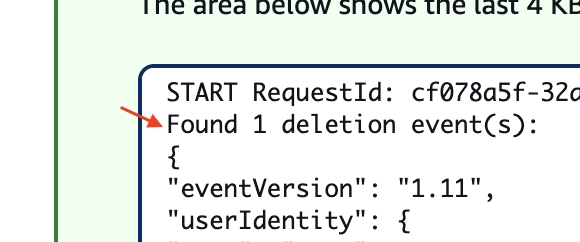


Image description


Great, the Lambda function successfully detected the deletion event.

To further enhance this solution, you can update the code to process multiple S3 objects in one run, or consider leveraging AWS-native services like AWS Config, AWS CloudTrail Lake, or AWS Security Hub for more scalable and automated deletion tracking across your environment.


Also if you want to notify specific users, consider integrating with services like Amazon SNS or SES.


Conclusion


This Lambda function provides a lightweight and effective way to track deletion events across your AWS account using CloudTrail logs. By automatically processing logs from S3 and printing relevant deletion actions to CloudWatch Logs, it helps improve visibility, audit ability, and security awareness — without needing any additional alerting or external systems.


Happy coding 👨🏻‍💻


💡 Enjoyed this? Let’s connect and geek out some more on LinkedIn.

1. Sofort-Triage & Abwehrmaßnahmen

SOC Incident Playbook: Remote Code Execution (RCE) Defense
1 Warnungen
title: Detect Exploitation - Tracking 🔍 Deletion Events with AWS Lambda and CloudTrail - (Let's Build 🏗️ Series)
id: 0ff02681-8d5e-4023-abd7-861dbb14e3e3
status: experimental
description: Automatisch generierte SIEM-Erkennungsregel basierend auf CTI Intelligence
references:
  - https://tsecurity.de/
author: iShareStuff CTI Automated Detection Engine
date: 2026-09-25
logsource:
  category: network_connection
  product: any
detection:
  selection:
      CommandLine|contains:
        - 'exploit'
  condition: selection
falsepositives:
  - Legitime administrative Zugriffe oder Penetrationstests
level: high
tags:
  - attack.initial_access
Syntax validiert (0 Fehler)
rule CTI_Threat_Indicator {
    meta:
        author = "iShareStuff CTI Automated Detection Engine"
        date = "2026-09-25"
        description = "YARA Signature for "
    strings:
        $str = "Tracking 🔍 Deletion Events wit" ascii wide
    condition:
        any of them
}
Syntax validiert (0 Fehler)
index=security sourcetype IN ("cisco:asa", "pan:traffic", "zeek_conn", "suricata", "WinEventLog:Security")
("Tracking  Deletion Events with AWS Lambd")
| stats count earliest(_time) as first_seen latest(_time) as last_seen by src_ip, dest_ip, dest_host, signature
| eval first_seen=strftime(first_seen, "%Y-%m-%d %H:%M:%S"), last_seen=strftime(last_seen, "%Y-%m-%d %H:%M:%S")
| sort - count
Syntax validiert (0 Fehler)
message: "*Tracking  Deletion Events with AWS Lambd*"
Syntax validiert (0 Fehler)
CommonSecurityLog
| where Message has "Tracking  Deletion Events with AWS Lambd"
| summarize EventCount = count(), FirstSeen = min(TimeGenerated), LastSeen = max(TimeGenerated) by SourceIP, DestinationIP, DestinationPort, Activity
| extend DetectionRule = "iShareStuff-CTI-Compiled"
| sort by EventCount desc

2. Cyber Threat Intelligence & Forensik

🎯
MITRE ATT&CK Matrix Navigator 14 Taktiken
Reconnaissance
-
Resource Development
-
Initial Access
Execution
Persistence
-
Privilege Escalation
Defense Evasion
Credential Access
-
Discovery
-
Lateral Movement
-
Collection
-
Command and Control
Exfiltration
-
Impact
tsecurity.de Cognitive Threat RAG
Fokus-Vektor:

Kognitive Analyse für identifizierte Bedrohung: Erhöhte Bedrohungslage im Bereich Tracking 🔍 Deletion Events with AWS Lamb.... Basierend auf 368k Vektor-Korrelationen werden sofortige Isolationsmaßnahmen für betroffene Endpunkte empfohlen.

🛡️ Angriffsfläche & Exposure

Netzwerk/Remote-Zugriff ohne Vorauthentifizierung möglich.

⚡ Empfohlene Sofortmaßnahmen
  • 1. Perimeter-Inspektion: Relevante Portfreigaben und exponierte Endpunkte unverzüglich scannen.
  • 2. Patch-Applikation: Hersteller-Hotfix einspielen oder betroffene Daemons in isolierte DMZ-Segmente überführen.
  • 3. Telemetrie & EDR-Alerts: Prozessaufrufe und Child-Processes auf anomale Shell-Spawns überwachen.
🔗 Semantisch verwandte Zero-Days MariaDB 11.7 VEC
Ähnliche Beiträge
🔍 Verwandte News

Auch interessante Nachrichten Tracking 🔍 Deletion Events with AWS Lambda and CloudTrail - (Let's Build 🏗️ Series)

Thematisch verwandte Begriffe: Tracking, Deletion, Events, with · 6 Treffer

Laden...

Videos werden geladen ...

Laden...

Beiträge werden geladen ...

Laden...

Videos werden geladen ...

Laden...

Beiträge werden geladen ...

Laden...

Videos werden geladen ...

Laden...

Beiträge werden geladen ...

Laden...

Videos werden geladen ...

Laden...

Beiträge werden geladen ...

Laden...

Videos werden geladen ...

Zum Aktualisieren ziehen
ZERO-DAY CVE-2026-61525 | Zammad is a web based open source helpdesk/customer support system. In 7…
Advisory →
tsecurity.de Icon
Offline-Lesen, Eilmeldungen & 0ms Ladezeit

Installiere tsecurity.de direkt auf deinen Home-Bildschirm für das ultimative Vollbild-Magazinerlebnis ohne Browser-Leisten.

Nächster Beitrag