
Zum Hauptinhalt springen
Echtzeit-Radar & Feeds
Alle RSS Feeds ➔
👥 Community & Social
Windows Tipps & SecurityGrafikkarte vor Überhitzung schützen: So geht’s(25.09.2026 um 08:00 Uhr)
••••••••••
Windows Tipps & SecurityGrafikkarte vor Überhitzung schützen: So geht’s(25.09.2026 um 08:00 Uhr)
••••••••••
Intelligence View
⚡ tsecurity.de Intelligence

Building in Public: From Terminal to Deployment with AI-Driven CI/CD

Hey devs! 👋 If you've ever found yourself juggling config files, CI/CD pipelines, and deployment scripts wondering "Why can't this just work?", and how I can do with AI agents, with the entire context and now with the MCP protol to read, un…

0
↗ Quelle (dev.to)
Reagiere als Erste:r — dein Feedback zählt!

Hey devs! 👋


If you've ever found yourself juggling config files, CI/CD pipelines, and deployment scripts wondering "Why can't this just work?", and how I can do with AI agents, with the entire context and now with the MCP protol to read, understand the context and execute actions, big difference, well I,'ll start to code some agents to try if could I do that.


In this post, I'm going to walk you through how we're building dploy, an open-source CLI that brings together AI agents and infrastructure automation. It's all about going from your terminal to production with zero guesswork.


Let’s dive in.


🤖 What Is dploy?


Imagine you clone a new repo. You’re not sure if it has Docker. You don’t know what tests are configured. You want to deploy it… but not sure how.


dploy is a CLI tool that analyzes your project, figures out what you're working with (Python? Node? Go? All of them?), and creates a personalized plan to deploy it. It uses LLM agents, guided by a protocol called MCP (Model Context Protocol) to understand your code, make decisions, and execute actions like:


  • Creating deployment plans

  • Generating CI/CD pipelines

  • Opening PRs

  • Executing builds

  • Deploying to the cloud


All from your terminal.


All using AI.


No need to write YAML from scratch ever again.


🛠️ The Core Commands
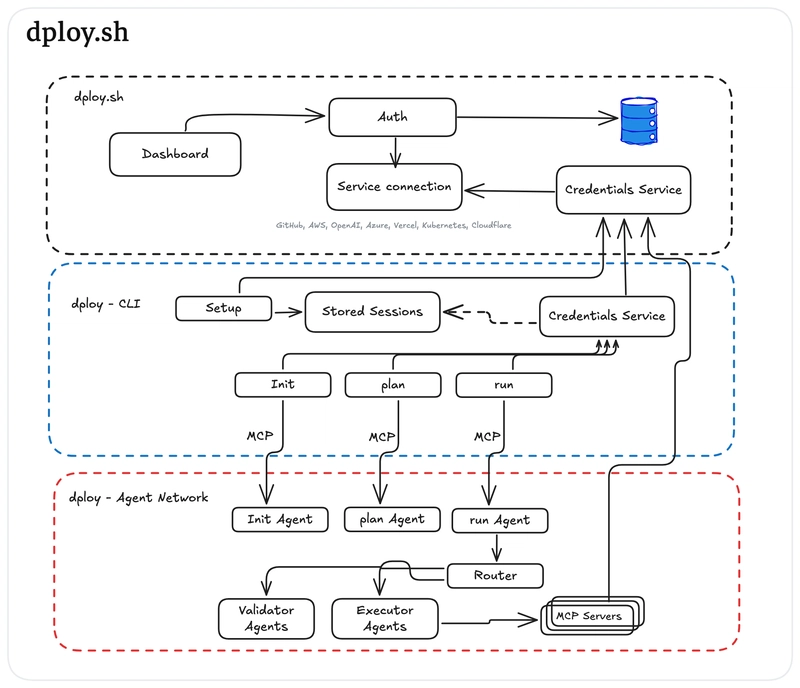


Dploy desing sytem

Here’s how the CLI works (soon):


dploy setup


Creates the config folder ~/.dploy/, asks for your API key for the backend (dploy.sh), and sets up your session.


dploy init <path>


Scans your project and builds a ~/.dploy/init.yml with metadata: programming languages, frameworks, test setup, linter presence, Docker files, and more.


dploy plan


Uses agents to generate a deployment plan based on the project type and infra needs. It’s saved as ~/.dploy/plan.yml.


dploy version <name>


Creates a new version of the code, opens a PR, merges it, and updates your main branch.


dploy run


Deploys your app using the plan, through a router-agent that orchestrates LLMs to perform specific actions via MCP.


and the last but not least:


dploy


An agent to analize the current state and execute all necesary comands tos to dploy your code.


The AI Layer (MCP + Agents)


We wanted to go beyond static templates.


Every dploy action is backed by AI agents that:


  1. Read your project.

  2. Decide the best action (e.g., “generate a GitHub Action for a Python/Poetry app”).

  3. Perform the task.


They talk via the Model Context Protocol (MCP), a structured format that defines the agent’s goal, constraints, and interfaces. Think of it like a contract between your tool and an AI brain.


And yeah — you can bring your own OpenAI key.


🌐 The Backend: dploy.sh


While dploy is the CLI, dploy.sh is the control tower. It handles:


  • API key management

  • Session storage

  • External integrations

  • Authentication


We're building this with a clean backend and a mobile-friendly frontend so you can manage your deploys anywhere.


Why Build This?


Just for fun

Because CI/CD shouldn’t be a second job.


This tool is for:


  • Indie hackers 🧑‍💻

  • Solo founders 🚀

  • Platform engineers 🛠️

  • Code Vibers 🤖


If you want to go from code → PR → deploy without babysitting your pipeline, we built this for you.


🚧 What's Next?


We’re working on:


  • Multi-agent coordination (think: "test-agent", "lint-agent", "deploy-agent")

  • Custom agent flows you can define with prompts

  • A GUI for managing your deploy pipelines

  • Templates for common stacks


🙌 Join Us


We’re sharing updates, prototypes, and code on Twitter: @kevinzwpeda, GitHub Project, Blog to show progess and here on dev.to.


Follow the journey, give feedback, or even contribute.


This is just the beginning.


👉 What would you automate in your CI/CD process if you had a personal AI agent? Let me know in the comments!

1. Sofort-Triage & Abwehrmaßnahmen

SOC Incident Playbook: Remote Code Execution (RCE) Defense
Syntax validiert (0 Fehler)
title: Detect Exploitation - Building in Public: From Terminal to Deployment with AI-Driven CI/CD
id: 4a4b2e62-64f1-49a4-ae6d-0596c24d7b5d
status: experimental
description: Automatisch generierte SIEM-Erkennungsregel basierend auf CTI Intelligence
references:
  - https://tsecurity.de/
author: iShareStuff CTI Automated Detection Engine
date: 2026-09-27
logsource:
  category: network_connection
  product: any
detection:
  selection:
      DestinationHostname:
        - 'dev.to'
  condition: selection
falsepositives:
  - Legitime administrative Zugriffe oder Penetrationstests
level: high
tags:
  - attack.initial_access
Syntax validiert (0 Fehler)
rule CTI_Threat_Indicator {
    meta:
        author = "iShareStuff CTI Automated Detection Engine"
        date = "2026-09-27"
        description = "YARA Signature for "
    strings:
        $str = "Building in Public: From Termi" ascii wide
    condition:
        any of them
}
Syntax validiert (0 Fehler)
index=security sourcetype IN ("cisco:asa", "pan:traffic", "zeek_conn", "suricata", "WinEventLog:Security")
(dest_host="dev.to")
| stats count earliest(_time) as first_seen latest(_time) as last_seen by src_ip, dest_ip, dest_host, signature
| eval first_seen=strftime(first_seen, "%Y-%m-%d %H:%M:%S"), last_seen=strftime(last_seen, "%Y-%m-%d %H:%M:%S")
| sort - count
Syntax validiert (0 Fehler)
destination.domain: ("dev.to") and event.category: "network"
Syntax validiert (0 Fehler)
CommonSecurityLog
| where DestinationHostName in ("dev.to")
| summarize EventCount = count(), FirstSeen = min(TimeGenerated), LastSeen = max(TimeGenerated) by SourceIP, DestinationIP, DestinationPort, Activity
| extend DetectionRule = "iShareStuff-CTI-Compiled"
| sort by EventCount desc

2. Cyber Threat Intelligence & Forensik

IoC Intelligence (1 Indikatoren)
dev[.]to
CTI Threat Relationship Graph2 Knoten / 1 Relationen
CVE / Incident Software MITRE ATT&CK CWE Weakness IoC
🎯
MITRE ATT&CK Matrix Navigator 14 Taktiken
Reconnaissance
-
Resource Development
-
Initial Access
Execution
Persistence
-
Privilege Escalation
Defense Evasion
Credential Access
-
Discovery
-
Lateral Movement
-
Collection
-
Command and Control
Exfiltration
-
Impact
tsecurity.de Cognitive Threat RAG
Fokus-Vektor:

Analyse für identifizierte Bedrohung auf Basis von Live-CTI (ENISA EUVD): CVSS 0.0 · EPSS 0.0% · CISA KEV: nein. Handlungsableitung aus den verlinkten Hersteller-Quellen.

🛡️ Angriffsfläche & Exposure

Netzwerk/Remote-Zugriff ohne Vorauthentifizierung möglich.

⚡ Empfohlene Sofortmaßnahmen
  • 1. Perimeter-Inspektion: Relevante Portfreigaben und exponierte Endpunkte unverzüglich scannen.
  • 2. Patch-Applikation: Hersteller-Hotfix einspielen oder betroffene Daemons in isolierte DMZ-Segmente überführen.
  • 3. Telemetrie & EDR-Alerts: Prozessaufrufe und Child-Processes auf anomale Shell-Spawns überwachen.
Ähnliche Beiträge
🔍 Verwandte News

Auch interessante Nachrichten Building in Public: From Terminal to Deployment with AI-Driven CI/CD

Thematisch verwandte Begriffe: Building, Public, From, Terminal · 6 Treffer

Laden...

Videos werden geladen ...

Laden...

Beiträge werden geladen ...

Laden...

Videos werden geladen ...

Laden...

Beiträge werden geladen ...

Laden...

Videos werden geladen ...

Laden...

Beiträge werden geladen ...

Laden...

Videos werden geladen ...

Laden...

Beiträge werden geladen ...

Laden...

Videos werden geladen ...

💬 Kommentare werden geladen…
Zum Aktualisieren ziehen
ZERO-DAY CVE-2026-100739 | A vulnerability was detected in mathurvishal CloudClassroom-PHP-Project…
Advisory →
tsecurity.de Icon
Offline-Lesen, Eilmeldungen & 0ms Ladezeit

Installiere tsecurity.de direkt auf deinen Home-Bildschirm für das ultimative Vollbild-Magazinerlebnis ohne Browser-Leisten.

Nächster Beitrag