"Concurrency is not parallelism... but also kinda is if you squint hard enough."
Let’s be real — if you're here, you're probably either:
- Building your first Go app and just saw the word goroutine thrown like a ragebait on Twitter,
- Trying to impress your future self by understanding what makes Go a beast at handling millions of things at once, or
- Debugging a deadlock so complex you started questioning your life decisions.
Whichever path led you here — respect.
Because concurrency isn't some optional sprinkle.
In Go, it’s baked right into the damn cake.
In this blog, we’re gonna really talk about concurrency.
Not just shallow examples that say "just use go func()."
Nah, we're going all in : Goroutines, Channels, Buffered Channels, Deadlocks, Select, WaitGroups, Mutexes, Context — all explained like you're grabbing coffee with your backend bro.
Warning:
This is gonna be a long ride.
It’s basically a one-stop shop — after this, you won’t need another “Go concurrency” blog.
So grab a coffee ☕, maybe some cookies 🍪, and let’s get you absolutely cracked at this.
Table of Contents
- Concurrency Explained
- Goroutines
- Channels
- The Select Statement
- WaitGroups and Mutexes
- The Context Package
- Common Concurrency Patterns in Go
- Common Pitfalls With Concurrency in Go
Concurrency explained
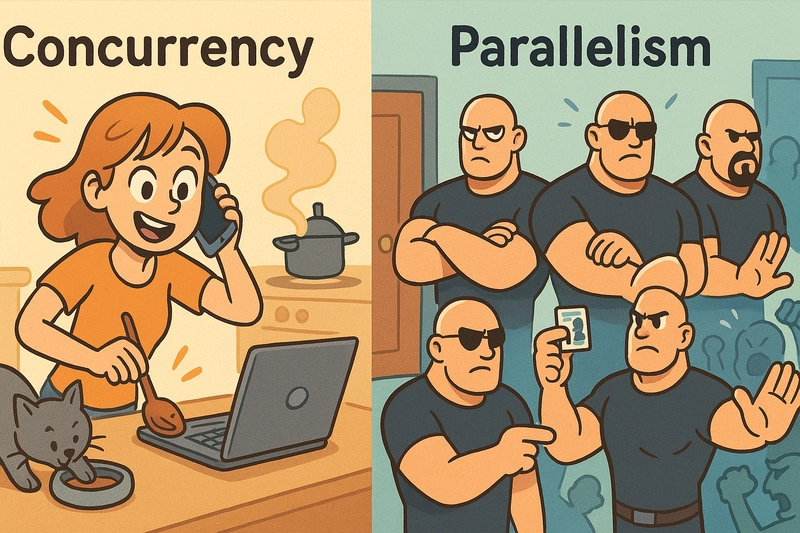
Concurrency is about dealing with a bunch of things at the same time, but not necessarily doing them simultaneously.
Example : Computer’s processor switches between tasks rapidly, giving the illusion of doing many things at once.
Go routines in Go let you write code where multiple tasks appear to run at the same time, but the system is just switching tasks efficiently.
Concurrency is managing many tasks at once (but not necessarily simultaneously), while Parallelism is actually executing multiple tasks at the same time. Parallelism needs multiple cores/CPUs to take full advantage.
Where is Concurrency even needed?
I/O Bound Operations (Networking, File Operations, Database Queries):
- You have one process waiting on data (from a database, an API, or even a file). While it waits, another task can run. This is perfect for concurrency.
Example: Web servers handling a lot of incoming requests. Each request might be waiting for data (like an API response), but the server doesn’t stop. It keeps working on others in the meantime.
Handling Multiple Requests Simultaneously:
- Think of a backend API handling multiple users. While one request is waiting for a response, another one should not have to wait. Concurrency lets that happen smoothly.
Example: A backend service in Go that needs to process hundreds of incoming HTTP requests. You don’t want to process them one by one. You fire off a goroutine for each request. You don’t even notice the bottleneck.
When You Have Time-Consuming Tasks:
- Your server may need to run long tasks (like image processing, video encoding). With concurrency, you can fire these tasks in parallel and return control to the user.
Example: If a user uploads an image and it needs to be resized, you don’t block them - you fire off a goroutine to handle the resizing, and the user can keep doing other things.
Distributed Systems and Microservices:
- You need to coordinate between multiple services that are processing things in parallel.
- Concurrency helps to deal with distributed services and allow them to talk to each other without blocking any process.
Background Work:
- Say you're building a system where things are running in the background (like a task scheduler). Concurrency makes sure things run in the background without blocking anything else.
Goroutines - Concurrently running Functions
Goroutines are lightweight, concurrent units of execution. A goroutine is essentially a function or method that runs concurrently with other functions in the same program.
They do consume a trivial amount of memory compared to the conventional threads and the scheduling of these routines is managed internally by Go. Now you do not need to worry about low level thread management anymore.
A goroutine takes around 2 KB of stack space, which is a tiny fraction compared to threads in other languages.
Multiple goroutines can execute concurrently, but they may not run simultaneously on multiple CPUs unless the Go runtime is explicitly set to use multiple CPUs.
Start a Goroutine - Syntax Shenanigans
In Go, you can spawn a goroutine by adding the go keyword before a function call.
package main


import (

    "fmt"

    "time"

)


func greet() {

    fmt.Println("Hello from the goroutine!")

}


func main() {

    // Creating a goroutine to run greet function concurrently

    go greet()


    // Main function waits for the goroutine to finish (sleep for demonstration)

    time.Sleep(1 * time.Second) // Wait for the goroutine to complete

}
go greet() here starts a concurrently running function (a goroutine)
time.Sleep is used here just to make sure that the main function doesn't exit before the goroutine finishes. Without this, the program might exit before the goroutine even has a chance to run.
→ Let’s see a good scenario and use goroutines there.
You want to fetch multiple URLs concurrently (e.g., for web scraping or API calls). Each fetch operation will be a separate goroutine.
package main


import (

    "fmt"

    "net/http"

    "time"

)


func fetchURL(url string) {

    // Simulating fetching a URL

    fmt.Printf("Started fetching %s\n", url)

    _, err := http.Get(url)

    if err != nil {

        fmt.Printf("Error fetching %s: %v\n", url, err)

        return

    }

    fmt.Printf("Finished fetching %s\n", url)

}


func main() {

    urls := []string{

        "https://example.com",

        "https://example.org",

        "https://example.net",

    }


    for _, url := range urls {

        // Spawning a goroutine for each URL fetch

        go fetchURL(url)

    }


    // Giving some time for goroutines to finish (this could be improved with synchronization)

    time.Sleep(2 * time.Second)

}
- Each
fetchURLcall is executed concurrently by spawning a goroutine withgo fetchURL(url). - We simulate a small delay in the program using
time.Sleep(2 * time.Second)so that all the goroutines have time to finish executing.
Goroutine Scheduling and the Runtime
→ Go runtime is the one that manages goroutines.
- The Go scheduler takes care of scheduling goroutines onto available OS threads.
- The number of goroutines can exceed the number of CPU cores, and the Go runtime will ensure they are executed without much performance overhead.
How the Go runtime handles it:
Lightweight: Each goroutine uses very little memory and stack space.
M:N Scheduling: Go uses an M:N scheduler, meaning multiple goroutines (M) are multiplexed onto fewer threads (N), which allows many goroutines to run with fewer threads, saving memory.
Channels
What are Channels?
→ Channels behave like “walkie-talkies” between two goroutines. They help pass data between two channels.
→ Think of a channel as something like a pipe, the data goes from one end of a pipe (one goroutine) and received at another end (another goroutine)
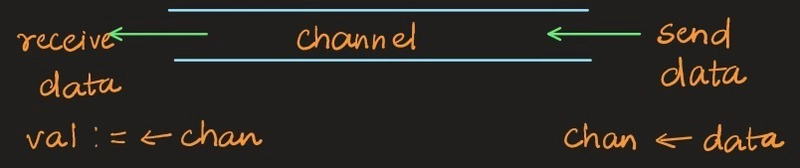
→ We don’t need mutexes (locks) in channels : Channels manage synchronization internally.
→ Syntax
ch := make(chan int) // Channel to send and receive int values

ch <- value //Send into channel [data into rear end]

value := <-ch//Receive from channel [received from front end]
A really simple example :
package main


import "fmt"


func worker(ch chan string) {

    // Receiving data from channel

    msg := <-ch

    fmt.Println("Received:", msg)

}


func main() {

    ch := make(chan string) // create channel

    go worker(ch)           // start goroutine


    // Send data into channel

    ch <- "Hello pixie!"  // blocks until worker reads it

}
mainsends"Hello pixie!"intoch
workergoroutine reads fromch
Synchronized communication: Sending and receiving blocks until both are ready.
Buffered vs Unbuffered Channels:
Unbuffered channel → send blocks until another goroutine is ready to receive.
go func() {

    ch <- 10 // This will BLOCK until someone receives

}()


value := <-ch  // Receiving side → unblocks sender
Buffered channel → send blocks only if buffer is full.
ch := make(chan int, 5) // capacity = 5
Sender can send up to 5 items without any receiver.- Only blocks if buffer is full.
- Receiver blocks only when buffer is empty.
ch := make(chan int, 2)


ch <- 1  // ok

ch <- 2  // ok

ch <- 3  // BLOCKS (buffer full!)
Closing a Channel
close(ch)
What happens?
- No more values can be sent into
ch. - You can still receive remaining values.
- Reading from a closed empty channel gives zero value (
0for int,""for string, etc).
IMPORTANT:
Only sender should close the channel, NEVER receiver.- Closing a channel signals to receivers:
"No more food coming 🍗, clean up!"
A small summary before we move ahead :
| Thing | Meaning |
|---|---|
| Unbuffered channel | Direct handshake between sender and receiver |
| Buffered channel | Temporary shelf (buffer) — senders/receivers can work independently until full/empty |
| Close | Only sender should close to signal "no more data" |
CHANNEL
↳ Unbuffered (default)
Both sender and receiver must be ready
↳ Buffered (capacity N)
Sender blocks only when full
Receiver blocks only when empty
↳ Close(channel)
Signals no more data
Receiver reads remaining values
Further sends panic
Deadlocks in Channels
Let’s see how basic deadlocks are caused (let’s take unbuffered channel here)
package main


import (

    "fmt"

)


func main() {

    ch := make(chan int) // UNBUFFERED


    // Try to send

    fmt.Println("Sending 1...")

    ch <- 1 // ❌ BLOCKS HERE — no one is receiving!

    fmt.Println("Sent 1!") // ❌ NEVER REACHED

}
This will cause deadlock.
Because you’re sending but no one's receiving.
package main


import (

    "fmt"

)


func main() {

    ch := make(chan int)


    go func() {

        val := <-ch // Now somebody is ready to RECEIVE

        fmt.Println("Received:", val)

    }()


    fmt.Println("Sending 1...")

    ch <- 1 // ✅ Now send will succeed, because receiver exists

    fmt.Println("Sent 1!")

}
Slightly Advanced: 2-Way Deadlock
Two goroutines waiting on each other = death spiral.
package main


import "fmt"


func main() {

    ch1 := make(chan int)

    ch2 := make(chan int)


    go func() {

        ch1 <- 42      // Waiting for someone to receive from ch1

        val := <-ch2   // Will never reach here

        fmt.Println("Goroutine 1 got", val)

    }()


    go func() {

        ch2 <- 24      // Waiting for someone to receive from ch2

        val := <-ch1   // Will never reach here

        fmt.Println("Goroutine 2 got", val)

    }()


    select {} // Block main forever (simulate long run)

}
Both goroutines are stuck:
- First trying to send.
- No one receiving first.
- PANIC. Deadlock.
💡 Quick Golden Rule:
❝ With unbuffered channels, send and receive must happen simultaneously. Otherwise? You're building your own tombstone. ❞
Mini Worker Pool using Buffered Channels
Let’s look at a slightly advanced example to better our understanding about channels a bit.
You want to distribute work (like downloading files, processing images, etc.) to multiple goroutines.
Let’s build a mini worker pool:
package main


import (

    "fmt"

    "time"

)


func worker(id int, jobs <-chan int, results chan<- int) {

    for j := range jobs {

        fmt.Printf("Worker %d started job %d\n", id, j)

        time.Sleep(time.Second) // simulate heavy task

        fmt.Printf("Worker %d finished job %d\n", id, j)

        results <- j * 2 // Send result back

    }

}


func main() {

    const numJobs = 5

    jobs := make(chan int, numJobs)

    results := make(chan int, numJobs)


    // Start 3 workers

    for w := 1; w <= 3; w++ {

        go worker(w, jobs, results)

    }


    // Send jobs

    for j := 1; j <= numJobs; j++ {

        jobs <- j

    }

    close(jobs) // Closing jobs channel — no more jobs coming


    // Collect results

    for a := 1; a <= numJobs; a++ {

        fmt.Println("Result:", <-results)

    }

}
Now, this sums up the concept of concurrency. Let’s dissect this code snippet and understand what is going on?
First: About These Funky Arrows
worker(id int, jobs <-chan int, results chan<- int)
jobs <-chan int→
Read-Only Channel forint
- This goroutine can ONLY RECEIVE from
jobs.
It cannot send intojobs.
results chan<- int→
Write-Only Channel forint
- This goroutine can ONLY SEND into
results.
It cannot receive fromresults.
So why this design?
Because clean roles = fewer bugs.
- Worker only picks up jobs.
- Worker only pushes results.
Enforces discipline at compile-time (Go will error if you do the wrong operation).
You can't accidentally do this:
j := <-results // ❌ won't compile
or
jobs <- 100 // ❌ won't compile
Go catches stupidity early — true backend villain language 😈.
Now Full Code Explained Step-by-Step
1. Channels setup
const numJobs = 5

jobs := make(chan int, numJobs)

results := make(chan int, numJobs)
jobschannel: buffered to hold 5 int jobs.
resultschannel: buffered to hold 5 int results.
This ensures main goroutine can dump jobs fast without waiting.
2. Launch 3 workers
for w := 1; w <= 3; w++ {

    go worker(w, jobs, results)

}
- Spawns 3 concurrent goroutines, each running
worker. - Each
workeris:
- Waiting for jobs (
for j := range jobs). - Processing job (simulated by
time.Sleep(time.Second)). - Sending result back.
- Waiting for jobs (
Now 3 workers are ready to fight for jobs.
3. Send jobs
for j := 1; j <= numJobs; j++ {

    jobs <- j

}

close(jobs)
- Main goroutine pushes 5 jobs (
1,2,3,4,5) intojobschannel. - Then
close(jobs)→ no more new jobs coming. - This is important because
for j := range jobsin workers needs to know when to stop. - After closing,
for j := range jobsexits when all jobs are done.
Clean end of supply line.
4. Collect results
for a := 1; a <= numJobs; a++ {

    fmt.Println("Result:", <-results)

}
Main goroutine waits and receives 5 results.- Each result is printed out.
Results are guaranteed to come because:
- Worker always pushes a result after finishing a job.
- Buffer size matches number of jobs.
How The Code Flows
Timeline Visualization:
Main Thread:

  Push job 1, 2, 3, 4, 5 → jobs channel

  Close jobs channel

  Wait for 5 results → print them


Worker Goroutines(All workers run parallely, so any worker can pick any job)

  Worker1: pick job 1 → work 1s → push result //say worker 1 is available

  Worker2: pick job 2 → work 1s → push result

  Worker3: pick job 3 → work 1s → push result

  (Then next jobs 4,5 picked by available workers)
Workers share the job queue — whoever is free picks next.
Output :

Suppose you remove this line:
close(jobs)
then the worker code:
for j := range jobs {

    // do work

}
has no way of knowing when jobs are over.
Result?
- After finishing all the jobs you sent (
5in this case),
The workers will be stuck waiting at<-jobs
Deadlock !
Your program will hang forever after printing the first few results.
The Select Statement
Select lets a goroutine wait on multiple communication operations at once.
The first one that's ready, wins.
Basic Syntax
select {

case val := <-chan1:

    fmt.Println("received", val, "from chan1")

case chan2 <- 10:

    fmt.Println("sent 10 to chan2")

default:

    fmt.Println("no communication ready")

}
Looks suspiciously like a switch, right?
BUT it operates on channels only.
Key Rules of Select
First ready case wins.
If multiple are ready, it picks one randomly (fairness).
If none are ready, and nodefault, it blocks. (stuck)
Ifdefaultexists, and nothing is ready, default runs instantly.
Real Example (multiple receives)
package main


import (

    "fmt"

    "time"

)


func main() {

    c1 := make(chan string)

    c2 := make(chan string)


    // Sender goroutines

    go func() {

        time.Sleep(1 * time.Second)

        c1 <- "from c1"

    }()

    go func() {

        time.Sleep(2 * time.Second)

        c2 <- "from c2"

    }()


    // Select to receive

    for i := 0; i < 2; i++ {

        select {

        case msg1 := <-c1:

            fmt.Println("Received:", msg1)

        case msg2 := <-c2:

            fmt.Println("Received:", msg2)

        }

    }

}
Output:
Received: from c1

Received: from c2
First we receive from c1, then c2, depending on who is ready.
Big Brain Situations where select is 🔥:
- You want to listen on multiple channels without blocking on just one.
- You want timeouts (can mix with
time.After). - You want cancel listening (mix with
context).
Scenario: Implementing Timeout and Cancellation with Select
In real-world systems, you’ll often need to:
Timeout operations after a certain period.
Cancel operations if they take too long or aren't needed anymore.
We’ll combine select, time.After, and a cancel mechanism into one delicious, high-performance, non-blocking recipe. Let's cook up a system where multiple tasks are being executed concurrently, but if they take too long, they are timed out.
time.After is a built-in Go function from the time package that returns a channel which will receive the current time after a specified duration has passed.
Scenario Breakdown:
Task Processing: We’ll simulate two tasks, each with a random duration.
Timeout: We’ll set a timeout that forces cancellation after a fixed amount of time.
Cancel: If either task finishes early, we should cancel the other one.
Code: Timeout + Cancellation Example
package main


import (

    "fmt"

    "time"

    "math/rand"

)


func longRunningTask(taskId int, cancelCh <-chan struct{}, doneCh chan<- int) {

    // Randomize task duration (between 1 and 5 seconds)

    duration := time.Duration(rand.Intn(5)+1) * time.Second

    fmt.Printf("Task %d will take %v to complete\n", taskId, duration)


    // Simulate work

    select {

    case <-time.After(duration):

        // Task completed successfully

        fmt.Printf("Task %d completed\n", taskId)

        doneCh <- taskId

    case <-cancelCh:

        // Task was canceled

        fmt.Printf("Task %d was canceled\n", taskId)

    }

}


func main() {

    // Create channels

    doneCh := make(chan int, 2)   // To receive completed tasks

    cancelCh := make(chan struct{}) // For cancel signal


    // Start two long-running tasks

    go longRunningTask(1, cancelCh, doneCh)

    go longRunningTask(2, cancelCh, doneCh)


    // Timeout duration for all tasks

    timeout := 3 * time.Second


    // Select to handle timeout or task completion

    select {

    case taskId := <-doneCh:

        fmt.Printf("Task %d completed before timeout\n", taskId)

    case <-time.After(timeout):

        // Timeout occurred, cancel remaining tasks

        fmt.Println("Timeout! Cancelling remaining tasks...")

        close(cancelCh)

    }


    // Collect remaining task results

    for i := 0; i < 2; i++ {

        select {

        case taskId := <-doneCh:

            fmt.Printf("Task %d finished\n", taskId)

        case <-time.After(timeout):

            fmt.Println("Another timeout!")

        }

    }

}
Explanation of How This Works
Task Simulation:
- Each task runs in its own goroutine.
- We use
time.After(duration)to simulate the task taking random time (between 1 and 5 seconds).
Timeout Mechanism:
- We set a global timeout of 3 seconds using
time.After(timeout). - The
selectblocks until either a task completes or the timeout is reached. - If the timeout occurs, we send a cancellation signal to the
cancelChchannel.
- We set a global timeout of 3 seconds using
Cancellation Logic:
- If the task is still running when the timeout occurs, the
cancelChchannel sends a signal, and the task checks for that signal to abort its operation.
- If the task is still running when the timeout occurs, the
Graceful Handling of Remaining Tasks:
- After sending the cancellation signal, the program ensures any task that finished afterward is properly handled by waiting for them to complete (or timeout if necessary).
Output Example:
Let’s assume the first task finishes at 2 seconds, and the second one is still running when the timeout hits.
Task 1 will take 2s to complete

Task 2 will take 4s to complete

Task 1 completed

Timeout! Cancelling remaining tasks...

Task 2 was canceled

Task 1 finished
What's the Takeaway?
Unblocking and timeout are now easy to manage thanks toselect.
selectlets you handle multiple things happening at once, all while keeping the code clean and organized.
Deadlock avoidance:selecthelps you avoid race conditions or deadlocks because of its non-blocking nature (unless you specifically want blocking withdefault).
WaitGroups and Mutexes
In Go, WaitGroups and Mutexes are two of the most commonly used synchronization primitives. They are part of the sync package and help manage concurrency by ensuring proper synchronization between multiple goroutines.\
1. WaitGroups in Go
What is a WaitGroup?
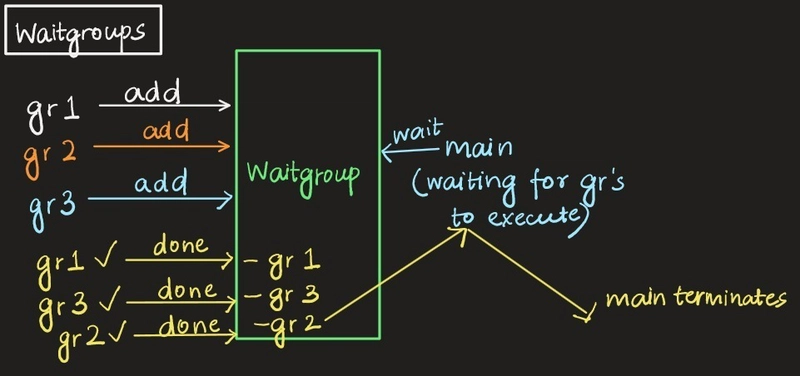
A WaitGroup is used to wait for a collection of goroutines to finish executing. It provides a way for a program to synchronize multiple goroutines and wait until all of them are done before proceeding.
Basic Concept
Add(n): Specifies the number of goroutines that theWaitGroupshould wait for.
Done(): Called by each goroutine when it finishes. It decrements the counter in theWaitGroup.
Wait(): Blocks until the counter in theWaitGroupreaches zero, i.e., until all the goroutines have finished their tasks.
Let’s start with a simple example that uses a WaitGroup to wait for multiple goroutines to finish.
package main


import (

    "fmt"

    "sync"

    "time"

)


func worker(id int, wg *sync.WaitGroup) {

    defer wg.Done() // Decrements the counter when the goroutine finishes

    fmt.Printf("Worker %d started\n", id)

    time.Sleep(time.Second) // Simulate work

    fmt.Printf("Worker %d finished\n", id)

}


func main() {

    var wg sync.WaitGroup


    // Launching 3 worker goroutines

    for i := 1; i <= 3; i++ {

        wg.Add(1) // Increment the counter for each goroutine

        go worker(i, &wg)

    }


    // Wait for all goroutines to finish

    wg.Wait()

    fmt.Println("All workers finished")

}
Explanation:
- The
mainfunction launches 3 goroutines, each calling theworkerfunction. - The
WaitGroupcounter is incremented by callingwg.Add(1)for each goroutine. - Each worker calls
wg.Done()when it finishes its task. - The
mainfunction callswg.Wait()to block until all workers have finished.
Flow:
- Three workers are launched in parallel.
- The
mainfunction waits for all workers to finish by callingwg.Wait(). - When all workers finish, the program prints
"All workers finished".
Advanced Example: WaitGroup with Error Handling
In this advanced example, we'll use a WaitGroup in combination with channels to handle errors and synchronize tasks.
package main


import (

    "fmt"

    "sync"

    "time"

)


func fetchData(url string, wg *sync.WaitGroup, resultChan chan<- string, errorChan chan<- error) {

    defer wg.Done() // Decrements the counter when the goroutine finishes


    // Simulating data fetching

    fmt.Printf("Fetching data from %s...\n", url)

    time.Sleep(time.Second * 2) // Simulate download delay


    // Simulate error for one URL

    if url == "https://badsite.com" {

        errorChan <- fmt.Errorf("failed to fetch %s", url)

        return

    }


    resultChan <- fmt.Sprintf("Successfully fetched data from %s", url)

}


func main() {

    var wg sync.WaitGroup

    resultChan := make(chan string, 3)

    errorChan := make(chan error, 3)


    urls := []string{"https://example.com", "https://goodsite.com", "https://badsite.com"}


    // Start fetching data concurrently

    for _, url := range urls {

        wg.Add(1)

        go fetchData(url, &wg, resultChan, errorChan)

    }


    // Wait for all goroutines to finish

    go func() {

        wg.Wait()

        close(resultChan) // Close resultChan once all goroutines are done

        close(errorChan)  // Close errorChan once all goroutines are done

    }()


    // Collect results and errors

    for {

        select {

        case result, ok := <-resultChan:

            if ok {

                fmt.Println(result)

            }

        case err, ok := <-errorChan:

            if ok {

                fmt.Println("Error:", err)

            }

        }


        if len(resultChan) == 0 && len(errorChan) == 0 {

            break

        }

    }


    fmt.Println("All operations completed.")

}
Explanation:
- Multiple goroutines fetch data concurrently, and the
WaitGroupwaits for all of them to finish. - Errors are sent through the
errorChanwhile successful results are sent to theresultChan. - After all goroutines finish, the channels are closed, and the results and errors are collected using a
selectstatement.
2. Mutexes in Go
What is a Mutex?
A Mutex (short for mutual exclusion) is a synchronization primitive used to ensure that only one goroutine can access a critical section (shared resource) at a time. It prevents race conditions and ensures that the shared data is accessed safely by multiple goroutines.
A Mutex is used to lock and unlock access to critical sections of the code. Only one goroutine can hold the lock at any given time, while others will have to wait for the lock to be released.

Basic Concept
Lock(): Acquires the lock, ensuring exclusive access to the critical section.
Unlock(): Releases the lock, allowing other goroutines to acquire it.
Example: Mutex with Shared Resource Access
Let’s consider a scenario where multiple goroutines are concurrently updating a shared map. We'll use a Mutex to ensure that only one goroutine accesses the map at a time.
package main


import (

    "fmt"

    "sync"

    "time"

)


var sharedMap = make(map[string]int)

var mu sync.Mutex


func updateMap(key string, value int, wg *sync.WaitGroup) {

    defer wg.Done()


    mu.Lock() // Lock the map before updating

    defer mu.Unlock()


    // Simulate some work with a sleep

    time.Sleep(time.Millisecond * 100)

    sharedMap[key] = value

    fmt.Printf("Updated %s to %d\n", key, value)

}


func main() {

    var wg sync.WaitGroup


    // Launch 5 goroutines to update the shared map

    for i := 1; i <= 5; i++ {

        wg.Add(1)

        go updateMap(fmt.Sprintf("key%d", i), i*10, &wg)

    }


    wg.Wait()


    // Print the final state of the shared map

    fmt.Println("Final sharedMap:", sharedMap)

}
Explanation:
- Multiple goroutines are launched to update the shared
mapconcurrently. - The
Mutexensures that only one goroutine can access themapat a time to avoid race conditions. - After all goroutines finish, the final state of the map is printed.
Key Takeaways:
WaitGroups are used to wait for a collection of goroutines to finish before continuing execution.
Mutexes are used to ensure mutual exclusion when accessing shared resources, preventing race conditions.- Both
WaitGroupsandMutexesare essential for building safe, concurrent programs in Go.
The Context Package
The context package allows you to manage concurrent operations cleanly and safely in Go.
The context package allows you to:
Control cancellation of goroutines.
Set timeouts and deadlines for operations.
Pass request-scoped values across API boundaries and between goroutines
Basically, context.Context works as connecting parts (signal mechanisms) between goroutines.
Instead of letting goroutines run indefinitely, you can tell them:
"Hey, it's time to stop working."
Core Functions in context
| Function | Purpose |
|---|---|
context.Background() | Returns a non-nil, empty context. Used as the root for other contexts. |
context.TODO() | Placeholder context when you're unsure what to use. |
context.WithCancel(parent) | Creates a child context that can be manually canceled. |
context.WithTimeout(parent, duration) | Creates a child context that cancels itself after a specified duration. |
context.WithDeadline(parent, time) | Similar to timeout but tied to an absolute point in time. |
context.WithValue(parent, key, value) | Allows passing key-value pairs through context trees. |
Why Is context Important for Concurrency?
Avoids Goroutine Leaks: Without cancellation signals, goroutines can keep running forever, causing memory bloat.
Couples Work to Lifecycle: Tie goroutines to the lifetime of a request or operation.
Handles Timeouts Gracefully: Important for networked services, APIs, and time-sensitive tasks.
Propagates Metadata: Pass user authentication, trace IDs, etc., neatly through multiple layers.
Example 1: Manually Canceling a Goroutine
package main


import (

    "context"

    "fmt"

    "time"

)


func worker(ctx context.Context) {

    for {

        select {

        case <-ctx.Done():

            fmt.Println("Worker: context canceled, exiting...")

            return

        default:

            fmt.Println("Worker: working...")

            time.Sleep(500 * time.Millisecond)

        }

    }

}


func main() {

    ctx, cancel := context.WithCancel(context.Background())


    go worker(ctx)


    time.Sleep(2 * time.Second)

    fmt.Println("Main: canceling context now")

    cancel()


    time.Sleep(1 * time.Second) // Give time for goroutine to finish

}
Explanation:
context.WithCancelreturns a new context and acancelfunction.- When
cancel()is called, the worker receives the signal and exits cleanly.
Example 2: Context with Timeout
package main


import (

    "context"

    "fmt"

    "time"

)


func worker(ctx context.Context) {

    for {

        select {

        case <-ctx.Done():

            fmt.Println("Worker: timeout reached, exiting...")

            return

        default:

            fmt.Println("Worker: working...")

            time.Sleep(500 * time.Millisecond)

        }

    }

}


func main() {

    ctx, cancel := context.WithTimeout(context.Background(), 3*time.Second)

    defer cancel()


    go worker(ctx)


    time.Sleep(5 * time.Second)

}
Explanation:
- After 3 seconds, the context automatically cancels itself.
- No manual
cancel()call is necessary to enforce the timeout (thoughdefer cancel()is good practice).
Passing Metadata Through Context
You can use context.WithValue to attach metadata to a context. This is very useful for passing things like authentication tokens, trace IDs, or user-specific information through call chains.
package main


import (

    "context"

    "fmt"

)


func processRequest(ctx context.Context) {

    userID := ctx.Value("userID")

    if userID != nil {

        fmt.Println("Processing request for user:", userID)

    } else {

        fmt.Println("No user ID found in context")

    }

}


func main() {

    ctx := context.WithValue(context.Background(), "userID", "12345")


    processRequest(ctx)

}
Important:
- Only use
WithValuefor request-scoped data. - Avoid using context as a global bag for business logic or configuration data.
Real-World Application: HTTP Request Context
When handling HTTP requests in a server, the request itself carries a context:
func handler(w http.ResponseWriter, r *http.Request) {

    ctx := r.Context()


    select {

    case <-time.After(5 * time.Second):

        fmt.Fprintln(w, "Request completed")

    case <-ctx.Done():

        http.Error(w, "Request canceled", http.StatusRequestTimeout)

    }

}
Why it matters:
- If the client disconnects, the request context is canceled automatically.
- No resources wasted processing a request the client no longer cares about.
Best Practices
- Always listen to
ctx.Done()inside long-running goroutines. - Always cancel child contexts you create (
defer cancel()) to avoid leaks.
Avoid usingcontext.WithValuefor business logic; use it strictly for transporting metadata.
Never store Contexts inside structs; pass them explicitly.
Common Concurrency Patterns in Go
Earlier , we discussed buffered channels using a simple worker example. What we didn't reveal then is that the same snippet actually showcases several important concurrency patterns commonly used in Go.
Let's revisit the code first:
package main


import (

    "fmt"

    "time"

)


func worker(id int, jobs <-chan int, results chan<- int) {

    for j := range jobs {

        fmt.Printf("Worker %d started job %d\n", id, j)

        time.Sleep(time.Second) // simulate heavy task

        fmt.Printf("Worker %d finished job %d\n", id, j)

        results <- j * 2 // Send result back

    }

}


func main() {

    const numJobs = 5

    jobs := make(chan int, numJobs)

    results := make(chan int, numJobs)


    // Start 3 workers

    for w := 1; w <= 3; w++ {

        go worker(w, jobs, results)

    }


    // Send jobs

    for j := 1; j <= numJobs; j++ {

        jobs <- j

    }

    close(jobs) // Closing jobs channel — no more jobs coming


    // Collect results

    for a := 1; a <= numJobs; a++ {

        fmt.Println("Result:", <-results)

    }

}
Now, what patterns are hidden inside?
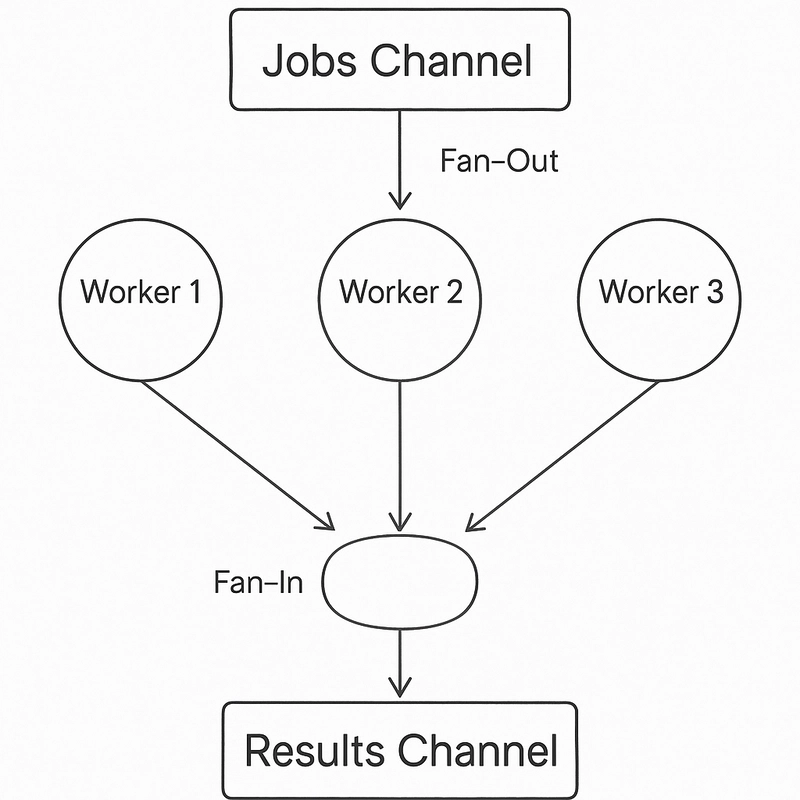
1. Fan-out
We start multiple goroutines (workers) that are all reading from the same jobs channel. This spreads out the workload across multiple concurrent workers - hence, fanning out.
Key idea: multiple consumers (workers) pulling from one source of work (jobs).
"Got a hundred pizzas to deliver? Send three drivers instead of one."
2. Fan-in
All the workers, after finishing their work, push their results into the same results channel. This fans in the results from multiple goroutines into a single channel for collection.
Key idea: multiple producers (workers) sending to one destination (results).
"All drivers hand over their earnings at one counter."
3. Worker Pool
This pattern specifically sets up a fixed number of goroutines (3 in our case) to handle an arbitrary number of jobs. Instead of creating a new goroutine per task (which can blow up memory), we use a small, controlled pool.
Key idea: limited, reusable goroutines handle many tasks.
"You don't hire 100 chefs to make 100 pizzas — you hire 3 good ones and make it work."
4. Channel Closing Signaling Completion
Notice how we close(jobs) after sending all jobs? That closing is a crucial signal: it tells all workers "no more work is coming," allowing their for j := range jobs loops to terminate gracefully.
Key idea: close the input channel to broadcast "we're done here" to consumers.
"The bakery door closes. No new orders. Workers finish what they're doing and go home."
Why These Patterns Matter
Efficiency: Worker pools prevent spawning thousands of goroutines unnecessarily.
Scalability: Fan-out/fan-in patterns scale your app without drama.
Graceful shutdown: Closing channels ensures clean termination without leaks.
The Pipeline pattern
Observe the give code snippet carefully.
package main


import "fmt"


// Stage 1: Generate numbers

func gen(nums ...int) <-chan int {

    out := make(chan int)

    go func() {

        for _, n := range nums {

            out <- n

        }

        close(out)

    }()

    return out

}


// Stage 2: Square numbers

func square(in <-chan int) <-chan int {

    out := make(chan int)

    go func() {

        for n := range in {

            out <- n * n

        }

        close(out)

    }()

    return out

}


func main() {

    // Set up the pipeline

    nums := gen(2, 3, 4, 5)

    squares := square(nums)


    // Consume the output

    for s := range squares {

        fmt.Println(s)

    }

}
Pipeline = a series of stages connected by channels.
Each stage is independent, parallelizable, and communicates via channels.
Every stage is:
- Taking input from previous channel.
- Doing its job (transforming data).
- Passing it to the next stage via another channel.
Concurrency behind the scenes:
Every stage (gen, square) does its work independently and asynchronously.
They are literally pushing and pulling data through channels.
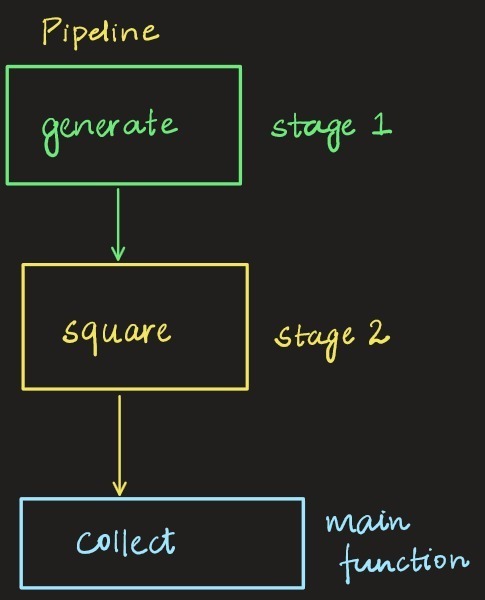
Real Life Comparison:
Imagine a factory assembly line:
- First guy (
gen) just drops raw materials on the belt. - Second guy (
square) picks them, processes them (squares them), and sends them forward. - You (
main) are the final inspector printing the results.
Concurrency patterns in Go are not limited to these. If you wish to dive even deeper, refer this repo.
Common pitfalls with concurrency in Go
Here are some common pitfalls we encounter while dealing with concurrency in Go. Several of them have been explained in detail above.
Deadlocks
→ Goroutines stuck waiting forever (e.g., reading from an empty channel).
Goroutine Leaks
→ Forgetting to close channels or signal exit - goroutines hang around eating RAM .
Race Conditions
→ Two goroutines modifying shared data without sync- data gets corrupted (use mutex).
Improper Channel Closing
→ Only senders should close channels.
→ Receivers never close it -that's how you get panics.
Forgot to Drain Channels
→ Senders block because nobody's receiving.
Overusing Goroutines
→ Spawning millions of goroutines casually → memory death spiral.
Blocking Operations Inside Goroutines
→ One sleepy goroutine = whole system choke if not handled with timeouts/select.
Misusing Buffered Channels
→ Thinking buffers are infinite. (Spoiler: they're not.)
→ Full buffer = blocked sender.
Panic Inside Goroutines
→ If a goroutine panics and you don't recover it → stealth crashes.
No Context Cancellation
→ Forgetting to pass
context.Contextto control goroutines.
That’s a wrap
Okay, so we are finally ending this blog. It was absolutely fun writing this.
If you made it till here — hats off to you!
We covered a lot of ground:
- How Go handles concurrency so beautifully with its simple primitives.
- What goroutines are, how channels let them talk, and how select lets them multitask smartly.
- How to synchronize goroutines safely with WaitGroups and Mutexes.
- How to control cancellations and deadlines with the Context package.
- Some real-world patterns and pitfalls that every Go developer should know.
Concurrency can feel intimidating at first, but with practice, it becomes second nature — and trust me, it's one of the most rewarding things to master in Go.
If you ever find yourself stuck, just remember:
Keep it simple, make it clear who owns what, and let Go’s concurrency model do its magic.
Thanks for reading — and happy coding!