
In November 2024, Anthropic published a blog post announcing what may be its most significant contribution to the AI ecosystem so far: the Model Context Protocol.
According to the official definition on the website:
MCP is an open protocol that standardizes how applications provide context to LLMs. Think of MCP as a USB-C port for AI applications. Just as USB-C offers a standardized way to connect your devices to various peripherals and accessories, MCP provides a standardized way to connect AI models to different data sources and tools.
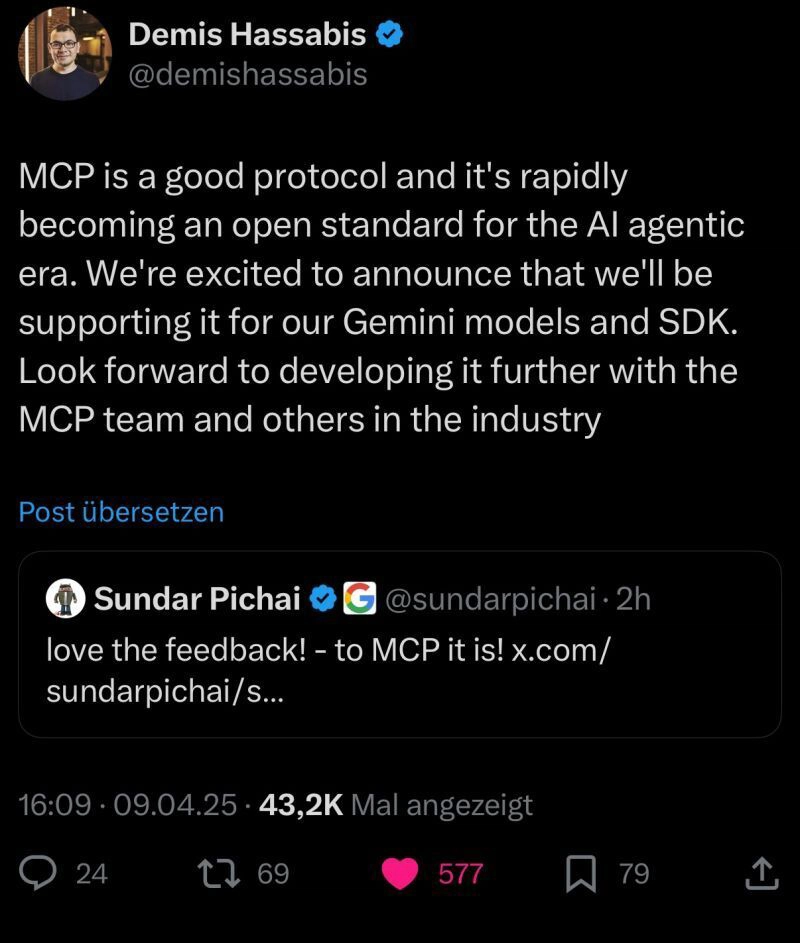
Quickly, other players began announcing support for this new protocol:
To keep this post concise, I won’t discuss the architecture defined by MCP in detail, but I’ll leave some links at the end for those who want to dive deeper.
Still, some basic components are necessary to understand:
MCP Hosts: Programs like Claude Desktop, IDEs, or AI tools that want to access data via MCP
MCP Clients: Protocol clients that maintain 1:1 connections with servers
MCP Servers: Lightweight programs that expose specific resources via MCP
In this example, I’ll create a Server and use some Hosts to test access to it.
Besides the protocol definitions, the official project website offers SDKs for some languages, such as Python, TypeScript, Java, Kotlin, and C#. Although there’s an ongoing discussion about Go support in the official repository, the community has already started creating some protocol implementations. For the proof of concept presented in this post, I used one of these projects, mcp-golang.
The first step was to create a new project:
mkdir mcp-server

go mod init github.com/eminetto/mcp-server
The main.go code looked like this:
package main


import (

    "encoding/json"

    "errors"

    "fmt"

    "io"

    "net/http"

    "os"

    "strings"

    "time"


    mcp_golang "github.com/metoro-io/mcp-golang"

    "github.com/metoro-io/mcp-golang/transport/stdio"

    "github.com/ryanuber/go-filecache"

)


const cacheTime = 500


type MyFunctionsArguments struct {

    ZipCode string `json:"zip_code" jsonschema:"required,description=The zip code to be searched"`

}


// Cep is the brazilian postal code and address information

type Cep struct {

    Cep         string `json:"cep"`

    Logradouro  string `json:"logradouro"`

    Complemento string `json:"complemento"`

    Bairro      string `json:"bairro"`

    Localidade  string `json:"localidade"`

    Uf          string `json:"uf"`

    Unidade     string `json:"unidade"`

    Ibge        string `json:"ibge"`

    Gia         string `json:"gia"`

}


func main() {

    done := make(chan struct{})


    server := mcp_golang.NewServer(stdio.NewStdioServerTransport())

    err := server.RegisterTool("zipcode", "Find an address by his zip code", func(arguments MyFunctionsArguments) (*mcp_golang.ToolResponse, error) {

        address, err := getCep(arguments.ZipCode)

        if err != nil {

            return nil, err

        }


        return mcp_golang.NewToolResponse(mcp_golang.NewTextContent(fmt.Sprintf("Your address is %s!", address))), nil

    })

    if err != nil {

        panic(err)

    }

    err = server.Serve()

    if err != nil {

        panic(err)

    }


    <-done

}


func getCep(id string) (string, error) {

    cached := getFromCache(id)

    if cached != "" {

        return cached, nil

    }

    req, err := http.Get(fmt.Sprintf("http://viacep.com.br/ws/%s/json/", id))

    if err != nil {

        return "", err

    }


    var c Cep

    err = json.NewDecoder(req.Body).Decode(&c)

    if err != nil {

        return "", err

    }

    res, err := json.Marshal(c)

    if err != nil {

        return "", err

    }


    return saveOnCache(id, string(res)), nil

}


func getFromCache(id string) string {

    updater := func(path string) error {

        return errors.New("expired")

    }


    fc := filecache.New(getCacheFilename(id), cacheTime*time.Second, updater)


    fh, err := fc.Get()

    if err != nil {

        return ""

    }


    content, err := io.ReadAll(fh)

    if err != nil {

        return ""

    }


    return string(content)

}


func saveOnCache(id string, content string) string {

    updater := func(path string) error {

        f, err := os.Create(path)

        if err != nil {

            return err

        }

        defer f.Close()

        _, err = f.Write([]byte(content))

        return err

    }


    fc := filecache.New(getCacheFilename(id), cacheTime*time.Second, updater)


    _, err := fc.Get()

    if err != nil {

        return ""

    }


    return content

}


func getCacheFilename(id string) string {

    return os.TempDir() + "/cep" + strings.Replace(id, "-", "", -1)

}
Highlighting the Most Important Parts
Definition of the function parameters that will be available:
type MyFunctionsArguments struct {

    ZipCode string `json:"zip_code" jsonschema:"required,description=The zip code to be searched"`

}
Definition of the tool that will be available to the client and host:
server := mcp_golang.NewServer(stdio.NewStdioServerTransport())

    err := server.RegisterTool("zipcode", "Find an address by his zip code", func(arguments MyFunctionsArguments) (*mcp_golang.ToolResponse, error) {

        address, err := getCep(arguments.ZipCode)

        if err != nil {

            return nil, err

        }


        return mcp_golang.NewToolResponse(mcp_golang.NewTextContent(fmt.Sprintf("Your address is %s!", address))), nil

    })

    if err != nil {

        panic(err)

    }

    err = server.Serve()
The protocol defines that a Server can provide three capabilities:
Resources: Data similar to files that a client can read (such as API responses or file content)
Tools: Functions that can be called by the LLM (with user approval)
Prompts: Pre-written templates that help users perform specific tasks
As seen in the code above, I’m exposing only one tool in this proof of concept. I left out the other items to simplify the example.
The rest of the code is responsible for the tool’s logic, which in this case involves accessing an external API and returning data according to the search. Other examples could include accessing a database or a private cloud resource. The project website has some other examples.
The next step is to generate a binary using: go build.
Now that we have built our Server, we need to configure a Host to use the logic we’re exposing.
Since Anthropic created the protocol, it’s fair that their tool, Claude, is the best example of usage. With the app installed on macOS, just go to the settings area, click “Developer,” and then “Edit Config.” Claude will show you the location of the claude_desktop_config.json file, which I edited and saved with the following content:
{

  "mcpServers": {

    "golang-mcp-server": {

      "command": "/Users/eminetto/Developer/mcp-server/mcp-server",

      "args": [],

      "env": {}

    }

  }

}
There are more possible configurations, but these were sufficient for this scenario.
Now we can ask Claude a question like:
What is the full address for zip code 88034102?
It will notify that to answer this, it needs to access an external tool:

After you give permission, the tool will show the answer as expected.

In this example, I asked the same question in Portuguese and English, and Claude answered it in both languages.

As MCP proposes, we can use the same Server with different Hosts. To test this, I used Cursor, a popular AI-based IDE. Configuring it is also simple: click the settings icon. On the settings screen, an “MCP” option says, “Add new global MCP Server.” The IDE will open a mcp.json file where we fill in the same content used to configure Claude. Now, we can use the IDE’s chat to ask the same question and get the same result:

MCP paves the way for an even broader reach of existing AI tools, especially as more companies adopt the standard. It took me a while to get excited about the possibilities of AIs/GenAI and separate the hype from reality. But that excitement has finally hit me, and I see great application possibilities within companies.
I plan to write another post on the subject when Gemini launches support for MCP (maybe at this year’s Google I/O? I’ll be there and hope to bring news). The same goes for the release of the official Go SDK.
And what’s your opinion on this, dear reader? Do you think it’s just another hype wave, or does this standardization pave the way for new applications?
Links
- MCP and the future of AI tools
- Extend the Amazon Q Developer CLI with Model Context Protocol (MCP) for Richer Context
- Use MCP servers in VS Code (Preview)
Originally published at https://eltonminetto.dev on May 01, 2025