



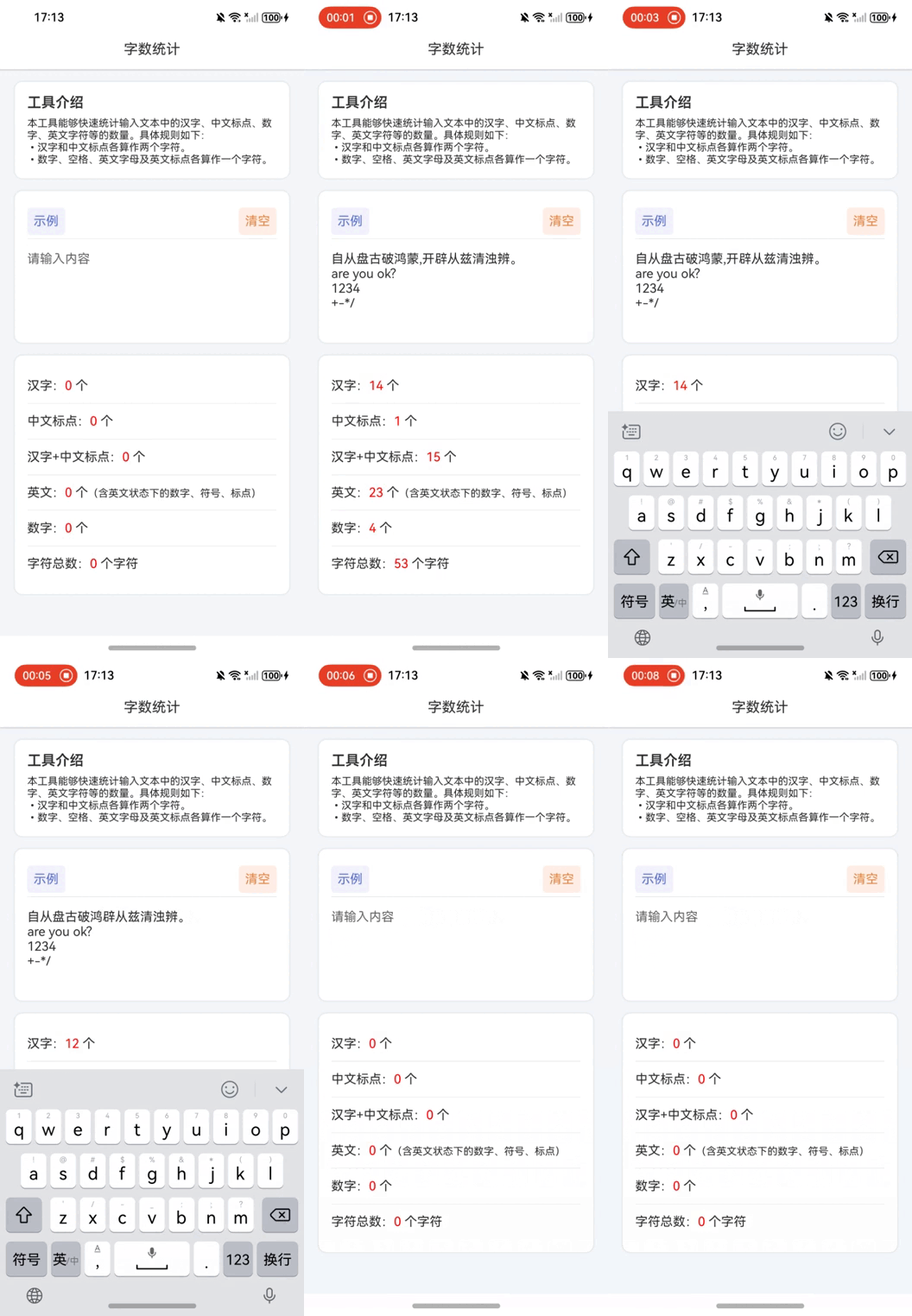
The following code demonstrates how to create a character counting component in HarmonyOS NEXT that can handle mixed Chinese and English text input while implementing specific counting rules.
// Define a component for number and text statistics

@Entry

@Component

struct NumberToChineseConverter {

  // State variable storing example number string

  @State private exampleNumber: string = '自从盘古破鸿蒙,开辟从兹清浊辨。\nare you ok?\n1234\n+-*/';

  // Text color state variable

  @State private textColor: string = "#2e2e2e";

  // Shadow border color state variable

  @State private shadowColor: string = "#d5d5d5";

  // Base padding state variable

  @State private basePadding: number = 30;

  // Chinese character count state variable

  @State private chineseCharCount: string = "0";

  // Chinese punctuation count state variable

  @State private chinesePunctuationCount: string = "0";

  // Total Chinese characters + punctuation state variable

  @State private totalChineseCount: string = "0";

  // English character count state variable

  @State private englishCharCount: string = "0";

  // Digit count state variable

  @State private digitCount: string = "0";

  // Total character count state variable

  @State private charTotalCount: string = "0";

  // Input text state variable with change listener

  @State @Watch('inputChanged') private inputText: string = "";


  // Method called when input text changes

  inputChanged() {

    // Initialize counters

    let chineseChars = 0;      // Chinese characters

    let chinesePunctuation = 0; // Chinese punctuation

    let englishChars = 0;      // English characters

    let digits = 0;            // Digits

    let count = 0;             // Total characters


    // Iterate through each character

    for (let i = 0; i < this.inputText.length; i++) {

      let char = this.inputText.charAt(i);

      count++;


      if (/\d/.test(char)) {

        digits++;

      }

      if (/[\u4e00-\u9fa5]/.test(char)) {

        chineseChars++;

        count++;  // Chinese characters count as 2 units

      }

      if (/[\u3001-\u3002\uff01-\uff1a]/.test(char)) {

        chinesePunctuation++;

        count++;  // Chinese punctuation counts as 2 units

      }

      if (/[a-zA-Z0-9\s!-/:-@[-`{-~]/.test(char)) {

        englishChars++;

      }

    }


    // Update state variables

    this.chineseCharCount = `${chineseChars}`;

    this.chinesePunctuationCount = `${chinesePunctuation}`;

    this.totalChineseCount = `${chineseChars + chinesePunctuation}`;

    this.englishCharCount = `${englishChars}`;

    this.digitCount = `${digits}`;

    this.charTotalCount = `${count}`;

  }


  // UI construction method

  build() {

    Column() {

      Text('Character Counter')

        .fontColor(this.textColor)

        .fontSize(18)

        .width('100%')

        .height(50)

        .textAlign(TextAlign.Center)

        .backgroundColor(Color.White)

        .shadow({

          radius: 2,

          color: this.shadowColor,

          offsetX: 0,

          offsetY: 5

        });


      Scroll() {

        Column() {

          // Tool introduction section

          Column() {

            Text('Tool Description').fontSize(18).fontWeight(600).fontColor(this.textColor);

            Text('This tool quickly counts characters in input text, including Chinese characters, punctuation, digits, and English characters. Rules:\n• Chinese characters and punctuation count as 2 units\n• Digits, spaces, and English characters count as 1 unit')

              .textAlign(TextAlign.JUSTIFY)

              .fontSize(13)

              .fontColor(this.textColor)

              .margin({ top: `${this.basePadding / 2}lpx` });

          }

          .alignItems(HorizontalAlign.Start)

          .width('650lpx')

          .padding(`${this.basePadding}lpx`)

          .margin({ top: `${this.basePadding}lpx` })

          .borderRadius(10)

          .backgroundColor(Color.White)

          .shadow({ radius: 10, color: this.shadowColor });


          // Example and Clear section

          Column() {

            Row() {

              Text('Example')

                .fontColor("#5871ce")

                .fontSize(16)

                .padding(`${this.basePadding / 2}lpx`)

                .backgroundColor("#f2f1fd")

                .borderRadius(5)

                .clickEffect({ level: ClickEffectLevel.LIGHT, scale: 0.8 })

                .onClick(() => {

                  this.inputText = this.exampleNumber;

                });

              Blank();

              Text('Clear')

                .fontColor("#e48742")

                .fontSize(16)

                .padding(`${this.basePadding / 2}lpx`)

                .clickEffect({ level: ClickEffectLevel.LIGHT, scale: 0.8 })

                .backgroundColor("#ffefe6")

                .borderRadius(5)

                .onClick(() => {

                  this.inputText = "";

                });

            }

            .height(45)

            .justifyContent(FlexAlign.SpaceBetween)

            .width('100%');


            Divider();

            TextArea({ text: $$this.inputText, placeholder: `Input text here` })

              .width(`${650 - this.basePadding * 2}lpx`)

              .height(100)

              .fontSize(16)

              .caretColor(this.textColor)

              .fontColor(this.textColor)

              .margin({ top: `${this.basePadding}lpx` })

              .padding(0)

              .backgroundColor(Color.Transparent);

          }

          .alignItems(HorizontalAlign.Start)

          .width('650lpx')

          .padding(`${this.basePadding}lpx`)

          .margin({ top: `${this.basePadding}lpx` })

          .borderRadius(10)

          .backgroundColor(Color.White)

          .shadow({ radius: 10, color: this.shadowColor });


          // Statistics display section

          Column() {

            // Multiple Rows showing different counts...

            // (Similar structure to Chinese version with English translations)

          }

          .alignItems(HorizontalAlign.Start)

          .width('650lpx')

          .padding(`${this.basePadding}lpx`)

          .margin({ top: `${this.basePadding}lpx` })

          .borderRadius(10)

          .backgroundColor(Color.White)

          .shadow({ radius: 10, color: this.shadowColor });

        }

      }

      .scrollBar(BarState.Off)

      .clip(false);

    }

    .height('100%')

    .width('100%')

    .backgroundColor("#f4f8fb");

  }

}
Key Features
Character Counting Rules
- Chinese characters and punctuation count as 2 units
- Digits, English characters, and symbols count as 1 unit
- Real-time updates through @Watch decorator
UI Components
- Clean material design with shadow effects
- Scrollable container for responsive layout
- Example/Clear buttons with click effects
- Thematic color scheme management
Technical Highlights
- Regular expressions for character classification
- State management with @State decorators
- Responsive layout using lpx units
- Component-based architecture
This implementation demonstrates HarmonyOS NEXT's capabilities in building responsive, feature-rich applications with clean state management and modern UI components.