



Introduction
As a fullstack developer, I've spent countless hours deciphering unfamiliar codebases. It's part of the job, but it's rarely efficient. 🕒 Recently, I've been testing DeepWiki – a tool that converts GitHub repositories into interactive documentation hubs.
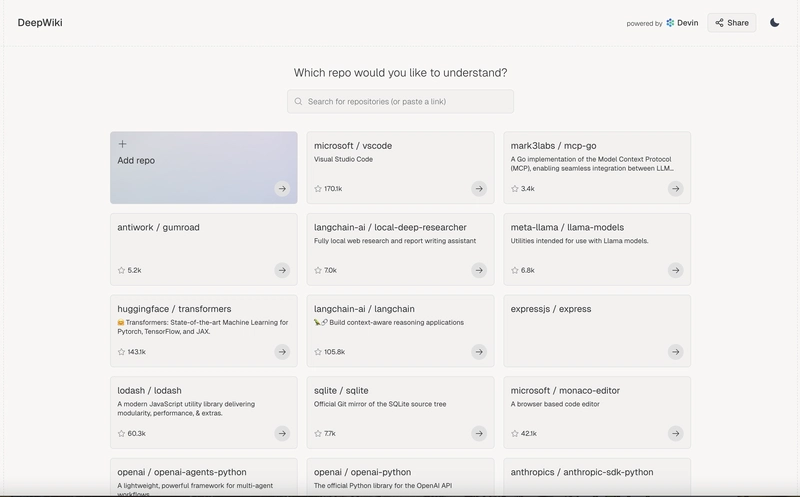
What DeepWiki does automatically:
- 🔍 Analyzes repository structure
- 📝 Generates documentation based on the code
- 📊 Creates visual relationship diagrams
- 💬 Offers a natural language interface for questions
I've found it particularly useful when contributing to open-source projects or understanding complex libraries without extensive documentation. The time saved on initial orientation is substantial.
This guide shares my practical experience with the free version of DeepWiki, including straightforward steps to integrate it into your workflow and keep the documentation synchronized with repository updates.
Let's explore how this tool can help fellow independent developers work more efficiently, without the marketing hype. ⚡
Getting Started with DeepWiki 🛠️
The One-Second Setup ⚡
Transform any GitHub repository into a wiki by replacing "github.com" with "deepwiki.com":
https://github.com/username/repository → https://deepwiki.com/username/repository


Browser Requirements 🖥️
- Works in all modern browsers
- Desktop provides better navigation than mobile
- Initial loading takes 20-45 seconds for average repositories
First Look: The Interface 👀
When loaded, you'll see three main sections:
Navigation Panel (Left): Repository file structure
Content Area (Center): Documentation and diagrams
Ask Panel (Center bottom): AI assistant for questions
On this Page (Right) : Section headings for the current documentation.

DeepWiki immediately identifies key files, main functionality, and generates architecture diagrams where possible.
Core Features Walkthrough 🔍
Repository Structure Navigation 📁
The left sidebar presents an organized view of your repository:
- Navigation tree with expandable sections (like "Authentication System," "UI Components")
- Hierarchical organization of subsystems and their components
- Quick access to key interfaces (e.g., "Login Interface," "Replay Upload Interface")
Auto-Generated Documentation 📚
The center panel provides comprehensive documentation automatically created from your code:
- "Purpose and Scope" summaries explaining what the repository does
- System architecture overviews with integration details
- Component relationships and dependencies clearly outlined
- Direct links to related systems (notice how "Authentication System" is linked)
Visual Diagrams 📊
Automatically generated diagrams visualize code relationships:
- Class hierarchies
- Component interactions
- Data flow patterns

Ask Questions in Natural Language 💬
Ask about the codebase in plain English:
- "How is authentication handled?"
- "What does the main function do?"
- "Explain the data models"
DeepWiki highlights relevant code sections and provides contextual explanations based on its analysis.


Advanced Techniques 🚀
Keep Your Wiki Automatically Updated 🔄
DeepWiki offers a seamless way to ensure your documentation stays in sync with your codebase:
- Add the official DeepWiki badge to your repository's README file
- This enables automatic weekly refreshes of your DeepWiki documentation
Simply add this markdown to your README:
[](https://deepwiki.com/username/repository)
The badge looks like this and links directly to your DeepWiki page:

This is the easiest way to ensure your team and contributors always have access to up-to-date documentation without manual refreshes.
Unlock DeepResearch Mode for Complex Questions 🧠
Standard questions are great for quick answers, but for deeper understanding, DeepResearch mode is a game-changer:
- Click the "Research" button in the Ask panel
- Pose your complex question
- Watch as the AI conducts a thorough, multi-turn investigation
Real example: When I asked about authentication flow, DeepResearch delivered a comprehensive breakdown:
"Ok, now give me details of the auth flow, explaining how it is happening behind the scenes from Google's servers to Supabase and to this app. Draw a flow diagram demonstrating the same"

The result was a detailed explanation AND a visual flow diagram showing the entire authentication process – from Google OAuth to Supabase token handling to frontend session management.
Link - https://deepwiki.com/search/what-modes-of-auth-does-this-r_f9a4e4c1-cec2-43a8-a32c-8a27d2138132#3


Craft Questions That Get Better Answers 🎯
The secret to great results is asking the right way:
- Name specific files: "Explain how src/auth/handlers.js works"
- Request visualizations: "Draw a diagram of the data flow"
- Ask for comparisons: "How does the old API differ from the new one?"
Pro tip: 💡 When investigating complex features like authentication, explicitly ask for diagrams to visualize the flow between components.
Conclusion: Code Exploration Reimagined ✨
DeepWiki has transformed how I approach unfamiliar codebases. What once took hours now takes minutes with AI-powered documentation and targeted questions.
It shines brightest when:
- Exploring open-source projects
- Understanding complex dependencies
- Getting quick overviews of interesting repositories
For maintainers, the README badge feature ensures your documentation stays current with weekly automatic updates – a small addition with significant value for your contributors.
Your turn takes just one step: Change "github.com" to "deepwiki.com" in any repository URL and unlock immediate insights.
What will you discover in your next code exploration?
Tags: #DeepWiki #DeveloperTools #CodeExploration #OpenSource #AIForDevelopers #SoftwareDevelopment #DevProductivity #CodingTools #TechTutorial #GitHubAlternative #ProgrammingTips #DeveloperExperience #AITools #SoftwareEngineering #TechStack #WebDevelopment #ProgrammingTools #CodeNavigation #DevTools #MustHaveTools