
Zum Hauptinhalt springen
tsecurity.de LIVE
Echtzeit-Radar & Feeds
Alle RSS Feeds
👥 Community & Social
Sichere ProgrammierungBreeze TTS 2 vs ElevenLabs: Open Source TTS Verdict(23.09.2026 um 05:44 Uhr)
Sichere ProgrammierungAgentic AI vs Generative AI: The 2026 Verdict(23.09.2026 um 05:44 Uhr)
Sichere ProgrammierungI made my agent prove every quote against the source document(23.09.2026 um 05:45 Uhr)
Sichere Programmierung8mb.video Alternative: Skip the Line, Skip the Upsell(23.09.2026 um 05:47 Uhr)
Sichere ProgrammierungBuilding a GTA 6 JSON API for entities and current status(23.09.2026 um 05:52 Uhr)
Sichere ProgrammierungEvery filter needs a documented exception(23.09.2026 um 06:01 Uhr)
Sichere ProgrammierungBreeze TTS 2 vs ElevenLabs: Open Source TTS Verdict(23.09.2026 um 05:44 Uhr)
Sichere ProgrammierungAgentic AI vs Generative AI: The 2026 Verdict(23.09.2026 um 05:44 Uhr)
Sichere ProgrammierungI made my agent prove every quote against the source document(23.09.2026 um 05:45 Uhr)
Sichere Programmierung8mb.video Alternative: Skip the Line, Skip the Upsell(23.09.2026 um 05:47 Uhr)
Sichere ProgrammierungBuilding a GTA 6 JSON API for entities and current status(23.09.2026 um 05:52 Uhr)
Sichere ProgrammierungEvery filter needs a documented exception(23.09.2026 um 06:01 Uhr)
Intelligence View
⚡ tsecurity.de Intelligence

A Simple Guide to Deploying Azure Virtual Machine Scale Sets (VMSS)

A Simple Guide to Deploying Azure Virtual Machine Scale Sets (VMSS) Azure Virtual Machine Scale Sets are a group of load balanced VM instances that can be easily scaled up or down in response to demand or a defined schedule. Scale sets…

0
↗ Quelle (dev.to)
Reagiere als Erste:r — dein Feedback zählt!


A Simple Guide to Deploying Azure Virtual Machine Scale Sets (VMSS)


Azure Virtual Machine Scale Sets are a group of load balanced VM instances that can be easily scaled up or down in response to demand or a defined schedule.


Scale sets can be deployed with Windows server image or Linux image. But for this tutorial, we’d be deploying a Linux based VMSS via the Azure portal.


Step1: On the Azure portal, search for Virtual Machine Scale Sets and select it.


Step2: On the VMSS page click create, the basics tab page shows up.


  1. Create a new resource group for the VMSS


  2. Create a name for the scale set.


  3. Select a region close to you.


  4. Availability zone: none


  5. Orchestration mode: Uniform (create identical VMs when scaling)


  6. Security type: Standard


  7. Scaling mode: Manual


  8. Instance count: 2


Then Click on configure scaling options


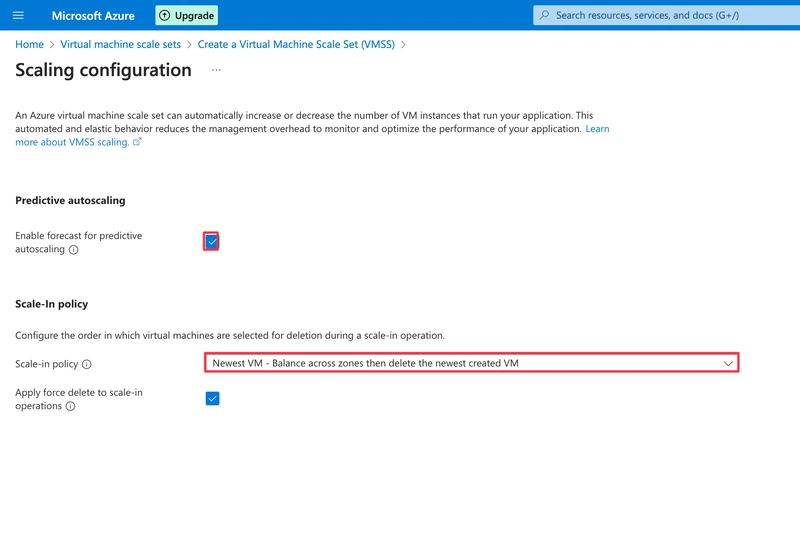
On the scaling configuration page, Enable forecast for predictive autoscaling.


Select Newest VM as the option for deletion in the scale in policy. Then save. This implies that the newest VM created would be the first to be deleted when scaling down.


Close and return to the basics tab.


Step 3: Configure the VM


  1. Select the server image


  2. Select the VM size


  3. Authentication type: SSH public key


  4. Set an Admin Username for logging into the VMs


  5. SSH public key source: Generate new key pair


  6. SSH key type: RSA SSH Format


  7. Name the key pair that would be generated.


Then go to the next tab. We could skip the spot and disk tabs and head on to the networking tab.


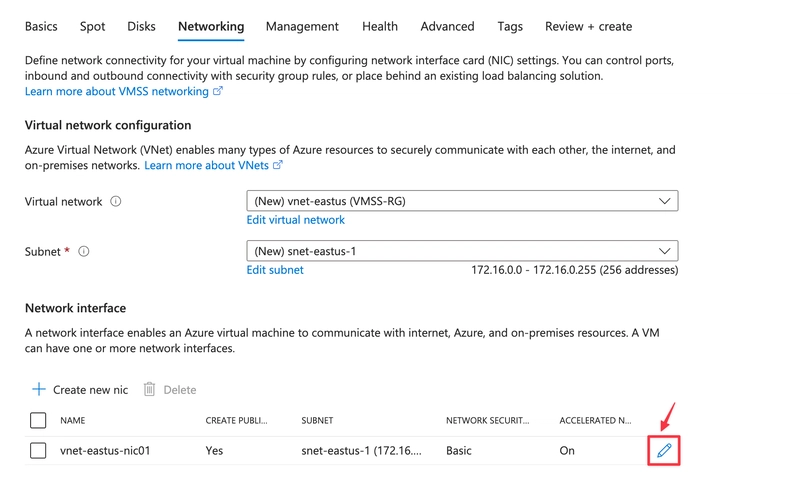
By default, A virtual network and subset is already set, but we need to configure the network Interface of the VMSS to allow SSH and HTTP connections.


Click on the pencil icon highlighted in the image below.


The Edit network interface page opens,


Click on Allow selected ports for Public Inbound ports, then select the ports you want, In this case HTTP(80) and SSH(22).


Make sure the Public IP address is also enabled to facilitate connection via SSH to the VMSS, then save.


Next we configure load balancing for the VMSS.


First select Azure load balancer, then create a load balancer.


A side pane opens on the right,


We name the load balancer, and then click create.


Next, review and create.


After validation is passed, we are prompted to download a key pair before the resource is created. Click on it to continue.


When the resource is successfully deployed, click go to resource.


On the overview page, we can now see that 2 uniform VM instances have been deployed and a public IP address also assigned.


We can choose to either connect to the VMs in our scale set individually or manage them as a whole.


In this tutorial, the latter would be the case.


To do this, we locate our downloaded key pair file and copy the file path.


Then set the file permission to read only on mac using **chmod 400 , **via the terminal app. This is not required on Windows.


Then we can now connect the VMSS backend via SSH but we have to specify the frontend port range from when we created the load balancer for the VMSS.


Run the command*** ssh -i username@IPaddress -p , ***then type yes. The VMSS connects successfully.


Any updates or installations made whilst connected now would affect all VM instances running in the scale set, which makes it very easy to manage the Virtual machine scale set.


Thanks for your read.

Ähnliche Beiträge
🔍 Verwandte News

Auch interessante Nachrichten A Simple Guide to Deploying Azure Virtual Machine Scale Sets (VMSS)

Thematisch verwandte Begriffe: Simple, Guide, Deploying, Azure · 6 Treffer

Laden...

Videos werden geladen ...

Laden...

Beiträge werden geladen ...

Laden...

Videos werden geladen ...

Laden...

Beiträge werden geladen ...

Laden...

Videos werden geladen ...

Laden...

Beiträge werden geladen ...

Laden...

Videos werden geladen ...

Laden...

Beiträge werden geladen ...

Laden...

Videos werden geladen ...

Zum Aktualisieren ziehen
ZERO-DAY CVE-2026-17636 | IBM Financial Transaction Manager (FTM) for RedHat OpenShift could allow…
Advisory →
TTS Reader • tsecurity.de Voice
tsecurity.de Icon
tsecurity.de App
Offline-Lesen, Eilmeldungen & 0ms Ladezeit

Installiere tsecurity.de direkt auf deinen Home-Bildschirm für das ultimative Vollbild-Magazinerlebnis ohne Browser-Leisten.

Nächster Beitrag
Themen-Radar & Intelligence Matrix
Echtzeit-Taxonomie nach Angriffsvektoren & Plattformen

tsecurity.de Live Threat Radar

🔴 LIVE RADAR
MONITORING
AKTIV
CVE-DATENBANK
LIVE
🔍
Community Radar & Live Chat
Sentinel Bot online • Live-Stream
Dein Cluster: Security Explorer
Match:
lädt…
Verbindung zum Community-Stream wird aufgebaut...
Bearbeitungsmodus — Senden überschreibt deine Nachricht
Community-Puls — was gerade passiert
lädt…
Aktivitäten deiner Analysten
lädt…
Neues Thema oder Eilmeldung einreichen

Reiche interessante Links, Zero-Days oder Debatten ein. Die Community entscheidet per Upvote über die Veröffentlichung.

Heiß diskutierte Einreichungen
🔖 Gespeicherte Artikel
📂 Keine gespeicherten Artikel vorhanden.
Zurück Ziehen Vor
Links: vorheriger Artikel Rechts: nächster Artikel unten: schließen
News NIS-2 Frühwarnung Tier-1 Intel ⏱️ 3 Min vor 10 Min
Artikeldaten werden geladen...

Zurück: vorheriger Vor: nächster
↗ Original-Quelle
Social Reaktionen Deine Reaktion zählt
Einstufung & Relevanz-Poll 0 Stimmen
In sozialen Netzwerken teilen 1-Klick