
Zum Hauptinhalt springen
Echtzeit-Radar & Feeds
Alle RSS Feeds ➔
👥 Community & Social
Windows Tipps & SecurityGrafikkarte vor Überhitzung schützen: So geht’s(25.09.2026 um 08:00 Uhr)
••••••••••
Windows Tipps & SecurityGrafikkarte vor Überhitzung schützen: So geht’s(25.09.2026 um 08:00 Uhr)
••••••••••
Intelligence View
⚡ tsecurity.de Intelligence

1 Prompt, 6 Runs: Rebuilding a Classic Cricket Game Using Amazon Q CLI

We all remember playing hand-cricket with friends — choosing numbers, hoping not to get out. I decided to bring that nostalgic game to life using Python and Amazon Q CLI. Introduction We all had that one go-to game during s…

0
↗ Quelle (dev.to)
Reagiere als Erste:r — dein Feedback zählt!

We all remember playing hand-cricket with friends — choosing numbers, hoping not to get out. I decided to bring that nostalgic game to life using Python and Amazon Q CLI.


Introduction


We all had that one go-to game during school breaks or boring classes — the legendary hand-cricket game. With nothing but fingers and imagination, it brought endless excitement, strategy, and friendly competition.

I was absolutely hooked on this game!

So, I decided to recreate that nostalgic cricket experience using Python — but here’s the twist: I used Amazon Q CLI to build the entire game in just 1 prompt.

Yes, you read that right. Just 1 prompt to bring my favourite childhood game to life!


Installation


To get started, you'll need to install Amazon Q CLI. Follow the official installation guide here to set it up on your system.


Prompt I used with Q CLI:


Generate a Python game using the pygame library that simulates a simple cricket batting innings against the computer.

Gameplay rules
---------------
1. The human plays as the batsman; the computer bowls by choosing a random number 1-6 each turn.
2. Display six clickable buttons (or on-screen rectangles) labeled 1-6 for the user’s shot.
3. When the user clicks a button:
a. Read that number as `user_shot`.
b. Computer randomly chooses `computer_ball = random.randint(1, 6)`.
c. If the two numbers are equal, display a big “OUT!” message, show the final score, and reveal a “Play Again” button.
d. If different, add `user_shot` to the running total and update the score display.
4. Show on screen each turn: current score, last shot, last ball, and turn count.
5. “Play Again” resets the state (score = 0, turn = 1, clear messages).
6. Close window cleanly on QUIT.

Implementation requirements
---------------------------
* Single file called `cricket_game.py`.
* Use `pygame.font` for text and `pygame.draw.rect` for buttons.
* Fixed window size (e.g., 800×600) with a simple background color.
* Organize code into functions/classes: e.g. `Button`, `GameState`, `main()`.
* Handle frame rate with `pygame.time.Clock()`.
* Put startup in `if __name__ == "__main__": main()`.
* Use only pygame and Python standard library (no extra dependencies).
* Comment the code generously and comply with PEP 8.


In return, Amazon Q CLI gave me:


Within moments, I had a fully functional cricket game with:


  • An interactive gameplay loop with ball-by-ball turns


  • Smart random logic for computer guesses


  • Clear tracking of runs and player outs


  • Seamless transition between user input and computer logic


  • Well-structured, clean, and easy-to-understand Python code


💡 Pro Tip: Amazon Q CLI isn’t just about generating code - it also acts as a coding partner, offering suggestions, logic explanations, and ways to make your code cleaner and more efficient.


Understanding the Logic with Q CLI


Amazon Q CLI didn’t just generate the code - it also explained each part, helping me understand the logic step by step. Below is a snapshot of that.


Image description


Documentation


Clear documentation is key to any project — it helps others (and your future self) understand the purpose and usage. So, I asked Amazon Q CLI to generate a README.md file for me, and it delivered a well-structured, ready-to-use document in seconds.


Amazon Q CLI’s Step-by-Step Explanation


Image description


A Quick Look at the Game in Action


Here’s a glimpse of the cricket game UI — simple, clean, and nostalgic. The interface shows your guess, the computer's random pick, and keeps track of your score until you're out. Just like the hand-cricket games we played growing up — now in digital form!
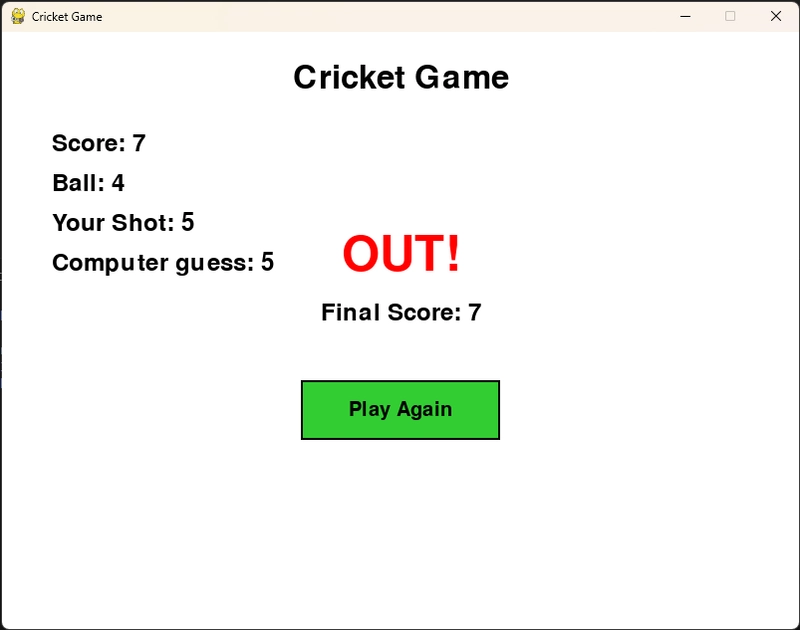


Image description


What I Took Away


Working on this project helped me understand:


  • Managing user interaction in a game loop


  • Integrating random logic for AI opponent moves


  • Leveraging Amazon Q CLI to speed up development


  • Writing modular, maintainable Python code


And most of all: bringing a beloved childhood game into the digital world.


Ready to Play?


Feel free to download the code, try it out, and customize it! Add new features, or multiplayer support - make this game truly yours.


GitHub Repository: Cricket Game

1. Sofort-Triage & Abwehrmaßnahmen

SOC Incident Playbook: Vulnerability Remediation & Verification
Syntax validiert (0 Fehler)
title: Detect Exploitation - 1 Prompt, 6 Runs: Rebuilding a Classic Cricket Game Using Amazon Q CLI
id: 79d28b7b-bdab-4922-853f-80950182bfe3
status: experimental
description: Automatisch generierte SIEM-Erkennungsregel basierend auf CTI Intelligence
references:
  - https://tsecurity.de/
author: iShareStuff CTI Automated Detection Engine
date: 2026-09-25
logsource:
  category: network_connection
  product: any
detection:
  selection:
      CommandLine|contains:
        - 'exploit'
  condition: selection
falsepositives:
  - Legitime administrative Zugriffe oder Penetrationstests
level: high
tags:
  - attack.initial_access
Syntax validiert (0 Fehler)
rule CTI_Threat_Indicator {
    meta:
        author = "iShareStuff CTI Automated Detection Engine"
        date = "2026-09-25"
        description = "YARA Signature for "
    strings:
        $str = "1 Prompt, 6 Runs: Rebuilding a" ascii wide
    condition:
        any of them
}
Syntax validiert (0 Fehler)
index=security sourcetype IN ("cisco:asa", "pan:traffic", "zeek_conn", "suricata", "WinEventLog:Security")
("1 Prompt 6 Runs Rebuilding a Classic Cri")
| stats count earliest(_time) as first_seen latest(_time) as last_seen by src_ip, dest_ip, dest_host, signature
| eval first_seen=strftime(first_seen, "%Y-%m-%d %H:%M:%S"), last_seen=strftime(last_seen, "%Y-%m-%d %H:%M:%S")
| sort - count
Syntax validiert (0 Fehler)
message: "*1 Prompt 6 Runs Rebuilding a Classic Cri*"
Syntax validiert (0 Fehler)
CommonSecurityLog
| where Message has "1 Prompt 6 Runs Rebuilding a Classic Cri"
| summarize EventCount = count(), FirstSeen = min(TimeGenerated), LastSeen = max(TimeGenerated) by SourceIP, DestinationIP, DestinationPort, Activity
| extend DetectionRule = "iShareStuff-CTI-Compiled"
| sort by EventCount desc

2. Cyber Threat Intelligence & Forensik

🎯
MITRE ATT&CK Matrix Navigator 14 Taktiken
Reconnaissance
-
Resource Development
-
Initial Access
Execution
Persistence
-
Privilege Escalation
Defense Evasion
Credential Access
-
Discovery
-
Lateral Movement
-
Collection
-
Command and Control
Exfiltration
-
Impact
tsecurity.de Cognitive Threat RAG
Fokus-Vektor:

Kognitive Analyse für identifizierte Bedrohung: Erhöhte Bedrohungslage im Bereich 1 Prompt, 6 Runs: Rebuilding a Classic C.... Basierend auf 368k Vektor-Korrelationen werden sofortige Isolationsmaßnahmen für betroffene Endpunkte empfohlen.

🛡️ Angriffsfläche & Exposure

Netzwerk/Remote-Zugriff ohne Vorauthentifizierung möglich.

⚡ Empfohlene Sofortmaßnahmen
  • 1. Perimeter-Inspektion: Relevante Portfreigaben und exponierte Endpunkte unverzüglich scannen.
  • 2. Patch-Applikation: Hersteller-Hotfix einspielen oder betroffene Daemons in isolierte DMZ-Segmente überführen.
  • 3. Telemetrie & EDR-Alerts: Prozessaufrufe und Child-Processes auf anomale Shell-Spawns überwachen.
🔗 Semantisch verwandte Zero-Days MariaDB 11.7 VEC
Ähnliche Beiträge
🔍 Verwandte News

Auch interessante Nachrichten 1 Prompt, 6 Runs: Rebuilding a Classic Cricket Game Using Amazon Q CLI

Thematisch verwandte Begriffe: Prompt, Runs, Rebuilding, Classic · 6 Treffer

Laden...

Beiträge werden geladen ...

Laden...

Videos werden geladen ...

Laden...

Beiträge werden geladen ...

Laden...

Videos werden geladen ...

Laden...

Beiträge werden geladen ...

Laden...

Videos werden geladen ...

Laden...

Beiträge werden geladen ...

Laden...

Videos werden geladen ...

Zum Aktualisieren ziehen
ZERO-DAY CVE-2026-97818 | phpIPAM through 1.8.3 has incorrect authorization for id=="admins" and i…
Advisory →
tsecurity.de Icon
Offline-Lesen, Eilmeldungen & 0ms Ladezeit

Installiere tsecurity.de direkt auf deinen Home-Bildschirm für das ultimative Vollbild-Magazinerlebnis ohne Browser-Leisten.

Nächster Beitrag