
Over the years, Microsoft has made a significant shift in contributing heavily to the open-source world. From the development and release of TypeScript to VSCode, to contributing and working actively on other open-source projects such as Rust, React, and other major open-source tools that have made life easy for developers. Microsoft has really made a name for itself in this open-source game. And Microsoft has added yet another new open-source project to their already impressive arsenal of open-source tools. This new open-source project is called “Edit”, and it is an interesting project. Let’s talk about it.
Let me begin with this power quote: Microsoft is officially entering the command-line editor space with “Edit” a modern, open-source alternative to Vim designed for power users, developers, and sysadmins who live in the terminal.
While “Edit” might sound like just another text editor in a crowded market, it marks a significant shift, especially for Windows developers who’ve long relied on outdated Notepad variants or bolted-on Unix tools.
So enough of the introduction, what is Edit? And why is Microsoft building it now?
A Fresh Take on a Legacy Problem
For over 30 years, Vim has been the undisputed king of terminal text editors. Its interface, performance, and very deep configurability made it a favorite among Unix users. But it’s also infamous for its steep learning curve and “byzantine” keybindings. For many Windows users, Vim is more of a survival tool than a preference. And this is exactly what Microsoft’s Edit aims to fix.
“Edit” is Built in Rust, designed with performance and usability in mind, Edit is engineered to be fast, predictable, and easy to extend. It’s terminal-native but not hostile to newcomers. Think: Vim’s muscle, without the arcane rituals.
Fun fact,
“Edit” was written in 3 languages before finally settling for Rust. Rust was not the first choice for “Edit”. Zig was a preferred choice, but due to incompatibility issues with Windows, “Edit” was re-written in Rust.
Key Features of Microsoft Edit
Here’s what sets Edit apart:
Rust-Based Core: Edit is written in Rust, giving it modern performance characteristics, memory safety, and cross-platform potential out of the box.
Modal Editing (Yes, Like Vim): Edit supports modal editing but is designed to be more intuitive. Think of it as “Vim-lite” with better defaults.
Configurable Without the Pain: I think most people will like this. The Settings and keybindings live in clean, readable config files. You won’t need to memorize Vimscript to tweak your workflow.
First-Class Windows Support: Unlike Vim and its cousins, Edit is designed to feel native on Windows. No WSL workarounds, no Cygwin, no compromise. But not just windows. You can use it with other unix-based operating systems like MacOS and Linux.
Terminal-First, But GUI-Ready: Edit runs in your terminal, but the project roadmap includes optional GUI shells for a hybrid experience, similar to Neovim + frontends like Oni or Helix.
Why Now? Why Windows?
Let’s be honest: text editing on Windows has been a mixed bag. Notepad is too barebones. VS Code is excellent but heavy. Powershell and CMD have improved, but neither is developer-first in the way Unix shells are. Until recently, terminal editing on Windows was a second-class experience.
But now, with the rise of Windows Terminal, WSL2, and a growing Rust ecosystem, Microsoft has the pieces to offer something leaner and meaner for developers who live in CLI environments.
“Edit” is the missing puzzle piece. It gives Windows power users a native, high-performance editor that respects their workflows, doesn’t force them into Linux metaphors, and still plays nice with Git, SSH, and scripting pipelines. Yes it plays nice with SSH. Interesting right?
For Vim Veterans: Should You Switch?
If you’re a Vim user, you might be skeptical. Vim is mature, fast, and everywhere. Should you switch?
Here’s a breakdown:
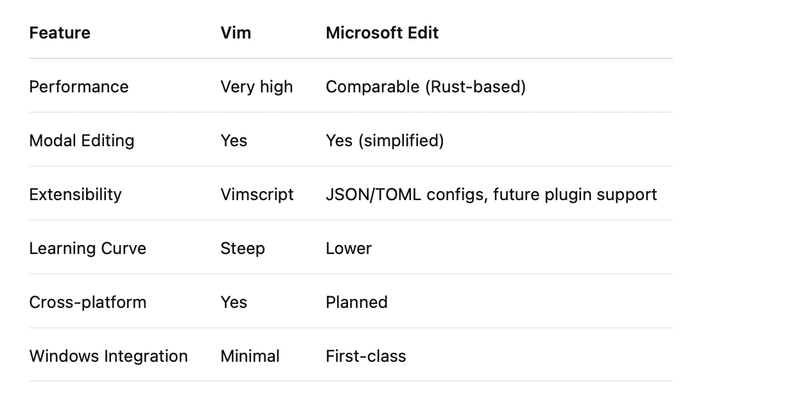
What’s clear is that Edit isn’t trying to replace Vim wholesale. Instead, it’s positioning itself as a practical, modern option for users who want the power of modal editing without the historical baggage.
For Vim experts, Edit could be a “daily driver” alternative in environments where Vim feels clunky or outdated — especially on Windows.
For Windows Developers: A Game-Changer
This is where Edit could really shine. On Windows, terminal-based editing has long been an afterthought. With Edit, Microsoft is saying: you don’t need to live in VS Code to be productive. You can stay in the terminal, script, build, git, and edit all without leaving your flow.
For devs using Windows Terminal, Powershell, or WSL2, Edit fits right in. No more context-switching between editors. No more crutches like nano or Notepad++. Just a native, fast, keyboard-first tool that gets out of your way. (Even though I like nano, this is better).
The Bigger Picture: Microsoft Loves the Terminal Again
Edit is the latest sign of Microsoft’s ongoing love affair with developers and open source. From VS Code to the new Windows Terminal to full Linux kernel support in WSL2, the company is rethinking what productivity means for modern devs.
By releasing Edit as open source, Microsoft is betting on community-driven development. And by making it modular, scriptable, and terminal-native, they’re not just copying Vim they’re reimagining it for a new generation.
Final Thoughts
Microsoft Edit isn’t just a new text editor, it’s a statement. It tells developers, especially on Windows: We see you. We get how you work. And we’re building tools that respect that.
And if you think about this, this was the same thing Microsoft did with TypeScript and with VSCode. I truly believe in “Edit”. This Microsoft philosophy to understand what devs need in the past carved a place for itself and totally changed the tech world. I believe “Edit” could do the same also.
For Vim users though, Edit may not replace your beloved .vimrc overnight. But it’s worth watching and trying. Especially if you live in the Windows ecosystem and crave a native, powerful alternative that doesn’t come with a legacy learning curve.
As Edit evolves, it could become the bridge between the raw power of Vim and the modern UX of tools like Helix or VS Code. It might just be the best of both worlds. I’m very optimistic and eager to see where this goes.
If you like this article, give it a reaction.
If you have a question or an opinion or controversy, drop a comment.
If you want to read about other programming tips. Check out my other article. You will definitely learn something new from there.
Thanks for reading. 🙂