



We all know LLMs can do amazing things by now, but deploying them in the real world can mean running into real problems. For example, MCP (Model Context Protocol) is justifiably getting a lot of attention right now for the incredibly creative scenarios it can enable. But the security vulnerabilities MCP can expose should be a genuine nightmare for any organization, not to mention other major concerns like scaling or managing an MCP endpoint over time. But hey, good news: security, scaling, resiliency, and manageability is what we do! So we're going to show you how to use Fastly Compute to make an MCP Server that's ready for the real world — secure, scalable, and reliable.
What is MCP?
The Model Context Protocol (MCP) is an open protocol designed to standardize how applications provide essential context to Large Language Models (LLMs). MCP acts as a universal interface, enabling AI applications to seamlessly connect with diverse data sources.
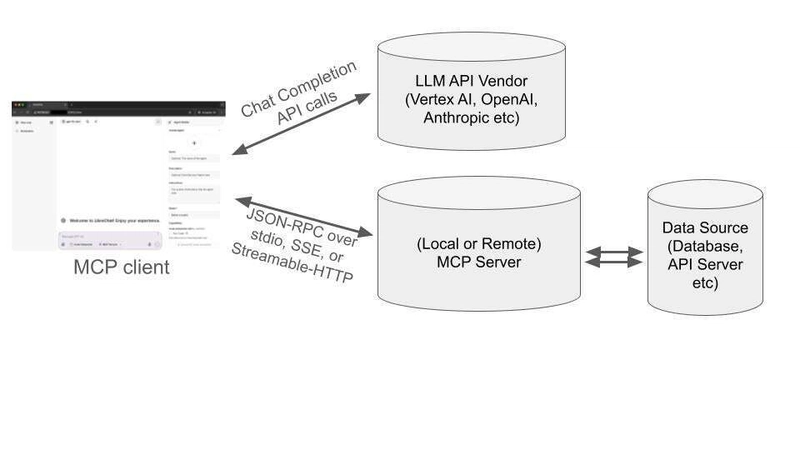
MCP also provides the flexibility to switch between LLM providers and prioritizes data security within a user's infrastructure by employing a client-server architecture where applications (MCP Hosts) connect to data sources (Local Data Sources and Remote Services) through lightweight MCP Servers and Clients. This unified approach offers pre-built integrations, allowing developers to quickly leverage various data sources.
We'll cover how to build an MCP server using Fastly Compute, but if you're interested in accessing Fastly's platform API through MCP, the fastly-mcp-server package can help, and we'll be talking more about that in the future.
Why Fastly’s platform makes MCP run better
As an enterprise serverless architect, I often find myself advising customers on the best approach for their workloads, specifically whether they could benefit from edge computing. There are several factors I consider, such as the expected level of concurrency and potential spikes in the workload, and the need for low latency in user-facing applications. And, as you might have guessed, MCP, which we’ll delve into further in this article, is a really good example of a workload that benefits significantly from the unique design of Fastly’s platform and Fastly Compute. The following is a demonstration of the MCP Client in action.

You'll notice that the LLM agent is performing multiple concurrent calls to MCP tools, such as "GetHistoricalStats" and "GetServiceDetail." If you were responsible for running this MCP server, how much load would you estimate and how would you provision the server infrastructure? For a relatively new environment like MCP, having a massive and complex infrastructure isn't ideal. While serverless is convenient for starting small, you naturally need to avoid common issues like cold starts (without much hassle, of course). Given the possibility of spikes, where multiple users might simultaneously call the MCP tools, it's crucial to choose a scalable environment. Additionally, because communication often occurs via chat, it’s critical to keep response latency as low as possible.
A noteworthy advantage of using Fastly Compute for cases like this is that its WebAssembly-based runtime leverages isolation sandbox technology, enabling safer execution of code both locally and remotely. This means your MCP server is safer running on Fastly. As we’ve seen, Fastly Compute’s design addresses many of MCP’s inherent architectural weaknesses. In the following sections, I'll walk you through the specific process of deploying a remote MCP server using this platform.
How to build a remote MCP server with Fastly Compute
We'll start by deploying a Streamable HTTP endpoint that doesn't include legacy SSE endpoints. This can be easily accomplished using the following steps. Please note that you need to replace the API token in two places within the main.go file before publishing. (For information on obtaining your API token, refer to this guide document.)
$ git clone https://gist.github.com/d829a6a58ce359b1aa99ecae12ba79f1.git fastly-compute-mcp-server

$ cd fastly-compute-mcp-server

$ vi main.go # Replace __PUT_YOUR_FASTLY_API_TOKEN__ with your own TOKEN

$ fastly compute publish

...

✓ Activating service (version 1)


Manage this service at:

    https://manage.fastly.com/configure/services/mMnYw4qeGq81xga89Mq8O0


View this service at:

    https://highly-proper-orange.edgecompute.app
During the publishing process, you'll be asked several questions. Answer "yes" to any y/n prompts, and for all other items, you can simply press “Enter” key to accept the default (empty) values. After a short while, you'll see a message indicating that your service is now available, as shown above.
Next, let's use the npx command to launch the MCP inspector verification tool and check if our deployed server is functioning correctly. Once the npx @modelcontextprotocol/inspector command completes successfully, access http://127.0.0.1:6274 to open the official tester interface. From the left sidebar, select "streamable http" as the connection type and enter the service address (https://*.edgecompute.app) shown as a result from the publish command.
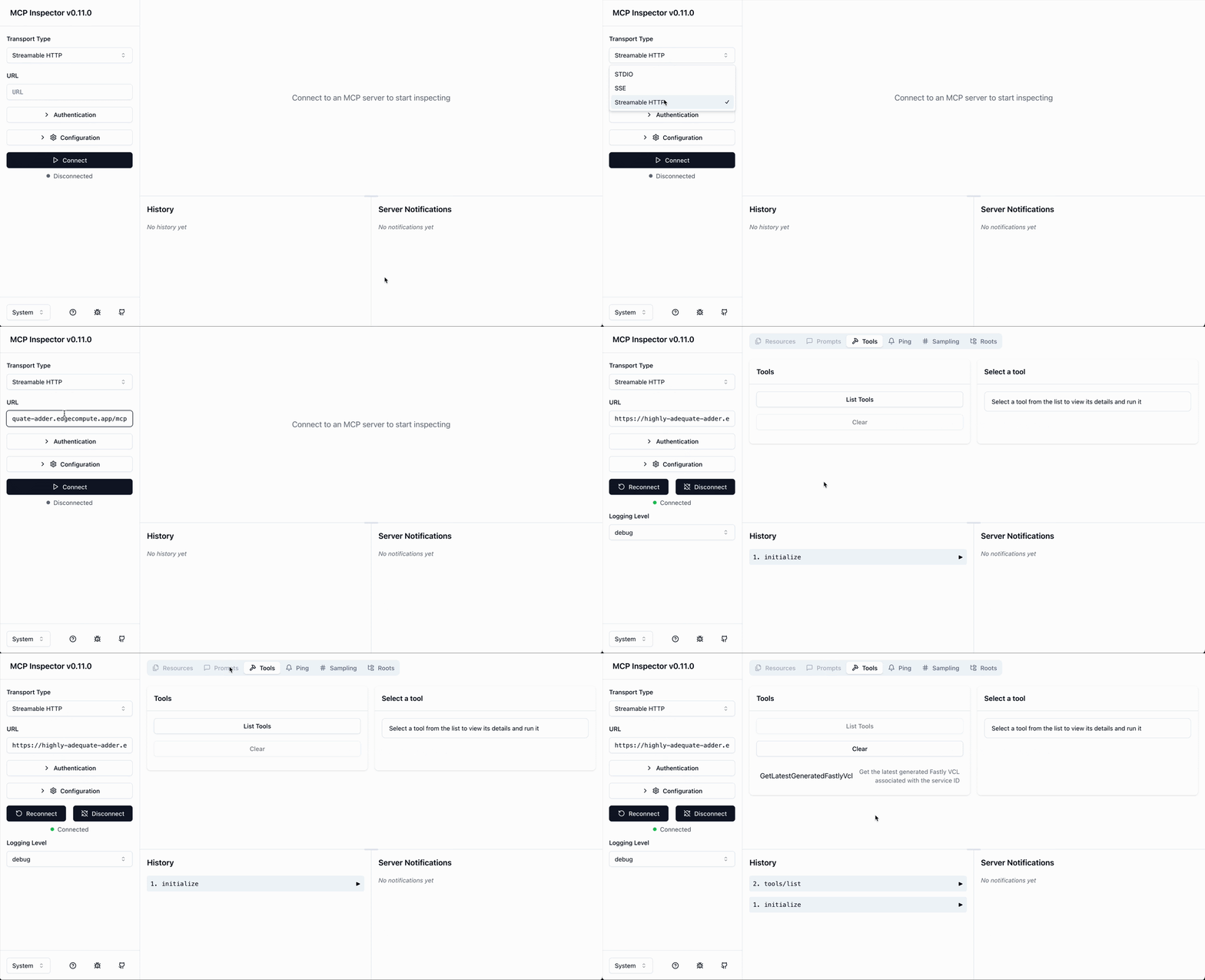
When you see "Connected" below the Connect button in the left sidebar, it means the connection was successful. In the control pane on the right, click on the Tools tab and try actions like List Tools to test the functionality. This means you've successfully operated a remote MCP server that communicates using non-SSE Streamable-HTTP.
Adding support for legacy clients with SSE
As of this writing in May 2025, many MCP clients still do not support Streamable HTTP, and some remote servers only offer SSE transport. To ensure backward compatibility with these clients, we’ll take the MCP server we’ve created a step further by adding SSE support. (Note that in this sample, we will use Fanout for establishing SSE connections. This is a Fastly push messaging service that requires its own signup.)
First, create a new service following the same steps as before. However, this time when publishing, create two backends at the following stage of the screen. For the first backend, specify the address of *.edgecompute.app in the Domain field and name it "self". For the second backend, register api.fastly.com with the name "fastly" as shown below.
✓ Creating service


Domain: [put-your-favorite-name-here.edgecompute.app]


Backend (hostname or IP address, or leave blank to stop adding backends): put-your-favorite-name-here.edgecompute.app

Backend port number: [443]

Backend name: [backend_1] self


Backend (hostname or IP address, or leave blank to stop adding backends): api.fastly.com

Backend port number: [443]

Backend name: [backend_2] fastly
Once you've published successfully, execute the command shown below as an additional step to enable Fanout. When you see the SUCCESS notification, your setup is ready to use.
$ fastly products --enable=fanout

SUCCESS: Successfully enabled product 'fanout'
Finally, configure your MCP client (like Claude Desktop or Cursor) to check functionality. For clients that natively support SSE, there's little difficulty—just follow the app's configuration instructions. In this case, we’ll set up LibreChat, an MCP client that only supports STDIO, as an example. (The following is an example of YAML configuration for LibreChat, but the method of executing the npx command is consistent for any client. Don't forget to use your edgecompute.app service URL when you configure "mcp-remote" command).
mcpServers:

  fastly-mcp-server:

    command: npx

    args:

      - -y

      - "mcp-remote"

      - https://highly-adequate-adder.edgecompute.app/sse

      - --transport

      - sse-only
As of May 2025, the mcp-remote package defaults to Streamable-HTTP connections unless you use the --transport sse-only option. To ensure a connection via SSE, you need to include this option.
When you launch LibreChat with this configuration, you'll see a screen like the one below. This completes the setup.

This sample shows an MCP tool that downloads the VCL from a Fastly VCL Service, but you can easily extend it with additional features. It’s important to note that Fanout's specification limits message size to about 64KB. So, when supporting legacy SSE, make sure the result messages from MCP tool calls don't become too large.
Conclusion: What’s next?
In this article, we've introduced how the flexible and efficient development environment of Fastly Compute simplifies the process of setting up a high-performance MCP server quickly. As a next step, I plan to explore building a more advanced server based on the OAuth specification. Stay tuned!
We would also love to hear how your organization is leveraging LLMs and AI, and how you are addressing the associated challenges. Please share your thoughts and join the community discussions. We welcome all kinds of feedback.
SOCIAL SHARE CARD GENERATOR