
Zum Hauptinhalt springen
tsecurity.de LIVE
Echtzeit-Radar & Feeds
Alle RSS Feeds
👥 Community & Social
YouTube Security VideosWelcome to GitHub Copilot Day: the future of agentic engineering(22.09.2026 um 20:00 Uhr)
YouTube Security VideosMicrosoft Mechanics: What Can a Copilot Agent Actually Read?(22.09.2026 um 20:27 Uhr)
Unix & Linux ServerPeppermintOS Is Moving From Xorg to XLibre to Avoid Wayland(22.09.2026 um 19:58 Uhr)
Sicherheitslücken (CVE)USN-8803-1: Sudo vulnerability(22.09.2026 um 16:15 Uhr)
Sichere ProgrammierungClaude Opus 5.5 is now available in GitHub Copilot(22.09.2026 um 19:10 Uhr)
Sichere ProgrammierungColab is now part of your Google AI plan(22.09.2026 um 20:51 Uhr)
Sichere ProgrammierungThe Hidden Production Risks of Third-Party SDKs(22.09.2026 um 20:00 Uhr)
YouTube Security VideosWelcome to GitHub Copilot Day: the future of agentic engineering(22.09.2026 um 20:00 Uhr)
YouTube Security VideosMicrosoft Mechanics: What Can a Copilot Agent Actually Read?(22.09.2026 um 20:27 Uhr)
Unix & Linux ServerPeppermintOS Is Moving From Xorg to XLibre to Avoid Wayland(22.09.2026 um 19:58 Uhr)
Sicherheitslücken (CVE)USN-8803-1: Sudo vulnerability(22.09.2026 um 16:15 Uhr)
Sichere ProgrammierungClaude Opus 5.5 is now available in GitHub Copilot(22.09.2026 um 19:10 Uhr)
Sichere ProgrammierungColab is now part of your Google AI plan(22.09.2026 um 20:51 Uhr)
Sichere ProgrammierungThe Hidden Production Risks of Third-Party SDKs(22.09.2026 um 20:00 Uhr)
Intelligence View
⚡ tsecurity.de Intelligence

Como utilizar o FFmpeg com C++ (Windows e GNU/Linux)

📺 Criei uma Biblioteca Dinâmica com C++ para a API do FFmpeg em C para facilitar a integração para aplicativos gráficos e com mais velocidade. ffpp é uma biblioteca dinâmica escrita em C++ com API para a maioria das tarefas principais …

0
↗ Quelle (dev.to)
Reagiere als Erste:r — dein Feedback zählt!


📺 Criei uma Biblioteca Dinâmica com C++ para a API do FFmpeg em C para facilitar a integração para aplicativos gráficos e com mais velocidade.


ffpp é uma biblioteca dinâmica escrita em C++ com API para a maioria das tarefas principais com FFmpeg. Muito mais rápida para interfaces gráficas do que usar processos.


ffpp


Executando no Windows.


ffpp


Executando no GNU/Linux.


Uso no Windows


Requer Clang


  1. Baixe o libffppwin


Invoke-WebRequest -Uri "https://bit.ly/libffppwin" -OutFile "libffppwin.rar"


  1. Extraia o .rar


  2. Entre na pasta


cd .\libffppwin


  1. Crie um código básico, exemplo: main.cpp


#include "ffpp/ffpp.hpp"
#include
<memory>

int main(){
auto ffpp = std::make_unique<FFPP>();
std::cout << "Duração: "
<< ffpp->ffpp_info(FFPP_INFO::DURATION, "video.mp4") << '\n';
}


Se quiser, use este vídeo como exemplo: video.mp4


  1. Compile e execute:


# PowerShell
pwsh build.ps1 main.cpp # Ou mais arquivos

# Ou: Windows [PowerShell](https://terminalroot.com.br/tags#powershell)
powershell build.ps1 main.cpp # Ou mais arquivos

# Ou diretamente
.\build.ps1 main.cpp # Ou mais arquivos


Se o Windows Defender bloquear a execução, permita o script:


pwsh -ExecutionPolicy Bypass -File build.ps1 main.cpp # Ou mais arquivos


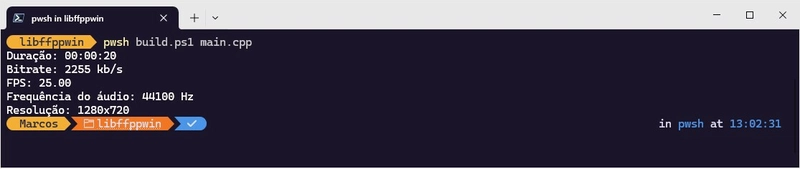
O script build.ps1 compila e executa o binário gerado. A saída fornece, por exemplo, a duração do vídeo: Duração: 00:00:05


Se quiser baixar o libffmpeg e compilar a dll do zero, veja este arquivo: build-win.md.


No GNU/Linux


Dependências:


No Arch:


sudo pacman -S gcc ffmpeg make cmake pkg-config git


No Debian/Ubuntu/Mint:


sudo apt install build-essential ffmpeg make cmake pkg-config git


Compilar e instalar


Execute todos os comandos abaixo:


git clone https://github.com/terroo/ffpp
cd ffpp
cmake . -B build
cmake --build build
sudo cmake --install build
# Importante após a instalação
# Algo como: export LD_LIBRARY_PATH=/usr/local/lib
# Mas para todo o sistema:
echo /usr/local/lib | sudo tee /etc/ld.so.conf.d/ffpp.conf
sudo ldconfig


Crie um código básico, exemplo: main.cpp


#include <ffpp/ffpp.hpp>
#include
<memory>

int main(){
auto ffpp = std::make_unique<FFPP>();
std::cout << "Duração: "
<< ffpp->ffpp_info(FFPP_INFO::DURATION, "video.mp4") << '\n';
}


Se quiser, use este vídeo como exemplo: video.mp4


Compile e execute:


g++ main.cpp -lavformat -lavcodec -lavutil -lswscale -lffpp
./a.out


Exemplo de saída: Duração: 00:00:05.


Exemplos da API


Assumindo que você criou o objeto no heap (auto ffpp = std::make_unique<FFPP>();).


01. Converter MP4 para WMV:


ffpp->ffpp_convert("video.mp4", "new.wmv");


Converte apenas entre extensões de vídeo: .mp4, .flv, .wmv e .mov


02. Extrair quadros:


ffpp->ffpp_extract_frames("video.mp4", "my_frames_dir");


Imagens .ppm serão geradas na pasta fornecida (my_frames_dir/).


03. Obter informações de um vídeo:


std::cout << "Duração: " 
<< ffpp->ffpp_info(FFPP_INFO::DURATION, "video.mp4") << '\n';
std::cout << "Taxa de bits: "
<< ffpp->ffpp_info(FFPP_INFO::BITRATE, "video.mp4") << '\n';
std::cout << "FPS: "
<< ffpp->ffpp_info(FFPP_INFO::FPS, "video.mp4") << '\n';
std::cout << "Frequência do áudio: "
<< ffpp->ffpp_info(FFPP_INFO::AUDIO_FREQUENCY, "video.mp4") << '\n';
std::cout << "Resolução: "
<< ffpp->ffpp_info(FFPP_INFO::RESOLUTION, "video.mp4") << '\n';


04. Cortar um vídeo de um tempo até um certo comprimento:


ffpp->ffpp_cut("video.mp4", "00:00:10", 6, "output.mp4");


O corte começa após 10 segundos do vídeo e dura 6 segundos.


📹 Assista ao Vídeo


Como utilizar o FFmpeg com C++ (Windows e GNU/Linux)


👀 Veja Também


Ähnliche Beiträge
🔍 Verwandte News

Auch interessante Nachrichten Como utilizar o FFmpeg com C++ (Windows e GNU/Linux)

Thematisch verwandte Begriffe: Como, utilizar, FFmpeg, Windows · 6 Treffer

Laden...

Videos werden geladen ...

Laden...

Beiträge werden geladen ...

Laden...

Videos werden geladen ...

Laden...

Beiträge werden geladen ...

Laden...

Videos werden geladen ...

Laden...

Beiträge werden geladen ...

Laden...

Videos werden geladen ...

Laden...

Beiträge werden geladen ...

Laden...

Videos werden geladen ...

Zum Aktualisieren ziehen
ZERO-DAY CVE-2026-75517 | Novu provides an API for sending notifications through multiple channels…
Advisory →
TTS Reader • tsecurity.de Voice
tsecurity.de Icon
tsecurity.de App
Offline-Lesen, Eilmeldungen & 0ms Ladezeit

Installiere tsecurity.de direkt auf deinen Home-Bildschirm für das ultimative Vollbild-Magazinerlebnis ohne Browser-Leisten.

Nächster Beitrag
Themen-Radar & Intelligence Matrix
Echtzeit-Taxonomie nach Angriffsvektoren & Plattformen

tsecurity.de Live Threat Radar

🔴 LIVE RADAR
MONITORING
AKTIV
CVE-DATENBANK
LIVE
🔍
Community Radar & Live Chat
Sentinel Bot online • Live-Stream
Dein Cluster: Security Explorer
Match:
lädt…
Verbindung zum Community-Stream wird aufgebaut...
Bearbeitungsmodus — Senden überschreibt deine Nachricht
Community-Puls — was gerade passiert
lädt…
Aktivitäten deiner Analysten
lädt…
Neues Thema oder Eilmeldung einreichen

Reiche interessante Links, Zero-Days oder Debatten ein. Die Community entscheidet per Upvote über die Veröffentlichung.

Heiß diskutierte Einreichungen
🔖 Gespeicherte Artikel
📂 Keine gespeicherten Artikel vorhanden.
Zurück Ziehen Vor
Links: vorheriger Artikel Rechts: nächster Artikel unten: schließen
News NIS-2 Frühwarnung Tier-1 Intel ⏱️ 3 Min vor 10 Min
Artikeldaten werden geladen...

Zurück: vorheriger Vor: nächster
↗ Original-Quelle
Social Reaktionen Deine Reaktion zählt
Einstufung & Relevanz-Poll 0 Stimmen
In sozialen Netzwerken teilen 1-Klick