



This article demonstrates how to create functional tabs using only CSS, without any JavaScript. The tabs will allow users to switch between different content sections seamlessly, showcasing the power of CSS for interactive elements.
Original article: wtfcodes.com
Basic setup:
To get started, we will create a typical HTML structure for our tabs and apply some basic styles to make them visually appealing.
<div class="tabs-wrapper">

  <nav class="tabs-nav">

    <div class="tab-item">

      <span>Tab A</span>

    </div>

    <div class="tab-item">

      <span>Tab B</span>

    </div>

    <div class="tab-item">

      <span>Tab C</span>

    </div>


  </nav>


  <div class="tab-content" id="tab-a-content">

    I am Tab A content

  </div>

  <div class="tab-content" id="tab-b-content">

    I am Tab B content

  </div>

  <div class="tab-content" id="tab-c-content">

    I am Tab C content

  </div>

</div>
body{

  font-family: Arial;

  padding: 1em;

}


.tabs-nav{

  display: flex;

  gap: 8px;

  margin-bottom: 16px;

  user-select: none;

}


.tab-item{

  background: #bcbcbc;

  padding: 6px 12px;

  border-radius: 6px;

  color: #fff;

  cursor: pointer;

}

.tab-content{

  padding: 12px;

  border-radius: 16px;

  border: 1px solid grey;

}

Great! Now we need somekind of interactivity.
Lets think what cab we do so the active tab has something different than other tabs.
Well we can use <input type="radio" /> to indicate the active tab. Since radio inputs allow only one to be selected at a time, we can use them to control which tab is active.
And to make sure we can toggle the radio inputs by clicking on the tab, we can use the <label> element instead of <div> for the tab items.
So the updated HTML structure will look like this:
<div class="tabs-wrapper">

  <nav class="tabs-nav">

    <label for="tab-a-toggle" class="tab-item">

      <span>Tab A</span>

      <input checked name="tabs-toggle" id="tab-a-toggle" type="radio">

    </label>

    <label for="tab-b-toggle" class="tab-item">

      <span>Tab B</span>

      <input name="tabs-toggle" id="tab-b-toggle" type="radio">

    </label>

    <label for="tab-c-toggle" class="tab-item">

      <span>Tab C</span>

      <input name="tabs-toggle" id="tab-c-toggle" type="radio">

    </label>

  </nav>


  <div class="tab-content" id="tab-a-content">

    I am Tab A content

  </div>

  <div class="tab-content" id="tab-b-content">

    I am Tab B content

  </div>

  <div class="tab-content" id="tab-c-content">

    I am Tab C content

  </div>

</div>

Nice progress!
Since we don't want the radio inputs to be visible, we can hide them using .tab-item input{display: none; } in the CSS.
Highlight the active tab:
We can use the tab-item:has(input:checked) selector in CSS to check if a tab has a checked input and apply styles to it.
.tab-item input{

  display: none;

}

.tab-item:has(input:checked){

  background: #6b54f0;

}
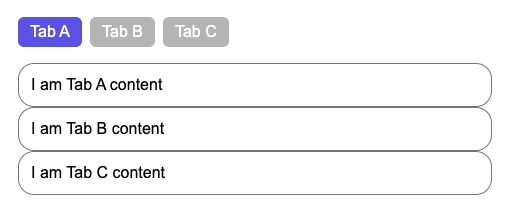
Amazing! Now we can see which tab is active.
Using the same logic, we can also show/hide the content of the active tab.
.tab-content{

  display: none;

}

.tabs-wrapper:has(#tab-a-toggle:checked) #tab-a-content{

  display: block;

}

.tabs-wrapper:has(#tab-b-toggle:checked) #tab-b-content{

  display: block;

}

.tabs-wrapper:has(#tab-c-toggle:checked) #tab-c-content{

  display: block;

}

Final code:
<div class="tabs-wrapper">

  <nav class="tabs-nav">

    <label for="tab-a-toggle" class="tab-item">

      <span>Tab A</span>

      <input checked name="tabs-toggle" id="tab-a-toggle" type="radio">

    </label>

    <label for="tab-b-toggle" class="tab-item">

      <span>Tab B</span>

      <input name="tabs-toggle" id="tab-b-toggle" type="radio">

    </label>

    <label for="tab-c-toggle" class="tab-item">

      <span>Tab C</span>

      <input name="tabs-toggle" id="tab-c-toggle" type="radio">

    </label>

  </nav>


  <div class="tab-content" id="tab-a-content">

    I am Tab A content

  </div>

  <div class="tab-content" id="tab-b-content">

    I am Tab B content

  </div>

  <div class="tab-content" id="tab-c-content">

    I am Tab C content

  </div>

</div>
body{

  font-family: Arial;

  padding: 1em;

}


.tabs-nav{

  display: flex;

  gap: 8px;

  margin-bottom: 16px;

  user-select: none;

}


.tab-item{

  background: #bcbcbc;

  padding: 6px 12px;

  border-radius: 6px;

  color: #fff;

  cursor: pointer;

}

.tab-content{

  padding: 12px;

  border-radius: 16px;

  border: 1px solid grey;

}


.tab-item input{

  display: none;

}

.tab-item:has(input:checked){

  background: #6b54f0;

}


.tab-content{

  display: none;

}


.tabs-wrapper:has(#tab-a-toggle:checked) #tab-a-content{

  display: block;

}

.tabs-wrapper:has(#tab-b-toggle:checked) #tab-b-content{

  display: block;

}

.tabs-wrapper:has(#tab-c-toggle:checked) #tab-c-content{

  display: block;

}
Thank you for reading!
If you enjoyed this article, please consider sharing it with others.
You can support me on Buy Me a Coffee.
If you have any feedback or suggestions, feel free to reach out to me on Twitter.
Don't forget to checkout wtfcodes.com