"Algorithms may be logic, but visualization makes them come alive."
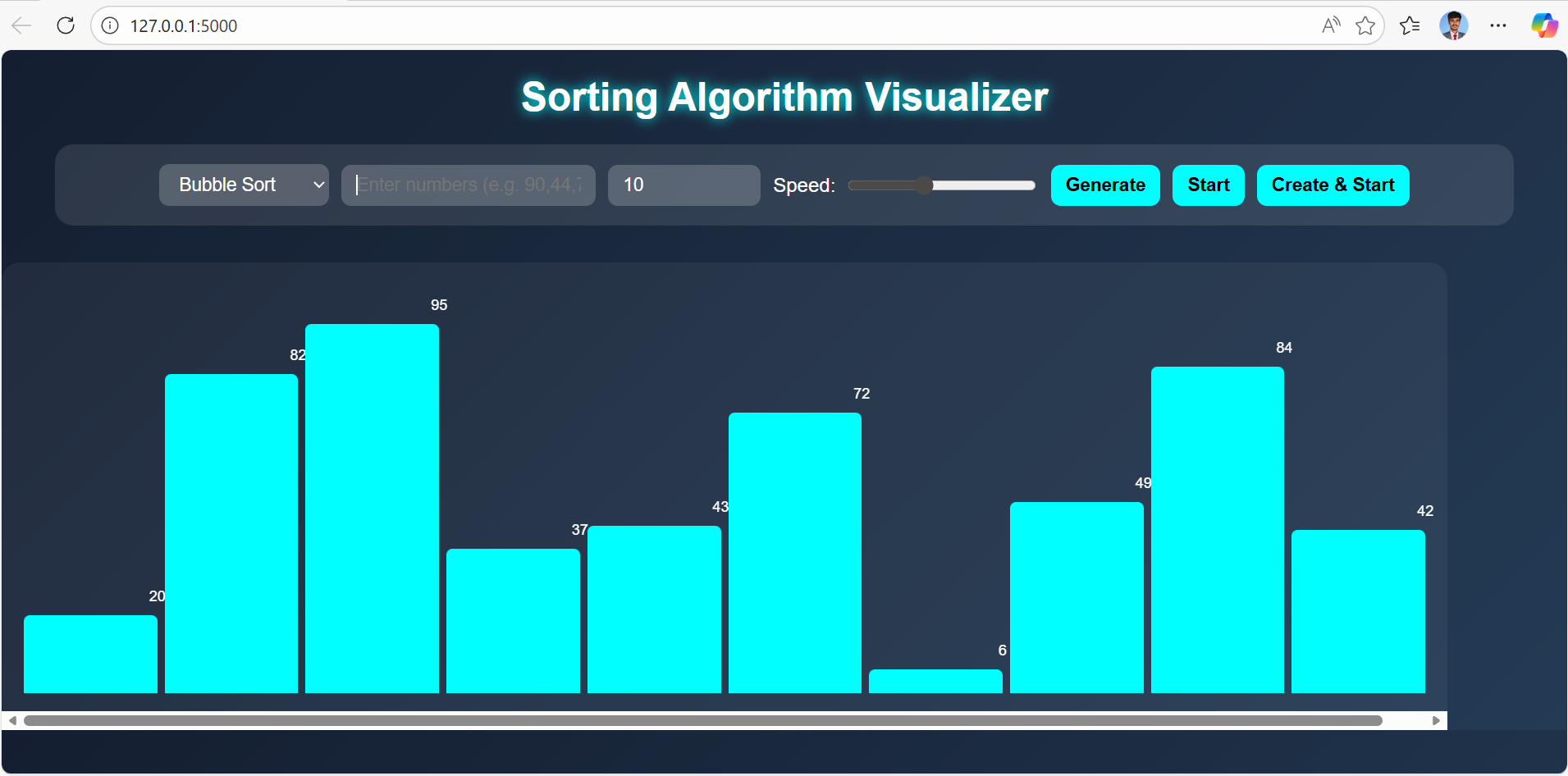
Sorting algorithms have always been a fascinating part of computer science — transforming chaos into order through systematic steps. However, understanding how these algorithms work behind the scenes can sometimes be challenging through code alone. That’s where the Sorting Algorithm Visualizer comes in. This project brings algorithms like Bubble Sort, Insertion Sort, Selection Sort, Merge Sort, and Quick Sort to life through dynamic animations. Each movement of the bars represents comparisons, swaps, and progress toward order, allowing users to see the logic in motion. It’s not just a coding project — it’s a visual learning experience that bridges the gap between theory and intuition, turning complex logic into something truly mesmerizing.
from flask import Flask, request, jsonify, send_file


app = Flask(__name__)


@app.route('/')

def index():

    return send_file('index.html')


# ---------------- SORTING ALGORITHMS ----------------

def bubble_sort(arr):

    steps = []

    n = len(arr)

    for i in range(n):

        for j in range(0, n - i - 1):

            if arr[j] > arr[j + 1]:

                arr[j], arr[j + 1] = arr[j + 1], arr[j]

            steps.append(arr.copy())

    return steps


def selection_sort(arr):

    steps = []

    n = len(arr)

    for i in range(n):

        min_idx = i

        for j in range(i + 1, n):

            if arr[j] < arr[min_idx]:

                min_idx = j

        arr[i], arr[min_idx] = arr[min_idx], arr[i]

        steps.append(arr.copy())

    return steps


def insertion_sort(arr):

    steps = []

    for i in range(1, len(arr)):

        key = arr[i]

        j = i - 1

        while j >= 0 and key < arr[j]:

            arr[j + 1] = arr[j]

            j -= 1

            steps.append(arr.copy())

        arr[j + 1] = key

        steps.append(arr.copy())

    return steps


def merge_sort_steps(arr):

    steps = []

    def merge_sort(a, start, end):

        if end - start > 1:

            mid = (start + end)//2

            merge_sort(a, start, mid)

            merge_sort(a, mid, end)

            L, R = a[start:mid], a[mid:end]

            i = j = 0

            k = start

            while i < len(L) and j < len(R):

                if L[i] < R[j]:

                    a[k] = L[i]

                    i += 1

                else:

                    a[k] = R[j]

                    j += 1

                k += 1

                steps.append(a.copy())

            while i < len(L):

                a[k] = L[i]

                i += 1

                k += 1

                steps.append(a.copy())

            while j < len(R):

                a[k] = R[j]

                j += 1

                k += 1

                steps.append(a.copy())

    merge_sort(arr, 0, len(arr))

    return steps


def quick_sort_steps(arr):

    steps = []

    def quick_sort(a, low, high):

        if low < high:

            p = partition(a, low, high)

            quick_sort(a, low, p - 1)

            quick_sort(a, p + 1, high)

    def partition(a, low, high):

        pivot = a[high]

        i = low - 1

        for j in range(low, high):

            if a[j] <= pivot:

                i += 1

                a[i], a[j] = a[j], a[i]

                steps.append(a.copy())

        a[i + 1], a[high] = a[high], a[i + 1]

        steps.append(a.copy())

        return i + 1

    quick_sort(arr, 0, len(arr) - 1)

    return steps


def heap_sort_steps(arr):

    steps = []

    def heapify(n, i):

        largest = i

        l = 2 * i + 1

        r = 2 * i + 2

        if l < n and arr[l] > arr[largest]:

            largest = l

        if r < n and arr[r] > arr[largest]:

            largest = r

        if largest != i:

            arr[i], arr[largest] = arr[largest], arr[i]

            steps.append(arr.copy())

            heapify(n, largest)

    n = len(arr)

    for i in range(n // 2 - 1, -1, -1):

        heapify(n, i)

    for i in range(n - 1, 0, -1):

        arr[i], arr[0] = arr[0], arr[i]

        steps.append(arr.copy())

        heapify(i, 0)

    return steps


@app.route('/sort', methods=['POST'])

def sort_data():

    data = request.json

    arr = data.get("array", [])

    algo = data.get("algorithm", "bubble")


    algorithms = {

        "bubble": bubble_sort,

        "selection": selection_sort,

        "insertion": insertion_sort,

        "merge": merge_sort_steps,

        "quick": quick_sort_steps,

        "heap": heap_sort_steps

    }


    if algo not in algorithms:

        return jsonify({"error": "Invalid algorithm"}), 400


    steps = algorithms[algo](arr.copy())

    return jsonify({"steps": steps})


if __name__ == '__main__':

    app.run(debug=True)
<!DOCTYPE html>
<html lang="en">
<head>
<meta charset="UTF-8">
<meta name="viewport" content="width=device-width, initial-scale=1.0">
<title>Sorting Algorithm Visualizer</title>
<style>
body {
font-family: "Poppins", sans-serif;
background: linear-gradient(135deg, #141e30, #243b55);
color: white;
margin: 0;
padding: 0;
text-align: center;
}
h1 {
margin: 20px 0;
text-shadow: 0 0 10px cyan;
font-size: 2em;
}
.controls {
display: flex;
flex-wrap: wrap;
justify-content: center;
align-items: center;
gap: 10px;
background: rgba(255,255,255,0.1);
padding: 15px 20px;
border-radius: 15px;
width: 90%;
margin: 10px auto;
}
select, input, button {
padding: 8px 12px;
border: none;
border-radius: 8px;
font-size: 15px;
outline: none;
}
select, input[type="number"], input[type="text"] {
background: rgba(255,255,255,0.2);
color: white;
min-width: 100px;
}
button {
background: cyan;
color: black;
font-weight: bold;
cursor: pointer;
transition: 0.3s;
}
button:hover {
background: #00bcd4;
color: white;
}
.bar-container {
display: flex;
align-items: flex-end;
justify-content: center;
flex-wrap: nowrap;
margin-top: 30px;
height: 350px;
width: 90%;
background: rgba(255, 255, 255, 0.05);
border-radius: 15px;
padding: 15px;
overflow-x: auto;
}
.bar {
flex: 1;
margin: 0 3px;
background: cyan;
border-radius: 5px 5px 0 0;
transition: height 0.3s ease, background 0.3s ease;
position: relative;
text-align: center;
}
.bar span {
position: absolute;
top: -22px;
width: 100%;
font-size: 12px;
color: white;
}
.speed-control {
display: flex;
align-items: center;
gap: 8px;
color: white;
}
@media (max-width: 600px) {
.controls {
flex-direction: column;
gap: 8px;
}
h1 {
font-size: 1.5em;
}
}
</style>
</head>
<body>
<h1>Sorting Algorithm Visualizer</h1>
<div class="controls">
<select id="algorithm">
<option value="bubble">Bubble Sort</option>
<option value="selection">Selection Sort</option>
<option value="insertion">Insertion Sort</option>
<option value="merge">Merge Sort</option>
<option value="quick">Quick Sort</option>
<option value="heap">Heap Sort</option>
</select>
<input type="text" id="userInput" placeholder="Enter numbers (e.g. 90,44,78)">
<input type="number" id="size" min="5" max="50" value="10">
<div class="speed-control">
<label>Speed:</label>
<input type="range" id="speed" min="50" max="1000" value="400">
</div>
<button onclick="generateArray()">Generate</button>
<button onclick="startSorting()">Start</button>
<button onclick="createAndStart()">Create & Start</button>
</div>
<div class="bar-container" id="barContainer"></div>
<script>
let array = [];
let delay = 400;
function generateArray() {
const userInput = document.getElementById("userInput").value.trim();
if (userInput) {
array = userInput.split(",").map(Number);
} else {
const size = document.getElementById('size').value;
array = Array.from({ length: size }, () => Math.floor(Math.random() * 100) + 5);
}
displayArray(array);
}
function displayArray(arr) {
const container = document.getElementById('barContainer');
container.innerHTML = '';
const max = Math.max(...arr);
const barWidth = Math.max(20, Math.floor(800 / arr.length));
arr.forEach(num => {
const bar = document.createElement('div');
bar.classList.add('bar');
bar.style.height = `${(num / max) * 300}px`;
bar.style.minWidth = `${barWidth}px`;
bar.innerHTML = `<span>${num}</span>`;
container.appendChild(bar);
});
}
async function startSorting() {
const algorithm = document.getElementById('algorithm').value;
delay = document.getElementById('speed').value;
if (array.length === 0) {
alert("Please generate or enter an array first!");
return;
}
const response = await fetch('/sort', {
method: 'POST',
headers: { 'Content-Type': 'application/json' },
body: JSON.stringify({ array, algorithm })
});
const data = await response.json();
if (data.steps) await visualizeSteps(data.steps);
}
async function visualizeSteps(steps) {
for (const step of steps) {
displayArray(step);
await new Promise(r => setTimeout(r, delay));
}
}
async function createAndStart() {
generateArray();
await new Promise(r => setTimeout(r, 500));
startSorting();
}
window.onload = generateArray;
</script>
</body>
</html>