



When working with payments, developers waste time context-switching between dashboards, logs, terminals, and code editors. This reduces the productivity of developer and also slows down development. Creem CLI helps you to manage your entire Creem store from the terminal. Everything from managing products, customers, subscription and even the migration.
And when you combine it with AI coding assistants like Claude Code, Cursor, or Windsurf, it becomes even more powerful. Instead of memorizing commands, you can just describe what you want and get things done faster.
In this article, we’ll set up Creem CLI, integrate it with AI coding tools, and explore how it can streamline your workflow and make development easier.
Setup Creem
Install Creem CLI
brew tap armitage-labs/creem

brew install creem
Once you install the CLI, you can verify installation with the below command:
creem --version

Authentication
Once setup is done, you need to authenticate yourself to perform operations on your store. You will need API key to authenticate. You can find this from your creem dashboard.
creem login --api-key creem_test_YOUR_KEY_HERE
once done, you can also verify your account with below command:
creem whoami

Now you are authenticated and can perform all kind of action to your creem account with Creem CLI.
Overview
Now, lets see some of the basic and most useful CLI commands to get you the better idea of how CLI can be helpful.
# list all the products

creem products


# list all the customers of store

creem customers


# list all the subscriptions of store

creem subscriptions


# list all the transactions of store

creem transactions
Browse all the Products
Run the command Creem Products to list all the products from our store.

You can navigate and click enter on any product to get the product details. Here I have selected one product and below is the details of it

likewise, you can also browse all your transactions, customers and Subscriptions.
Manage Subscriptions
You can directly manage the subscriptions from the CLI, without ever login in to your creem dashboard.


Check the status bar for commands to update the subscription status.
Quick commands
Here is the list of commands you will mostly use.
# Products

creem products list

creem products get prod_XXXXX

creem products create --name "Pro Plan" --price 1999 --currency USD --billing-type recurring --billing-period every-month


# Customers

creem customers list

creem customers get cust_XXXXX

creem customers billing cust_XXXXX   # generates a billing portal link


# Subscriptions

creem subscriptions list --status active

creem subscriptions cancel sub_XXXXX --mode scheduled

creem subscriptions pause sub_XXXXX

creem subscriptions resume sub_XXXXX


# Transactions

creem transactions list --limit 50

creem transactions get txn_XXXXX


# Checkouts

creem checkouts create --product prod_XXXXX --success-url https://app.com/welcome
How to Use CLI Most effectively:
For any details regarding any command in creem CLI, you can always use creem -h or creem --help. For example if you don’t know what are the options for the command for creating product from Creem CLI then I will fire the command like
creem products create —help
and it will instantly give me all the available options:

and by using this we can easily create product as per our requirement.
Now we have got the basic idea about what Creem CLI is and how can we use it. Now, we will see how we can see how we can use this in AI coding tool like Claude Code.
Integrate Creem CLI with Coding tool
For this purpose, I created a simple Next.js application with two products: one one-time product and one subscription product. There is also a success page with a link to the customer portal for managing payments. Additionally, we have Orders and Subscriptions pages where all orders and subscriptions are displayed.
For this project, we will use Claude Code as the coding tool in the VS Code IDE.
To set this up, we need to add Creem’s SKILL.md file to our project, which is straightforward:
- Visit https://creem.io/SKILL.md
- Copy the content and create a file at
.claude/skills/creem/SKILL.mdin your project
That’s it — the skill has been added to the project.
Now, we will work through the following workflows using the Creem CLI and an AI coding tool:
- Test the checkout flow and verify it with the Creem CLI
- Handle state changes caused by webhook failures
- Manage products and subscriptions
- Create and manage discount codes
You can checkout the Github repo here: https://github.com/DeepKumbhare/creem-cli-tutorial
Workflows
Workflow 1: Testing the checkout flow and verifying it using the CREEM CLI.
We will ask Claude Code to generate the checkout the link for one of our product in store and it will use the CLI to generate the checkout link and will provide it to us. We will make a test payment and ask again Claude Code to verify the transaction.
I : we have a product image generator. Please create a checkout link for it and give it to me.
Claude code: Here's your checkout link for the Image Generator product ($12.00/month): https://creem.io/test/checkout/prod_5PrU9h573ROasTsHXQkGTN/ch_2kR5r6O82HGmL82m47qZSI This is a test mode checkout. To test payments, use Stripe test card 4242 4242 4242 4242 with any future expiry and any CVC.
I have then made the payment with test card and asked Claude Code to confirm the payment.
I : we just have completed the payment can you please verify the checkout is successful. and it says
Claude Code:
Payment is confirmed! The most recent transaction shows:


  ┌─────────────────┬─────────────────────────────┐

  │      Field      │            Value            │

  ├─────────────────┼─────────────────────────────┤

  │ Status          │ paid                        │

  ├─────────────────┼─────────────────────────────┤

  │ Amount          │ $12.00 USD                  │

  ├─────────────────┼─────────────────────────────┤

  │ Transaction ID  │ tran_4DCPbFnJcvTe7tIG7n9lqa │

  ├─────────────────┼─────────────────────────────┤

  │ Subscription ID │ sub_7CEoO2Ric0UpRvFCsOsOsg  │

  ├─────────────────┼─────────────────────────────┤

  │ Customer ID     │ cust_7hy4RWKFhdErs8HnyjY4eq │

  ├─────────────────┼─────────────────────────────┤

  │ Type            │ Subscription invoice        │

  └─────────────────┴─────────────────────────────┘


  The checkout was successful — a new subscription has been created for the Image Generator product.
After this I have also confirmed this on my project’s subscription page:

it is showing in the active state so it means payment is successful and the subscription is active.
let’s move to next workflow.
Workflow 2: Verify State mismatch between Creem and Fix it.
Sometimes when user make some changes like pause the subscription from the Creem it doesn’t propagate properly to our application and this causes the mismatch of states between
Creem and our application. There may be multiple reason for this like when creem fired webhook, our endpoint was down or there may be some internal server error on our application side. So, in this workflow, we will find this mismatch and will try to fix this.
To perform this, we will tell Claude Code to pause the last subscription and then check with our app if it has also updated it’s state or not.
I : Pause my last subscription and check if our application has also updated the state of that transaction.


Claude Code:

I have updated the status of last subscription to paused.


The DB still shows status: active. The webhook from Creem hasn't updated it yet — this is likely because the app is


running on localhost, which Creem's webhook delivery can't reach from the internet.


Summary:


- Creem: sub_7CEoO2Ric0UpRvFCsOsOsg is now paused ✓

- DB (id: 13): still active — webhook not received


For webhooks to work locally, you need a tunnel (e.g. ngrok http 3000) forwarding requests to your local server, with


that public URL registered as the webhook endpoint in the Creem dashboard. Once that's in place, the


subscription.paused event will fire and your handler at /api/webhook/creem will update the DB status to paused.
At this point, it got confused because it assumed we were running the application on localhost and therefore would not be able to receive webhooks locally. Based on that assumption, it suggested using ngrok and trying again.
However, that was not actually the issue in our case, because we had already created and started an ngrok tunnel. So the next step is to clarify that ngrok is already running and ask it to check again and help identify the real issue.
I: ❯ ngrok is already working can you ploease check and help me to find the issue


Claude Code:


Found it. The subscription.paused handler at line 249–251 logs but does not update the DB:


case "subscription.paused":


console.log("Subscription paused:", [event.object.id](http://event.object.id/));


break;  // ← missing DB update


and it finally found out the issue


The subscription.paused case was missing the DB update — it only logged and did nothing. Now it updates the status to

paused.


Since the webhook already fired and was missed, you can resend it from the Creem dashboard (Dashboard > Developers >


Webhooks > find the subscription.paused event > Resend), and the DB will update correctly this time.
At this point, it identified the actual issue. In our webhook handler for the subscription.paused event, we were only logging the event to the console and not creating an entry in the database.
This has now been fixed, and the webhook handler correctly stores the event in the database.
However, the current event still reflects a stale subscription status in our database. To correct this, we will re-fire the webhook event from the Creem dashboard so that it is processed again, this time with the fixed handler, and the database entry is created properly.
This is how the Creem CLI combined with AI, helps us identify state mismatches and resolve them effectively.
Workflow 3: manage products/subscriptions from the terminal
In this workflow, we will see how easily we can now manage products and subscription with help of Creem CLI and power of AI.
In this workflow, I will ask Claude Code to Create a new product and list all the products. and for subscription we will ask it to pause the subscription with the subscription id.
First, lets create a new product ‘AI Writer’. This is a subscription based saas product and price is 49$/month.
I: lets create a new product ai writer & it will be subscription product priced at 49$/month


Claude Code:


Product created successfully:

  ┌──────────────┬─────────────────────────────┐

  │    Field     │            Value            │

  ├──────────────┼─────────────────────────────┤

  │ ID           │ prod_1FjKcB7j9b1WqrZFm1W1c7 │

  ├──────────────┼─────────────────────────────┤

  │ Name         │ AI Writer                   │

  ├──────────────┼─────────────────────────────┤

  │ Price        │ $49.00/month                │

  ├──────────────┼─────────────────────────────┤

  │ Billing      │ Recurring / month           │

  ├──────────────┼─────────────────────────────┤

  │ Tax Category │ SaaS                        │

  ├──────────────┼─────────────────────────────┤

  │ Mode         │ Test                        │

  └──────────────┴─────────────────────────────┘


  Product URL: https://creem.io/test/product/prod_1FjKcB7j9b1WqrZFm1W1c7
It has created the product and also given me the product url.
Now We will List all the products.
I: List all the products of my store.


Claude Code: You have 4 products in test mode:


  ┌─────────────────┬─────────┬───────────────────┬────────┐

  │      Name       │  Price  │      Billing      │ Status │

  ├─────────────────┼─────────┼───────────────────┼────────┤

  │ AI Writer       │ $49.00  │ Recurring / month │ active │

  ├─────────────────┼─────────┼───────────────────┼────────┤

  │ Image generator │ $12.00  │ Recurring / month │ active │

  ├─────────────────┼─────────┼───────────────────┼────────┤

  │ UI kit bundle   │ $199.00 │ One-time          │ active │

  ├─────────────────┼─────────┼───────────────────┼────────┤

  │ Vanilla         │ $100.00 │ One-time          │ active │

  └─────────────────┴─────────┴───────────────────┴────────┘
Now, we will check with subscriptions. I want to pause the subscription with subscription id: sub_7CEoO2Ric0UpRvFCsOsOsg
I: Pause the subscription with ID: sub_7CEoO2Ric0UpRvFCsOsOsg

Claude Code: Done. Subscription sub_7CEoO2Ric0UpRvFCsOsOsg is now paused.

  ┌──────────┬───────────────────────────────────┐

  │  Field   │               Value               │

  ├──────────┼───────────────────────────────────┤

  │ Customer │ creem-test@gmail.com (Test creem) │

  ├──────────┼───────────────────────────────────┤

  │ Product  │ Image generator                   │

  ├──────────┼───────────────────────────────────┤

  │ Status   │ paused                            │

  └──────────┴───────────────────────────────────┘
This is how easily we can manage products and subscription using a simple natural language.
Workflow 4: Manage discounts
In this workflow, We will create and manage discounts.
First, we will ask claude code to generate discount code for our product. we can also mention discount code.
I : create a discount code for product Image Generator keep coupon code TEST20 for 20% off.
Here Claude Code will try to create the discount with API. rather than using the CLI. Because there is a catch in creem’s skill.md file they haven’t mentioned way to create discount with CLI. Instead it is written like:
### Flow 5: Discount codes
bash
CLI: Create a discount
(Use the SDK or API — the CLI does not have a discounts command yet)
However, claude code is so smart that it figures out the way by using the commands like `creem discounts create --help` and generate the discount code.


Creem can easily fix this by adding discounts related stuff to [skills.md](http://skills.md) file.


Here is what it can be added:
tsx
Flow 5: Discount codes
Create a percentage discount (e.g., 20% off):
creem discounts create \

  --name "Launch Sale" \

  --code "LAUNCH20" \

  --type "percentage" \

  --percentage 20 \

  --duration "forever" \

  --max-redemptions 20 \

  --products prod_XXXXX
Create a fixed-amount discount (e.g., $10 off):
creem discounts create \

  --name "$10 Off" \

  --code "SAVE10" \

  --type "fixed" \

  --amount 1000 \

  --currency "USD" \

  --duration "once" \

  --products prod_XXXXX
Discount creation options:
| Option | Type | Required | Description |
|---|---|---|---|
--name | string | Yes | Discount name (displayed in dashboard) |
--code | string | No | Discount code (auto-generated if not provided) |
--type | string | Yes | "percentage" or "fixed" |
--percentage | number | Conditional | Discount percentage 1-100 (required for percentage type) |
--amount | number | Conditional | Discount amount in cents (required for fixed type) |
--currency | string | No | Currency code for fixed discounts (default: USD) |
--duration | string | Yes | "once", "forever", or "repeating" |
--duration-months | number | No | Number of months for repeating duration |
--max-redemptions | number | No | Maximum uses before discount expires |
--expires | date | No | Expiry date (ISO format: 2025-12-31) |
--products | string | Yes | Comma-separated product IDs (e.g., prod_abc,prod_def) |
Manage discounts:
# Get discount details by ID

creem discounts get disc_XXXXX --json


# Get discount details by code

creem discounts get --code LAUNCH20 --json


# Delete a discount

creem discounts delete disc_XXXXX


# View all discounts

# ℹ Discount list endpoint is not available via API

# View your discounts at: https://creem.io/dashboard/discounts
Now claude code will respond like:
tsx
⏺ Discount code created:
┌──────────┬───────────────────────────────────┐
│ Field │ Value │
├──────────┼───────────────────────────────────┤
│ Code │ TEST20 │
├──────────┼───────────────────────────────────┤
│ Discount │ 20% off │
├──────────┼───────────────────────────────────┤
│ Duration │ Forever (applies to all payments) │
├──────────┼───────────────────────────────────┤
│ Product │ Image Generator │
├──────────┼───────────────────────────────────┤
│ Status │ active │
└──────────┴───────────────────────────────────┘
Customers can use TEST20 at checkout to get 20% off their Image Generator subscription.
Now, we can use this discount code on the product and confirm that this is working or not.
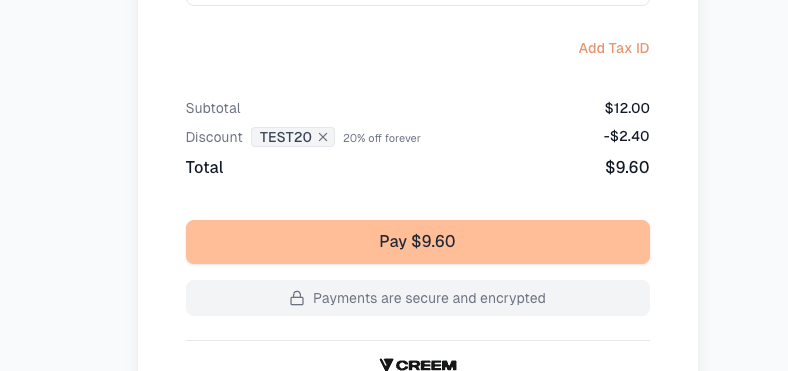
Wow 🤩, our discount code is working.
Now we will ask it to delete the discount code: TEST20.
tsx
me: ❯ delete the discout code TEST20
cc: Discount code TEST20 has been deleted.
Discount code is now deleted and can’t be applied any more.


We have seen total 4 workflows. I hoped you find them useful when working with Creem.


## Summary


Creem CLI completely changes the way developers handle payments by bringing everything directly into the terminal. Instead of juggling between dashboards, logs, and code, you can manage products, customers, subscriptions, transactions, and even checkouts from a single place.


When combined with AI coding tools like Claude Code, Cursor, or Windsurf, the experience becomes even more powerful. You can perform complex workflows using simple natural language. From generating checkout links and verifying payments to debugging webhook issues and fixing state mismatches.


In this guide, we explored how to:


- Set up and authenticate Creem CLI

- Manage products, customers, subscriptions, and transactions from the terminal

- Test and verify checkout flows using AI

- Detect and fix webhook/state sync issues

- Create and manage discounts


Creem CLI combined with AI provides faster smarter developer experience.


## 🎯 **Conclusion**


Creem CLI is more than just a command-line tool. it’s a productivity multiplier for developers working with payments.


By bringing everything into your terminal and pairing it with AI assistants, you unlock a new way of working:


- Less context switching

- Faster debugging

- Natural language-driven workflows


From creating products and managing subscriptions to troubleshooting webhook issues and generating discount codes, everything becomes faster and more intuitive.


👉 **GitHub Repository:**


https://github.com/DeepKumbhare/creem-cli-tutorial
SOCIAL SHARE CARD GENERATOR