




Brute Force: Low & Medium

As you can see, we got this error message, So let's hop on Burp Suite and intercept the GET Request

Send it to the Intruder, hit Clear to clear any saved parameter, select the password that you sent for mine it was ‘admin’ so select it and hit Add

Now let's go to the payloads section in the intruder and load our txt payload file (i used the top 100 words from rockyou.txt wordlist for simplicity)

Now we set the payload, How can we find if tha password is right ot not ?
So,let's go to settings in the intruder section to make our customization

Intruder use these words to define if the attack fails, so it have some famous error messages
In the First Image that i posted, there was word ‘incorrect’ in it
So, after we added ‘incorrect’ , if we got the right password of course we will not find the ‘incorrect’ word. NOW Let's start the attack

The password section is the only one that didn't find the ‘incorrect’ word

Brute Force: Medium
In medium level we can make the same steps as i did in low level but i’ll go through another tool just for a change, we'll use wfuzz tool on kali linux

This is the Intercept, as you can see the password must be ‘FUZZ’ , but why?
to tell wfuzz tool that the password is the one that we want to brute force it

this is the code that i used for the attack
wfuzz -c -z file,/home/prankster/top_100_Rock_You.txt -b 'security=medium; PHPSESSID=17ef46f3cec5a583f4bf12da8c0a4daf' 'http://192.168.1.4/dvwa/vulnerabilities/brute/?username=admin&password=FUZZ&Login=Login'
Now let’s find the correct password

All of these the response is 200 (OK) , have 86 lines, but the words number for Line 4 is different ! , also the characters are different ! that means that other passwords were wrong because they tell us the same incorrect sentence each time execpt ‘password’ which is the password for user admin

Command Execution: Low
You can find that there is page for pinging that takes ip address as input BUT, do you think it can take the ip address only ?

What if you typed the ip address and then ls command ? , let’s find out

simicolon ; is the separator between commands , you can use whatever you want (&&) or (&) or (|)
After pinging, he read the ls command also, so now we can do whatever command we want

after pinging, we can find there's 3 files (help, index.php, source), and the current username (www-data) , and some system information using (uname -a) command.
Command Execution: Medium
The concept of command execution is the same, you just type the desired command and then put the malicious command that you want,
the only change is the separator between the commands like
( ; ) or (&) or (&&) or ( | ) So, Let's see which of these is working


So, pipe (|) , and (&) separators are the working separators in medium level
Cross-Site Request Forgery (CSRF): Low
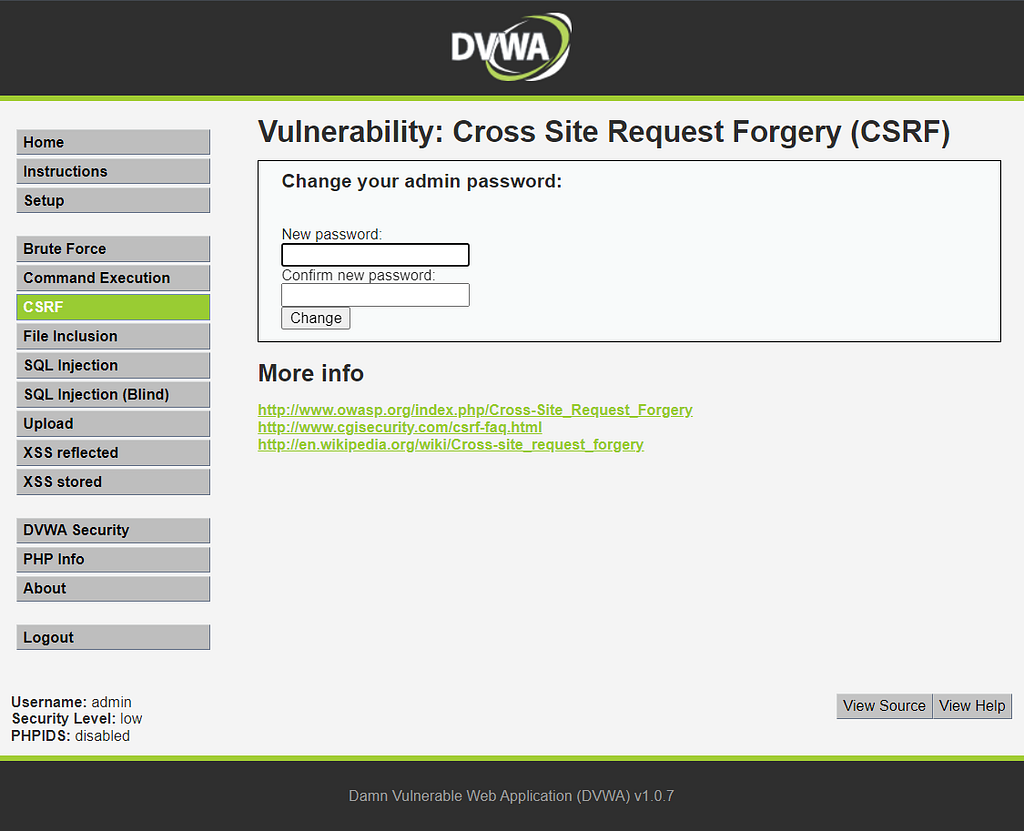
this page for changing password for user admin, so if we tried to change the password to ‘test123’ it will change in the url as it's shown down

As you can see the password new and the confirmation of it is in the URL ‘test123’ are now the new password
if we changed the URL to http://192.168.1.4/dvwa/vulnerabilities/csrf/?password_new=Hello&password_conf=Hello&Change=Change#
And open this new link, the password will change directly to ‘Hello’

if you logged out and tried to login with ‘test123’ password, it will give you Login Failed
if you tried ‘Hello’ instead, you'll be logged in successfully
so you can use this malicious link with some phishing techniques and so on
Cross-Site Request Forgery (CSRF): Medium
first, we need to intercept the GET packet for password changing


Why we intercepted now ? , Because the Referer in the next packet will be hidden, so we will add it manually but with a little bit change

once we added the Referer manually , we can forward the packet and the password will change directly

now you can login with the new changed password ‘csrfmedium’
File Inclusion : Low & Medium
In this situation we just need to manipulate the URL in the website


File Inclusion : Medium
The same way as we did on low level is working on medium level, But let's try another files to confirm


SQL Injection : Low
In sql injection section we have to put the user id

Let's try some Injections💉

@ is just any sign and the ‘ after it means that anything after this will be outside of the ‘user id’ scope, and the statement after the or condition is a tautology (always True) hince it always true, it will print all users in it

The single quote closes the string that was opened by the SQL query
UNION to make two SELECT queries into a single result set , The Selection is obvious (user, password)
Everything after # is treated as a comment and ignored by the SQL engine.
SQL Injection : Medium
The concept is the same, you just have to remove comments like single quote or put more quotes , but it's the same concept


SQL Injection (Blind) : Low
these queries are working perfectly


But in Blind case, sqlmap is a perfect solution
First , you need to hit Submit in DVWA and intercept this packet using Burp Suite

now we will go to sqlmap on linux and execute this command
sqlmap -u "http://192.168.1.4/dvwa/vulnerabilities/sqli_blind/?id=&Submit=Submit" --cookie="security=low; PHPSESSID=17ef46f3cec5a583f4bf12da8c0a4daf" --dbs
"Make Sure to customize your cookie and ip address"
Make sure to type the URL right, and the cookie from your Burp Suite Intercept is also right

lets explore avaliable tables for DVWA database with this command
sqlmap -u "http://192.168.1.4/dvwa/vulnerabilities/sqli_blind/?id=&Submit=Submit" --cookie="security=low; PHPSESSID=17ef46f3cec5a583f4bf12da8c0a4daf" -D dvwa --tables

Now Lets explore more about ‘users’ table in DVWA database with this command
sqlmap -u "http://192.168.1.4/dvwa/vulnerabilities/sqli_blind/?id=&Submit=Submit" --cookie="security=low; PHPSESSID=17ef46f3cec5a583f4bf12da8c0a4daf" -D dvwa -T users --dump

after this i decided to crack the the users password using the default wordliast in sqlmap. So all of them are cracked except the admin password
Because the admin password is ‘csrfmedium’ since the last csrf attack i didn't change it , so it's difficult to crack, but the rest are all cracked

SQL Injection (Blind) : Medium
These queries still working perfectly, unfortunately SQLMAP is not working properly in this medium level of blind sql injection


File Upload: Low
we just want to upload a simple web shell, so i used this simple php web shell LINK , and now let's upload it

Now let's access it from the URL, remove the # at the end of URL
and paste this path instead ‘../../hackable/uploads/index.php’
once you got this website, you can execute whatever you want

File Upload: Medium
In this level, the site checks whether the uploaded file is image or not so the last trick will give us an error.
So we will hop on burp suite and change the type of it to image
first we need to choose the php file, and turn the intercept on for BurpSuite
and hit Submit on DVWA, to intercept this submittion packet

this will give me an error if there's no intercept, but now i intercepted this request on burp suite

Lets change the ‘Content-Type’ from ‘application/x-php’ to ‘image/jpeg’

Alright, Let's Hit ‘Forward’ and sent the request to the DVWA

NICE! file is successfully uploaded
let's remove the ‘#’ from the URL and past the path that he gave us ‘../../hackable/uploads/index.php’ , once you get this page, congratulations

XSS Reflected: Low
In reflected xss the malicious script is reflected off the web server and executed immediately and it's not stored on the web server

Once You submit this xss payload , it'll pop-up a message says Reflected XSS
<script>alert('Reflected XSS');</script>

XSS Reflected: Medium
the previous payload is not working in this phase, so let's try another payload.
i just crafted a specified payload that makes reflected xss and take my logo print it next to hello inside the DVWA
<img src="http://127.0.0.1/Prankster_Photo.jpg" onload="alert('Reflected XSS')" style="width:100px; height:100px;">i just uploaded my logo on http server and resized the image to be
100px X 100px , i did all of this inside the XSS Reflected payload


Let's try another reflected xss payload that uses a click me button to perform reflected xss attack everytime you press it
<a href="#" onclick="alert('Reflected XSS')">Click Me</a>
Every time you hit ‘Click Me’ button, will perform the attack

XSS Stored: Low
The malicious script is stored on the server and it will run automatically without any buttons or anything, every time you visit the XSS Stored section in DVWA , this xss code will execute
<script>alert('Stored XSS');</script>
Every time you visit the XSS Stored section in DVWA, you'll get this pop-up

XSS Stored: Medium
to be honest, the same payload is still working on medium level and i can't remove anything LOL!!
must be button for ‘clear guestbook’ but i can't find it so, the XSS is still working perfectly

I've tried to make another stored xss attack , but there's already a stores xss up and running. I also asked ChatGPT in this case and he answered this :
“If you already have an XSS payload running on the website, it’s unlikely that it would prevent another XSS attack from working.”
So let's try another way to make sure we passed medium level, so let's reset the database to enter the xss payload again on medium level

now lets maximize the name section to put the payload in the name section

Let's try this payload in the name section, this payload will give you the cookie for the user
<script>alert(document.cookie)</script>


Finally, Thanks for reading my blog , and fell free to make these attacks the way you want, it’s not a rule you can customize whatever you want to achieve your Goals.
Contact Me:
Discord: Prankster#6546
DVWA Cheat Sheet (Low & Medium) was originally published in InfoSec Write-ups on Medium, where people are continuing the conversation by highlighting and responding to this story.
SOCIAL SHARE CARD GENERATOR