Collaborating with your team using Visual Studio Live Share keeps getting easier! Since making Live Share available for the public use at that we had not previously thought of (e.g. technical interviews and hackathons), as well helped us prioritize releasing some of the biggest feature requests and issues, like , as well as !
Live Share + Visual Studio 2019
After installing the . We’re happy to say we’ve continued to expand this capability and have recently added language support for more languages, including: . Now, you will see the project-based view of the codebase, rather than the “folder view”. The guests and host no longer have different views into the project, and now have the same view, as if they were all developing locally.
Real-time code reviews
Another big area of collaboration among teams comes when committing your code and conducting reviews. Live Share wants to further enhance that experience and offer new ways to work with your teammates.
When a host shares their code during a Live Share session, ), and Visual Studio Code, guests can view the diffs to get context on what changes have been made before or during a session. This can help with having real-time code reviews in your tool of choice, or even figuring out a merge conflict.
Another aspect of the reviewing experience is comments. For that, Live Share enables in-line commenting. While in a session, participants can add comments to code for others to see in real-time. You can use this for making notes about certain changes found in a shared diff or making a to-do list of things to accomplish during the collaboration session.
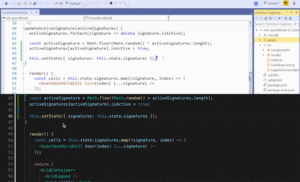
To further enhance your code review experience, and ensure you can use the tools you’re already familiar with, we’re excited to announce that , sharing .
Interactive Education
The primary goal of Visual Studio Live Share is to enable developers to collaborate with each other more easily, and education is a scenario we care deeply about. Whether you’re mentoring a developer on your team, or giving a lecture to a classroom, Live Share provides participants with an experience that is more engaging and truly personalized to everyone’s learning needs.
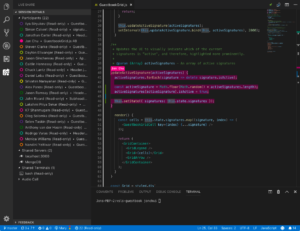
While Live Share was already applicable to education, we’ve specifically addressed the following key feedback items, in order to ensure it’s further optimized for the diverse needs of instructors and students everywhere:
to prevent unnecessary or accidental edits from being made during a lecture, while being able to elevate individual users to read/write to make changes.- Allow that helps with managing large groups.
Get Collaborating!
If you haven’t had a chance, give Visual Studio Live Share a try! The extension is also available for download for users. Additionally, it available as a default install option in the new ! We’re so grateful for all the amazing feedback we’ve received from you, and love hearing more. We talked a about a few new use cases we’ve optimized for based on your feedback, and we’re so excited for all the new ways we can enhance how you collaborate. As always, feel free to send us your feedback by
Jon Chu, Program Manager
@jonwchu
Jon is a Program Manager on the Visual Studio Live Share team bringing collaboration tools to developers, enabling them to tell their own unique stories. Prior to Live Share he’s worked on XAML tooling and NuGet.

SOCIAL SHARE CARD GENERATOR