Understanding Cross-Site and Same-Site Cookie Context
Websites typically integrate external services for advertising, content recommendations, third party widgets, social embeds and other features. As you browse the web, these external services may store cookies in your browser and subsequently access those cookies to deliver personalized experiences or measure audience engagement. Every cookie has a domain associated with it. If the domain associated with a cookie matches an external service and not the website in the user’s address bar, this is considered a cross-site (or “third party”) context.
Less obvious cross-site use cases include situations where an entity that owns multiple websites uses a cookie across those properties. Although the same entity owns the cookie and the websites, this still counts as cross-site or “third party” context when the cookie’s domain does not match the site(s) from which the cookie is accessed.
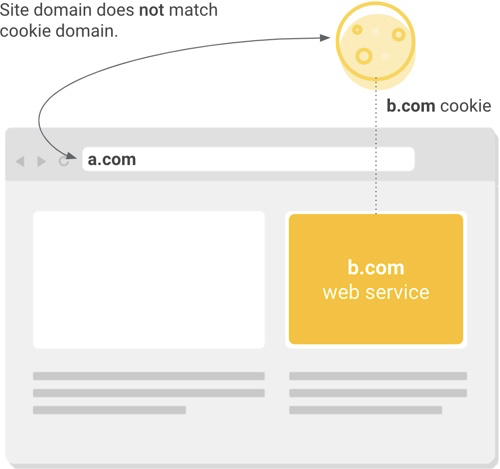 |
When an external resource on a web page accesses a cookie that does not match the site domain, this is cross-site or “third-party” context. |
In contrast, cookie access in a same-site (or “first party”) context occurs when a cookie’s domain matches the website domain in the user’s address bar. Same-site cookies are commonly used to keep people logged into individual websites, remember their preferences and support site analytics.
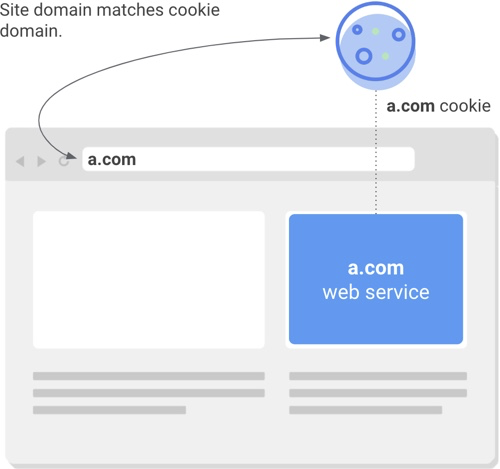 |
When a resource on a web page accesses a cookie that matches the site the user is visiting, this is same-site or “first party” context. |
A New Model for Cookie Security and Transparency
Today, if a cookie is only intended to be accessed in a first party context, the developer has the option to apply one of two settings (SameSite=Lax or SameSite=Strict) to prevent external access. However, very few developers follow this recommended practice, leaving a large number of same-site cookies needlessly exposed to threats such as and the SameSite=None; Secure requirements for cross-site cookies in Firefox. Microsoft recently provides instructions for implementing SameSite=None; Secure in a variety of languages, libraries and frameworks.
SameSite Cookies Explained offers specific guidance for the situations above, and channels for raising issues and questions.
To test the effect of the new Chrome behavior on your site or cookies you manage, you can go to chrome://flags in Chrome 76+ and enable the “SameSite by default cookies” and “Cookies without SameSite must be secure” experiments. In addition, these experiments will be automatically enabled for a subset of Chrome 79 Beta users. Some Beta users with the experiments enabled could experience incompatibility issues with services that do not yet support the new model; users can opt out of the Beta experiments by going to chrome://flags and disabling them.
If you manage cookies that are only accessed in a same-site context (same-site cookies) there is no required action on your part; Chrome will automatically prevent those cookies from being accessed by external entities, even if the SameSite attribute is missing or no value is set. However we strongly recommend you apply an appropriate SameSite value (Lax or Strict) and not rely on default browser behavior since not all browsers protect same-site cookies by default.
Finally, if you’re concerned about the readiness of vendors and others who provide services to your website, you can check for Developer Tools console warnings in Chrome 77+ when a page contains cross-site cookies that are missing the required settings:
 |
Some providers (including some Google services) will implement the necessary changes in the months leading up to Chrome 80 in February; you may wish to reach out to your partners to confirm their readiness.
Posted by Barb Palser, Chrome and Web Platform Partnerships
Vollständiger Original-Bericht
Ausführliche Details, Code-Beispiele & Hersteller-Stellungnahme auf blog.chromium.org.

SOCIAL SHARE CARD GENERATOR