We are pleased to announce that the November 2019 release of the Python Extension for Visual Studio Code is now available. You can in the documentation.
In this release we focused mostly on product quality. We closed a total of 60 issues, 39 of them being bug fixes. However, we’re also pleased to deliver delightful features such as:
- Add imports “quick fix” when using the Python Language Server
- Altair plot support
- Line numbers in the Notebook Editor.
If you’re interested, you can check the full list of improvements in our ), and when you enable the Microsoft Language Server, you will get this new functionality. To enable the Language Server, add the setting “python.jediEnabled”: false, a declarative statistical visualization library for Python.

Line Numbers in the Notebook Editor
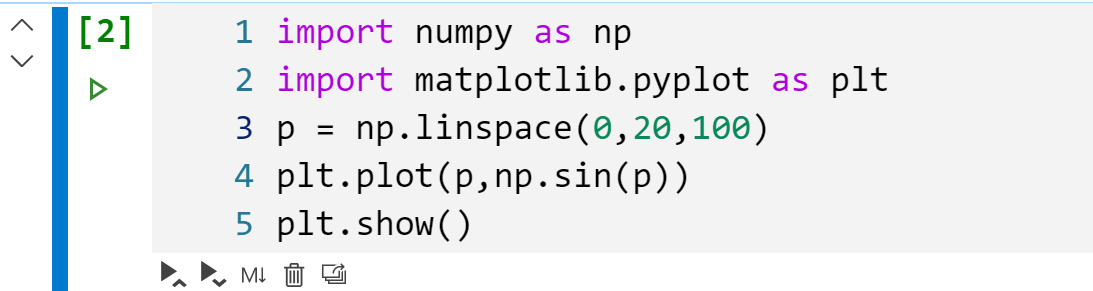
Line numbers are now supported in the notebook editor. On selected code cells, you can toggle the line numbers by pressing the “L” key.
Other Changes and Enhancements
We have also added small enhancements and fixed issues requested by users that should improve your experience working with Python in Visual Studio Code. Some notable changes include:
- Fix running a unittest file to not execute only the first test. (thanks )
- Added commands translation for Farsi and Turkish (thanks )
- Added command translations for Turkish (thanks )
- Place all plots on a white background regardless of theme. ( for Visual Studio Code now to try out the above improvements. If you run into any problems, page.
The post .
↗ Original-Artikel auf devblogs.microsoft.com lesenVollständiger Original-BerichtAusführliche Details, Code-Beispiele & Hersteller-Stellungnahme auf devblogs.microsoft.com.

SOCIAL SHARE CARD GENERATOR