



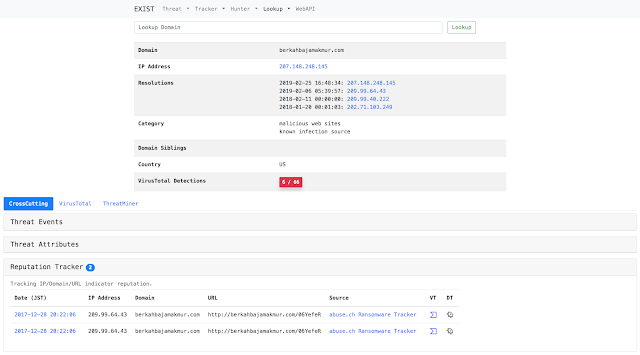
EXIST is a web application for aggregating and analyzing CTI (cyber threat intelligence).
EXIST is written by the following software.
- Python 3.5.4
- Django 1.11.22
Concept
EXIST is a web application for aggregating CTI to help security operators investigate incidents based on related indicators.
EXIST automatically fetches data from several CTI services and Twitter via their APIs and feeds. You can cross-search indicators via the web interface and the API.
If you have servers logging network behaviors of clients (e.g., logs of DNS and HTTP proxy servers, etc.), you will be able to analyze the logs by correlating with data on EXIST. If you implement some programs by using the API, you will realize automated CTI-driven security operation center.

Use Cases
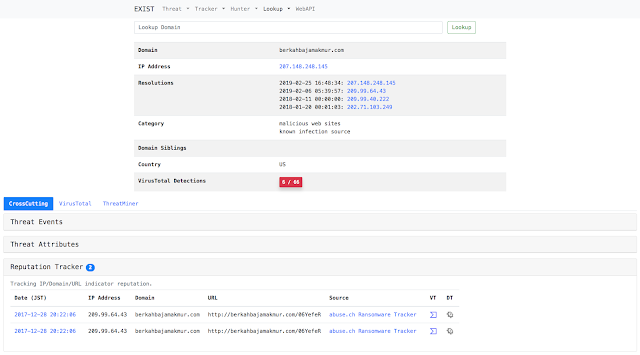
Case1: Investigate domain detected by IDS
Just type domain in the search form.
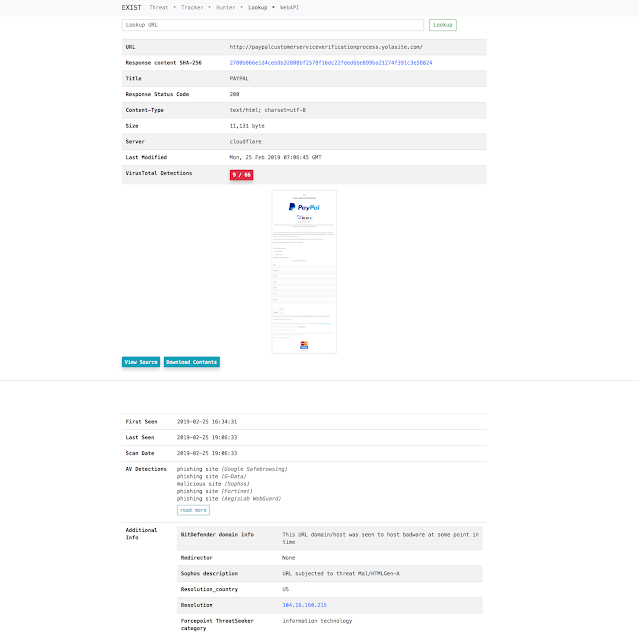
Case2: Access the malicious URL on behalf of the user and acquire the display image of the browser and the contents to be downloaded
Just type url in the search form.
Case3: Monitor cyber threats
Just add keywords in the Threat Hunter or Twitter Hunter.

Features
Tracker
Tracker automatically collects data feeds from several CTI services.
- Threat Tracker
- Reputation Tracker
- Twitter Tracker
- Exploit Tracker
- News Tracker
- Vuln Tracker
Hunter
Hunter enables us to set queries for gathering data from several CTI services and Twitter.
- Twitter Hunter
- Threat Hunter
- News Hunter
Lookup
Lookup retrieves information related to specific information (e.g. IP address, domain) from several internet services (e.g. whois).
- IP Address
- Domain
- URL
- File Hash
Web API
Provide data stored in the EXIST database by Web API.
- reputation
- exploit
- threatEvent
- threatAttribute
- news
- vuln
Getting started
After that I assume the environment of CentOS 7 or Ubuntu 18.04 LTS. Please at your own when deploying to other environment.
Install python modules
$ sudo pip install -r requirements.txtInstall MariaDB
- CentOS 7
$ curl -sS https://downloads.mariadb.com/MariaDB/mariadb_repo_setup | sudo bash
$ sudo yum install MariaDB-server MariaDB-client- Ubuntu 18.04 LTS
$ sudo apt install mariadb-server mariadb-clientRun database
$ sudo systemctl start mariadb
$ sudo systemctl enable mariadb
Database setting
- Create datebase and user.
- Create intelligence/settings.py in reference to intelligence/settings.py.template. And edit according to your DB settings.
Migrate database
$ python manage.py makemigrations exploit reputation threat threat_hunter twitter twitter_hunter news news_hunter vuln
$ python manage.py migrate
Install Redis server
Reputation tracker uses redis as the Celery cache server backend.
- CentOS 7
$ sudo yum install redis
$ sudo systemctl start redis
$ sudo systemctl enable redis- Ubuntu 18.04 LTS
$ sudo apt install redis-server
$ sudo systemctl start redis-server
$ sudo systemctl enable redis-server
Setup Celery
Reputation tracker uses Celery as an asynchronous task job queue.
- Create a celery config. I recommend that the config is set on the following paths:
- CentOS 7: /etc/sysconfig/celery
- Ubuntu 18.04 LTS: /etc/celery.conf
# Name of nodes to start
# here we have a single node
CELERYD_NODES="w1"
# or we could have three nodes:
#CELERYD_NODES="w1 w2 w3"

# Absolute or relative path to the 'celery' command:
CELERY_BIN="/path/to/your/celery"

# App instance to use
# comment out this line if you don't use an app
CELERY_APP="intelligence"
# or fully qualified:
#CELERY_APP="proj.tasks:app"

# How to call manage.py
CELERYD_MULTI="multi"

# Extra command-line arguments to the worker
CELERYD_OPTS="--time-limit=300 --concurrency=8"

# - %n will be replaced with the first part of the nodename.
# - %I will be replaced with the current child process index
# and is important when using the prefork pool to avoid race conditions.
CELERYD_PID_FILE="/var/run/celery/%n.pid"
CELERYD_LOG_FILE="/var/log/celery/%n%I.log"
CELERYD_LOG_LEVEL="INFO"- Create a celery service management script on
/etc/systemd/system/celery.service. Also, you must set your celery config path toEnvironmentFile.
[Unit]
Description=Celery Service
After=network.target

[Service]
Type=forking
User=YOUR_USER
Group=YOUR_GROUP
EnvironmentFile=/etc/sysconfig/celery
WorkingDirectory=/path/to/your/exist
ExecStart=/bin/sh -c '${CELERY_BIN} multi start ${CELERYD_NODES} \
-A ${CELERY_APP} --pidfile=${CELERYD_PID_FILE} \
--logfile=${CELERYD_LOG_FILE} --loglevel=${CELERYD_LOG_LEVEL} ${CELERYD_OPTS}'
ExecStop=/bin/sh -c '${CELERY_BIN} multi stopwait ${CELERYD_NODES} \
--pidfile=${CELERYD_PID_FILE}'
ExecReload=/bin/sh -c '${CELERY_BIN} multi restart ${CELERYD_NODES} \
-A ${CELERY_APP} --pidfile=${CELERYD_PID_FILE} \
--logfile=${CELERYD_LOG_FILE} --loglevel=${CELERYD_LOG_LEVEL} ${CELERYD_OPTS}'

[Install]
WantedBy=multi-user.target- Create Celery log and run directories.
$ sudo mkdir /var/log/celery; sudo chown YOUR_USER:YOUR_GROUP /var/log/celery
$ sudo mkdir /var/run/celery; sudo chown YOUR_USER:YOUR_GROUP /var/run/celery- Create a configuration file in /etc/tmpfiles.d/exist.conf
#Type  Path               Mode  UID        GID         Age  Argument
d /var/run/celery 0755 YOUR_USER YOUR_GROUP -- Run Celery
$ sudo systemctl start celery.service
$ sudo systemctl enable celery.service
Run web server
$ python manage.py runserver 0.0.0.0:8000- Access to http://[YourWebServer]:8000 with your browser.
- WebAPI: http://[YourWebServer]:8000/api/
Note: I recommend to use Nginx and uWSGI when running in production environment.
Collect feed
Scripts for inserting feed into database are scripts/insert2db/*/insert2db.py.
Configure insert2db
- Configuration files are scripts/insert2db/conf/insert2db.conf. Create it in reference to insert2db.conf.template.
- If you use MISP, write MISP URL and API key to insert2db.conf.
- If you use Malshare, write your API key to insert2db.conf.
- Create your Twitter API account in https://developer.twitter.com/ for tracking with EXIST.
- Create an App for EXIST.
- Get Consumer API key (CA), Consumer API secret key (CS), Access token (AT), access token secret (AS).
- Write CA, CS, AT, AS to insert2db.conf.
Run scripts
$ python scripts/insert2db/reputation/insert2db.py
$ python scripts/insert2db/twitter/insert2db.py
$ python scripts/insert2db/exploit/insert2db.py
$ python scripts/insert2db/threat/insert2db.py
$ python scripts/insert2db/news/insert2db.py
$ python scripts/insert2db/vuln/insert2db.py
Note: To automate information collection, write them to your cron.
Setting hunter
Twitter Hunter
Twitter Hunter can detect tweets containing specific keywords and user ID. And you can notify slack if necessary.
- Configuration files are scripts/hunter/conf/hunter.conf. Create it in reference to hunter.conf.template.
- If you use slack, write your slack token to hunter.conf.
- Create your Twitter API account in https://developer.twitter.com/.
- Create 18 Apps for EXIST.
- Get 18 Consumer API key (CA), Consumer API secret key (CS), Access token (AT), access token secret (AS).
- Write CA, CS, AT, AS to auth-hunter[00-18] to hunter.conf.
- Make scripts/hunter/twitter/tw_watchhunter.py run every minute using cron to make Twitter Hunter persistent.
Threat Hunter
Threat Hunter can detect threat events containing specific keywords. And you can notify slack if necessary.
- Configuration files are scripts/hunter/conf/hunter.conf. Create it in reference to hunter.conf.template.
- If you use slack, write your slack token to hunter.conf.
- Make scripts/hunter/threat/th_watchhunter.py run every minute using cron to make Threat Hunter persistent.
Other requirement tools and settings
VirusTotal API
EXIST uses VirusTotal API.
- Create your VirusTotal account.
- Write your API-key to conf/vt.conf.
Note: You get more information if you have private API key.
GeoIP DB
Lookup IP / Domain uses GeoLite2 Database.
- Download GeoIP DB from http://geolite.maxmind.com/download/geoip/database/GeoLite2-City.mmdb.gz
- Write the path to GeoLite2-City.mmdb in your conf/geoip.conf.
wkhtmltopdf and Xvfb
Lookup URL uses wkhtmltopdf and Xvfb.
- Download and install wkhtmltopdf from https://wkhtmltopdf.org/downloads.html
- Install Xvfb.
$ sudo yum install xorg-x11-server-Xvfb$ sudo apt install wkhtmltopdf xvfbFlush old data
- Configuration files are scripts/url/url.conf. Create it in reference to url.conf.template.
- Make scripts/url/delete_webdata.sh run every day using cron to flush old Lookup URL data.
- Make scripts/url/delete_oldtaskresult.sh run every day using cron to flush old Celery data.
SOCIAL SHARE CARD GENERATOR