This is the second in our series of Top 5 interesting cases from 2019. Each of these bugs has some element that sets them apart from the more than 1,000 advisories released by the program this year. Today’s blog looks a local privilege escalation in the Windows kernel-mode driver submitted to the program by Marcin Wiązowski.
As sandboxing programs for security purposes becomes commonplace, sandbox escapes become more important. As such, we’re always looking for these types of bugs. We were especially excited when Marcin Wiązowski submitted this innovative Windows 7 local privilege escalation (LPE) bug, together with a full exploit. The bug was great, and his write-up of the vulnerability and exploit were even better. This blog goes through his analysis of the bug that would eventually become (although another structure name is used there):
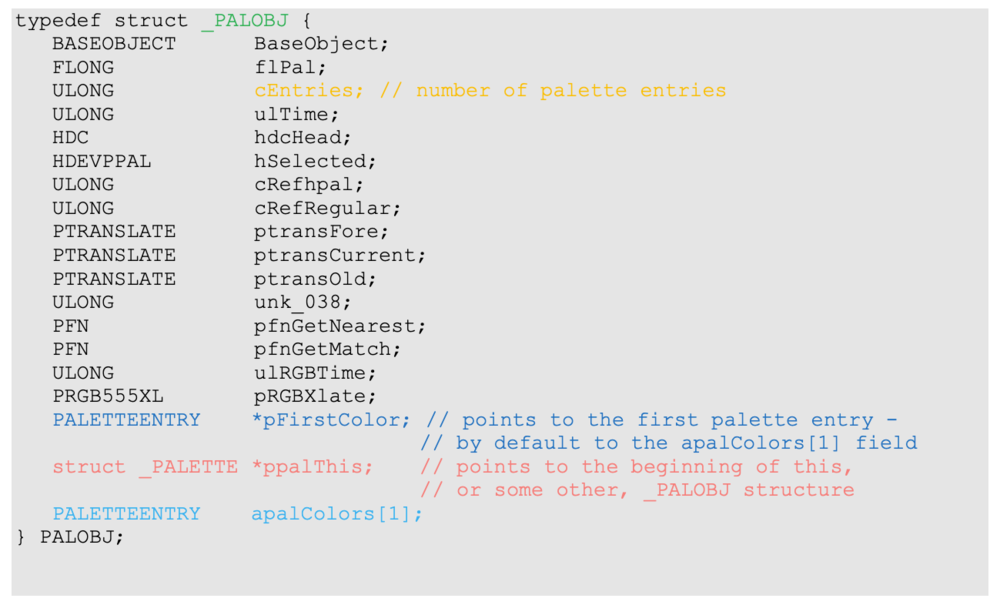
There is a ppalThis pointer in the _PALOBJ structure, which by default points to the structure itself. Palette entries follow the _PALOBJ structure immediately in memory. Note the first entry still belongs to the _PALOBJ structure itself, and is declared as apalColors[1]. The pFirstColor field points to the first palette entry. By default, it just points to the apalColors[1] field.
After making a call to the gdi32.dll!CreateDCA/W API in user mode, a callback from kernel is made to call our hook , the user-mode DrvEnablePDEV function. Then the kernel performs various operations on the data returned to it by the DrvEnablePDEV call. In particular, if the flGraphicsCaps field has the GCAPS_PALMANAGED flag set, the palette returned in the hpalDefault field is used as a template. It is used to create an internal copy of it and this internal copy becomes a device palette. This is performed in a win32k.sys!CreateSurfacePal function, which uses also our ulNumColors and ulNumPalReg values. In the newly-created device palette, the palette entries (that are going to become reserved entries) are initialized by setting their peFlags values to 0x30.
The algorithm of the win32k.sys!CreateSurfacePal function (Algorithm 2) is:
1 - CreateSurfacePal accepts the following parameters:
-- A pointer to the kernel memory of our hpalDefault palette – i.e. pointer to the palette’s _PALOBJ structure in kernel memory. Let’s name this pointer palSrc.
-- ulNumColors (number of reserved entries)
-- ulNumPalReg
2 - Call win32k.sys!PALMEMOBJ::bCreatePalette to create a new palette by using our palSrc palette as a template. The new palette will become a device palette; let’s name it palDst.
3 - Initialize reserved entries in palDst with 0x30 peFlags value. The pseudocode is as follows:
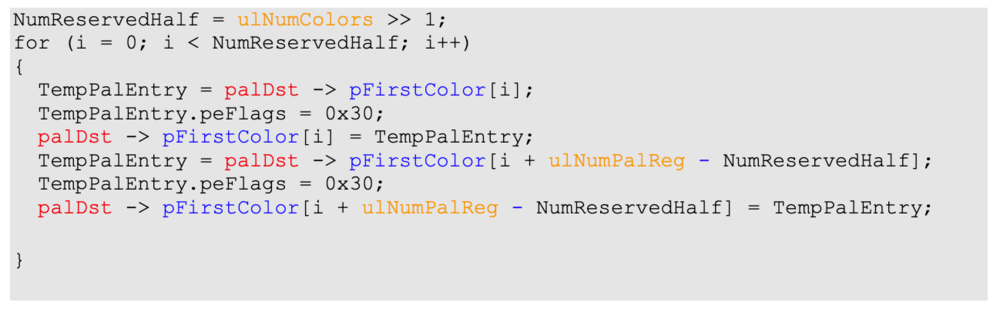
4 - Call win32k.sys!XEPALOBJ::vCopyEntriesFrom, to copy all the palette entries back from palDst to palSrc. On x64, this call is inlined, so only win32k.sys!memmove is called.
5 - Call win32k.sys!XEPALOBJ::ulTime, also inlined on x64, to copy the palSrc->ulTime value to:
-- palDst->ulTime field
-- palDst->ppalThis->ulTime field (only when palDst->ppalThis != palDst).
Under normal circumstances, CreateSurfacePal would be called with parameters as follows:
• hpalDefault being a handle to a palette with 256 entries
• ulNumColors (number of reserved entries) = 20
• ulNumPalReg = 256
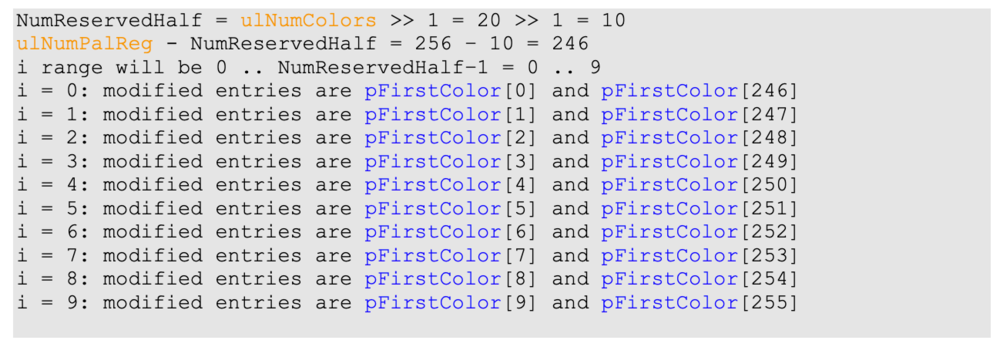
So the code, described in step 3 sets peFlags values to 0x30 in the first 10 and last 10 entries of the palDst palette:
The problem with the code described in step 3 is that the algorithm doesn’t validate the ulNumColors parameter (indicating the number of reserved entries) against the true number of palette entries, which is palSrc -> cEntries. Having hijacked a printer driver in user mode, an attacker can pass an out-of-range ulNumColors value, causing out-of-bounds memory writes.
Assuming the default palette size of 256 entries, the attacker should pass ulNumColors value of 514:
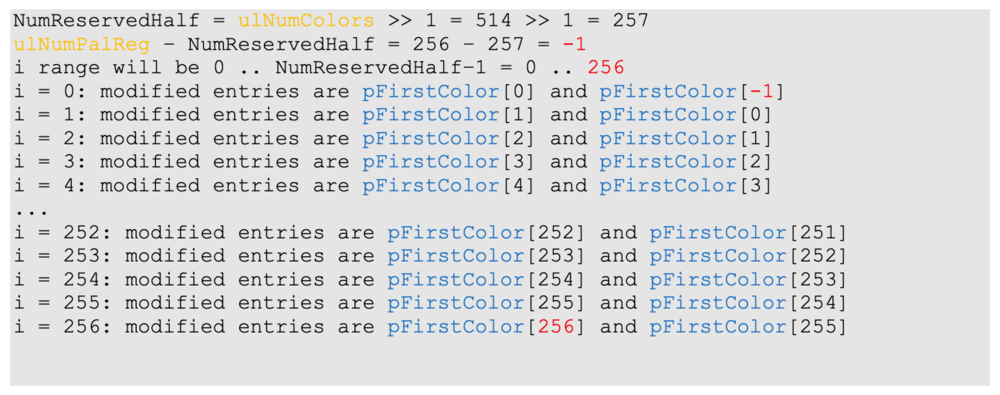
As seen above, one entry below the range and one entry above the range will be modified by setting the highest byte of the PALETTEENTRY record (which is a DWORD) to 0x30.
One entry below the range contains a palDst->ppalThis field, which allows us to alter the ppalThis pointer by setting its highest byte to 0x30.
One entry above the range – fortunately – is always unused. When allocating memory for the palette object, the following calculation is made:
sizeof(_PALOBJ) + sizeof(PALETTEENTRY) * NumberOfEntries
However, the_PALOBJ structure contains one entry (the apalColors[1] field), so one more entry than needed is always allocated.
Exploitation on x86
On x86, palDst->ppalThis is a 4-byte value. By overwriting its highest byte with 0x30, we set it to a value having the form 0x30XXXXXX. This represents a user-mode address. The first usage of the overwritten palDst->ppalThis pointer occurs is in the CreateSurfacePal function itself. It is used to write the ulTime field. This is step 5 of Algorithm 2 described above.
If we want to just crash the operating system, it’s enough to make sure that the entire memory range from 0x30000000 to 0x30ffffff is inaccessible.
We will now consider how this vulnerability can be used to achieve escalation of privilege.
When using a printer driver without any manipulations, the order of operations is as follows:
1 - Application code calls gdi32.dll!CreateDCA/W, which finds and loads a printer driver DLL.
2 - The printer driver DLL creates a template palette by calling gdi32.dll!EngCreatePalette.
3 - The kernel makes a callback to user mode and calls the printer driver’s DrvEnablePDEV function. At this point, DrvEnablePDEV can specify a handle to the template palette to be used. The kernel will use this handle to obtain a pointer to palette’s kernel memory. In CreateSurfacePal, this will be palSrc.
4 - If the DrvEnablePDEV call returned the GCAPS_PALMANAGED flag, the kernel creates a driver palette based on the template palette. In CreateSurfacePal, this will be palDst. In the template palette palSrc, the kernel sets the hSelected field to point to the newly created device palette:
palSrc->hSelected = palDst
5 - Now usual printing actions are performed.
6 - The user calls gdi32.dll!DeleteDC.
7 - The kernel makes a callback to user mode and calls the printer driver’s DrvDisablePDEV function. The printer driver DLL deletes the template palette by calling gdi32.dll!EngDeletePalette. Because the template palette references the device palette in its hSelected field, the device palette (which we also know as palDst) is deleted automatically.
8 - The print driver DLL is unloaded.
Let’s now focus on the “device palette is deleted automatically” part. In practice, the device palette’s palDst -> ppalThis field points to a _PALOBJ record, and it is used as follows:
a: To access the BaseObject field. This field contains a handle to the palDst palette at the beginning of the BaseObject structure. The palette’s handle is passed to win32k.sys!HmgRemoveObject, which requires the palette’s reference counter to be 1. The reference counter is managed internally by the operating system.
b: After the successful call to HmgRemoveObject, the ppalThis pointer is passed to a win32k.sys!FreeObject call, which in turn passes the pointer to win32k.sys!ExFreePoolWithTag to deallocate the object.
By triggering the vulnerability, we are able to redirect the ppalThis pointer to user-mode memory. If at that address we can spoof _PALOBJ structure that is “valid enough”, we can cause this user-mode address to be passed to the ExFreePoolWithTag, which is our goal for further exploitation.
To be “valid enough”, our fake, user-mode _PALOBJ structure must be filled with zeroes, with the following exceptions:
a: The BaseObject field must contain a valid handle to a palette that has its reference counter equal to 1.
b: The ppalThis field must point to the beginning of our fake structure to avoid further recursion in the objection destruction algorithm.
There are two problems to overcome. The first is that the overwritten ppalThis pointer points to some 0x30XXXXXX location, but we don’t know where exactly. Fortunately, it’s enough to fill the entire memory range from 0x30000000 to 0x30ffffff memory range with zeroes in the initial preparation phase. Then, as already described in step 5 of the Algorithm 2, the CreateSurfacePal function will write a non-zero timestamp to the ulTime field by referencing the already overwritten ppalThis pointer. We can then scan the memory range for the non-zero DWORD value. This reveals the exact location of our spoofed user-mode _PALOBJ structure.
The second problem is that the BaseObject field of our fake _PALOBJ structure must contain a handle a palette having its reference counter equal to 1. Under normal circumstances, this should be just a handle to the kernel-created device palette palDst, but we don’t know the handle value of this palette. Fortunately, we can use any other palette instead. The question then becomes where to obtain a palette with reference counter equal to 1. Interestingly, such a palette can be obtained by using our hooked printer driver DLL one more time. We can make a second call to gdi32.dll!CreateDCA/W and pass a newly-created template palette to the kernel, this time without performing any additional manipulations. After returning from the CreateDCA/W call, our template palette will have its reference counter equal to 1 as long as we don’t call gdi32.dll!DeleteDC. We can now place the handle of this palette in the BaseObject field of our fake _PALOBJ structure.
We are now able to pass an address of our user-mode _PALOBJ structure to the kernel ExFreePoolWithTag call, which is definitely an unusual situation. Under normal circumstances, ExFreePoolWithTag handles only blocks of kernel memory. By surrounding our fake user-mode _PALOBJ structure by two fake pool headers, we can trick the ExFreePoolWithTag internals into writing a semi-controlled value to a fully controlled kernel memory address. This is, of course, exactly what we want to do.
The ExFreePoolWithTag function works on blocks of so-called pool memory. Describing all the details of pool memory exploitation would be far beyond the scope of this blog, and furthermore, it couldn’t be done better than it was already done in the classic work “Kernel Pool Exploitation on Windows 7” by :
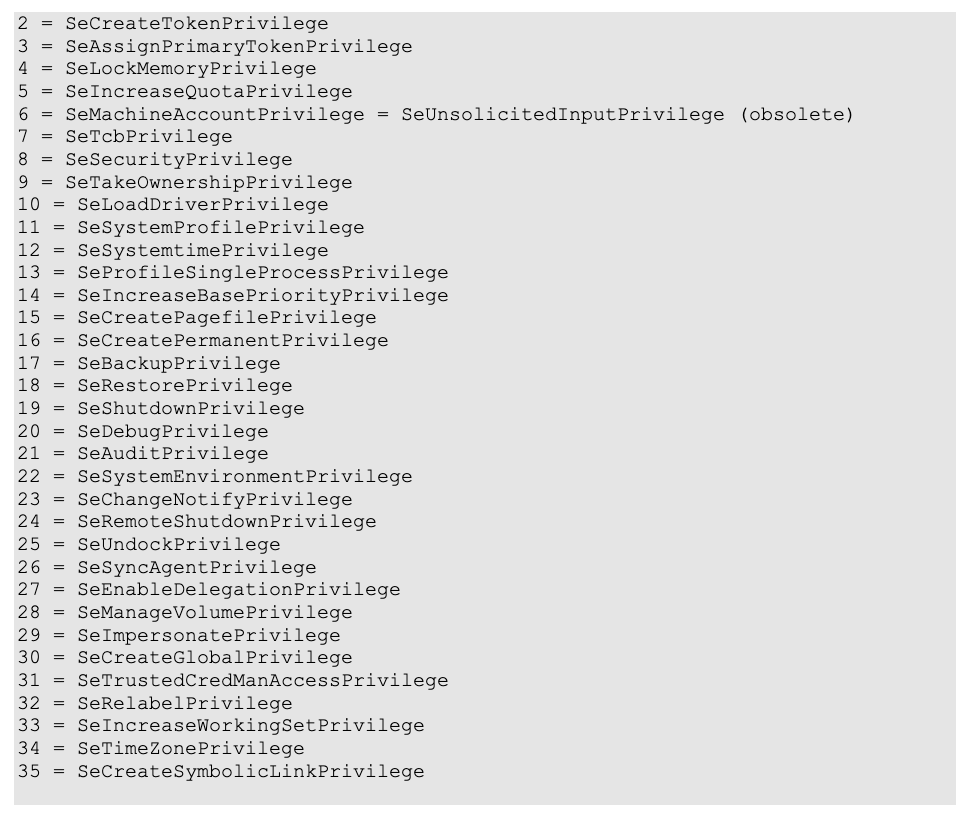
These privileges may be present or absent. They may also be enabled or disabled. A privilege that is present in the token may get disabled and then reenabled again. It may be also removed, so it becomes absent and cannot be made present anymore so that a process cannot elevate its privileges. Making privileges present is possible only during creation of the token, and creating a token is available only for highly privileged system processes that hold SeCreateTokenPrivilege and SeSecurityPrivilege. If a process is privileged to create a token, it can create a token with any privileges that it wants. Such privileges can be used later to launch a process as any user.
To exploit the vulnerability, a kernel address of a token structure must be obtained. To achieve this, a handle to the token must be obtained first by calling advapi32.dll!OpenProcessToken. Then the internal API ntdll.dll!NtQuerySystemInformation can be used to obtain the kernel address of the token structure. The simplified token’s structure is:

The Privileges_Present field is a 64-bit bitfield that determines present and absent privileges. Currently, only privileges from 2 to 35 are defined, so only these bits are in normal use.
The Privileges_Enabled field is a 64-bit bitfield that determines which present privileges are enabled and which are disabled.
To elevate privileges, we’ll set the pFirstColor field of PaletteHI to point to the TOKEN.Privileges_Present field. Then we’ll call gdi32.dll!SetPaletteEntries on PaletteHI to write to four consecutive palette entries with indices from 0 to 3. The new contents of these palette entries should contain all bits set to 1. This will make all privileges present and enabled. Setting undefined privileges doesn’t cause any problems, although they can be removed by using advapi32.dll!AdjustTokenPrivileges.
Now we have all possible privileges, but still some things we cannot do, as we are still a standard user. The next step is to make use of the SeCreateTokenPrivilege and SeSecurityPrivilege privileges we now have. Using these privileges, we can create any token we want using the undocumented API ntdll.dll!NtCreateToken. In fact, we can create a token representing the most powerful SYSTEM user with all privileges present – a more powerful token than usual SYSTEM tokens. The operating system itself uses SYSTEM tokens, that have some privileges absent. Then, having the most powerful token and also the SeAssignPrimaryTokenPrivilege privilege, we can use advapi32.dll!CreateProcessAsUserW to create the most powerful process that can exist.
Since we have also a SeTcbPrivilege, we can change the SessionId field of the newly-created token. It is set to 0 by default, so a process created by using this token works like system services and cannot interact with a desktop. After setting the token’s SessionId to the SessionId of some logged-in user, the newly created process can draw windows on the user’s desktop. This is nice for demonstration purposes, although it is not required to seize the operating system.
64-bit Exploitation
On 64-bit systems, the palDst -> ppalThis pointer is an 8-byte value. By overwriting its highest byte with 0x30, we set it to a value of the form 0x30XXXXXX’XXXXXXXX value. Current hardware implementations of the 64-bit architecture support only 48 bits for addressing, and the most significant 16 bits of the virtual address (bits 48 through 63) must be copies of bit 47. As a consequence, the highest 16 bits must be either all 0s or all 1s. By setting highest byte to 0x30, we break this rule, which causes an exception and crash. This means that on 64-bit systems the vulnerability can be exploited only for DoS.
Potentially, it might be possible to exploit this vulnerability for elevation of privileges on Itanium machines with Windows Server installations.
Changes in Windows 8 and Above
According to disassembled win32k.sys (Windows 8 and 8.1) or win32kbase.sys (Windows 10), the vulnerability in CreateSurfacePal function doesn’t exist. The value passed from user mode is verified properly.
It’s also worth noting that since Windows 10 Version 1607 (Redstone 1 “Anniversary Update”), the GDICELL. KernelAddress field no longer holds a direct pointer to kernel memory. You can read more on this in “. The accompanying bulletin simply states the problem was fixed by “correcting how the Windows kernel-mode driver handles objects in memory.” In all likelihood, the patch backports the behavior from Windows 8 since that version of the OS is not affected.
Conclusion
Thanks again to Marcin Wiązowski for providing such a thorough and well-documented analysis of this LPE. It’s easy to see why this bug (and its analysis) stood out from others when looking back at 2019.
These types of bugs are often combined with other vulnerabilities to forge a complete exploit chain. A similar LPE was recently seen in the wild alongside a use-after-free in Chrome targeting Korean news sites. Although the LPE itself isn’t thought to have critical severity, the pairing with other remote code execution bugs makes for an effective attack.
Stay tuned for the next Top 5 bug blog, which will be released tomorrow. Until then, follow the team for the latest in exploit techniques and security patches.

SOCIAL SHARE CARD GENERATOR