
Zum Hauptinhalt springen
Intelligence View
⚡ tsecurity.de Intelligence

AI ตรวจจับใบหน้าด้วย OpenCV แบบเรียลไทม์: เริ่มต้นง่าย ๆ ด้วย Python

สวัสดีค่ะ ! บทความนี้เราจะพาไปรู้จักกับการใช้ OpenCV (Open Source Computer Vision Library) เพื่อใช้ในการตรวจจับใบหน้าแบบเรียลไทม์ผ่านกล้องเว็บแคมกัน โดยเราจะใช้…

Beitrag
0
Seite
0
↗ Quelle (dev.to)
Cloud & Tech-Stack · 2 Min. Lesezeit
Quelle: dev.to
Rubrik: Secure Programming

สวัสดีค่ะ !

บทความนี้เราจะพาไปรู้จักกับการใช้ OpenCV (Open Source Computer Vision Library) เพื่อใช้ในการตรวจจับใบหน้าแบบเรียลไทม์ผ่านกล้องเว็บแคมกัน


โดยเราจะใช้เทคนิค Haar Cascade Classifier ซึ่งเป็นหนึ่งในโมเดลคลาสสิกของ Computer Vision ที่สามารถใช้ได้รวดเร็วและเบาเครื่อง เหมาะสำหรับผู้เริ่มต้น AI และ Deep Learningมากๆเลยค่ะ เพราะทั้งสะดวกและไม่ซับซ้อนด้วย


ตัวอย่างCODE


import cv2


face_cascade = cv2.CascadeClassifier(cv2.data.haarcascades + 'haarcascade_frontalface_default.xml')


cap = cv2.VideoCapture(0)

while True:

ret, frame = cap.read()
gray = cv2.cvtColor(frame, cv2.COLOR_BGR2GRAY) # แปลงภาพเป็นขาวดำ


faces = face_cascade.detectMultiScale(gray, 1.1, 4)


for (x, y, w, h) in faces:
cv2.rectangle(frame, (x, y), (x+w, y+h), (0, 255, 0), 2)


cv2.imshow('Face Detection', frame)


if cv2.waitKey(1) & 0xFF == ord('q'):
break


cap.release()
cv2.destroyAllWindows()


🔍 โค้ดนี้เราใช้ทำอะไร ทำงานอย่างไร?


อันดับแรกนะคะโปรแกรมจะใช้กล้องเว็บแคมเพื่อจับภาพ


จากนั้นจึงตรวจสอบว่ามี “หน้า” ปรากฏอยู่หรือไม่


และสุดท้ายถ้ามีหน้าก็วาดกรอบสีเขียวรอบใบหน้าแบบเรียลไทม์นั่นเองค่ะ


ตัวอย่างภาพ
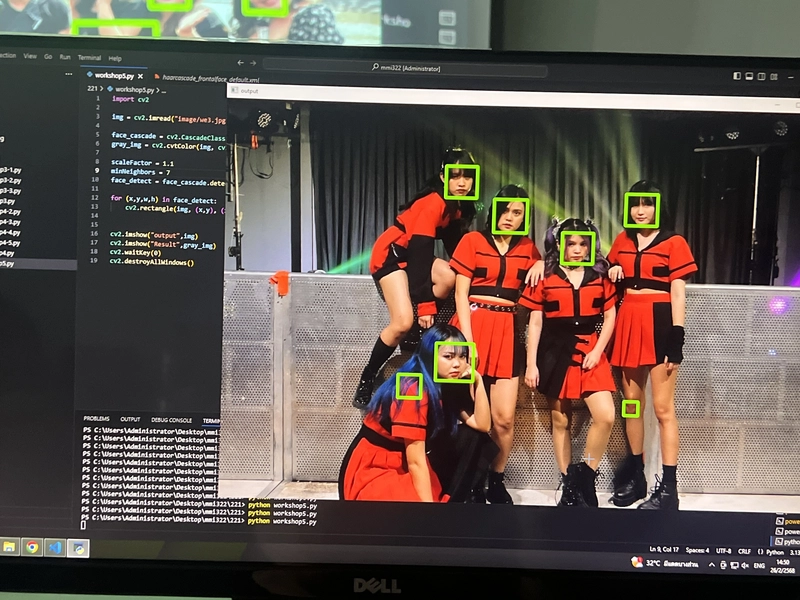


Image description


โค้ดนี้คือการใช้ OpenCV ตรวจจับใบหน้า (Face Detection) แบบเรียลไทม์จาก กล้องเว็บแคม โดยใช้ Haar Cascade Classifier


import cv2


นำเข้าไลบรารี OpenCV ซึ่งใช้ในการประมวลผลภาพและวิดีโอ


face_cascade = cv2.CascadeClassifier(cv2.data.haarcascades + 'haarcascade_frontalface_default.xml')


โหลดโมเดลสำหรับตรวจจับใบหน้าที่ชื่อว่า Haar Cascade Frontal Face


โมเดลนี้คือ .xml ไฟล์ที่ฝึกมาแล้วให้รู้ว่า "ใบหน้า" มีลักษณะอย่างไร


มันทำงานโดยการ สแกนภาพทีละกรอบเล็ก ๆ แล้วประเมินว่าเป็นหน้าคนไหม


cap = cv2.VideoCapture(0)


เปิดกล้องเว็บแคม (อุปกรณ์ที่ index = 0 คือกล้องหลักของเครื่อง)


while True:
ret, frame = cap.read()


เริ่มลูปไม่รู้จบ เพื่ออ่านวิดีโอทีละเฟรม


ret = ผลลัพธ์ว่าอ่านสำเร็จหรือไม่ (True/False)


frame = ภาพจากกล้องในขณะนั้น


    gray = cv2.cvtColor(frame, cv2.COLOR_BGR2GRAY)


แปลงภาพจากสี (BGR) เป็นขาวดำ (Grayscale)

→ เพื่อให้โมเดลทำงานเร็วขึ้น เพราะมันไม่ต้องประมวลผลสี


    faces = face_cascade.detectMultiScale(gray, 1.1, 4)


ตรวจจับ "ใบหน้า" บนภาพ grayscale


1.1 = scale factor → ขยายภาพทีละนิด (ช่วยหาใบหน้าในหลายขนาด)


4 = minNeighbors → ยิ่งมากยิ่งลด false positive (ค่าแนะนำ 3-6)


ผลลัพธ์คือ ลิสต์ของกรอบใบหน้า ที่เจอในภาพ (x, y, w, h)


    for (x, y, w, h) in faces:
cv2.rectangle(frame, (x, y), (x+w, y+h), (0, 255, 0), 2)


วาดกรอบสีเขียว (RGB = (0, 255, 0)) รอบใบหน้าที่ตรวจเจอ


(x, y) คือมุมบนซ้ายของกรอบ


(x+w, y+h) คือมุมล่างขวาของกรอบ


2 คือความหนาของเส้น


    cv2.imshow('Face Detection', frame)


แสดงผลวิดีโอที่วาดกรอบใบหน้าแล้ว ผ่านหน้าต่างชื่อว่า Face Detection


    if cv2.waitKey(1) & 0xFF == ord('q'):
break


ถ้าผู้ใช้กดปุ่ม q จะ หยุดการทำงานของลูป


waitKey(1) = รอ 1 มิลลิวินาทีต่อเฟรมเพื่อดูว่ามี key ถูกกดไหม


ord('q') = เช็คว่าเป็นตัว q รึเปล่า


cap.release()
cv2.destroyAllWindows()


หลังจบการทำงาน:


cap.release() ปิดการเชื่อมต่อกับกล้อง


cv2.destroyAllWindows() ปิดหน้าต่างที่เปิดโดย OpenCV


นี่เป็นพื้นฐานของการตรวจจับใบหน้าง่ายๆค่ะ นอกจากนี้เราสามารถนำพื้นฐานเหล่านี้ไปประยุกต์ได้หลากหลาย เช่นการตรวจจับอารมณ์หรือรอยยิ้ม ก็ทำได้อย่างง่าย เพียงแค่เพิ่มโค้ด


 # วาดกรอบใบหน้า
cv2.rectangle(frame, (x, y), (x+w, y+h), (0, 255, 0), 2)

# ตรวจจับรอยยิ้ม
smiles = smile_cascade.detectMultiScale(roi_gray, scaleFactor=1.7, minNeighbors=20)
for (sx, sy, sw, sh) in smiles:
cv2.putText(frame, "Smile 😊", (x, y - 10), cv2.FONT_HERSHEY_SIMPLEX, 0.7, (255, 200, 0), 2)
break


แต่ว่าทุกคนต้องติดตั้งเวอร์ชัน Advanced (Face + Smile + Age/Gender + Emotion) สำหรับ0penCVกันก่อนนะคะ !


pip install opencv-python opencv-contrib-python deepface


ตัวอย่างการใช้งานจริง


สถานการณ์ตัวอย่าง:


นำไปใช้ในระบบความปลอดภัย เช่น กล้องวงจรปิด


สร้างระบบเช็คชื่อด้วยใบหน้าในห้องเรียน


ใช้ตรวจจับใบหน้าในแอปพลิเคชันเพื่อทำ Face Filter หรือวัดอารมณ์


Image description


หวังว่าทุกคนจะได้รับความรู้และประสบการณ์ที่ดีจากบทความนี้นะคะ หวังว่าแนวทางแนะนำการใช้ OpenCV และ Haar Cascade เพื่อทำ Face Detection แบบเรียลไทม์ ด้วยโค้ดเพียงไม่กี่บรรทัด จะเป็นจุดเริ่มต้นสู่การพัฒนาแอปพลิเคชันด้าน AI และ Computer Vision ที่นำไปใช้งานจริงได้หลากหลายให้กับทุกๆคน และสุดท้ายนี้เราสามารถเพิ่มลูกเล่นเช่น ตรวจจับรอยยิ้ม, ดวงตา หรือแม้แต่ใส่ filter แบบ IG ก็ได้นะ ถ้าทุกคนอยาก level up ต่อไป 🤖✨


References


OpenCV Website : OpenCV

Haar Cascade XML Classifiers : github

(ชุดโมเดลสำหรับตรวจจับใบหน้า รอยยิ้ม ดวงตา และยังมีโมเดลตัวอื่นๆให้ลองศึกษาและใช้ฟรีด้วยนะ)

Social ReaktionenReagiere als Erste:r — dein Feedback zählt!
Informations-Bewertung:
✏️ Information ergänzen
🛡️ Versioniert via CMS-Revisions-Engine (Freigabe-Queue für Gäste)

💬 Community discussion & comments

🌐 Join the main chat

Start the discussion in the Social Chat broadcast stream or submit an expert contribution via the supplement form above.

Security Briefing Free · 1-Click Unsubscribe

Intelligence Digest — free

The top security news daily · unsubscribe anytime

Community Rating & Social Proof
⭐ Reader Rating
–
Ø / 5.0
No reader ratings yet
Was this article helpful?
0
Submit your rating
Detailed rating (optional)
Content & Quality
Source & Credibility
Freshness

Related story clusters & sources (vector AI)

6 Cluster
18 sources
Black Friday bei VZMore: Bis 600 Euro Rabatt auf Power-Mini-PCs
WinFuture News 50 min. ago
17 more sources
Latest from TechRadar1 hour agoThe best Black Friday turntable deals, as picked by an audio editor Latest from TechRadar17 min. ago40+ best Black Friday deals in the UK — Switch 2, Shark vacuums, iPhone 18, Lego, PS5 bundles, Samsung, LG OLED TVs, and more CNET12 days agoUpgrade Your Home Security for Less. Score Up to 65% Off With These Black Friday Ring Deals Giga.de1 hour agoVor Black Friday zu viel bezahlt? Mit einem Trick könnt ihr doch noch sparen t3n.de30 min. agoBlack Friday: Diese Samsung-Angebote bei Amazon und Media Markt lohnen sich netzwelt.de2 hours agoBlack-Friday-Kracher: Huawei-Smartwatch mit EKG für unter 150 Euro Golem.de50 min. agoAnzeige: Sony WH-1000XM6 Referenz-Kopfhörer am Black Friday zum Amazon-Bestpreis Macerkopf.de1 hour agoAmazon Black Friday: Apple Pencil, WISO Steuer 2027, Microsoft 365, iPhone 18 Cases und mehr PC-WELT31 min. agoLeistungsstarker Mini-PC mit Intel Core Ultra 9: VZMORE iX9 Max erstmals unter 760 Euro Golem.de1 hour agoAnzeige: Fahrradcomputer von Garmin zum Black Friday reduziert bei Amazon CNET13 days agoGet up to 50% off Select Alexa Devices With Amazon’s Black Friday Upgrade Deal CNET5 days agoBlack Friday Is Knocking Hundreds Off Apple’s iPads, and There’s Plenty to Choose From TechRepublic3 hours agoAmazon Cuts Google Pixel 11 Pro to $749 for Black Friday Golem.de2 hours agoVideostreaming und Black Friday: Apple TV ein halbes Jahr lang zum halben Preis auch auf Amazon Golem.de2 hours agoAnzeige: Smartwatch von Fitbit als Black Friday Deal zum halben Preis bei Media Markt appgefahren.de2 hours agoBaseus U2 Pro Sicherheitskamera: Black Friday-Deal mit über 50 Prozent Rabatt Google Alert5 hours agoFakeshops am Black Friday: Diese Tipps gibt das BSI - it-daily.net
17 sources
CVE-2026-99707 | Linux Kernel up to 6.12.117/6.18.63/7.3.4/7.4-rc1 khugepaged collapse_file use after free
VulDB Updates 1 hour ago
16 more sources
VulDB Updates1 hour agoCVE-2026-99728 | Linux Kernel up to 7.3.4/7.4-rc1 Deferred Split Scan mm/huge_memory deferred_split_scan/deferred_split_folio race condition VulDB Updates1 hour agoCVE-2026-99715 | Linux Kernel up to 7.3.4/7.4-rc1 nvme-rdma nvme_rdma_queue_rq null pointer dereference VulDB Updates1 hour agoCVE-2026-99730 | Linux Kernel up to 6.12.117/6.18.63/7.3.4/7.4-rc1 Filemap mm/filemap.c filemap_fault race condition VulDB Updates1 hour agoCVE-2026-99724 | Linux Kernel up to 7.3.4/7.4-rc1 NTFS ntfs_read_compressed_block out-of-bounds VulDB Updates1 hour agoCVE-2026-99725 | Linux Kernel up to 6.12.117/6.18.63/7.3.4/7.4-rc1 CIPSO cipso_v4_delopt buffer overflow VulDB Updates1 hour agoCVE-2026-99735 | Linux Kernel up to 6.12.117/6.18.63/7.3.4/7.4-rc1 MGLRU mm/mglru.c walk_pud_range/walk_pmd_range race condition VulDB Updates1 hour agoCVE-2026-99744 | Linux Kernel up to 6.12.117/6.18.63/7.3.4/7.4-rc1 atl1c atl1c_clean_rfd length buffer overflow VulDB Updates1 hour agoCVE-2026-99746 | Linux Kernel up to 7.3.4/7.4-rc1 ASoC hda_sdw_bpt_close race condition VulDB Updates1 hour agoCVE-2026-99690 | Linux Kernel up to 6.12.117/6.18.63/7.3.4/7.4-rc1 ocfs2 ocfs2_get_dentry_osb use after free VulDB Updates1 hour agoCVE-2026-99678 | Linux Kernel up to 6.12.117/6.18.63/7.3.4/7.4-rc1 XFS xfs_iomap_write_direct integer overflow VulDB Updates1 hour agoCVE-2026-99680 | Linux Kernel up to 6.12.117/6.18.63/7.3.4/7.4-rc1 XFS xfs_fs_map_blocks allocation of resources VulDB Updates1 hour agoCVE-2026-99688 | Linux Kernel up to 6.12.117/6.18.63/7.3.4/7.4-rc1 sch_qfq net/sched/sch_qfq.c qfq_change_class use after free VulDB Updates1 hour agoCVE-2026-99679 | Linux Kernel up to 7.3.4/7.4-rc1 xfs xfs_iomap_write_unwritten allocation of resources VulDB Updates1 hour agoCVE-2026-99686 | Linux Kernel up to 6.18.63/7.3.4/7.4-rc1 vhost vhost_add_used_n_in_order integer overflow VulDB Updates1 hour agoCVE-2026-99697 | Linux Kernel up to 6.12.117/6.18.63/7.3.4/7.4-rc1 memcontrol high_work_func use after free VulDB Updates1 hour agoCVE-2026-99685 | Linux Kernel up to 6.12.117/6.18.63/7.3.4/7.4-rc1 iommu/virtio viommu_probe use after free
Similar posts
🔍 Verwandte News

Auch interessante Nachrichten AI ตรวจจับใบหน้าด้วย OpenCV แบบเรียลไทม์: เริ่มต้นง่าย ๆ ด้วย Python

Thematisch verwandte Begriffe: ตรวจจบใบหนาดวย, OpenCV, แบบเรยลไทม, เรมตนงาย · 6 Treffer

Laden...

Loading videos ...

Laden...

Loading posts ...

Laden...

Loading videos ...

Laden...

Loading posts ...

Laden...

Loading videos ...

Laden...

Loading posts ...

Laden...

Loading videos ...

Laden...

Loading posts ...

Laden...

Loading videos ...

💬 Loading comments…
Pull to refresh
Widgets & Topics
Loading widgets…
Nächster Beitrag