Start small and scale up to your most demanding workloads on Azure SQL Database Hyperscale. Run serverless compute that scales with demand and auto-pauses, so you stop paying for idle compute. Pool databases across tenants or business units and run cross-database joins and transactions natively.
Build AI apps on the same SQL engine. Store relational data, JSON and vectors together, run hybrid vector search across more than 1 billion rows with DiskANN indexes, and move read-heavy workloads to named replicas with no data copy. Connect Foundry agents through a SQL MCP Server, control their access down to the individual cell, and turn on automatic index compaction to keep queries running at speed.
Bob Ward, Principal Architect, SQL, shares how to size and deploy the right Hyperscale configuration from a single prompt with a GitHub Copilot skill in VS Code.
👥 Who it's for:
DBAs, database developers and app developers building on Azure SQL, plus solution architects planning multi-tenant, high-scale or AI-powered workloads.
⏱️ Chapters:
00:00 Run small to massive workloads on Hyperscale
00:56 How Hyperscale's distributed layers scale independently
02:01 No separate SQL Server license required
02:37 Size and deploy with a GitHub Copilot skill
03:27 Serverless compute scales up and down
03:58 Auto-pause stops billing for idle compute
04:34 Share capacity across databases with elastic pools
06:28 Cross-database joins and remote transactions
07:15 Store relational data, JSON and vectors together
07:38 Hybrid vector search with reciprocal rank fusion
08:38 Search 1 billion+ rows in milliseconds
09:12 Offload reads to named replicas, no data copy
10:04 Build Foundry agents with a SQL MCP Server
11:07 Control agent access down to the cell
11:36 Automatic index compaction for faster queries
13:16 Try the Copilot skill and go deeper
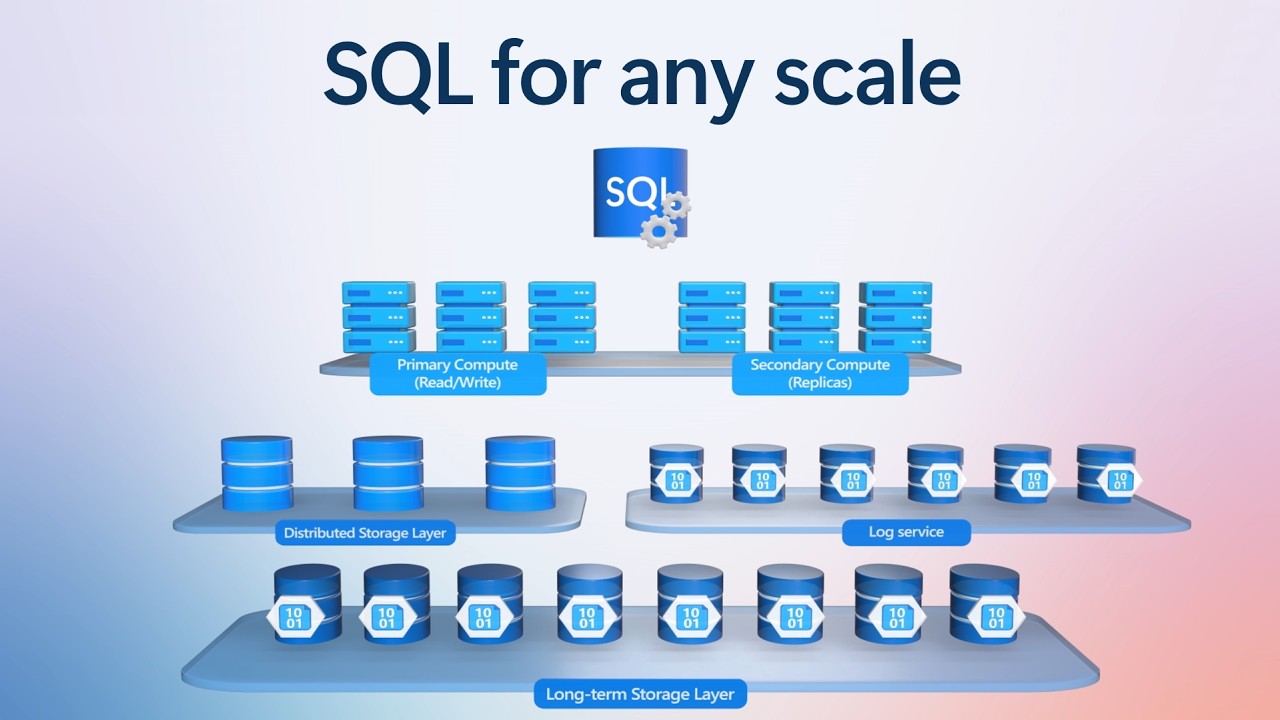
Azure SQL Database Hyperscale is a fully managed, cloud-native SQL database built on the familiar SQL Database engine. Compute, page servers, a log service and long-term Azure Storage each run as separate layers that scale independently, with storage up to 128 TB and zone redundancy for automatic failover. The name describes room to grow, not a minimum size. Hyperscale provisions in minutes, updates continuously and needs no separate SQL Server license.
The demo takes a patient scheduling app from a single serverless database to a three-clinic elastic pool sharing 24 vCores. Cross-database views find open appointments across every clinic, and remote transactions keep bookings consistent end to end.
On the AI side, a biomedical evidence explorer runs hybrid vector and keyword search, merges the results with reciprocal rank fusion, and then scales to 192 vCores and about 8 TB. Up to 30 named replicas share the primary's page servers and vector index, spin up in minutes, and take search and reporting load off the primary. A research agent in the Foundry Agent Service uses a SQL MCP Server to search evidence, compare sources and write up a briefing.
Automatic index compaction, which you enable with ALTER DATABASE in SSMS, uses background tasks to compact sparse index pages. The result is fewer logical reads and faster dashboards.
🔗 Related links:
— Try the Azure SQL Hyperscale configuration skill at https://aka.ms/SQLHyperscaleMechanics
— Get started at https://aka.ms/SQLHyperscale
— Read Bob Ward’s book on Hyperscale at https://aka.ms/sqlhyperscaleunveiled
► Unfamiliar with Microsoft Mechanics?
Microsoft’s Official Video Series for IT
— Subscribe https://www.youtube.com/c/MicrosoftMechanicsSeries
— Microsoft Tech Community: https://techcommunity.microsoft.com/t5/microsoft-mechanics-blog/bg-p/MicrosoftMechanicsBlog
— Podcast: https://microsoftmechanics.libsyn.com/podcast
►Join us on social:
— https://twitter.com/MSFTMechanics
— https://www.linkedin.com/company/microsoft-mechanics/
— https://www.instagram.com/msftmechanics/
— https://www.tiktok.com/@msftmechanics
#AzureSQL #Hyperscale #VectorSearch #Serverless
Build AI apps on the same SQL engine. Store relational data, JSON and vectors together, run hybrid vector search across more than 1 billion rows with DiskANN indexes, and move read-heavy workloads to named replicas with no data copy. Connect Foundry agents through a SQL MCP Server, control their access down to the individual cell, and turn on automatic index compaction to keep queries running at speed.
Bob Ward, Principal Architect, SQL, shares how to size and deploy the right Hyperscale configuration from a single prompt with a GitHub Copilot skill in VS Code.
👥 Who it's for:
DBAs, database developers and app developers building on Azure SQL, plus solution architects planning multi-tenant, high-scale or AI-powered workloads.
⏱️ Chapters:
00:00 Run small to massive workloads on Hyperscale
00:56 How Hyperscale's distributed layers scale independently
02:01 No separate SQL Server license required
02:37 Size and deploy with a GitHub Copilot skill
03:27 Serverless compute scales up and down
03:58 Auto-pause stops billing for idle compute
04:34 Share capacity across databases with elastic pools
06:28 Cross-database joins and remote transactions
07:15 Store relational data, JSON and vectors together
07:38 Hybrid vector search with reciprocal rank fusion
08:38 Search 1 billion+ rows in milliseconds
09:12 Offload reads to named replicas, no data copy
10:04 Build Foundry agents with a SQL MCP Server
11:07 Control agent access down to the cell
11:36 Automatic index compaction for faster queries
13:16 Try the Copilot skill and go deeper
Azure SQL Database Hyperscale is a fully managed, cloud-native SQL database built on the familiar SQL Database engine. Compute, page servers, a log service and long-term Azure Storage each run as separate layers that scale independently, with storage up to 128 TB and zone redundancy for automatic failover. The name describes room to grow, not a minimum size. Hyperscale provisions in minutes, updates continuously and needs no separate SQL Server license.
The demo takes a patient scheduling app from a single serverless database to a three-clinic elastic pool sharing 24 vCores. Cross-database views find open appointments across every clinic, and remote transactions keep bookings consistent end to end.
On the AI side, a biomedical evidence explorer runs hybrid vector and keyword search, merges the results with reciprocal rank fusion, and then scales to 192 vCores and about 8 TB. Up to 30 named replicas share the primary's page servers and vector index, spin up in minutes, and take search and reporting load off the primary. A research agent in the Foundry Agent Service uses a SQL MCP Server to search evidence, compare sources and write up a briefing.
Automatic index compaction, which you enable with ALTER DATABASE in SSMS, uses background tasks to compact sparse index pages. The result is fewer logical reads and faster dashboards.
🔗 Related links:
— Try the Azure SQL Hyperscale configuration skill at https://aka.ms/SQLHyperscaleMechanics
— Get started at https://aka.ms/SQLHyperscale
— Read Bob Ward’s book on Hyperscale at https://aka.ms/sqlhyperscaleunveiled
► Unfamiliar with Microsoft Mechanics?
Microsoft’s Official Video Series for IT
— Subscribe https://www.youtube.com/c/MicrosoftMechanicsSeries
— Microsoft Tech Community: https://techcommunity.microsoft.com/t5/microsoft-mechanics-blog/bg-p/MicrosoftMechanicsBlog
— Podcast: https://microsoftmechanics.libsyn.com/podcast
►Join us on social:
— https://twitter.com/MSFTMechanics
— https://www.linkedin.com/company/microsoft-mechanics/
— https://www.instagram.com/msftmechanics/
— https://www.tiktok.com/@msftmechanics
#AzureSQL #Hyperscale #VectorSearch #Serverless