
Quick off the mark from previous 10 year anniversary, Kali Linux 2023.2 is now here. It is ready for immediate download or upgrading if you have an existing Kali Linux installation.
The changelog highlights over the last few weeks since March’s release of 2023.1 is:
- New VM image for Hyper-V - With “Enhanced Session Mode” out of the box
- Xfce audio stack update: enters PipeWire - Better audio for Kali’s default desktop
- i3 desktop overhaul - i3-gaps merged with i3
- Desktop updates - Easy hashing in Xfce
- GNOME 44 - Gnome Shell version bump
- Icons & menus updates - New apps and icons in menu
- New tools - As always, various new packages added
New Hyper-V VM Image
With this release, we welcome a new member in the family of pre-built VM images! We now provide an image for Microsoft Hyper-V.
For those familiar with the matter, let’s jump straight into the details. This is a GEN2 image for Hyper-V, pre-configured for Enhanced Session Mode. All you need to do is to download the image, unpack it, then run the script install-vm.bat. Afterwards open the Hyper-V Manager and start the VM. Hyper-V should automatically propose to connect via Enhanced Session Mode (aka. xRDP over HvSocket), thereby greatly improving the user experience.

Before that, enabling Enhanced Session Mode required some manual steps, both on Windows and in the Kali VM, and it was not super easy. We hope that this new images provides a better out-of-the box experience for Hyper-V users. In fact, there should now be zero configuration required.
More details about this new image can be found in our documentation, on the page Import Pre-Made Kali Hyper-V VM.
Xfce & PipeWire
With this release, we changed the audio stack for Kali’s default desktop: PipeWire now replaces PulseAudio.
Some background information: PipeWire is a “server for handling audio, video streams, and hardware on Linux”. It was initially released in 2017, is actively developed, and is poised to become the de-facto sound server in pretty much every Linux distribution out there, therefore replacing PulseAudio. The GNOME desktop already uses PipeWire by default in most Linux distributions, including Kali Linux since version 2022.4 . Most users never noticed the change.
But let’s get back to Kali’s default desktop environment: Xfce. Xfce does not really “support” PipeWire per se, but it does not need to. PipeWire provides a compatibility layer, under the form of the pipewire-pulse daemon. And that’s what make the magic happens: applications that were meant to work with PulseAudio keep working as if nothing happened, blissfully unaware of the change.
We do not expect any issue with this transition, actually we expect the opposite, some well-known issues should be fixed, sound should work better overall.
What should you do about it? Nothing special. For users who upgrade their Kali installation though, a reminder: the right command to upgrade your system is sudo apt update && sudo apt full-upgrade. Let us put the emphasis on full-upgrade, rather than upgrade: it matters.
Should this change cause any problem with your setup, head to the page No sound on Kali 2023.2 for tentative solutions.
i3 Desktop Overhaul
The Kali i3 desktop was completely redone!
For context: i3 is a tiling window manager. You might not have heard of it, it’s not available from the Kali’s installer, and it can be said to be a desktop for advanced users. Nevertheless, Kali used to propose a i3 desktop (provided by the metapackage kali-desktop-i3) and also a i3-gaps desktop (metapackage kali-desktop-i3-gaps), which was a sort of alternative version of i3.
The upstream projects i3-gaps and i3 merged recently, so it was awkward for Kali to have two separate metapackages. Therefore those two packages were merged, and only kali-desktop-i3 remains. This metapackage now provides a complete desktop environment (rather than a bare minimum, as it used to).
All of that work was done by long-time i3 user and Kali contributor, Arszilla, and we’re really thankful for that. He shared some screenshots of his setup, so that he can give you an idea of what a i3 desktop can look like:
Lock Screen:

On/Off Menu:

Desktop with tiled windows (note how inactive windows become transparent):

Desktop with floating windows

How can you try it out? Maybe the cleanest way is to build yourself a custom installer iso that includes the i3 desktop, and then install it on your machine of choice. After booting it up, refer to the installation guide, there are a few manual steps to run if you want to configure your i3 desktop to something similar to the screenshots above.
Desktop Updates
Xfce
In this release we pre-installed a nifty extension for the Xfce File Manager: GtkHash. This extension provides the option to quickly compute checksums, simply by doing a right-click on a file and then opening the Checksums tab. No need to open a terminal and type the command manually! Screenshot below:

GNOME 44
Like for (almost) every half-year, there is a new version bump for the GNOME desktop environment. Kali 2023.2 brings the new version, GNOME 44, which is a more polished experienced following the work previously introduced in previous version.
Here are some of the new features for this update:
- Enhanced Shell Quick Settings Panel
- Quickly connect or disconnect to bluetooth devices
- Updated Settings App
- GNOME’s file chooser dialog can now display thumbnails
- Updated Kali theming
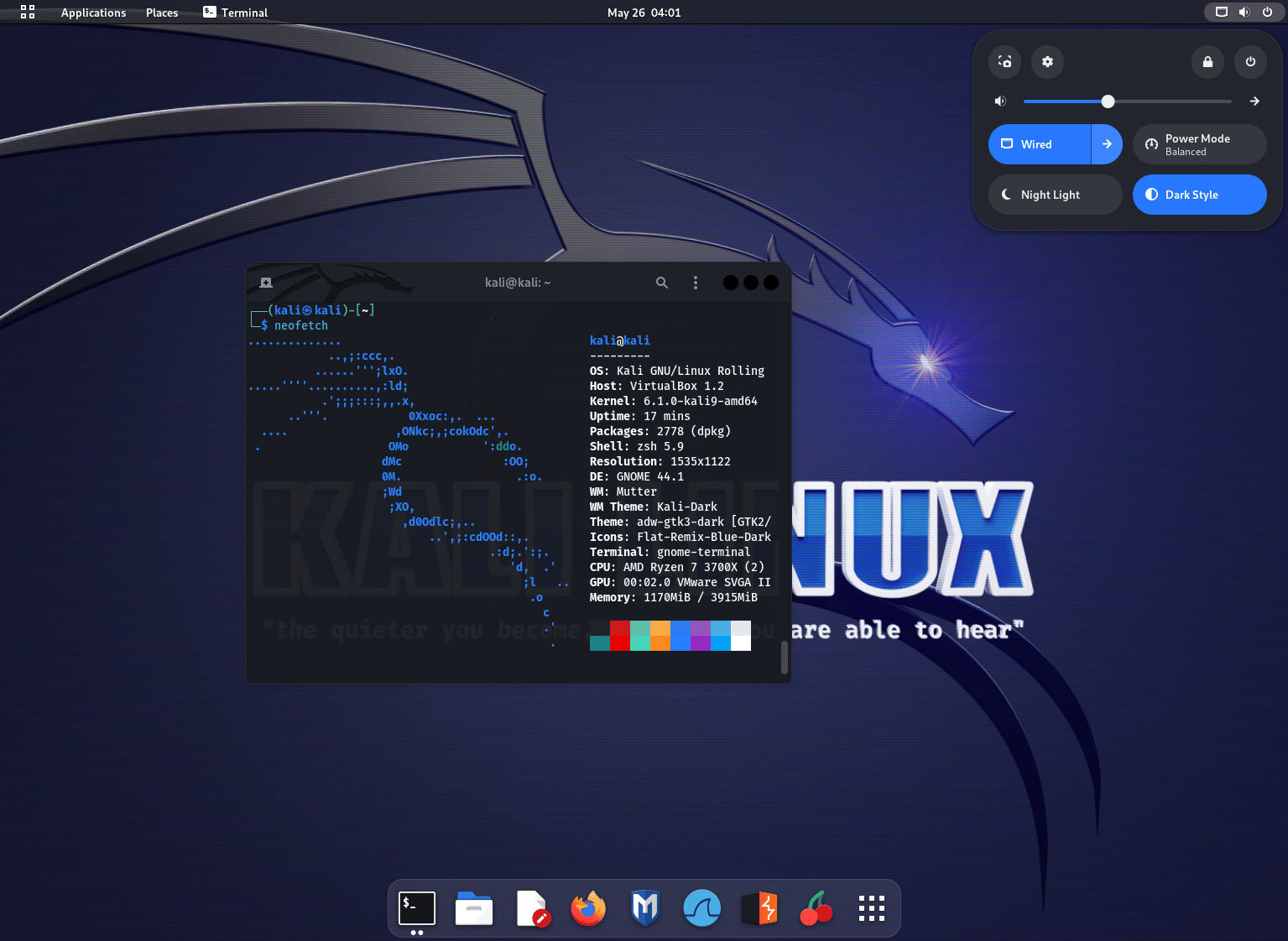

Tiling Assistant Extension
With this release, we are excited to introduce a new extension for Kali’s GNOME Shell desktop: Tiling Assistant. This extension elevates the default tiling experience, placing it on par with the quarter tiling support found in KDE and Xfce. With Tiling Assistant, you can surpass the limitations of the 2 column layout and unlock a range of powerful features. Enjoy intuitive window snapping, multi-monitor support, customizable keyboard shortcuts, and personalized settings, all designed to enhance your productivity and workflow.
App Icons and Kali Menu Updates
Beginning with this release, we are excited to announce that we have initiated work on updates and improvements for the Kali menu. Our primary focus is on enhancing the tools listed in the top 100 on the kali.org/tools page. This entails improving existing icons, introducing new ones, and enhancing the organization of Kali’s menu categories.
To provide you with a sneak peek, we have included a screenshot showcasing the new and updated app icons. We value your feedback, so if you believe that any particular tool would benefit from a new icon, please don’t hesitate to open a bug report at bugs.kali.org. Your input will contribute to the continued refinement of Kali’s menu experience.

New Tools in Kali
It would not be a Kali release if there were not any new tools added! A quick run down of what has been added (to the network repositories):
- Cilium-cli - Install, manage & troubleshoot Kubernetes clusters
- Cosign - Container Signing
- Eksctl - Official CLI for Amazon EKS
- Evilginx - Standalone man-in-the-middle attack framework used for phishing login credentials along with session cookies, allowing for the bypass of 2-factor authentication
- GoPhish - Open-Source Phishing Toolkit
- Humble - A fast security-oriented HTTP headers analyzer
- Slim(toolkit) - Don’t change anything in your container image and minify it
- Syft - Generating a Software Bill of Materials from container images and filesystems
- Terraform - Safely and predictably create, change, and improve infrastructure
- Tetragon - eBPF-based Security Observability and Runtime Enforcement
- TheHive - A Scalable, Open Source and Free Security Incident Response Platform
- Trivy - Find vulnerabilities, misconfigurations, secrets, SBOM in containers, Kubernetes, code repositories, clouds and more
- Wsgidav - Generic and extendable WebDAV server based on WSGI
There has also been numerous packages updates and new libraries as well.
Miscellaneous
Below are a few other things which have been updated in Kali, that do not have as much detail:
- Python PIP changes - Friendly reminder about
pip’s behavior changing in Kali 2023.4! - When using
kali-tweaks, altering OpenSSL security will now have an effect for Python based libraries as well! - Our Kali WSL rootfs build-script got a overhaul. The result will now give a similar experience both using it as well as the output as it will include more of the standard packages by default.
Kali ARM Updates
When using the ARM build-scripts, it will now prompt you to reboot after installing build dependencies if required.
Plus, we are now including additional firmware on all ARM images.
The USBArmory MKII image currently only supports the 512MB variant. The version of u-boot has been bumped.
The Raspberry Pi P4wnP1 image is now considered community supported. Unfortunately the upstream project does not support newer versions of bluez that Kali has, so until that is fixed, we do not want to ship an image that does not work properly.
Kali Documentation Updates
Our Kali documentation has had various updates to existing pages as well as the following new pages:
- Handling common APT problems
- Import Pre-Made Kali Hyper-V VM
- Kali WSL
- No sound on Kali 2023.2
- Troubleshooting Kali VMware VM
We also want to say a little thank you to following for their work:
Kali Blog Recap
Since our last release, we did the following blog posts:
Community Shout-Outs
These are people from the public who have helped Kali and the team for the last release. And we want to praise them for their work (we like to give credit where due!):
- Francisco Jose Rodriguez Martos - improving the arm build scripts yet again. Thank you so very much!
- Salty (from the Kali Discord) - doing the release testing for the Raspberry Pi 4.
- Mihir Parekh - reporting an issue with Kali KDE desktop in VMware, along with the workaround.
Anyone can help out, anyone can get involved!
New Kali Mirrors
We have some new mirrors since the year started! Those are:
- UK: mirror.vinehost.net, sponsored by VineHost, thanks to Callum White.
- Moldova: md.mirrors.hacktegic.com, sponsored by Hacktegic Technologies SRL, thanks to Artiom Mocrenco.
- Indonesia: xsrv.moratelindo.io, sponsored by PT Mora Telematika Indonesia, thanks to Deddy Harison.
- Ukraine: fastmirror.pp.ua, thanks to Ivan Barabash.
We almost got a new mirror in South America, but it did not work out, and we realized that we really lack mirrors in this region of the world. If you’re an organization in South America with quite some bandwidth to spare, and you want to improve Kali Linux availability in South America, check our guide on how to setup a Kali Linux Mirror. If you think it’s for you, please reach out!
Kali Team Discord Chat Session
The next Kali Discord session will happen a week after the release, Wednesday, 7th June 2023 16:00 -> 17:00 UTC/+0 GMT.
Please note, we will not be recording these sessions. These are live sessions only.
Get Kali Linux 2023.2
Fresh Images:
So what are you waiting for? Go get Kali already!
Seasoned Kali Linux users are already aware of this, but for the ones who are not, we do also produce weekly builds that you can use as well. If you cannot wait for our next release and you want the latest packages (or bug fixes) when you download the image, you can just use the weekly image instead.
This way you will have fewer updates to do.
Just know that these are automated builds that we do not QA like we do our standard release images. But we gladly take bug reports about those images because we want any issues to be fixed before our next release!
Existing Installs:
If you already have an existing Kali Linux installation, remember you can always do a quick update:
┌──(kali㉿kali)-[~]

└─$ echo "deb http://http.kali.org/kali kali-rolling main contrib non-free non-free-firmware" | sudo tee /etc/apt/sources.list

[...]

┌──(kali㉿kali)-[~]

└─$ sudo apt update && sudo apt -y full-upgrade

[...]

┌──(kali㉿kali)-[~]

└─$ cp -vrbi /etc/skel/. ~/

[...]

┌──(kali㉿kali)-[~]

└─$ [ -f /var/run/reboot-required ] && sudo reboot -f
You should now be on Kali Linux 2023.2 We can do a quick check by doing:
┌──(kali㉿kali)-[~]

└─$ grep VERSION /etc/os-release

VERSION="2023.2"

VERSION_ID="2023.2"

VERSION_CODENAME="kali-rolling"

┌──(kali㉿kali)-[~]

└─$ uname -v

#1 SMP PREEMPT_DYNAMIC Debian 6.1.27-1kali1 (2023-05-12)

┌──(kali㉿kali)-[~]

└─$ uname -r

6.1.0-kali9-amd64
NOTE: The output of uname -r may be different depending on the system architecture.
As always, should you come across any bugs in Kali, please submit a report on our bug tracker. We will never be able to fix what we do not know is broken! And social networks are not Bug Trackers!
Want to keep in up-to-date easier? We have a RSS feeds and newsletter of our blog!
💬 Community-Diskussion & Kommentare
Starte die Diskussion im Social-Chat Broadcast Stream oder reiche oben über „Information ergänzen“ einen Fachbeitrag ein.