
Zum Hauptinhalt springen
LIVE
CVSS 7.0CVE-2026-138158 | libgphoto2 through 2.5.34 contains a stack buffer overflow in sierra_get_string_register() that lets a malicious sierra-protocol camera or USB device overwrite stack memory. When files are listed, the device can answer the file-name register with an oversized packet, writing up to 32 KB past small stack buffers to cause crashes or possible code execution.CVSS 7.7CVE-2026-138159 | edbrowse through 3.8.19 contains an integer overflow in stringAndBytes() that allows malicious servers to write past a heap buffer by sending response bodies larger than 2 GB. When a user browses to an attacker-controlled HTTP, FTP, or gopher server, the oversized body skips reallocation and corrupts the heap, causing crashes or potentially code execution.CVSS 8.5CVE-2026-138160 | Gammu before 1.45.2 contains a stack-based buffer overflow vulnerability in ReadBackupTextLen() that allows attackers to overwrite stack memory via crafted backup files. Attackers can supply overlong quoted text values decoded into a 10,000-byte stack array during convertbackup, restore, or GSM_ReadBackupFile calls, causing crashes or potential code execution.CVSS 8.5CVE-2026-138161 | Gammu before 1.45.2 contains a buffer overflow vulnerability in LoadBackup() that allows attackers to corrupt memory by supplying an overlong MD5 value in a crafted backup file. Attackers can overwrite adjacent phonebook and calendar entry pointers via strcpy() into MD5Original when files are loaded with convertbackup or restore, causing crashes or potential code execution.CVSS 7.3CVE-2026-138162 | Gammu before 1.45.2 contains a stack-based buffer overflow vulnerability in ALCATEL_EncodeString() that allows attackers to overwrite stack memory via oversized encoded phonebook text. Attackers can supply a crafted backup restored with gammu restore or addnew to an attached Alcatel phone, using GSM extension characters to crash Gammu or potentially execute code.CVSS 8.5CVE-2026-138163 | Gammu before 1.45.2 contains a heap-based buffer overflow in ReadWAPSettingsEntry() that allows attackers to corrupt heap memory via crafted backup files with excess WAP or MMS settings entries. Attackers can supply a backup with more than four TitleNN keys in a [WAPSettings] or [MMSSettings] section, loaded via convertbackup, restore, or GSM_ReadBackupFile, causing crashes or potential code execution.CVSS 4.8CVE-2026-138164 | Gammu before 1.45.2 contains a stack-based buffer overflow vulnerability in SaveBackupText() in backtext.c that allows attackers to corrupt stack memory by supplying long text fields. Attackers can craft a backup with long calendar or note fields that, when converted with gammu convertbackup, writes hex digits past the 10,000-byte stack buffer.CVSS 9.3CVE-2026-138154 | POSTAL 2 before build 26810491 contains a sandbox escape vulnerability that allows malicious Steam Workshop mods to execute code by calling ConsoleCommand with a start file URI. Attackers can ship a batch file in a mod at the predictable workshop install path and launch it via ShellExecuteW, executing commands as the player on Windows.
Alle im Drawer
Intelligence View
⚡ tsecurity.de Intelligence

Skip the busywork with Smart Window

The days might be getting shorter, but your to-do list is only getting longer. Whether you’re getting a head start on holiday shopping or planning your next c…

Beitrag
0
Seite
0
↗ Quelle (The Mozilla Blog)
Quelle & Fakten · 4 Min. Lesezeit
Quelle: The Mozilla Blog (blog.mozilla.org)
Rubrik: Admin & Dev Tools

The days might be getting shorter, but your to-do list is only getting longer. Whether you’re getting a head start on holiday shopping or planning your next career move, Smart Window’s newest features will help you keep up. 


Firefox’s opt-in AI browsing experience can now use information from tabs you choose to help fill out forms. It can also watch web pages and notify you about specific changes you’ve asked it to track.


Let your open tabs fill in the blanks


Job applications ask for your work history; event registrations ask for a professional bio. If those details are already in your open tabs, Smart Window can now use pages you choose to suggest what to enter, saving you extra clicks and some Ctrl+C, Ctrl+V.


For example, Smart Window could use information from your online portfolio or professional profile to fill in your work history, or draw on those details to draft an answer to a question like “Tell me about a time when…” Firefox’s regular autofill still handles saved information such as your name and address, which can be entered directly into forms without relying on AI models.


To get started, click into a form field. If the form has at least four text fields that Smart Window can help fill, you’ll see “Fill from sources” appear in the dropdown, along with a recommended source page. Select “Fill from sources” to continue, or click the pencil icon to open “Edit sources” if you want to change or add tabs. Once you’ve chosen your sources, review the suggestions before filling out the form. You can edit the results before submitting; Smart Window won’t submit the form for you.


When you choose to use this feature, information from your selected source pages is shared with Gemini 3.1 Flash Lite, the AI model used for detecting the fields and extracting relevant information from your selected tabs. Your model choice for Smart Window chat stays the same, and saved autofill values stay on your device. Learn more about how form filling works.


This feature currently supports text fields on web forms and does not save any generated form fill data. We’re exploring support for more field types, including dropdown menus, as well as PDF forms and ways to save and manage generated  information for future forms.


Give your refresh button a break


A watched pot never boils, and refreshing a web page won’t make an update appear any sooner.


Smart Window can now watch a page for a specific update, whether that’s an item going on sale or a new job listing that includes a job title or company name that you’re following. Each task can follow up to five pages, so you can keep an eye on several stores or job boards at the same time. 
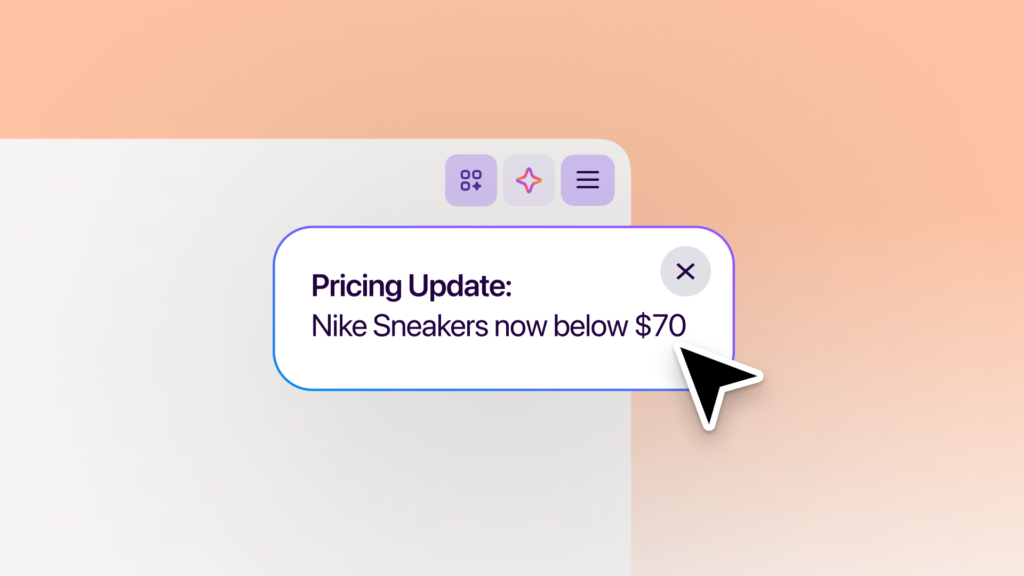


Type “/watch” in the Smart Window chat to set up a task. Describe what you’re looking for, add the pages to watch, and choose whether Firefox should check for updates on a daily or weekly basis. Those checks run only while the browser is open. 


When there’s a match, you’ll see an update through the Tasks button in the toolbar. With desktop notifications enabled, Firefox can also notify you directly; click the notification to open the watched pages. You can have up to 15 active tasks at a time, and you can edit, pause or delete tasks. Smart Window will automatically pause tasks after 60 days without a matching change. If 90 days pass without a change, it will stop checking altogether. 


Page monitoring uses the Qwen AI model to identify changes that match what you’re looking for. Your model choice for Smart Window chat stays the same. Learn more about creating and managing tasks.


Try the latest additions


These two new features are available in the Smart Window beta on desktop, in English in the U.S. and Canada, and will roll out to additional markets in the coming months.


Try Smart Window and share your experience on Mozilla Connect. We’d love to hear how you’re using Smart Window to get things done and what you’d like it to help with next.


The post Skip the busywork with Smart Window appeared first on The Mozilla Blog.

Information ergänzen Fachhinweis, Update, Korrektur oder Quelle zur Meldung beitragen
Gäste-Hinweise werden kurz redaktionell geprüft und danach hier angezeigt.

Community-Hinweise zur Meldung

0 freigegeben
Social ReaktionenReagiere als Erste:r — dein Feedback zählt!
Informations-Bewertung:

💬 Communitydiscussie & reacties

🌐 Naar de hoofdchat

Start de discussie in de Social Chat broadcaststream of dien hierboven een vakbijdrage in via het aanvulformulier.

Community Rating & Social Proof
⭐ Lezersbeoordeling
–
Ø / 5.0
Nog geen recensies van lezers
Was dit artikel nuttig?
0
Geef uw beoordeling
Detailbeoordeling (optioneel)
Inhoud & Kwaliteit
Bron & Geloofwaardigheid
Actualiteit
Security Briefing Gratis · 1-klik uitschrijven

Intelligence Digest gratis

Dagelijks het belangrijkste beveiligingsnieuws · kan op elk moment worden opgehaald

Verwant Story Cluster & Sources (vector AI)

1 Cluster
2 Bronnen
'King-sized' Black Friday deal: Save 79% off Paramount+
tsecurity.de 34 min. geleden
1 een andere bron
Trek om te vernieuwen
Widgets & Topics
Loading widgets…
Nächster Beitrag