A deep dive into LangChain’s implementation of graph construction with LLMs

Creating graphs from text is incredibly exciting, but definitely challenging. Essentially, it’s about converting unstructured text into structured data. While this approach has been around for some time, it gained significant traction with the advent of Large Language Models (LLMs), bringing it more into the mainstream.
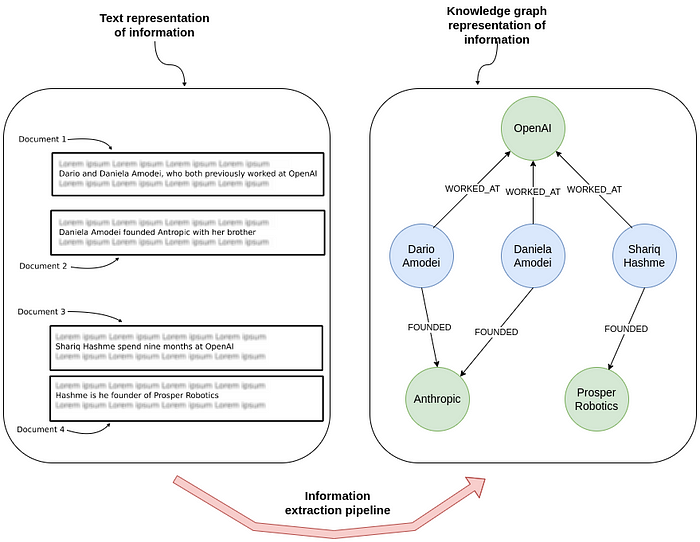
In the image above, you can see how information extraction transforms raw text into a knowledge graph. On the left, multiple documents show unstructured sentences about individuals and their relationships with companies. On the right, this same information is represented as a graph of entities and their connections, showing who worked at or founded various organizations.
But why would you want to extract structured information from text and represent it as a graph? One key reason is to power retrieval-augmented generation (RAG) applications. While using text embedding models over unstructured text is an useful approach, it can fall short when it comes to answering is required. By extracting structured information from text and constructing knowledge graphs, you not only organize data more effectively but also create a powerful framework for understanding complex relationships between entities. This structured approach makes it much easier to retrieve and leverage specific information, expanding the types of questions you can answer while providing greater accuracy.
Around a year ago, I began . Over the past year, we’ve gained valuable insights and introduced new features, which we’ll be showcasing in this blog post.
The code is available on , which offers cloud instances of the Neo4j database. Alternatively, you can set up a local instance of the Neo4j database by downloading the to help guide the extraction. In my experience, though, the function and argument descriptions tend to have a greater impact than the system message.
Unfortunately, at the moment, there is no simple way to customize function or argument descriptions in LLM Graph Transformer.
Prompt-based extraction
Since only a few commercial LLMs and LLaMA 3 support native tools, we implemented a fallback for models without tool support. You can also set ignore_tool_usage=True to switch to a prompt-based approach even when using a model that supports tools.
Most of the prompt engineering and examples for the prompt-based approach were contributed by . In this blog post, we’ll just do a high-level overview. We start by defining the system prompt.
You are a top-tier algorithm designed for extracting information in structured formats to build a knowledge graph. Your task is to identify the entities and relations specified in the user prompt from a given text and produce the output in JSON format. This output should be a list of JSON objects, with each object containing the following keys:

- **"head"**: The text of the extracted entity, which must match one of the types specified in the user prompt.
- **"head_type"**: The type of the extracted head entity, selected from the specified list of types.
- **"relation"**: The type of relation between the "head" and the "tail," chosen from the list of allowed relations.
- **"tail"**: The text of the entity representing the tail of the relation.
- **"tail_type"**: The type of the tail entity, also selected from the provided list of types.

Extract as many entities and relationships as possible.

**Entity Consistency**: Ensure consistency in entity representation. If an entity, like "John Doe," appears multiple times in the text under different names or pronouns (e.g., "Joe," "he"), use the most complete identifier consistently. This consistency is essential for creating a coherent and easily understandable knowledge graph.

**Important Notes**:
- Do not add any extra explanations or text.
In the prompt-based approach, a key difference is that we ask the LLM to extract only relationships, not individual nodes. This means we won’t have any isolated nodes, unlike with the tool-based approach. Additionally, because models lacking native tool support typically perform worse, we do not allow extraction any properties — whether for nodes or relationships, to keep the extraction output simpler.
Next, we add a couple of few-shot examples to the model.
examples = [
    {
        "text": (
            "Adam is a software engineer in Microsoft since 2009, "
            "and last year he got an award as the Best Talent"
        ),
        "head": "Adam",
        "head_type": "Person",
        "relation": "WORKS_FOR",
        "tail": "Microsoft",
        "tail_type": "Company",
    },
    {
        "text": (
            "Adam is a software engineer in Microsoft since 2009, "
            "and last year he got an award as the Best Talent"
        ),
        "head": "Adam",
        "head_type": "Person",
        "relation": "HAS_AWARD",
        "tail": "Best Talent",
        "tail_type": "Award",
    },
...
]
In this approach, there’s currently no support for adding custom few-shot examples or extra instructions. The only way to customize is by modifying the entire prompt through the promptattribute. Expanding customization options is something we’re actively considering.
Next, we’ll take a look at defining the graph schema.
Defining the graph schema
When using the LLM Graph Transformer for information extraction, defining a graph schema is essential for guiding the model to build meaningful and structured knowledge representations. A well-defined graph schema specifies the types of nodes and relationships to be extracted, along with any attributes associated with each. This schema serves as a blueprint, ensuring that the LLM consistently extracts relevant information in a way that aligns with the desired knowledge graph structure.
In this blog post, we’ll use the opening paragraph of .
Summary
In this post, we explored LangChain’s LLM Graph Transformer and its dual modes for building knowledge graphs from text. The tool-based mode, our primary approach, leverages structured output and function calling, which reduces prompt engineering and allows for property extraction. Meanwhile, the prompt-based mode is useful when tools aren’t available, relying on few-shot examples to guide the LLM. However, prompt-based extraction does not support property extraction and also yields no isolated nodes.
We observed that defining a clear graph schema, including allowed node and relationship types, improves extraction consistency and performance. A constrained schema helps ensure that the output adheres to our desired structure, making it more predictable, reliable, and applicable. Whether using tools or prompts, the LLM Graph Transformer enables more organized, structured representations of unstructured data, enabling better RAG applications and multi-hop query handling.
The code is available on
on Medium, where people are continuing the conversation by highlighting and responding to this story.

SOCIAL SHARE CARD GENERATOR