
A tool that might help with your homework
This article is the first of a two part series where we use LangGraph and Tavily to build a simple research agent, which writes and refines short articles. To keep track of the plans, articles and comments it generates we add the ability to programmatically create and edit Google Docs. In this article we focus on the agent, leaving the docs connection to the second article. You can find all the relevant code of prompt engineering, which stands for “Reasoning-Action”. Basically, the structure and sequence of prompts forces the LLM to answer the question in very methodical fashion, first by articulating a thought (typically a plan of attack), carrying out an action, then making an observation of the result. In agentic systems, this process can continue iteratively until the LLM decides that it’s come to an acceptable answer.
In this series of articles, we’ll use the search tool to build a simple research assistant that demonstrates some of these concepts and might even be useful for those of us looking to generate quick, well written reports about any subject. Our agent will be inspired by the plan -> research -> write -> submit -> review -> revise cycle that happens in peer-reviewed research, and you can take a look at the prompts for these different sections . This should be considered as more of an add-on than an integrated component of the agent, but it is interesting in its own right and so could also be read as a stand-alone article.
1. What should our research assistant do?
Before looking at how we can build this assistant and what it means for it to be “agentic”, we should think briefly about what we’d like it to do. The goal is to build a system that can plan and write short, informative articles about a given topic, then improve its own work through review and revision.
Why? Mainly this is just an exploration of technology, but the use of LLMs as semi-autonomous researchers is an active field of investigation and is yielding interesting projects such as . LangGraph is an LLM orchestration library that attempts to make it easier for us to design and build reliable agents. For an in-depth comparison of LangGraph and LangChain, I recommend this excellent . This makes it more complex (and potentially more unpredictable) than a chain, which is just a predefined set of LLM calls one after the other.
In an agent framework, the LLM has some autonomy over how to solve the problem it’s given, perhaps by choosing the appropriate tool to call or deciding when to stop refining a solution once it’s good enough. In that sense the LLM becomes more of the brain of the system, acting more like a human analyst than just an API call. One interesting challenge here is that while agents might be free to make decisions, they are usually embedded within or interact with traditional software systems that require structured inputs and outputs. It’s therefore very important to force the agent to return its answers in the way that these other systems understand, regardless of the decision it makes.
For a more in-depth discussion of agents in the context of LangGraph, this , depending on what visualization package you have installed. I’m using pygraphviz, which can be installed on an m-series mac using the following command
brew install graphviz
pip install -U --no-cache-dir  \
        --config-settings="--global-option=build_ext" \
        --config-settings="--global-option=-I$(brew --prefix graphviz)/include/" \
        --config-settings="--global-option=-L$(brew --prefix graphviz)/lib/" \
        pygraphviz
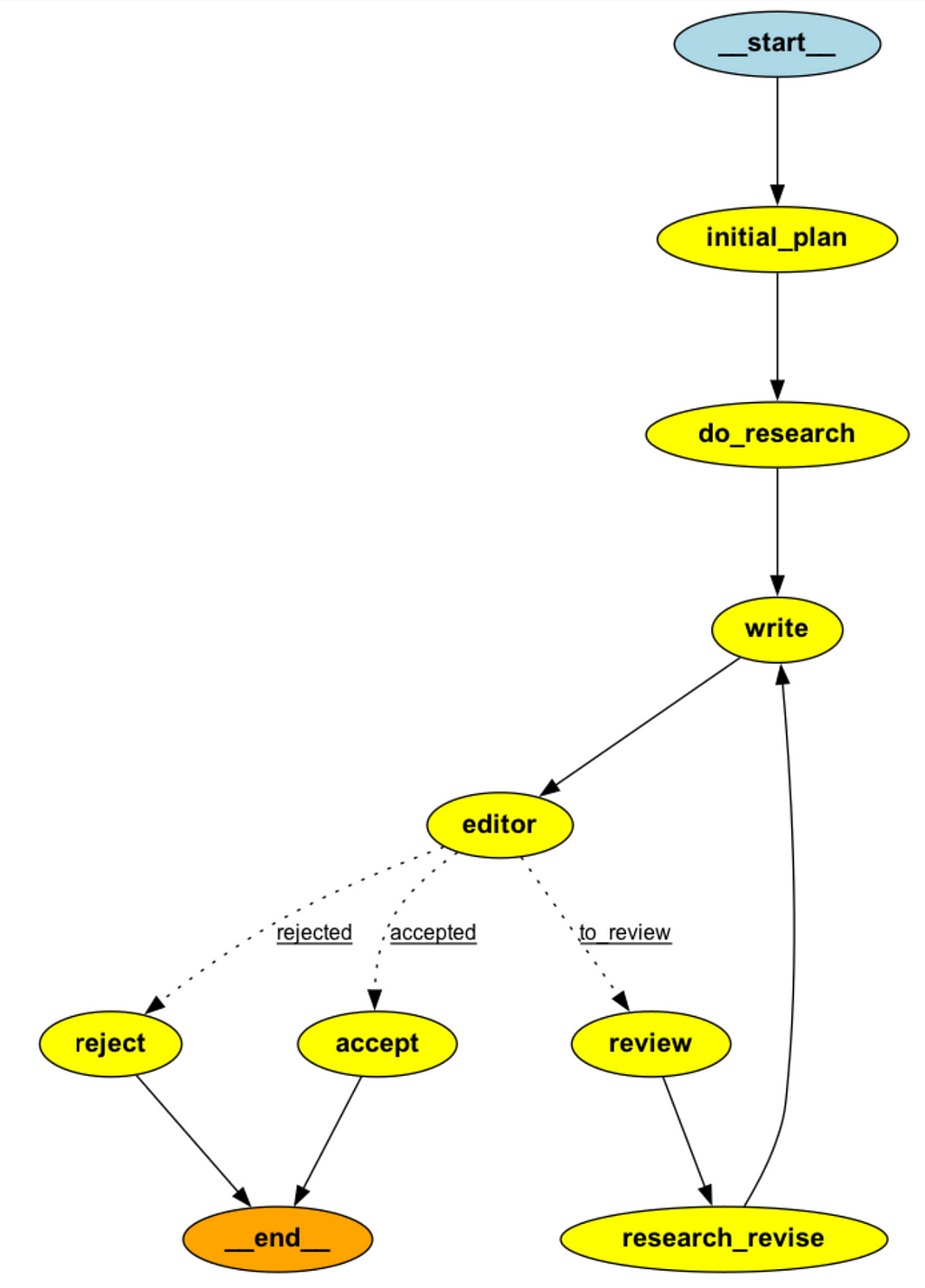
How do we test our agent? The simplest way would just be to call invoke with initial values of some of the components of AgentState (i.e. task, max_revisions and revision number), which enter the graph at the entry point node.
graph = agent.compile()
res = graph.invoke(
    {
        "task": "What are the key trends in LLM research and application that you see in 2024",
        "max_revisions": 1,
        "revision_number": 0,
    }
)
After some time (can be several minutes if the max_revisions is set to be large) this will return a dictionary of the agent state with all the components filled in. I’m using gpt4o-mini for this and the results are very impressive, although the extent to which adding the “review” and “editor” components really help to improve the quality of the article could be debated and we’ll return to that in section 3.
What if we want more insight into the inputs and outputs of the nodes at each stage of the graph? This is essential for debugging and explainable as the graph grows or if we’re hoping to deploy something like this in production. Thankfully LangGraph has some great tools here, which are covered under the sections of its documentation. A minimal implementation looks something like this, where we are using an in memory store to keep track of the updates the come out of each stage of the graph.
from langgraph.store.memory import InMemoryStore
from langgraph.checkpoint.memory import MemorySaver
import uuid

checkpointer = MemorySaver()
in_memory_store = InMemoryStore()
graph = agent.compile(checkpointer=checkpointer, store=self.in_memory_store)

# Invoke the graph
user_id = "1"
config = {"configurable": {"thread_id": "1", "user_id": user_id}}
namespace = (user_id, "memories")

for i, update in enumerate(graph.stream(
  {
     "task": task_description,
     "max_revisions": max_revisions,
     "revision_number": 0,
  }, config, stream_mode="updates"
        )):
   # print the data that just got generated
   print(update)
   memory_id = str(uuid.uuid4())
   # store the data that just got generated in memory
   self.in_memory_store.put(namespace, memory_id, {"memory": update})
   results.append(update)
More sophisticated applications would access the store from inside the nodes themselves, allowing a chatbot to recall previous conversations with a given user for example. Here we’re just using the memory to save the outputs of each of the nodes, which can then be viewed for debugging purposes. We’ll explore that a bit more in the final section.
3. What’s in the “do_research” node? The power of Tavily search
Perhaps the most interesting parts of the control flow above are the do_researchand research_revise nodes. Inside both of these nodes we are using an LLM to generate some web search queries relevant to the task, and then we’re using the for Tavily’s free “Researcher” plan which gives 1000 free API calls. Unfortunately after that you’d need to pay a monthly fee to keep using it, which is likely only worth it for business use cases.
Lets see an example using the code very similar to what’s going on inside AgentNodes.research_plan_node
from langchain_core.messages import (
    SystemMessage,
    HumanMessage,
)
from research_assist.researcher.prompts import (
    ResearchPlanPrompt,
)
from langchain_openai import ChatOpenAI
from tavily import TavilyClient

class Queries(BaseModel):
    """
    A model representing a list of search queries.

    Attributes:
        queries (List[str]): A list of search queries to be executed.
    """

    queries: List[str]

# set up task
task = """
What are the key trends in LLM reseach and application that you see in 2024
"""

# set up LLM and Tavily
model = ChatOpenAI(
    model="gpt-4o-mini", temperature=0, api_key=secrets["OPENAI_API_KEY"]
)
tavily = TavilyClient(api_key=secrets["TAVILY_API_KEY"])

# generate some queries relevant to the task
queries = agent.nodes.model.with_structured_output(Queries).invoke(
            [
                SystemMessage(content=ResearchPlanPrompt.system_template),
                HumanMessage(content=task),
            ]
)
This generates 5 search queries relevant to the task we defined, which look like this
['key trends in LLM research 2024',
 'LLM applications 2024',
 'latest developments in LLM technology 2024',
 'future of LLMs 2024',
 'LLM research advancements 2024']
Next we can call Tavily search on each of these queries
response = tavily.search(query=queries[0], max_results=2)
This provides a nicely formatted result with url, title and text chunk.
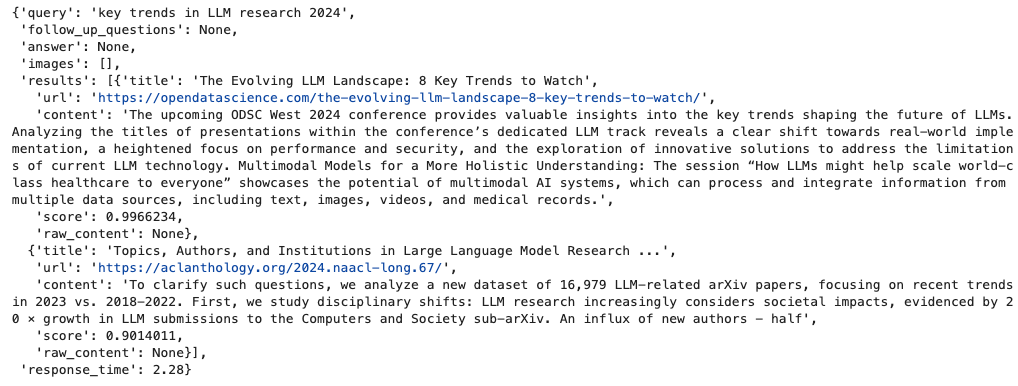
This is a very powerful and easy to use search tool that can give LLM applications access to the web without the need for extra work!
In our researcher agent, we’re currently only using the content field, which we extract and append to a list which is passed into the AgentState. That information then gets injected into the prompt thats used for the writer node, hence allowing the LLM to have access to it when generating the report.
There is a lot more you can do with Tavily search, but be aware that experimenting with it will quickly burn through your free API calls. In fact, for our report writing task there are many applications where Tavily calls probably aren’t necessary (i.e. the LLM already has sufficient knowledge to write the report), so I would recommend adding an additional conditional edge that allows the system to bypass the do_research and research_revise nodes if it determines that a web search is not needed. I will likely update the repo with this change soon.
4. Walk through an example
To solidify everything we just learned, let’s walk through an example of the researcher in action, using the same task as above.
First, we import the libraries and set up our LLM and searcher models
from research_assist.researcher.Agent import ResearchAgent, load_secrets
from langchain_openai import ChatOpenAI
from tavily import TavilyClient

secrets = load_secrets()
model = ChatOpenAI(
    model="gpt-4o-mini", temperature=0, api_key=secrets["OPENAI_API_KEY"]
)
tavily = TavilyClient(api_key=secrets["TAVILY_API_KEY"])

agent = ResearchAgent(model, tavily)
Now we can run the agent on a task and give it a maximum number of revisions.
task = """
What are the key trends in LLM reseach and application that you see in 2024
"""
result = agent.run_task(task_description=task,max_revisions=3)
Now the agent will run its task, which might take about a minute. Logging has been added to show what it’s doing and importantly, the results are being saved to the in_memory_store , which we saw at the end of section 2.
The final report is accessible in a few ways. Its stored in the result list and can be visualized in a notebook like this
Markdown(result[-3]['write']['draft'])
Its also stored in the agent’s memory along with all the other outputs. We can access it as follows
agent.in_memory_store.search(("1", "memories"))[-3].dict()The report itself is about 1300 words long — a bit too much to copy here — but I’ve pasted it into the repo !
The author is unaffiliated with any of the tools discussed in this article.
on Medium, where people are continuing the conversation by highlighting and responding to this story.

SOCIAL SHARE CARD GENERATOR