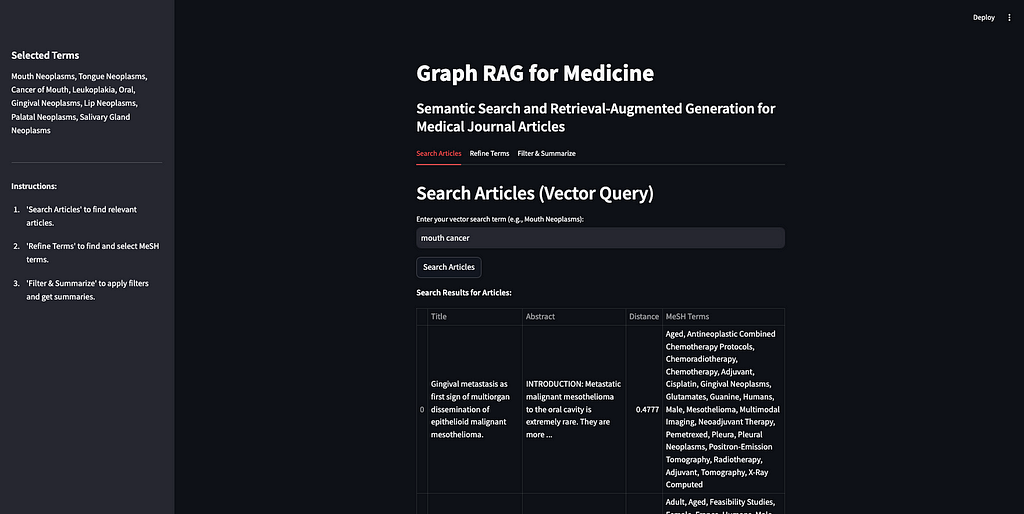
Using knowledge graphs and AI to retrieve, filter, and summarize medical journal articles
The accompanying code for the app and notebook are .
The basic idea is that, rather than sending your prompt directly to an LLM, which was not trained on your data, you can supplement your prompt with the relevant information needed for the LLM to answer your prompt accurately. The example I use often is copying a job description and my resume into ChatGPT to write a cover letter. The LLM is able to provide a much more relevant response to my prompt, ‘write me a cover letter,’ if I give it my resume and the description of the job I am applying for. Since knowledge graphs are built to store knowledge, they are a perfect way to store internal data and supplement LLM prompts with additional context, improving the accuracy and contextual understanding of the responses.
This technology has many, many, applications such , , and
Graph RAG has experienced a surge in search interest, even surpassing terms like knowledge graphs and retrieval-augmented generation. Note that Google Trends measures relative search interest, not absolute number of searches. The spike in July 2024 for searches of Graph RAG coincides with the week Microsoft .
The excitement around Graph RAG is broader than just Microsoft, however. Samsung acquired RDFox, a knowledge graph company, in July of 2024. The published in November 2024, a Samsung spokesperson stated, “We plan to develop knowledge graph technology, one of the main technologies of personalized AI, and organically connect with generated AI to support user-specific services.”
In October 2024, Ontotext, a leading graph database company, and Semantic Web company, the maker of PoolParty, a knowledge graph curation platform, merged to form , the merger aims to “democratize the evolution of Graph RAG as a category.”
While some of the buzz around Graph RAG may come from the broader excitement surrounding chatbots and generative AI, it reflects a genuine evolution in how knowledge graphs are being applied to solve complex, real-world problems. One example is that LinkedIn to select terms to use to filter the articles from step 1. This controlled vocabulary contains medical terms, alternative names, narrower concepts, and many other properties and relationships.
Some notes on this app and tutorial before we get started:
- This set-up uses knowledge graphs exclusively for metadata. This is only possible because each article in my dataset has already been tagged with terms that are part of a rich controlled vocabulary. I am using the graph for structure and semantics and the vector database for similarity-based retrieval, ensuring each technology is used for what it does best. Vector similarity can tell us “esophageal cancer” is semantically similar to “mouth cancer”, but knowledge graphs can tell us the details of the relationship between “esophageal cancer” and “mouth cancer.”
- The data I used for this app is a collection of medical journal articles from PubMed (more on the data below). I chose this dataset because it is structured (tabular) but also contains text in the form of abstracts for each article, and because it is already tagged with topical terms that are aligned with a well-established controlled vocabulary (MeSH). Because these are medical articles, I have called this app ‘Graph RAG for Medicine.’ But this same structure can be applied to any domain and is not specific to the medical field.
- What I hope this tutorial and app demonstrate is that you can improve the results of your RAG application in terms of accuracy and explainability by incorporating a knowledge graph into the retrieval step. I will show how KGs can improve the accuracy of RAG applications in two ways: by giving the user a way of filtering the context to ensure the LLM is only being fed the most relevant information; and by using domain specific controlled vocabularies with dense relationships that are maintained and curated by domain experts to do the filtering.
- What this tutorial and app don’t directly showcase are two other significant ways KGs can enhance RAG applications: governance, access control, and regulatory compliance; and efficiency and scalability. For governance, KGs can do more than filter content for relevancy to improve accuracy — they can enforce data governance policies. For instance, if a user lacks permission to access certain content, that content can be excluded from their RAG pipeline. On the efficiency and scalability side, KGs can help ensure RAG applications don’t die on the shelf. While it’s easy to create an impressive one-off RAG app (that’s literally the purpose of this tutorial), many companies struggle with a proliferation of disconnected POCs that lack a cohesive framework, structure, or platform. That means many of those apps are not going to survive long. A metadata layer powered by KGs can break down data silos, providing the foundation needed to build, scale, and maintain RAG applications effectively. Using a rich controlled vocabulary like MeSH for the metadata tags on these articles is a way of ensuring this Graph RAG app can be integrated with other systems and reducing the risk that it becomes a silo.
Step 0: Prepare the data
The code to prepare the data is in dataset of 50,000 research articles from the PubMed repository (License (URIs) to each article first. A URI is a unique ID for navigating RDF data and it is necessary for us to go back and forth between vectors and entities in our graph. Additionally, we will create a separate collection in our vector database for the MeSH terms. This will allow the user to search for relevant terms without having prior knowledge of this controlled vocabulary. Below is a diagram of what we are doing to prepare our data.
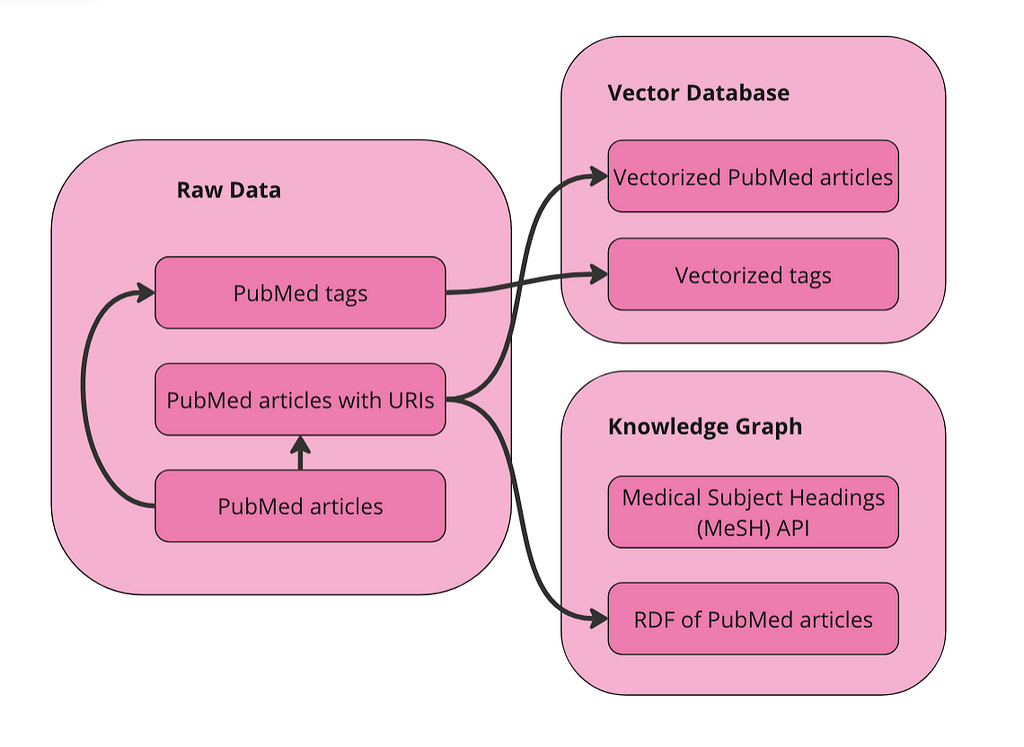
We have two collections in our vector database to query: articles and terms. We also have the data represented as a graph in RDF format. Since MeSH has an API, I am just going to query the API directly to get alternative names and narrower concepts for terms.
Vectorize data in Weaviate
First import the required packages and set up the Weaviate client:
import weaviate
from weaviate.util import generate_uuid5
from weaviate.classes.init import Auth
import os
import json
import pandas as pd

client = weaviate.connect_to_weaviate_cloud(
    cluster_url="XXX",  # Replace with your Weaviate Cloud URL
    auth_credentials=Auth.api_key("XXX"),  # Replace with your Weaviate Cloud key
    headers={'X-OpenAI-Api-key': "XXX"}  # Replace with your OpenAI API key
)
Read in the PubMed journal articles. I am using to do that.
Turn data into a knowledge graph
I am just using the same code we used in the to build the interface for this graph RAG app. Similar to the last blog post, I have kept the user flow the same.
- Search Articles: First, the user searches for articles using a search term. This relies exclusively on the vector database. The user’s search term(s) is sent to the vector database and the ten articles nearest the term in vector space are returned.
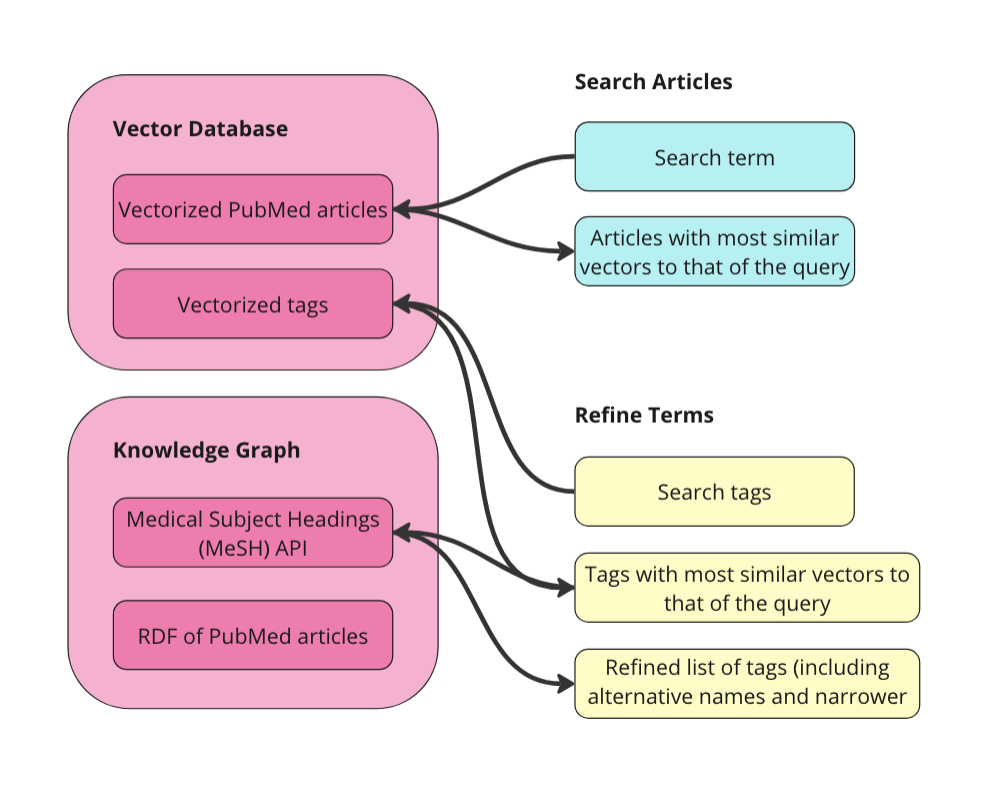
- Refine Terms: Second, the user decides the MeSH terms to use to filter the returned results. Since we also vectorized the MeSH terms, we can have the user enter a natural language prompt to get the most relevant MeSH terms. Then, we allow the user to expand these terms to see their alternative names and narrower concepts. The user can select as many terms as they want for their filter criteria.
- Filter & Summarize: Third, the user applies the selected terms as filters to the original ten journal articles. We can do this since the PubMed articles are tagged with MeSH terms. Finally, we let the user enter an additional prompt to send to the LLM along with the filtered journal articles. This is the generative step of the RAG app.
Let’s go through these steps one at a time. You can see the full app and code on my GitHub, but here is the structure:
-- app.py (a python file that drives the app and calls other functions as needed)
-- query_functions (a folder containing python files with queries)
  -- rdf_queries.py (python file with RDF queries)
  -- weaviate_queries.py (python file containing weaviate queries)
-- PubMedGraph.ttl (the pubmed data in RDF format, stored as a ttl file)
Search Articles
First, want to do is implement Weaviate’s .
The weakness of vector based retrieval, as I mentioned above are that they are black-box and struggle with factual knowledge. In our example, it looks like most of the articles are about some kind of treatment or therapy for some kind of cancer. Some of the articles are about mouth cancer specifically, some are about a sub-type of mouth cancer like gingival cancer (cancer of the gums), and palatal cancer (cancer of the palate). But there are also articles about nasopharyngeal cancer (cancer of the upper throat), mandibular cancer (cancer of the jaw), and esophageal cancer (cancer of the esophagus). None of these (upper throat, jaw, or esophagus) are considered mouth cancer. It is understandable why an article about a specific cancer radiation therapy for nasopharyngeal neoplasms would be considered similar to the prompt “treatments for mouth cancer” but it may not be relevant if you are only looking for treatments for mouth cancer. If we were to plug these ten articles directly into our prompt to the LLM and ask it to “summarize the different treatment options,” we would be getting incorrect information.
The purpose of RAG is to give an LLM a very specific set of additional information to better answer your question — if that information is incorrect or irrelevant, it can lead to misleading responses from the LLM. This is often referred to as “context poisoning”. What is especially dangerous about context poisoning is that the response isn’t necessarily factually inaccurate (the LLM may accurately summarize the treatment options we feed it), and it isn’t necessarily based on an inaccurate piece of data (presumably the journal articles themselves are accurate), it’s just using the wrong data to answer your question. In this example, the user could be reading about how to treat the wrong kind of cancer, which seems very bad.
Refine Terms
KGs can help improve the accuracy of responses and reduce the likelihood of context poisoning by refining the results from the vector database. The next step is for selecting what MeSH terms we want to use to filter the articles. First, we do another vector similarity search against the vector database but on the Terms collection. This is because the user may not be familiar with the MeSH controlled vocabulary. In our example above, I searched for, “therapies for mouth cancer”, but “mouth cancer” is not a term in MeSH — they use “Mouth Neoplasms”. We want the user to be able to start exploring the MeSH terms without having a prior understanding of them — this is good practice regardless of the metadata used to tag the content.
The function to get relevant MeSH terms is nearly identical to the previous Weaviate query. Just replace Article with term:
# Function to query Weaviate for MeSH Terms
def query_weaviate_terms(client, query_text, limit=10):
    # Perform vector search on MeshTerm collection
    response = client.collections.get("term").query.near_text(
        query=query_text,
        limit=limit,
        return_metadata=MetadataQuery(distance=True)
    )

    # Parse response
    results = []
    for obj in response.objects:
        results.append({
            "uuid": obj.uuid,
            "properties": obj.properties,
            "distance": obj.metadata.distance,
        })
    return results
Here is what it looks like in the app:
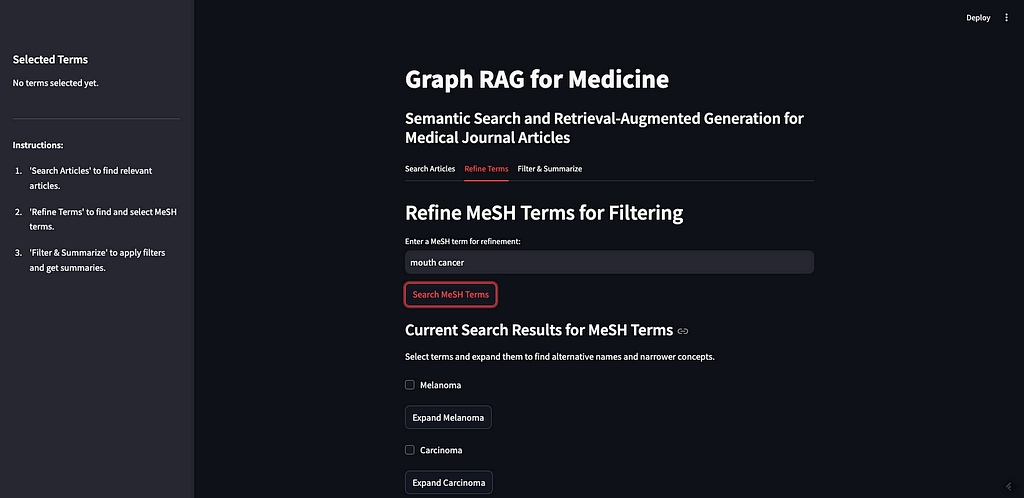
As you can see, I searched for “mouth cancer” and the most similar terms were returned. Mouth cancer was not returned, as that is not a term in MeSH, but Mouth Neoplasms is on the list.
The next step is to allow the user to expand the returned terms to see alternative names and narrower concepts. This requires querying the was originally published in Towards Data Science on Medium, where people are continuing the conversation by highlighting and responding to this story.

SOCIAL SHARE CARD GENERATOR