Zum Hauptinhalt springen
Echtzeit-Radar & Feeds
Alle RSS Feeds ➔
👥 Community & Social
•
Sichere ProgrammierungVisual Studio Code 1.141 (Insiders)(07.10.2026 um 19:00 Uhr)
•
Linux Tipps & Hardening[$] Comparing Chromium development at Google and Igalia(30.09.2026 um 16:16 Uhr)
•
Sichere ProgrammierungReports from the 2026 Python Language Summit(30.09.2026 um 16:32 Uhr)
•
KI & AI VideosJulian Goldie SEO: NEW LongCat Preview Just Dropped! 🔥(30.09.2026 um 16:00 Uhr)
•
Linux Tipps & HardeningA unified OS installer in systemd (asg2026)(30.09.2026 um 00:00 Uhr)
•
Windows Tipps & SecurityContainers without a new runtime: sdme on systemd-nspawn (asg2026)(30.09.2026 um 00:00 Uhr)
•
Linux Tipps & Hardeningsingle-file containers with statically linked systemd (asg2026)(30.09.2026 um 00:00 Uhr)
•
Linux Tipps & HardeningForget "podman generate systemd": How Quadlet Really Works (asg2026)(30.09.2026 um 00:00 Uhr)
•
IT Security VideoLiveOverflow: Why Old Threat Models Are Dead #shorts(30.09.2026 um 15:55 Uhr)
••
Sichere ProgrammierungVisual Studio Code 1.141 (Insiders)(07.10.2026 um 19:00 Uhr)
•
Linux Tipps & Hardening[$] Comparing Chromium development at Google and Igalia(30.09.2026 um 16:16 Uhr)
•
Sichere ProgrammierungReports from the 2026 Python Language Summit(30.09.2026 um 16:32 Uhr)
•
KI & AI VideosJulian Goldie SEO: NEW LongCat Preview Just Dropped! 🔥(30.09.2026 um 16:00 Uhr)
•
Linux Tipps & HardeningA unified OS installer in systemd (asg2026)(30.09.2026 um 00:00 Uhr)
•
Windows Tipps & SecurityContainers without a new runtime: sdme on systemd-nspawn (asg2026)(30.09.2026 um 00:00 Uhr)
•
Linux Tipps & Hardeningsingle-file containers with statically linked systemd (asg2026)(30.09.2026 um 00:00 Uhr)
•
Linux Tipps & HardeningForget "podman generate systemd": How Quadlet Really Works (asg2026)(30.09.2026 um 00:00 Uhr)
•
IT Security VideoLiveOverflow: Why Old Threat Models Are Dead #shorts(30.09.2026 um 15:55 Uhr)
•
Intelligence View
⚡ tsecurity.de Intelligence

How to Create a Resource Group in Azure

What is Azure Resource Group? Azure Resource Groups: Organizing & Managing Cloud Resources Efficiently. A Resource Group is a logical unit where related Azure resources—such as virtual machines, databases, storage accounts, and n…

0
↗ Quelle (dev.to)
Reagiere als Erste:r — dein Feedback zählt!

What is Azure Resource Group?

Azure Resource Groups: Organizing & Managing Cloud Resources Efficiently.


A Resource Group is a logical unit where related Azure resources—such as virtual machines, databases, storage accounts, and networking components—are grouped together.


A resource group is like a folder that helps you organize and manage cloud resources (like virtual machines, databases, network interfaces, etc.) that share a common lifecycle.


🔹 Think of it as a folder that holds all resources associated with a specific application, project, or department.

🔹 Helps with simplified management, cost tracking, and lifecycle organization.

🔹 Deleting a Resource Group also removes all resources inside it—making cleanup easier!


📦 Common Use Cases:

Grouping resources for a single application (e.g., web app + database + storage).


Managing permissions and access via Role-Based Access Control (RBAC).

Applying policies or tags to track cost, location, environment (e.g., dev/test/prod).

Facilitating resource deployment and deletion — you can delete everything in the group at once.


🛠️ Example:

Imagine you're deploying an e-commerce site:


You create a resource group called EcomRG


Inside it, you include:

A web app

Azure SQL Database

Azure Storage account

Virtual Network

Application Gateway


Now you can manage everything under one roof.


✅ Why It's Important:

Helps enforce security, cost control, and operational efficiency.


Simplifies DevOps, automation, and infrastructure-as-code deployments.


STEPS TO CREATE AZURE RESOURCE GROUP

Prerequisite: Have an Azure account

Step 1

Login into your Azure account from portal.azure.com and you will see the page below:
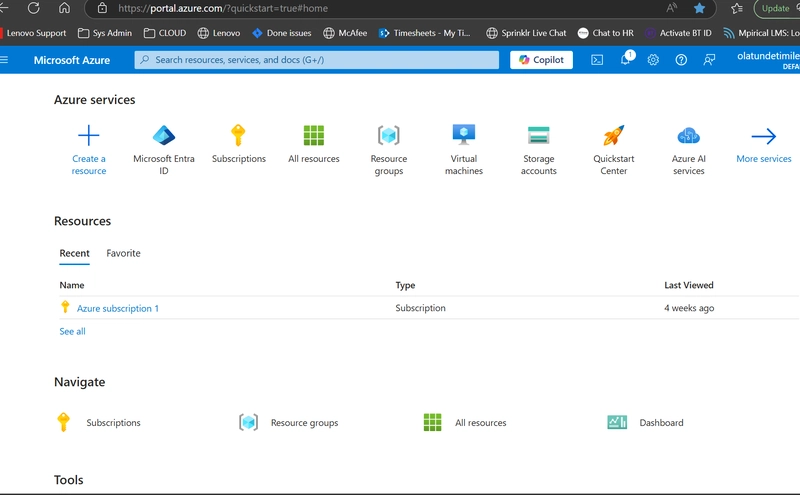


page displayed


Step 2

Click on Resource Group as depicted with the arrow
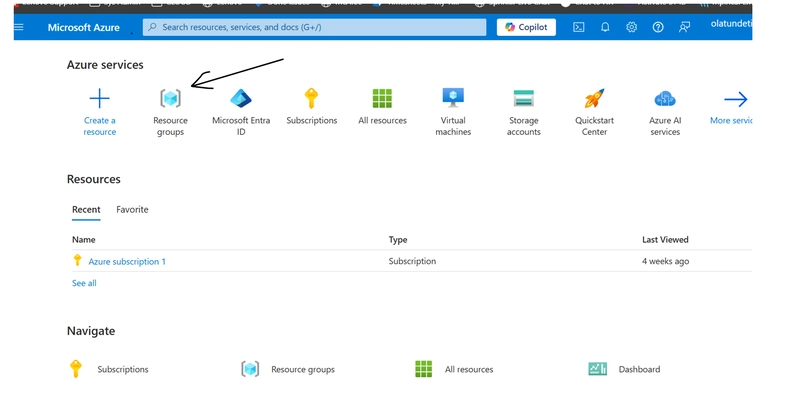


Click resource Group


Your will notice that the "resource Group" has been created as shown with the arrow below
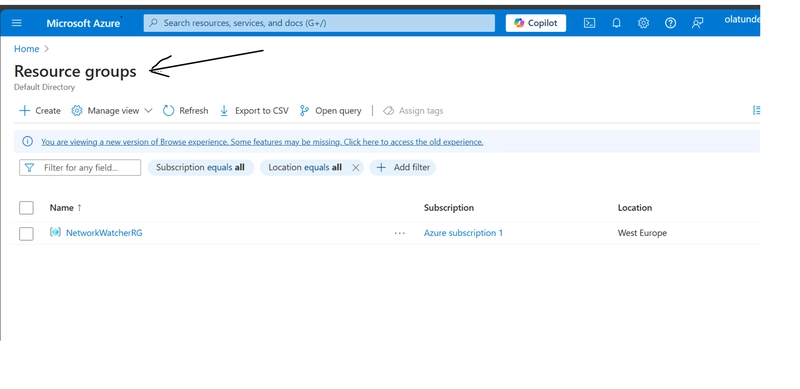


Resource Group


Step 3

Next is to click "Create" as shown with the arrow in other to create a new Resource Group
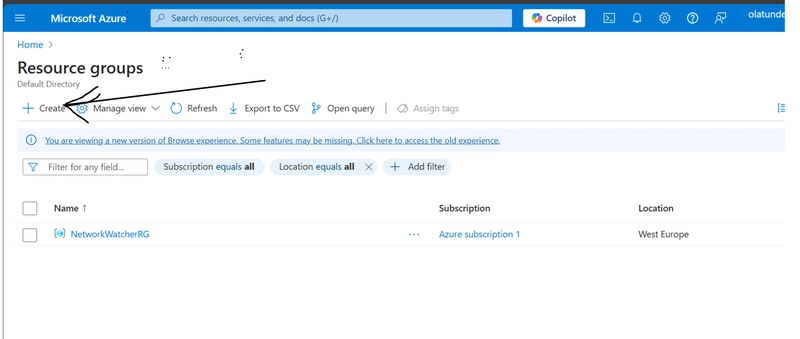


Create


Then a new page as shown below is displayed as below, where you can now create your Resource Group:
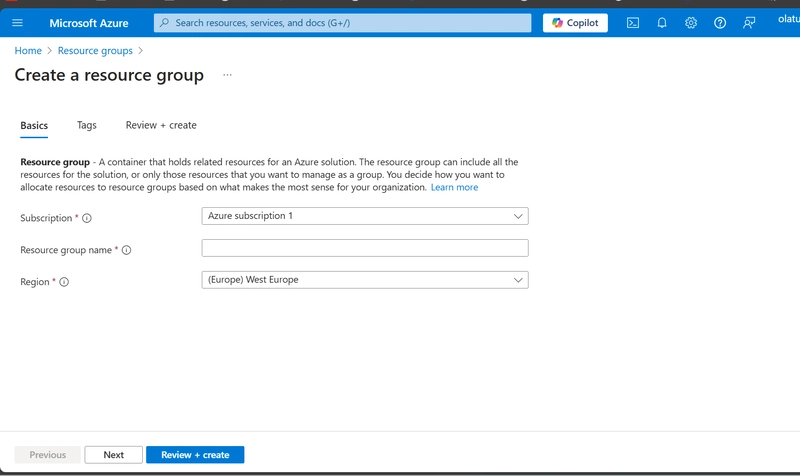


RG


Step 4

Then Name your Resource Group. lets give it a name "EcomRG" and select the region where you want to keep your resources as below. I have chosen west Europe. (Choose the location closest to you or to your customers or where the required resources are available)
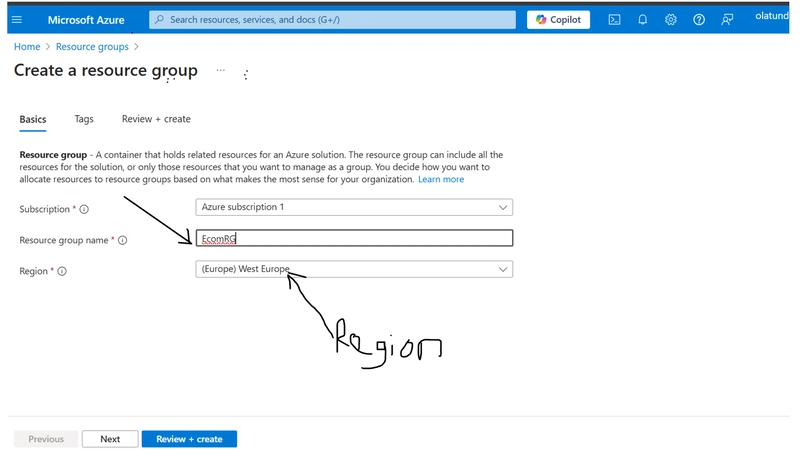


EcomRG


Step 5

We have done everything at this page. Next is to click "Review and Create"
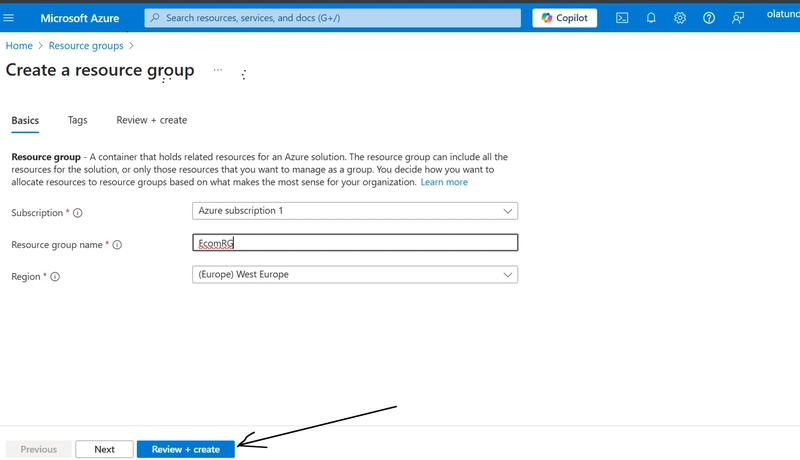


Review+Create

Then Click "Create" to finally create the Resource Group
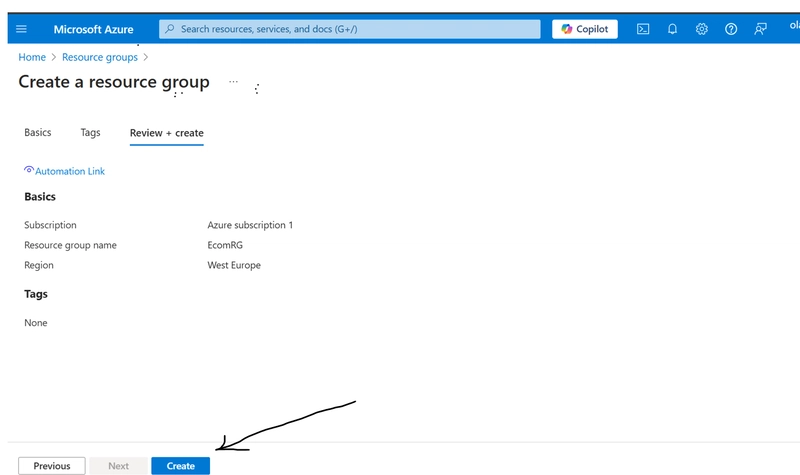


Create


Step 6

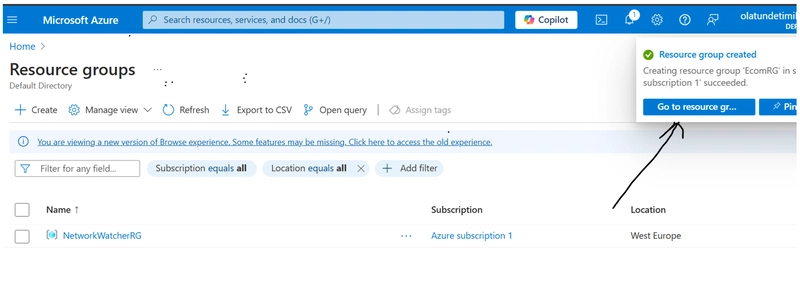
Click "Go to Resource Group"


RG


Now, you can see the the EcomRG resource group has been created as highlighted below and there is no resources created yet. You can now go ahead and create your resources.
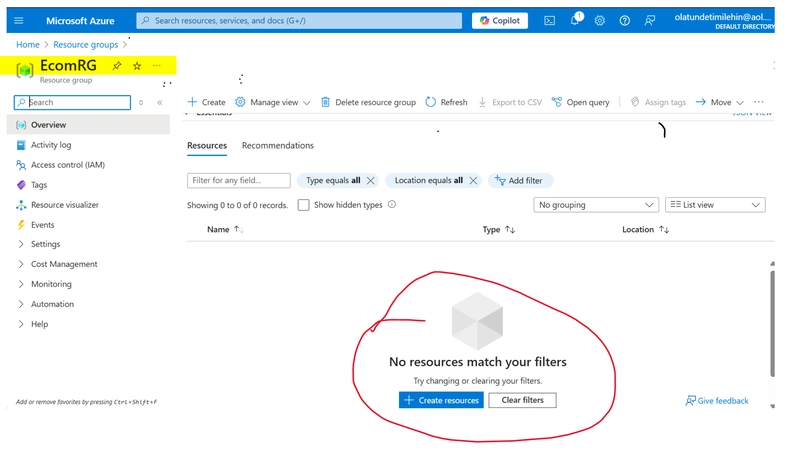


EcomRG


I hope you enjoy the simple process I took you through. Do like and comment on this post to encourage me do more

Ähnliche Beiträge
🔍 Verwandte News

Auch interessante Nachrichten How to Create a Resource Group in Azure

Thematisch verwandte Begriffe: Create, Resource, Group, Azure · 6 Treffer

Laden...

Videos werden geladen ...

Laden...

Beiträge werden geladen ...

Laden...

Videos werden geladen ...

Laden...

Beiträge werden geladen ...

Laden...

Videos werden geladen ...

Laden...

Beiträge werden geladen ...

Laden...

Videos werden geladen ...

Laden...

Beiträge werden geladen ...

Laden...

Videos werden geladen ...

💬 Kommentare werden geladen…
Zum Aktualisieren ziehen
ZERO-DAY CVE-2026-82307 | Improper neutralization of special elements used in an SQL command ('SQL…
Advisory →
tsecurity.de Icon
Offline-Lesen, Eilmeldungen & 0ms Ladezeit

Installiere tsecurity.de direkt auf deinen Home-Bildschirm für das ultimative Vollbild-Magazinerlebnis ohne Browser-Leisten.

Nächster Beitrag