



Welcome to the first quest I'll be tackling! This one might take a while to complete, as it will serve as the foundation for everything that follows - my Home Lab.
I've had the idea of creating a Home Lab for quite some time now - a place to test things, learn new technologies, and essentially just have some fun.
While exploring similar projects, I noticed a common theme: most people build a Home Lab to self-host services they use - NAS servers, media servers, VPNs, etc. While I do plan to host some of those too, my main focus is on building my own applications and services, not just hosting them. I want to recreate what you'd typically find with on a cloud provider or in a software development company - a platform that supports development.
My goal is to create a developer-focused platform where building, testing, deploying, and monitoring applications is the core.
This will be extremely opinionated, based on my experience. I’ll be using tools I’m familiar with, as well as exploring others I want to learn.
Requirements
Let's start with some requirements I've gathered for my setup.
Orchestration
For this project, I want to use Kubernetes as the main orchestrator. I've been using Kubernetes for quite a while now and, while Docker might be a better approach for home use, I want my setup to be fairly close to what you would see in a real production environment. After all, I expect to host some of my own projects, one of them being this blog.
So, if you're reading this, it means that I've already set up my Home Lab, and some of the requirements that we'll be mentioning have already been met.
Many have given up on self-hosting Kubernetes for something simpler. I might follow that same path, as warned by some of my colleagues. But until then, let's continue.
As I plan to use Kubernetes, I'll need at least 3 nodes. After some research, I decided to use 3 mini computers since I wanted to run the nodes on actual hardware instead of virtual machines. Initially, I considered using Raspberry Pis, but many of the tools I plan on using do not support the arm64 architecture. Additionally, most enterprise applications run on amd64, so it made sense to stick with that to keep my setup as close to real-world scenarios as possible.
Network
For the internal network, I wanted to separate it from my home network. That
meant I needed a router. Not just to create separation, but also to explore
networking configurations and have a physical distinction between home and
development environments.
To achieve this setup, I chose a mini computer equipped with multiple
Ethernet ports to function as a router. This device will handle the connection between my home router and all devices within the DMZ (Demilitarized Zone) network. Implementing a DMZ provides an additional layer of security by isolating internal resources from direct external access.
To make future expansion easier, I added a switch to the internal network. This will allow me to connect more nodes or devices to the DMZ network as needed.
Storage
Storage is a crucial requirement, so I added a NAS server. It stores backups for stateful applications (e.g., databases), my personal data, and serves as a self-hosted alternative to services like iCloud, Google Drive, and Dropbox.
Given the above, here is the list of hardware I’ll be using:
- 1 Mini computer with additional LAN ports (router)
- 1 Switch (for the DMZ network)
- 3 Mini computers (K8s nodes)
- 1 Computer (NAS)
Hardware
With the plan in place, it was time to start doing some research.
Router
As mentioned, I wanted a mini computer with extra ports for the router. I've worked with Cisco routers and pfSense in the past, but for this setup, I wanted to try something new. After some research, I went with OPNsense - an open-source firewall/router software that's a fork of pfSense.
I found a great mini PC on AliExpress:
- 4 LAN ports
- Intel i3 N305 (8 cores / 8 threads)
- 32GB RAM
- 1TB NVMe SSD
- Passive cooling
- Solid build quality
- ~450€
Powerline
My office is far from the router, and I wanted a wired connection. Drilling through walls and running long cables weren’t appealing, and I didn’t want to use Wi-Fi extenders. That left me with Powerline adapters.
Powerline devices uses the electrical wiring to transmit network signals. I chose the Devolo Magic 2, which extends Wi-Fi coverage and also provides
Ethernet ports. While the speed droped quite a bit, from ~500 Mbps to ~150 Mbps, this is still acceptable for my needs.
Switch
For the switch, I reused a 5-port model I had lying around (TP-Link TL-SF1005D) It’s quiet,compact, and fits my current requirements.
Nodes
I wanted the nodes to be quiet, compact, and performant. I found 3 mini PCs with the following specs:
- Ryzen 7 5700U (8 cores / 16 threads)
- 16GB RAM (upgradable to 32GB)
- 512GB SSD
- Passive cooling
- Good build quality
- ~250€
They came with two M.2 slots, and I wanted to separate the OS from the data. So, I added three Kingston DataTraveler Exodia thumb drives (one per node) to boot the OS while keeping the M.2 SSDs for local node storage.
NAS
Long-term storage has always been something I needed. If you just want reliability, I’d recommend a cloud provider like Google Drive or a prebuilt NAS from Synology or QNAP. But I’m here to learn, so I went DIY.
I found a second-hand custom-built NAS:
- 5 bays (no drives included)
- Intel N5000 (4 cores / 4 threads)
- 64GB ECC RAM
- Passive cooling
- Good build quality
- 400€
Software
With the hardware ready, it was time to look at the software stack.
Wireguard
I wanted to access the DMZ network remotely, just like I would with a cloud provider. I chose WireGuard as the VPN solution. It’s lightweight, fast, and secure.
I'll be hosting it on a Raspberry Pi 4B.
OPNSense
OPNsense is not just a router - it’s a flexible firewall platform with plugin support. I’ll use it alongside Unbound DNS to:
- Assign hostnames to devices
- Set up a local DNS server
- Define static IPs
This setup offers much more flexibility than the router provided by my ISP.
Kubernetes
Kubernetes is the orchestrator of choice. To run it, I'm using Talos - a minimal OS built specifically for Kubernetes. Talos aligns perfectly with my goals: it's secure, immutable, and easy to manage.
Kubernetes alone isn’t enough, so I’ll be adding these tools:
Networking: Cilium for pod-to-pod communication and network policies.
Ingress: NGINX Ingress Controller for external access.
Storage: Ceph for persistent volumes.
Certificates: Cert Manager to automate certificate management.
Metrics & Logs: Talos has built-in metrics support, which I’ll use for monitoring.
CI/CD: ArgoCD for GitOps-based deployments.
This will be the base stack. More tools will be added as the platform evolves.
Homelab Overview
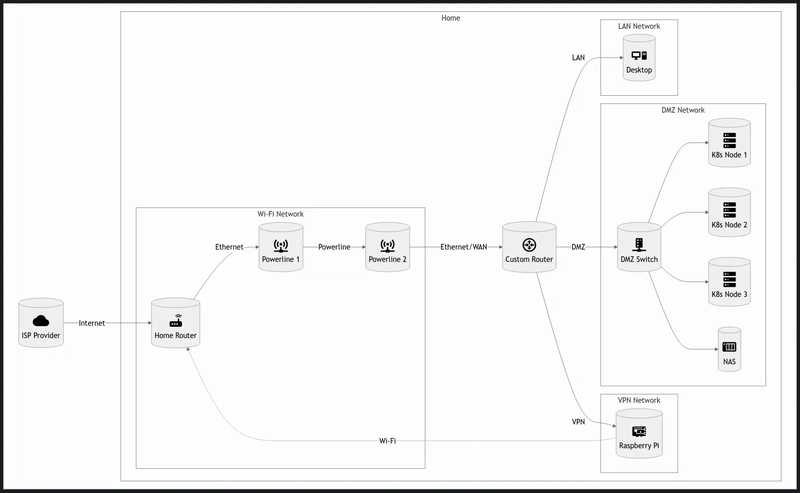
To better understand the components that we'll be using, here is a diagram of the components that we'll be using:
Architecture
Here’s a rough overview of the network setup (read right to left):
ISP connects to the Home Router (standard consumer-grade router).
Powerline Adapter connects the Home Router to the Custom Router
in my office.
Custom Router manages the DMZ network, where all critical
infrastructure lives.
Raspberry Pi runs the VPN server to allow remote access to the
DMZ.
Network Breakdown
Wi-Fi Network: Main home network. Used by everyday devices not part of the DMZ.
WAN Network: Connects the Home Router to the Custom Router. Provides internet access to all custom networks.
DMZ Network: Hosts the Kubernetes nodes, NAS, and future services. Managed by the Custom Router.
VPN Network: Contains the Raspberry Pi and allows external access into the DMZ.
LAN Network: Contains the desktop PC. It didn’t make sense to have it on Wi-Fi, so it gets its own segment.
This is the initial setup. It’s designed to be modular and expandable over time.
Conclusion
This wraps up the first chapter of my Home Lab series. We covered the
motivations and requirements behind the project, explored the hardware and software choices, and reviewed the overall architecture of the platform I’m aiming to build.
I'm really excited to start building this, as I feel like this will be a great learning experience - not just in terms of configuration, but also in exploring, architecture, planning, implementation, and of course, documenting and sharing.
I hope you’ll enjoy this journey as much as I will. Stay tuned for the next chapter! And if you have any suggestions, feel free to reach out.
This is part of the Home Lab series. All the chapters can be found here:
More to come...
Originally published at https://techquests.dev on April 11, 2025.
SOCIAL SHARE CARD GENERATOR