Zum Hauptinhalt springen
tsecurity.de LIVE
Echtzeit-Radar & Feeds
Alle RSS Feeds
👥 Community & Social
IT NachrichtenTelekom: Neuer Reise-eSIM-Dienst T-Travel startet weltweit(21.09.2026 um 11:45 Uhr)
IT NachrichtenSamsung Wallet: Neue Banken mit an Bord(21.09.2026 um 13:07 Uhr)
IT NachrichtenTelekom: Neuer Reise-eSIM-Dienst T-Travel startet weltweit(21.09.2026 um 11:45 Uhr)
IT NachrichtenSamsung Wallet: Neue Banken mit an Bord(21.09.2026 um 13:07 Uhr)
Intelligence View
⚡ tsecurity.de Intelligence

AWS IAM for Beginners: Understanding User Groups

In the first post of this IAM beginner series, I walked through IAM Users how to create one and why you shouldn’t rely on your root account for daily AWS tasks. Now, we're building on that foundation with something more scalable and p…

0
↗ Quelle (dev.to)
Reagiere als Erste:r — dein Feedback zählt!

In the first post of this IAM beginner series, I walked through IAM Users how to create one and why you shouldn’t rely on your root account for daily AWS tasks.


Now, we're building on that foundation with something more scalable and practical: User Groups.


What Are IAM User Groups?


User groups are collections of users that share the same permissions. Instead of assigning permissions one-by-one to each user, you attach a policy to the group, and every user in that group inherits it.


This simplifies access management especially in large teams or fast-growing projects.


How to Create a User Group in AWS


  1. Log in to the AWS console.

  2. Navigate to the IAM service.

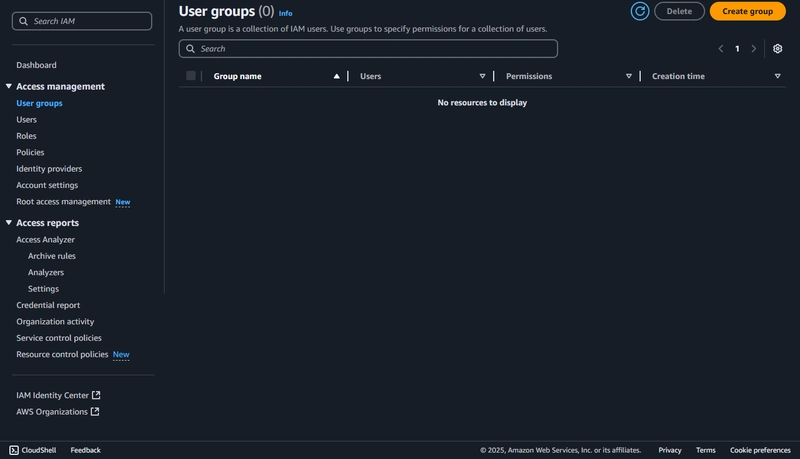
  3. On the sidebar under Access Management, click User groups.

  4. Click the Create group button.


AWS Console image of user groups


  1. Give your group a name, like Admins, Developers, or Testers.

  2. You can optionally add users to the group at this stage.


And you’re done!


Real-World Examples of User Groups


Let’s say you're working on a production application with different teams. Here's how you might use groups:


  • 🛠 Admins: Full control over all AWS resources. Attach policies like AdministratorAccess.

  • 👨‍💻 Developers: Need access to deploy apps using services like EC2, Lambda, and S3, but don’t need full account control.

  • 🧪 Testers: Might need read-only access to logs and certain data buckets to verify app behavior.


By using groups, you avoid assigning policies individually and reduce the risk of misconfiguration.


Why This Matters


This becomes especially useful when onboarding new team members. Instead of manually figuring out permissions every time, just add them to the relevant group, and they’re ready to go.


It also makes offboarding safer—remove someone from a group and they instantly lose access to associated resources.


What’s Next?


Next up, we’ll cover IAM Roles—one of the most misunderstood but powerful parts of IAM.


Roles are what services and other AWS accounts use to assume access without storing long-term credentials.


We'll explore when to use them, how they're different from users, and practical examples for real projects.


Conclusion


User groups are a foundational part of any secure and scalable IAM setup.


They help enforce the principle of least privilege, reduce human error, and make permission management way easier as your cloud usage grows.


Don’t wait until your IAM dashboard is a mess to start organizing users properly. Start now. Start simple.


✍️ If this post helped you, drop a comment or share it with someone new to AWS.


🔗 Catch up on Part 1: IAM Users


🛡️ Part 3 on IAM Roles is coming soon.


aws #iam #cloudsecurity #devops #awscommunity #awstips #infosec #cybersecurity #cloudcomputing #securitybestpractices

Ähnliche Beiträge
🔍 Verwandte News

Auch interessante Nachrichten AWS IAM for Beginners: Understanding User Groups

Thematisch verwandte Begriffe: Beginners, Understanding, User, Groups · 6 Treffer

Laden...

Videos werden geladen ...

Laden...

Beiträge werden geladen ...

Laden...

Videos werden geladen ...

Laden...

Beiträge werden geladen ...

Laden...

Videos werden geladen ...

Laden...

Beiträge werden geladen ...

Laden...

Videos werden geladen ...

Laden...

Beiträge werden geladen ...

Laden...

Videos werden geladen ...

Zum Aktualisieren ziehen
ZERO-DAY CVE-2026-94040 | A flaw has been found in vas3k TaxHacker up to 0.8.5. Affected by this v…
Advisory →
TTS Reader • tsecurity.de Voice
tsecurity.de Icon
tsecurity.de App
Offline-Lesen, Eilmeldungen & 0ms Ladezeit

Installiere tsecurity.de direkt auf deinen Home-Bildschirm für das ultimative Vollbild-Magazinerlebnis ohne Browser-Leisten.

Nächster Beitrag
Themen-Radar & Intelligence Matrix
Echtzeit-Taxonomie nach Angriffsvektoren & Plattformen

tsecurity.de Live Threat Radar

🔴 LIVE RADAR
MONITORING
AKTIV
CVE-DATENBANK
LIVE
🔍
Community Radar & Live Chat
Sentinel Bot online • Live-Stream
Dein Cluster: Security Explorer
Match:
lädt…
Verbindung zum Community-Stream wird aufgebaut...
Bearbeitungsmodus — Senden überschreibt deine Nachricht
Community-Puls — was gerade passiert
lädt…
Aktivitäten deiner Analysten
lädt…
Neues Thema oder Eilmeldung einreichen

Reiche interessante Links, Zero-Days oder Debatten ein. Die Community entscheidet per Upvote über die Veröffentlichung.

Heiß diskutierte Einreichungen
🔖 Gespeicherte Artikel
📂 Keine gespeicherten Artikel vorhanden.
Zurück Ziehen Vor
Links: vorheriger Artikel Rechts: nächster Artikel unten: schließen
News NIS-2 Frühwarnung Tier-1 Intel ⏱️ 3 Min vor 10 Min
Artikeldaten werden geladen...

Zurück: vorheriger Vor: nächster
↗ Original-Quelle
Social Reaktionen Deine Reaktion zählt
Einstufung & Relevanz-Poll 0 Stimmen
In sozialen Netzwerken teilen 1-Klick