
Zum Hauptinhalt springen
Echtzeit-Radar & Feeds
Alle RSS Feeds ➔
👥 Community & Social
•
YouTube Security VideosNeil Patel: The 3-Search Test For Your Business #shorts(24.09.2026 um 20:04 Uhr)
•
YouTube Security VideosLinus Tech Tips: The One Apple Product I Fanboy Over(24.09.2026 um 20:18 Uhr)
•
YouTube Security VideosMicrosoft Mechanics: One Prompt Builds Your Copilot Agent(24.09.2026 um 20:15 Uhr)
••
Sichere ProgrammierungAI-powered fuzzing with the GitHub Security Lab Taskflow Agent(24.09.2026 um 20:26 Uhr)
•••
Sichere ProgrammierungBuilt an Agentic Fraud Investigator using(24.09.2026 um 20:15 Uhr)
•
Sichere ProgrammierungBuilding a fraud investigator that argues with itself(24.09.2026 um 20:15 Uhr)
••
YouTube Security VideosNeil Patel: The 3-Search Test For Your Business #shorts(24.09.2026 um 20:04 Uhr)
•
YouTube Security VideosLinus Tech Tips: The One Apple Product I Fanboy Over(24.09.2026 um 20:18 Uhr)
•
YouTube Security VideosMicrosoft Mechanics: One Prompt Builds Your Copilot Agent(24.09.2026 um 20:15 Uhr)
••
Sichere ProgrammierungAI-powered fuzzing with the GitHub Security Lab Taskflow Agent(24.09.2026 um 20:26 Uhr)
•••
Sichere ProgrammierungBuilt an Agentic Fraud Investigator using(24.09.2026 um 20:15 Uhr)
•
Sichere ProgrammierungBuilding a fraud investigator that argues with itself(24.09.2026 um 20:15 Uhr)
•
Intelligence View
⚡ tsecurity.de Intelligence

Understanding the Linux File System Hierarchy

Introduction I’m continuing my 30-day Linux challenge as part of my preparation for the RHCSA exam. This is Day 2 and in today’s article, I’m walking you through this by breaking down one of the most fundamental topics in Linux that is Fi…

0
↗ Quelle (dev.to)
Reagiere als Erste:r — dein Feedback zählt!


Introduction


I’m continuing my 30-day Linux challenge as part of my preparation for the RHCSA exam. This is Day 2 and in today’s article, I’m walking you through this by breaking down one of the most fundamental topics in Linux that is File System Hierarchy.


If you are new to Linux or planning for certifications, understanding how files and directories are organized is not just helpful but it is essential.


In this article, I’ll explain what each core directory means, how it is used in real-world systems, and what you need to know as a system administrator.


My goal is to make this easy to follow, even if you're from a non-technical background. Whether you're preparing for RHCSA or just getting started with Linux, this guide will help you build a solid foundation.


Index


  1. What Is the Linux File System Hierarchy

  2. Quick Overview of Key Directories

  3. Why This Matters especially for RHCSA

  4. Real World Scenarios

  5. Best Practices and Recommendations

  6. Quick Summary


📁 What Is the Linux File System Hierarchy?


In Linux, everything starts from a single root literally. All files and directories are organized under /, the root directory. This hierarchical structure allows the system to stay organized, modular and manageable especially as the environment grows in complexity.


🗂️ Quick Overview of Key Directories


Directory with its Purpose

/ Root of the file system — everything begins here

/bin Essential command binaries (like ls, cp, mv) used by all users

/sbin System binaries, mainly for the root user

/etc Configuration files for the entire system

/home User directories (like /home/username)

/var Variable data — logs, mail spools etc.

/tmp Temporary files (automatically cleared)

/usr User-installed software and libraries

/boot Bootloader files, kernel etc.

/dev Device files (e.g., disks, terminals)

/proc Kernel and process information (virtual filesystem)

/mnt and /media Used to mount external drives
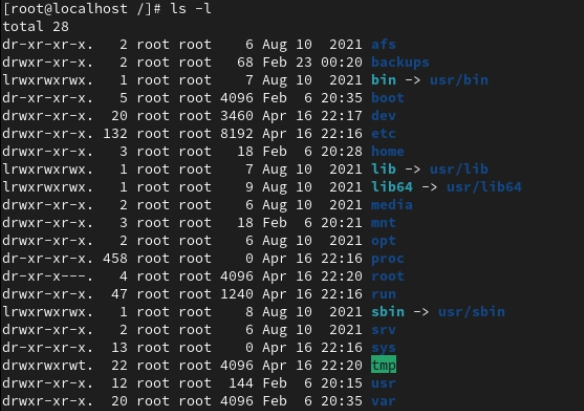
Image description


🛠️ Why This Matters (Especially for RHCSA)


• You’ll use these directories constantly for tasks like user management, troubleshooting and package installations.

• Many exam questions rely on knowing where to find logs, binaries, and configs. This structure tells you where to look.

• It improves your ability to navigate the system and think like an admin.


🧪 Real World Scenarios


✅ Need to check logs for a failed service? Go to /var/log.

✅ Want to update system-wide configurations? Try /etc.

✅ Installing custom software manually? It’ll likely land in /usr/local.

✅ Accessing user files? Head to /home.

This knowledge helps you feel less lost and more in control of what’s happening on your machine.


Best Practices and Recommendations


💡 Pro Tips

• Use ls -l / to get a high-level view of all top-level directories.

• Explore each directory slowly and try understanding what files live there.

• Don’t memorize and interact with the system. That’s how real understanding builds.

Image description


🔚 Quick Summary


Today’s article may seem like a basic one but the file system hierarchy is truly the backbone of everything you’ll do in Linux.

By learning what’s, where and why you make smarter decisions as a Linux user or system administrator.

Image description


I'd love to hear your thoughts, insights or experiences with Linux. Feel free to share and join the conversation [Connect with me on LinkedIn www.linkedin.com/in/techwithsana ]💜


#30dayslinuxchallenge #redhat #networking #cloudcomputing #cloudenginner #cloudarchitect #cloud #RHCSA #RHCE #RHEL #WomeninTech #Technology

CTI Threat Relationship Graph3 Knoten / 2 Relationen
CVE / Incident Software MITRE ATT&CK CWE Weakness IoC
SOC Incident Playbook: Vulnerability Remediation & Verification
title: Detect Exploitation - Understanding the Linux File System Hierarchy
id: e02533fe-07b1-4be5-a972-76b9dfb020ac
status: experimental
description: Automatisch generierte SIEM-Erkennungsregel basierend auf CTI Intelligence
references:
  - https://tsecurity.de/
author: iShareStuff CTI Automated Detection Engine
date: 2026-09-24
logsource:
  category: network_connection
  product: any
detection:
  selection:
      CommandLine|contains:
        - 'exploit'
  condition: selection
falsepositives:
  - Legitime administrative Zugriffe oder Penetrationstests
level: high
tags:
  - attack.initial_access
rule CTI_Threat_Indicator {
    meta:
        author = "iShareStuff CTI Automated Detection Engine"
        date = "2026-09-24"
        description = "YARA Signature for "
    strings:
        $str = "Understanding the Linux File S" ascii wide
    condition:
        any of them
}
tsecurity.de Cognitive Threat RAG
Fokus-Vektor:

Kognitive Analyse für identifizierte Bedrohung: Erhöhte Bedrohungslage im Bereich Understanding the Linux File System Hier.... Basierend auf 368k Vektor-Korrelationen werden sofortige Isolationsmaßnahmen für betroffene Endpunkte empfohlen.

🛡️ Angriffsfläche & Exposure

Netzwerk/Remote-Zugriff ohne Vorauthentifizierung möglich.

⚡ Empfohlene Sofortmaßnahmen
  • 1. Perimeter-Inspektion: Relevante Portfreigaben und exponierte Endpunkte unverzüglich scannen.
  • 2. Patch-Applikation: Hersteller-Hotfix einspielen oder betroffene Daemons in isolierte DMZ-Segmente überführen.
  • 3. Telemetrie & EDR-Alerts: Prozessaufrufe und Child-Processes auf anomale Shell-Spawns überwachen.
🔗 Semantisch verwandte Zero-Days MariaDB 11.7 VEC
Ähnliche Beiträge
🔍 Verwandte News

Auch interessante Nachrichten Understanding the Linux File System Hierarchy

Thematisch verwandte Begriffe: Understanding, Linux, File, System · 6 Treffer

Laden...

Videos werden geladen ...

Laden...

Beiträge werden geladen ...

Laden...

Videos werden geladen ...

Laden...

Beiträge werden geladen ...

Laden...

Videos werden geladen ...

Laden...

Beiträge werden geladen ...

Laden...

Videos werden geladen ...

Laden...

Beiträge werden geladen ...

Laden...

Videos werden geladen ...

Zum Aktualisieren ziehen
ZERO-DAY CVE-2026-57175 | Python Social Auth is a social authentication/registration mechanism. Pr…
Advisory →
tsecurity.de Icon
Offline-Lesen, Eilmeldungen & 0ms Ladezeit

Installiere tsecurity.de direkt auf deinen Home-Bildschirm für das ultimative Vollbild-Magazinerlebnis ohne Browser-Leisten.

Nächster Beitrag
Themen-Radar & Intelligence Matrix
Echtzeit-Taxonomie nach Angriffsvektoren & Plattformen

tsecurity.de Live Threat Radar

🔴 LIVE RADAR
MONITORING
AKTIV
CVE-DATENBANK
LIVE
🔍
Community Radar & Live Chat
Sentinel Bot online • Live-Stream
Dein Cluster: Security Explorer
Match:
lädt…
Verbindung zum Community-Stream wird aufgebaut...
Bearbeitungsmodus — Senden überschreibt deine Nachricht
Community-Puls — was gerade passiert
lädt…
Aktivitäten deiner Analysten
lädt…
Neues Thema oder Eilmeldung einreichen

Reiche interessante Links, Zero-Days oder Debatten ein. Die Community entscheidet per Upvote über die Veröffentlichung.

Heiß diskutierte Einreichungen
📂 Keine gespeicherten Artikel vorhanden.
Zurück Ziehen Vor
Links: vorheriger Artikel • Rechts: nächster Artikel • unten: schließen
News NIS-2 Frühwarnung Tier-1 Intel TTP ⏱️ 3 Min vor 10 Min
Artikeldaten werden geladen...
↗ Original-Quelle