



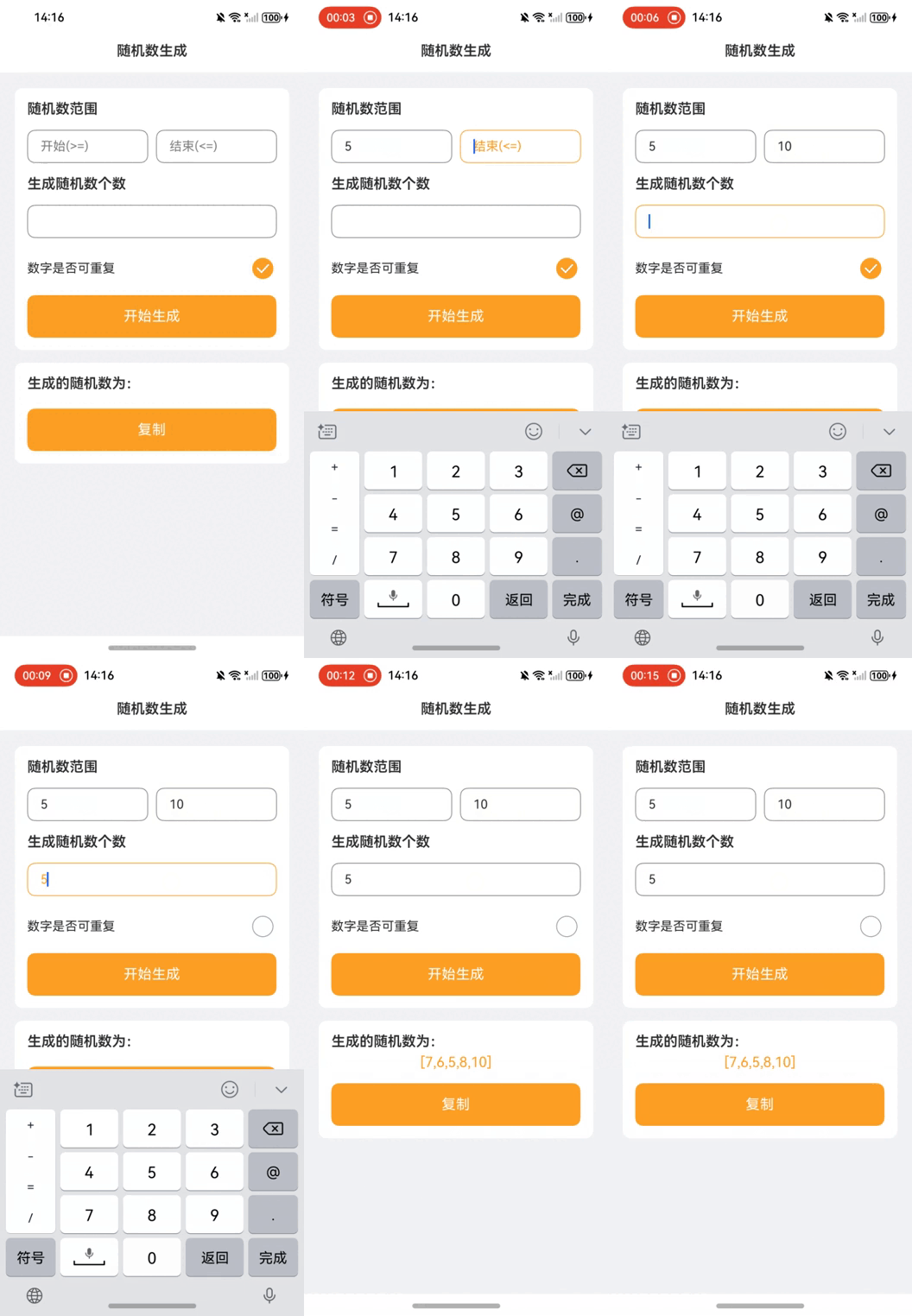
This article demonstrates a random number generator implementation using ArkUI in HarmonyOS NEXT. The application allows users to define number ranges, specify quantity, choose uniqueness, and copy results to clipboard.
// Import clipboard service module for copy functionality

import { pasteboard } from '@kit.BasicServicesKit';

// Import prompt service for user feedback

import { promptAction } from '@kit.ArkUI';


// Define main entry component using decorator

@Entry

@Component

struct RandomNumberGenerator {

  // Base spacing for layout configuration

  @State private baseSpacing: number = 30;

  // Generated random numbers string

  @State private generatedNumbers: string = '';

  // Primary theme color

  @State private primaryColor: string = '#fea024';

  // Text color

  @State private fontColor: string = "#2e2e2e";

  // Input focus states

  @State private isFocusStart: boolean = false;

  @State private isFocusEnd: boolean = false;

  @State private isFocusCount: boolean = false;

  // Allow duplicate numbers flag

  @State private isUnique: boolean = true;

  // Range boundaries and count

  @State private startValue: number = 0;

  @State private endValue: number = 0;

  @State private countValue: number = 0;


  // Generate random numbers based on parameters

  private generateRandomNumbers(): void {

    const startValue = this.startValue;

    const endValue = this.endValue;

    const countValue = this.countValue;

    const range: number = endValue - startValue + 1;


    const generatedNumbers = new Set<number>();

    const tempArray: number[] = [];


    if (!this.isUnique) {

      if (countValue > range) {

        this.getUIContext().showAlertDialog({

          title: 'Error',

          message: `Requested count exceeds available numbers in range`,

          confirm: {

            defaultFocus: true,

            value: 'OK',

            fontColor: Color.White,

            backgroundColor: this.primaryColor,

            action: () => {}

          },

          onWillDismiss: () => {},

          alignment: DialogAlignment.Center,

        });

        return;

      }


      for (let i = 0; i < countValue; i++) {

        let randomIndex = Math.floor(Math.random() * (range - i));

        let randomNum = tempArray[randomIndex] ?? startValue + randomIndex;

        generatedNumbers.add(randomNum);

        if (tempArray[range - 1 - i] === undefined) {

          tempArray[range - 1 - i] = startValue + range - 1 - i;

        }

        tempArray[randomIndex] = tempArray[range - 1 - i];

      }

      this.generatedNumbers = JSON.stringify(Array.from(generatedNumbers));

    } else {

      for (let i = 0; i < this.countValue; i++) {

        let randomNumber = startValue + Math.floor(Math.random() * (endValue - startValue));

        tempArray.push(randomNumber);

      }

      this.generatedNumbers = JSON.stringify(tempArray);

    }

  }


  // Copy text to system clipboard

  private copyToClipboard(text: string): void {

    const pasteboardData = pasteboard.createData(pasteboard.MIMETYPE_TEXT_PLAIN, text);

    const systemPasteboard = pasteboard.getSystemPasteboard();

    systemPasteboard.setData(pasteboardData);

    promptAction.showToast({ message: 'Copied to clipboard' });

  }


  // UI layout construction

  build() {

    Column() {

      // Header section

      Text("Random Number Generator")

        .width('100%')

        .height(54)

        .fontSize(18)

        .fontWeight(600)

        .backgroundColor(Color.White)

        .textAlign(TextAlign.Center)

        .fontColor(this.fontColor);


      // Configuration panel

      Column() {

        // Range input section

        Row() {

          Text(`Number Range`)

            .fontWeight(600)

            .fontSize(18)

            .fontColor(this.fontColor);

        }

        .margin({ top: `${this.baseSpacing}lpx`, left: `${this.baseSpacing}lpx` });


        // Range input fields

        Row() {

          TextInput({ placeholder: 'Start(>=)' })

            .layoutWeight(1)

            .type(InputType.Number)

            .placeholderColor(this.isFocusStart ? this.primaryColor : Color.Gray)

            .fontColor(this.isFocusStart ? this.primaryColor : this.fontColor)

            .borderColor(this.isFocusStart ? this.primaryColor : Color.Gray)

            .borderWidth(1)

            .borderRadius(10)

            .backgroundColor(Color.White)

            .showUnderline(false)

            .onBlur(() => this.isFocusStart = false)

            .onFocus(() => this.isFocusStart = true)

            .onChange((value: string) => this.startValue = Number(value));


          Line().width(10)


          TextInput({ placeholder: 'End(<=)' })

            .layoutWeight(1)

            .type(InputType.Number)

            .placeholderColor(this.isFocusEnd ? this.primaryColor : Color.Gray)

            .fontColor(this.isFocusEnd ? this.primaryColor : this.fontColor)

            .borderColor(this.isFocusEnd ? this.primaryColor : Color.Gray)

            .borderWidth(1)

            .borderRadius(10)

            .backgroundColor(Color.White)

            .showUnderline(false)

            .onBlur(() => this.isFocusEnd = false)

            .onFocus(() => this.isFocusEnd = true)

            .onChange((value: string) => this.endValue = Number(value));

        }

        .margin({ left: `${this.baseSpacing}lpx`, right: `${this.baseSpacing}lpx`, top: `${this.baseSpacing}lpx` });


        // Count input section

        Text('Quantity')

          .fontWeight(600)

          .fontSize(18)

          .fontColor(this.fontColor)

          .margin({ left: `${this.baseSpacing}lpx`, top: `${this.baseSpacing}lpx` });


        Row() {

          TextInput({ placeholder: '' })

            .layoutWeight(1)

            .type(InputType.Number)

            .placeholderColor(this.isFocusCount ? this.primaryColor : Color.Gray)

            .fontColor(this.isFocusCount ? this.primaryColor : this.fontColor)

            .borderColor(this.isFocusCount ? this.primaryColor : Color.Gray)

            .borderWidth(1)

            .borderRadius(10)

            .backgroundColor(Color.White)

            .showUnderline(false)

            .onBlur(() => this.isFocusCount = false)

            .onFocus(() => this.isFocusCount = true)

            .onChange((value: string) => this.countValue = Number(value));

        }

        .margin({ left: `${this.baseSpacing}lpx`, right: `${this.baseSpacing}lpx`, top: `${this.baseSpacing}lpx` });


        // Uniqueness toggle

        Row() {

          Text('Allow duplicates')

            .fontWeight(400)

            .fontSize(16)

            .fontColor(this.fontColor)

            .layoutWeight(1);


          Toggle({ type: ToggleType.Checkbox, isOn: this.isUnique })

            .width('100lpx')

            .height('50lpx')

            .borderColor(Color.Gray)

            .selectedColor(this.primaryColor)

            .onChange((isOn: boolean) => this.isUnique = isOn)

            .align(Alignment.End);

        }

        .margin({ top: `${this.baseSpacing}lpx` })

        .width('100%')

        .padding({ left: `${this.baseSpacing}lpx`, right: `${this.baseSpacing}lpx`, top: `${this.baseSpacing / 3}lpx` })

        .hitTestBehavior(HitTestMode.Block)

        .onClick(() => this.isUnique = !this.isUnique);


        // Generate button

        Text('Generate')

          .fontColor(Color.White)

          .backgroundColor(this.primaryColor)

          .height(54)

          .textAlign(TextAlign.Center)

          .borderRadius(10)

          .fontSize(18)

          .width(`${650 - this.baseSpacing * 2}lpx`)

          .margin({

            top: `${this.baseSpacing}lpx`,

            left: `${this.baseSpacing}lpx`,

            right: `${this.baseSpacing}lpx`,

            bottom: `${this.baseSpacing}lpx`

          })

          .clickEffect({ level: ClickEffectLevel.HEAVY, scale: 0.8 })

          .onClick(() => this.generateRandomNumbers());

      }

      .width('650lpx')

      .margin({ top: 20 })

      .backgroundColor(Color.White)

      .borderRadius(10)

      .alignItems(HorizontalAlign.Start);


      // Results display

      Column() {

        Text(`Generated Numbers:`)

          .fontWeight(600)

          .fontSize(18)

          .fontColor(this.fontColor)

          .margin({ top: `${this.baseSpacing}lpx`, left: `${this.baseSpacing}lpx` });


        Text(`${this.generatedNumbers}`)

          .width('650lpx')

          .fontColor(this.primaryColor)

          .fontSize(18)

          .textAlign(TextAlign.Center)

          .padding({ left: 5, right: 5 })

          .margin({ top: `${this.baseSpacing / 3}lpx` });


        // Copy button

        Text('Copy')

          .enabled(!!this.generatedNumbers)

          .fontColor(Color.White)

          .backgroundColor(this.primaryColor)

          .height(54)

          .textAlign(TextAlign.Center)

          .borderRadius(10)

          .fontSize(18)

          .width(`${650 - this.baseSpacing * 2}lpx`)

          .margin({

            top: `${this.baseSpacing}lpx`,

            left: `${this.baseSpacing}lpx`,

            right: `${this.baseSpacing}lpx`,

            bottom: `${this.baseSpacing}lpx`

          })

          .clickEffect({ level: ClickEffectLevel.HEAVY, scale: 0.8 })

          .onClick(() => this.copyToClipboard(this.generatedNumbers));

      }

      .width('650lpx')

      .backgroundColor(Color.White)

      .borderRadius(10)

      .margin({ top: `${this.baseSpacing}lpx` })

      .alignItems(HorizontalAlign.Start);

    }

    .height('100%')

    .width('100%')

    .backgroundColor("#f2f3f5");

  }

}
Key Technical Points:
State Management:
- Uses
@Statedecorators for reactive UI updates - Manages input focus states for better UX
- Uses
Random Generation Algorithm:
- Implements Fisher-Yates shuffle for unique numbers
- Handles range validation and error alerts
UI Components:
- Uses ArkUI's declarative syntax for layout
- Implements responsive input fields with visual feedback
System Integration:
- Clipboard integration via
pasteboardservice - Toast notifications using
promptAction
- Clipboard integration via
Features:
- Configurable number range and quantity
- Duplicate number prevention
- One-click copy functionality
- Responsive input validation
- Visual feedback for user actions
This implementation demonstrates HarmonyOS NEXT's capabilities in building interactive applications with clean architecture and good user experience.