



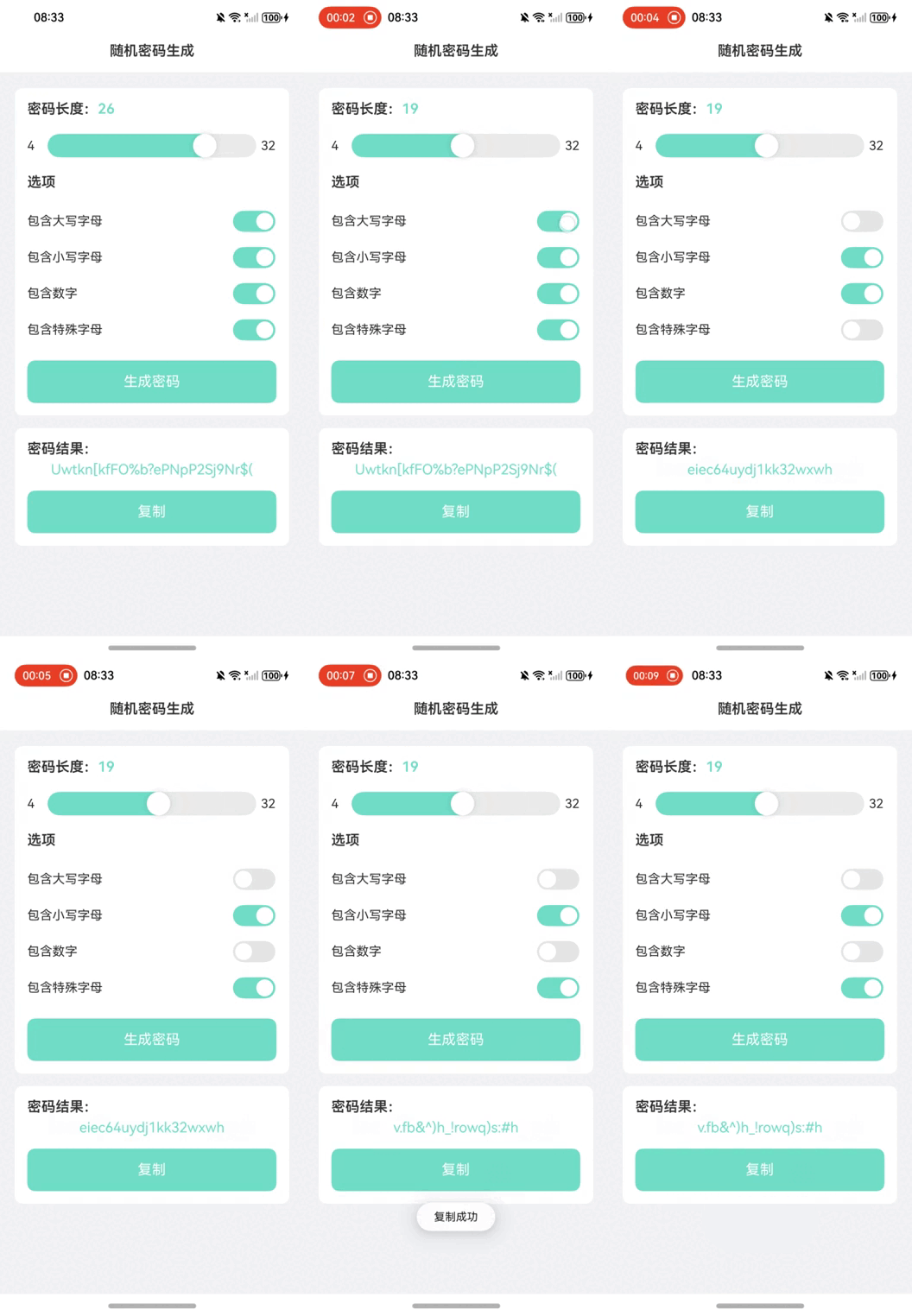
This article demonstrates how to create a random password generator application using HarmonyOS NEXT's ArkUI framework. The application allows users to customize password complexity through various character sets and provides clipboard integration for easy password management.
Code Implementation with English Annotations
// Import clipboard service

import { pasteboard } from '@kit.BasicServicesKit';

// Import dialog prompt service

import { promptAction } from '@kit.ArkUI';


// Observable class for password options using decorator

@ObservedV2

class PasswordOption {

  name: string; // Option name

  characters: string; // Corresponding character set

  @Trace selected: boolean = true; // Selection status (default: true)

  @Trace enabled: boolean = true; // Enable status (default: true)


  constructor(name: string, characters: string) {

    this.name = name;

    this.characters = characters;

  }

}


// Entry component decorator

@Entry

@Component

struct PasswordGeneratorPage {

  @State options: PasswordOption[] = [

    new PasswordOption("Uppercase", "ABCDEFGHIJKLMNOPQRSTUVWXYZ"),

    new PasswordOption("Lowercase", "abcdefghijklmnopqrstuvwxyz"),

    new PasswordOption("Numbers", "0123456789"),

    new PasswordOption("Symbols", "!@#$%^&*()_+-=[]{}|;:,.<>?"),

  ];

  @State passwordLength: number = 10;

  @State baseSpacing: number = 30;

  @State generatedPassword: string = '';

  @State isCopyButtonEnabled: boolean = false;

  @State primaryColor: string = '#71dec7';

  @State fontColor: string = "#2e2e2e";


  // Generate password method

  generatePassword() {

    let characterSet = '';

    this.options.forEach(option => {

      if (option.selected) characterSet += option.characters;

    });


    let password = '';

    for (let i = 0; i < this.passwordLength; i++) {

      password += characterSet[Math.floor(Math.random() * characterSet.length)];

    }

    this.generatedPassword = password;

  }


  // Copy to clipboard implementation

  copyToClipboard(text: string) {

    const pasteboardData = pasteboard.createData(pasteboard.MIMETYPE_TEXT_PLAIN, text);

    pasteboard.getSystemPasteboard().setData(pasteboardData);

    promptAction.showToast({ message: 'Copied' });

  }


  // Validate option selection rules

  checkOptionsSelection() {

    let selectedCount = 0;

    let lastSelectedIndex = 0;


    this.options.forEach((option, index) => {

      option.enabled = true;

      if (option.selected) {

        lastSelectedIndex = index;

        selectedCount++;

      }

    });


    if (selectedCount === 1) {

      this.options[lastSelectedIndex].enabled = false;

    }

  }


  // UI layout construction

  build() {

    Column() {

      // Header section

      Text("Random Password Generator")

        .width('100%')

        .height(54)

        .fontSize(18)

        .fontWeight(600)

        .backgroundColor(Color.White)

        .textAlign(TextAlign.Center)

        .fontColor(this.fontColor);


      // Password configuration panel

      Column() {

        // Length control

        Row() {

          Text(`Length: `)

            .fontWeight(600)

            .fontSize(18)

            .fontColor(this.fontColor);

          Text(`${this.passwordLength}`)

            .fontWeight(600)

            .fontSize(18)

            .fontColor(this.primaryColor);

        }.margin({ top: `${this.baseSpacing}lpx`, left: `${this.baseSpacing}lpx` });


        // Slider component

        Row() {

          Text('4').fontColor(this.fontColor).width(20);

          Slider({

            value: this.passwordLength,

            min: 4,

            max: 32,

            style: SliderStyle.InSet

          })

            .layoutWeight(1)

            .blockColor(Color.White)

            .trackColor('#EBEBEB')

            .trackThickness(30)

            .blockSize({ width: 55, height: 55 })

            .selectedColor(this.primaryColor)

            .onChange((value: number) => {

              this.passwordLength = value;

            });

          Text('32').fontColor(this.fontColor).width(20);

        }.margin({ left: `${this.baseSpacing}lpx`, right: `${this.baseSpacing}lpx`, top: `${this.baseSpacing}lpx` });


        // Character options

        Text('Options')

          .fontWeight(600)

          .fontSize(18)

          .fontColor(this.fontColor)

          .margin({ left: `${this.baseSpacing}lpx`, top: `${this.baseSpacing}lpx`, bottom: `${this.baseSpacing}lpx` });


        // Dynamic options rendering

        ForEach(this.options, (option: PasswordOption, index: number) => {

          Row() {

            Text(option.name)

              .fontWeight(400)

              .fontSize(16)

              .fontColor(this.fontColor)

              .layoutWeight(1);

            Toggle({ type: ToggleType.Switch, isOn: option.selected })

              .width('100lpx')

              .height('50lpx')

              .enabled(option.enabled)

              .selectedColor(this.primaryColor)

              .onChange((isOn: boolean) => {

                option.selected = isOn;

                this.checkOptionsSelection();

              });

          }

          .width('100%')

          .padding({

            left: `${this.baseSpacing}lpx`,

            right: `${this.baseSpacing}lpx`,

            top: `${this.baseSpacing / 3}lpx`,

            bottom: `${this.baseSpacing / 3}lpx`

          })

          .onClick(() => {

            if (option.enabled) option.selected = !option.selected;

          });

        });


        // Generate button

        Text('Generate Password')

          .fontColor(Color.White)

          .backgroundColor(this.primaryColor)

          .height(54)

          .textAlign(TextAlign.Center)

          .borderRadius(10)

          .fontSize(18)

          .width(`${650 - this.baseSpacing * 2}lpx`)

          .margin({ top: `${this.baseSpacing}lpx`, left: `${this.baseSpacing}lpx`, right: `${this.baseSpacing}lpx`, bottom: `${this.baseSpacing}lpx` })

          .clickEffect({ level: ClickEffectLevel.HEAVY, scale: 0.8 })

          .onClick(() => this.generatePassword());

      }

      .width('650lpx')

      .margin({ top: 20 })

      .backgroundColor(Color.White)

      .borderRadius(10)

      .alignItems(HorizontalAlign.Start);


      // Result display

      Column() {

        Text(`Generated Password:`)

          .fontWeight(600)

          .fontSize(18)

          .fontColor(this.fontColor)

          .margin({ top: `${this.baseSpacing}lpx`, left: `${this.baseSpacing}lpx` });


        Text(`${this.generatedPassword}`)

          .width('650lpx')

          .fontColor(this.primaryColor)

          .fontSize(18)

          .textAlign(TextAlign.Center)

          .margin({ top: `${this.baseSpacing / 3}lpx` });


        // Copy button

        Text('Copy')

          .enabled(!!this.generatedPassword)

          .fontColor(Color.White)

          .backgroundColor(this.primaryColor)

          .height(54)

          .textAlign(TextAlign.Center)

          .borderRadius(10)

          .fontSize(18)

          .width(`${650 - this.baseSpacing * 2}lpx`)

          .margin({ top: `${this.baseSpacing}lpx`, left: `${this.baseSpacing}lpx`, right: `${this.baseSpacing}lpx`, bottom: `${this.baseSpacing}lpx` })

          .clickEffect({ level: ClickEffectLevel.HEAVY, scale: 0.8 })

          .onClick(() => this.copyToClipboard(this.generatedPassword));

      }

      .width('650lpx')

      .backgroundColor(Color.White)

      .borderRadius(10)

      .margin({ top: `${this.baseSpacing}lpx` })

      .alignItems(HorizontalAlign.Start);

    }

    .height('100%')

    .width('100%')

    .backgroundColor("#f2f3f5");

  }

}
Key Features
State Management
Uses@ObservedV2decorator for observable classes and@Tracefor property tracking, implementing reactive UI updates.
Password Generation Logic
- Combines selected character sets
- Implements cryptographically secure randomization
- Enforces minimum character set selection
User Interface
- Responsive layout with percentage-based dimensions
- Customizable theme colors
- Interactive slider with real-time feedback
- Visual feedback for copy operations
Security Considerations
- Minimum password length of 4 characters
- Mandatory character set selection
- Clear visual feedback for copy operations
Development Highlights
Component Reusability
UsesForEachto dynamically generate option components based on the configuration array.Accessibility
Implements proper touch targets (minimum 50x50lp) and visual feedback for interactive elements.Platform Integration
Leverages HarmonyOS services for clipboard operations and system notifications.
This implementation demonstrates core HarmonyOS development concepts including service integration, reactive programming, and adaptive layout design. The application can be extended with additional features such as password strength indicators and history storage.