
Zum Hauptinhalt springen
tsecurity.de LIVE
Echtzeit-Radar & Feeds
Alle RSS Feeds
👥 Community & Social
IT NachrichtenFritzbox-Besitzer sollten diesen Speedtest kennen(24.09.2026 um 06:39 Uhr)
IT NachrichtenApple iOS 27.0.1: Wichtiges Update steht bereit(24.09.2026 um 06:44 Uhr)
Android Tipps & SecurityBYD strebt dichtes Netz an Ladestationen auf Tankstellen-Level an(24.09.2026 um 07:00 Uhr)
IT NachrichtenFritzbox-Besitzer sollten diesen Speedtest kennen(24.09.2026 um 06:39 Uhr)
IT NachrichtenApple iOS 27.0.1: Wichtiges Update steht bereit(24.09.2026 um 06:44 Uhr)
Android Tipps & SecurityBYD strebt dichtes Netz an Ladestationen auf Tankstellen-Level an(24.09.2026 um 07:00 Uhr)
Intelligence View
⚡ tsecurity.de Intelligence

A Simple Guide to Creating & Connecting to a Linux VM on Azure

First, you want to log on to your azure portal @portal.azure.com Then search for the virtual machine resource using the search bar Clicking on the first result opens up the Virtual Machines page, where we can create and manage our…
0
↗ Quelle (dev.to)
Reagiere als Erste:r — dein Feedback zählt!

First, you want to log on to your azure portal @portal.azure.com


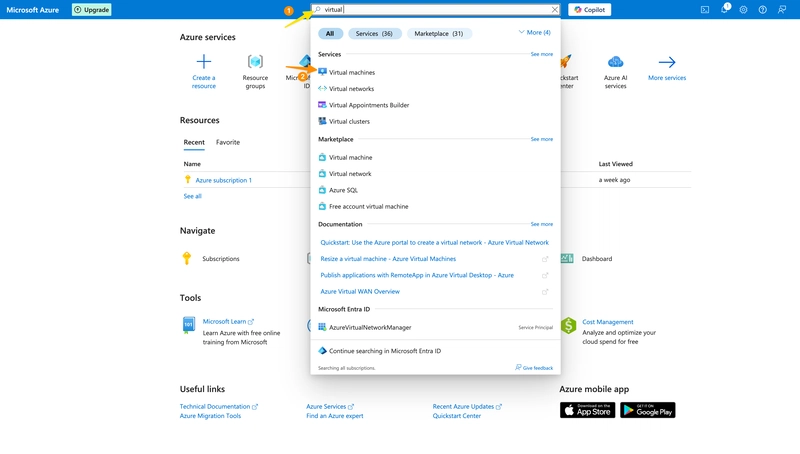
Then search for the virtual machine resource using the search bar


Clicking on the first result opens up the Virtual Machines page, where we can create and manage our VMs.


Next, (1) Click create, then (2) Azure VM


A new page opens up with options for creating our VM


  1. Create a new resource group for the VM.


  2. Give the VM a name.


  3. Select the desired region to deploy the VM.


  4. Select the availability option, In this case no redundancy is required.


  5. Select the security type — standard


  6. Then select the image for the VM. Ubuntu is the choice of linux image for this VM.


Scrolling down,


  1. Select the size of the VM based on computing demands.


  2. The authentication type is set to SSH public key.


  3. The username for the Administrator account is set.


  4. select Generate a new key pair


  5. Name the key pair.


Then click review and create.


The other settings are automatically managed when we skip them.


After the machine is successfully validated, go ahead to create the VM.


A pop-up would appear, click “download the private key and create the resource.”


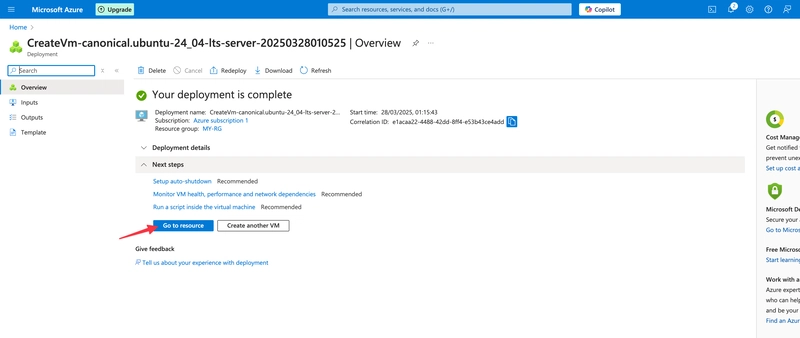
The private key is then downloaded and the resource is deployed. It took less than a minute to do so, which is also dependent on the size of the resource.


Click Go to resource and copy the public IP address.


Go to your downloads folder to see the downloaded private key.


On a windows device, proceed to opening the VM via powershell or command prompt using ssh -i filepath administratorusername@IPaddress.


On a mac device, you need to set a read-only permission for the file for it to be accessible and avoid errors whilst trying to access it via terminal.


To do this, first copy the file path name, (right click on the file name and hold option, the option would then appear)


Then open the Terminal app, run the command chmod 400 “filepath.pem”


Then proceed to connect to the VM using the Linux key using ssh -i filepath administratorusername@IPaddress.


Press Enter to run, and yes to connect to the VM


The VM would then open.


Cheers!

CTI Threat Relationship Graph4 Knoten / 3 Relationen
CVE / Incident Software MITRE ATT&CK CWE Weakness IoC
SOC Incident Playbook: Remote Code Execution (RCE) Defense
title: Detect Exploitation - A Simple Guide to Creating & Connecting to a Linux VM on Azure
id: 72340c78-7c01-4853-bade-85eb92daade0
status: experimental
description: Automatisch generierte SIEM-Erkennungsregel basierend auf CTI Intelligence
references:
  - https://tsecurity.de/
author: iShareStuff CTI Automated Detection Engine
date: 2026-09-24
logsource:
  category: network_connection
  product: any
detection:
  selection:
      CommandLine|contains:
        - 'exploit'
  condition: selection
falsepositives:
  - Legitime administrative Zugriffe oder Penetrationstests
level: high
tags:
  - attack.initial_access
  - attack.t1059
rule CTI_Threat_Indicator {
    meta:
        author = "iShareStuff CTI Automated Detection Engine"
        date = "2026-09-24"
        description = "YARA Signature for "
    strings:
        $str = "A Simple Guide to Creating & C" ascii wide
    condition:
        any of them
}
tsecurity.de Cognitive Threat RAG
Fokus-Vektor:

Kognitive Analyse für identifizierte Bedrohung: Erhöhte Bedrohungslage im Bereich A Simple Guide to Creating & Connecting .... Basierend auf 368k Vektor-Korrelationen werden sofortige Isolationsmaßnahmen für betroffene Endpunkte empfohlen.

🛡️ Angriffsfläche & Exposure

Netzwerk/Remote-Zugriff ohne Vorauthentifizierung möglich.

Empfohlene Sofortmaßnahmen
  • 1. Perimeter-Inspektion: Relevante Portfreigaben und exponierte Endpunkte unverzüglich scannen.
  • 2. Patch-Applikation: Hersteller-Hotfix einspielen oder betroffene Daemons in isolierte DMZ-Segmente überführen.
  • 3. Telemetrie & EDR-Alerts: Prozessaufrufe und Child-Processes auf anomale Shell-Spawns überwachen.
🔗 Semantisch verwandte Zero-Days MariaDB 11.7 VEC
Ähnliche Beiträge
🔍 Verwandte News

Auch interessante Nachrichten A Simple Guide to Creating & Connecting to a Linux VM on Azure

Thematisch verwandte Begriffe: Simple, Guide, Creating, Connecting · 6 Treffer

Laden...

Beiträge werden geladen ...

Laden...

Videos werden geladen ...

Laden...

Beiträge werden geladen ...

Laden...

Videos werden geladen ...

Laden...

Beiträge werden geladen ...

Laden...

Videos werden geladen ...

Laden...

Beiträge werden geladen ...

Laden...

Videos werden geladen ...

Zum Aktualisieren ziehen
ZERO-DAY CVE-2026-96676 | A vulnerability was identified in Fast FAC1900R 20190827_2.0.2. The impa…
Advisory →
TTS Reader • tsecurity.de Voice
tsecurity.de Icon
tsecurity.de App
Offline-Lesen, Eilmeldungen & 0ms Ladezeit

Installiere tsecurity.de direkt auf deinen Home-Bildschirm für das ultimative Vollbild-Magazinerlebnis ohne Browser-Leisten.

Nächster Beitrag
Themen-Radar & Intelligence Matrix
Echtzeit-Taxonomie nach Angriffsvektoren & Plattformen

tsecurity.de Live Threat Radar

🔴 LIVE RADAR
MONITORING
AKTIV
CVE-DATENBANK
LIVE
🔍
Community Radar & Live Chat
Sentinel Bot online • Live-Stream
Dein Cluster: Security Explorer
Match:
lädt…
Verbindung zum Community-Stream wird aufgebaut...
Bearbeitungsmodus — Senden überschreibt deine Nachricht
Community-Puls — was gerade passiert
lädt…
Aktivitäten deiner Analysten
lädt…
Neues Thema oder Eilmeldung einreichen

Reiche interessante Links, Zero-Days oder Debatten ein. Die Community entscheidet per Upvote über die Veröffentlichung.

Heiß diskutierte Einreichungen
🔖 Gespeicherte Artikel
📂 Keine gespeicherten Artikel vorhanden.
Zurück Ziehen Vor
Links: vorheriger Artikel Rechts: nächster Artikel unten: schließen
News NIS-2 Frühwarnung Tier-1 Intel TTP ⏱️ 3 Min vor 10 Min
Artikeldaten werden geladen...

Zurück: vorheriger Vor: nächster
↗ Original-Quelle
Social Reaktionen Deine Reaktion zählt
Einstufung & Relevanz-Poll 0 Stimmen
In sozialen Netzwerken teilen 1-Klick