
Zum Hauptinhalt springen
Echtzeit-Radar & Feeds
Alle RSS Feeds ➔
👥 Community & Social
Windows Tipps & SecurityGrafikkarte vor Überhitzung schützen: So geht’s(25.09.2026 um 08:00 Uhr)
••••••••••
Windows Tipps & SecurityGrafikkarte vor Überhitzung schützen: So geht’s(25.09.2026 um 08:00 Uhr)
••••••••••
Intelligence View
⚡ tsecurity.de Intelligence

Easy Steps to Deploying Windows 11 VM on Microsoft Azure

Easy Steps to Deploying Windows 11 VM on Microsoft Azure Deploying A VM on Azure has to be one of the most seamless ways to get a VM in modern times and I’ll be showing you how to do so in no time. First, log on to the Azure portal at p…

0
↗ Quelle (dev.to)
Reagiere als Erste:r — dein Feedback zählt!


Easy Steps to Deploying Windows 11 VM on Microsoft Azure


Deploying A VM on Azure has to be one of the most seamless ways to get a VM in modern times and I’ll be showing you how to do so in no time.


First, log on to the Azure portal at portal.azure.com
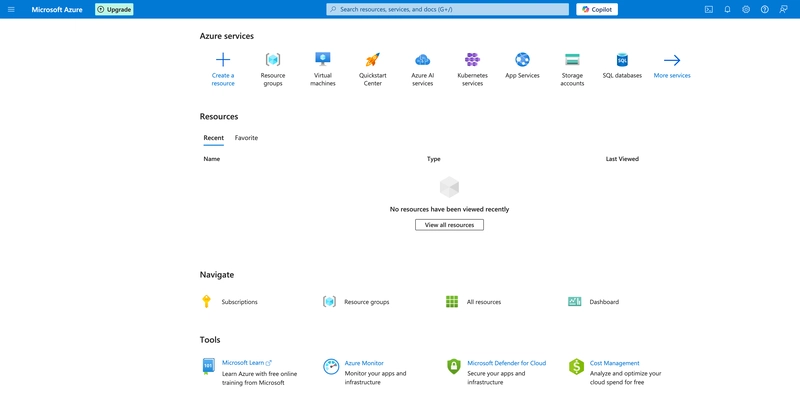


Azure Portal


Then, search for virtual machine resource from the search bar.
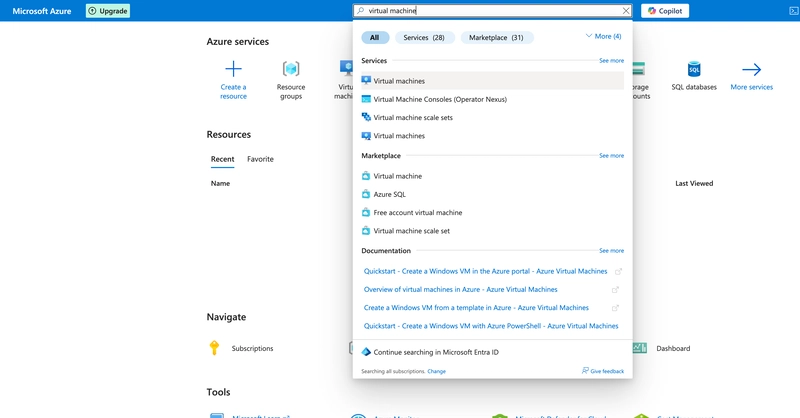


This would open the virtual machines page, select create, then Azure virtual machine.


By default, for free Azure accounts, a subscription would already be active, You can then go ahead and create a new resource group or select an existing one.


Then name your VM, select a region, and availability option based on vertical or horizontal redundancy requirements for your VM. If the VM doesn’t need one, No Infrastructure redundancy require is selected. The security type is set to standard.


For accounts using free subscriptions, some images won’t be available to you. I’m also on the free account, the image available is Windows 11 Enterprise, click on see all images


Then click on select, and select the image.


The VM architecture is set to x64 by default, since ARM64 is primarily used in mobile and embedded devices, while x64 (or x86–64) is dominant in desktop and server PCs.


Then VM size is selected based on workload type and usage, which in turn affects the cost of running it.


An administrator account must be created for the VM, which would be used to access the VM once it’s deployed. Next is the Disk options.


By default, these are already setup for optimal performances, but can be modified to taste.


Next is the Networking options, A virtual network is created by default, but the Public IP address might need to be modified to be dynamic as shown in the image below. Click on create new under the Public IP option.


From here, you can simply click review + create to continue with this case of a simple VM.


The VM settings are then checked and validated.


Once validation is passed, you get this overview page of all your settings before proceeding to create the VM.


Once the Deployment is complete, click go to resource.


This overview page opens, click connect to connect to the VM.


Then download the RDP file.


Open the RDP file from your downloads folder.


On windows, the RDP file opens in The Remote Desktop App by default.


But on MacOS, I had to install the new Windows App, which opens the Remote desktop tool once I open the RDP file.


A connection is established to the VM, then It asks for the Admin credentials we created whilst creating the VM.
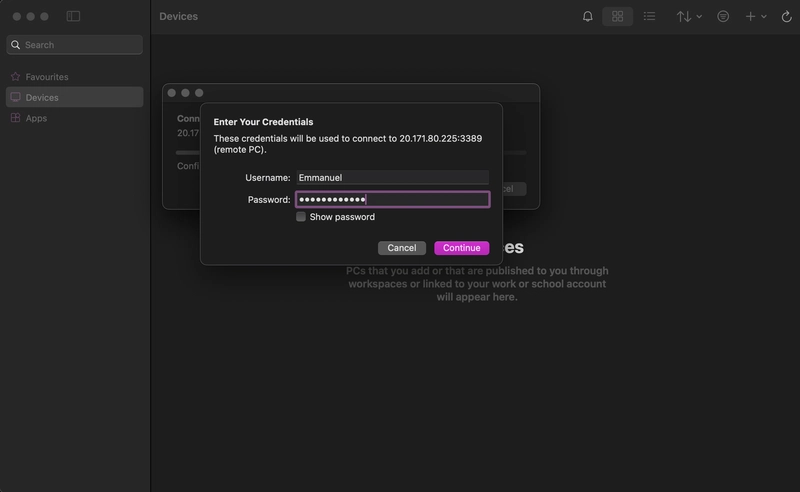


The VM then opens successfully.


And that’s how to successfully deploy a Windows 11 VM on Microsoft Azure.

1. Sofort-Triage & Abwehrmaßnahmen

SOC Incident Playbook: Remote Code Execution (RCE) Defense
Syntax validiert (0 Fehler)
title: Detect Exploitation - Easy Steps to Deploying Windows 11 VM on Microsoft Azure
id: 5ce13cb9-8e67-444b-ac92-60928ca42a50
status: experimental
description: Automatisch generierte SIEM-Erkennungsregel basierend auf CTI Intelligence
references:
  - https://tsecurity.de/
author: iShareStuff CTI Automated Detection Engine
date: 2026-09-25
logsource:
  category: network_connection
  product: any
detection:
  selection:
      CommandLine|contains:
        - 'exploit'
  condition: selection
falsepositives:
  - Legitime administrative Zugriffe oder Penetrationstests
level: high
tags:
  - attack.initial_access
Syntax validiert (0 Fehler)
rule CTI_Threat_Indicator {
    meta:
        author = "iShareStuff CTI Automated Detection Engine"
        date = "2026-09-25"
        description = "YARA Signature for "
    strings:
        $str = "Easy Steps to Deploying Window" ascii wide
    condition:
        any of them
}
Syntax validiert (0 Fehler)
index=security sourcetype IN ("cisco:asa", "pan:traffic", "zeek_conn", "suricata", "WinEventLog:Security")
("Easy Steps to Deploying Windows 11 VM on")
| stats count earliest(_time) as first_seen latest(_time) as last_seen by src_ip, dest_ip, dest_host, signature
| eval first_seen=strftime(first_seen, "%Y-%m-%d %H:%M:%S"), last_seen=strftime(last_seen, "%Y-%m-%d %H:%M:%S")
| sort - count
Syntax validiert (0 Fehler)
message: "*Easy Steps to Deploying Windows 11 VM on*"
Syntax validiert (0 Fehler)
CommonSecurityLog
| where Message has "Easy Steps to Deploying Windows 11 VM on"
| summarize EventCount = count(), FirstSeen = min(TimeGenerated), LastSeen = max(TimeGenerated) by SourceIP, DestinationIP, DestinationPort, Activity
| extend DetectionRule = "iShareStuff-CTI-Compiled"
| sort by EventCount desc

2. Cyber Threat Intelligence & Forensik

CTI Threat Relationship Graph3 Knoten / 2 Relationen
CVE / Incident Software MITRE ATT&CK CWE Weakness IoC
🎯
MITRE ATT&CK Matrix Navigator 14 Taktiken
Reconnaissance
-
Resource Development
-
Initial Access
Execution
Persistence
-
Privilege Escalation
Defense Evasion
Credential Access
-
Discovery
-
Lateral Movement
-
Collection
-
Command and Control
Exfiltration
-
Impact
tsecurity.de Cognitive Threat RAG
Fokus-Vektor:

Kognitive Analyse für identifizierte Bedrohung: Erhöhte Bedrohungslage im Bereich Easy Steps to Deploying Windows 11 VM on.... Basierend auf 368k Vektor-Korrelationen werden sofortige Isolationsmaßnahmen für betroffene Endpunkte empfohlen.

🛡️ Angriffsfläche & Exposure

Netzwerk/Remote-Zugriff ohne Vorauthentifizierung möglich.

⚡ Empfohlene Sofortmaßnahmen
  • 1. Perimeter-Inspektion: Relevante Portfreigaben und exponierte Endpunkte unverzüglich scannen.
  • 2. Patch-Applikation: Hersteller-Hotfix einspielen oder betroffene Daemons in isolierte DMZ-Segmente überführen.
  • 3. Telemetrie & EDR-Alerts: Prozessaufrufe und Child-Processes auf anomale Shell-Spawns überwachen.
🔗 Semantisch verwandte Zero-Days MariaDB 11.7 VEC
Ähnliche Beiträge
🔍 Verwandte News

Auch interessante Nachrichten Easy Steps to Deploying Windows 11 VM on Microsoft Azure

Thematisch verwandte Begriffe: Easy, Steps, Deploying, Windows · 6 Treffer

Laden...

Videos werden geladen ...

Laden...

Beiträge werden geladen ...

Laden...

Videos werden geladen ...

Laden...

Beiträge werden geladen ...

Laden...

Videos werden geladen ...

Laden...

Beiträge werden geladen ...

Laden...

Videos werden geladen ...

Laden...

Beiträge werden geladen ...

Laden...

Videos werden geladen ...

Zum Aktualisieren ziehen
ZERO-DAY CVE-2026-97875 | Rojo's "rojo serve" HTTP API (default port 34872) has no Host/Origin hea…
Advisory →
tsecurity.de Icon
Offline-Lesen, Eilmeldungen & 0ms Ladezeit

Installiere tsecurity.de direkt auf deinen Home-Bildschirm für das ultimative Vollbild-Magazinerlebnis ohne Browser-Leisten.

Nächster Beitrag