Want to download Windows 11 Insider Preview ISO?
If yes then you are in the right place.
On 29th June 2021, Microsoft has officially launched its first insider preview for all Windows 10 users.
Although, Windows 11 is still in the development phase but you can still experience it by using Insider Preview.
Apart from this, Microsoft has not released the open-source ISO file available for all but it’s given through the Windows Update.
But this update is only for Windows 10 users and given under the dev channel.
Also, I have seen many users searching for “Windows 11 Insider Preview ISO Direct Download” but haven’t found anything reliable.
But why users are searching for direct links? I think these are those users who are still using Windows 7 or maybe want to do a
What is Windows 11 Insider Preview?
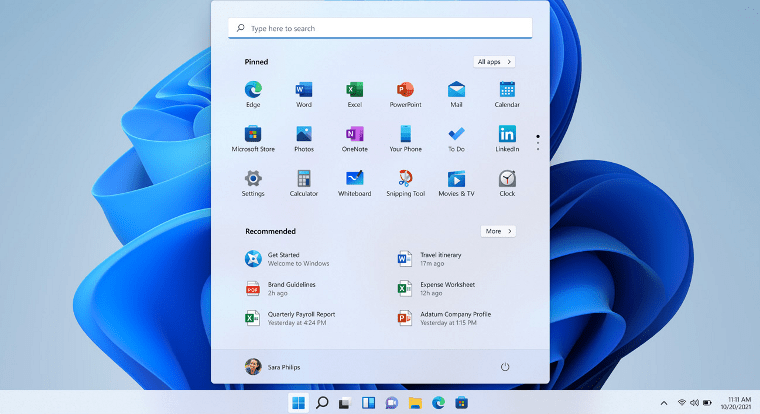
Windows 11 Insider Preview is basically a program by Microsoft Windows which helps them to provide all the new updates in a genuine way. Always whenever some new windows are launched the updates are given via Insider Preview Program. And all these updates are not for all users who but it is only for those who have signed up for the Insider’s Review Program.
And in this program mostly developers and tech geeks are part of it. This time Microsoft has released its first release “Windows 11 Insider Preview 22000.51” and in this, you may find bugs that need to be fixed. And also many times the running application also got crashed. But don’t worry they will be fixed after some time.
Also, I have seen many users complaining about unable to create Insider Preview Account and some are saying that they are not getting any new updates like Windows 11 Insider Preview Build.
But I would suggest you to use the below guide and check again to update it properly.
Also, check out this guide on if you are eligible for Windows 11. ( Please check you are connected to the internet )
7. After it will start searching for new updates and then and check if your device follows the minimum hardware requirements for this new Windows OS or not.
And this doesn’t work for you, then check out the download links.
Windows 11 Insider Preview ISO Download Direct Link [ 10.0.22000.51 ]

Currently, Microsoft is only providing official Windows 11 updates via Insider Preview Program. Although, if you are a member of this program then only you can get the updates via the dev channel or beta channel.
Also, if you head over to the
 )
)Insider Preview Size of File: 4.4 Gb for 64 bit ISO file.
Note:- I would suggest you to check the and then on your main computer or laptop. So that if anything wrong happens, you will not lose your important data files.
Just you have to follow the step by step guide…
1. First, Download the Win 11 ISO from the direct download links.
2. Now extract the downloaded ISO file using .
Here first, we will see how to use it, and then we will move to the direct download links.
Just follow the steps given below:-
1. First, click on the given download link below and then click on Create download package button link.
2. Once the files are downloaded, extract the ZIP files using Peazip or Winrar.
3. Now open the extracted folder and then Run the proper uup download windows. And this will start downloading the ( UUP Dump )
Some FAQs
Is Windows 11 available for insiders?
Yes, official Windows 11 Insider Preview Build 22000.51 update is only available for insiders via dev channel.
Should I download Windows 11 Insider preview?
Yes, you can download Windows 11 Insider preview update but only from an official source like Microsoft.
Is the Windows 11 Preview stable?
No, Windows 11 Preview is not stable you may find many bugs & crashes. ( Currently only recommended for developers )
How do I activate Windows Insider preview?
Go to Windows Settings > Update & Security > Windows Insider Program > Get Started > Login Microsoft Account > Dev Channel > Confirm > Restart > Check for Updates.
Will Windows 10 users get Windows 11?
Yes, genuine Windows 10 users will get Windows 11 for free via updates by Microsoft.
That’s it for now…
Conclusion
So that’s all about downloading the Windows 11 ISO Insider Preview direct download link. Also, in this post, we have shared how to download the ISO file from the Official Microsoft server for free. All the ISO direct download links provided above of 64 bit or 32 bit are 100% working.
Also, if you want similar posts like this, then please tell us.
Stay tuned for the next post on How to bypass Windows 11 Secure Boot.
Feel free to share your thoughts via comments and also tell us if you liked this information on Windows 11 Insider Preview ISO Download Direct Link.
Don’t forget to share this post with your friends.

SOCIAL SHARE CARD GENERATOR