Looking for MiniTool Partition Wizard Review?
If yes, then you are in the right place.
I know that there are lots of partition managers out there but in my opinion, this is the best one and most effective.
And if you are a Windows user then this tool is a boon for you.
But how? Like in the previous post on is one of the best disk partition management software. It is very easy to use and helps you to manage, update, reformat and clone your hard drive. This tool is developed by a specialized software development firm known as Minitool, been providing services for more than 15 years.
Moreover, this tool benefits both personal and business users and there have been more than 40 million downloads of this application around the world. And the best part is that the majority of reviews for Minitool Partition Wizard are positive. In a nutshell, this is the best program which gives you lots of functions and can help you in simplifying the process of managing hard disc.
MiniTool Partition Wizard Features
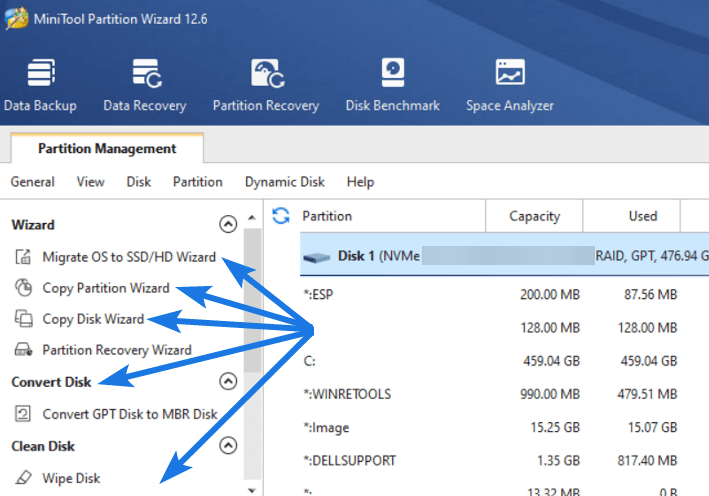
However, it’s easy to do partition-related activities with Windows 10’s Disc Management Utility. For example, building new volumes or expanding existing ones, adding mirrors, identifying active partitions, and creating or attaching virtual hard drives.
In spite of this, the default tool has always had a restricted set of options. And if you want more control over your partition management tasks then Minitool Partition Wizard is a good choice for you. With its simple wizards and clear interface, this Windows program makes managing drives, partitions, and volume a breeze.
All Image Credits:- partitionwizard.com
Now let’s get right to the features part…
Create/Delete/Format Partition
With this tool, creating and deleting partitions is very easy, just you have to select the drive letter and partition type, and it’s done. And using the format partition option, you can easily convert RAW to NTFS which means all the unallocated space on your hard drive can be revived.
Note:- Please make sure not to choose Local Disk C: ( OS partition )while using the delete or format partition options.
Move/Resize Partition

This option is a lifesaver if you just want to adjust the dynamic disk’s volume size. Most of the users face low disk space warnings on their Windows PC which can be easily fixed using this option. Two important procedures can be performed using this tool.
- Shrink dynamic volumes into plain, mirrored, striped, or spanned volumes to free up capacity for new volumes.
- Extend a mirrored, spanned, striped, or RAID 5 volume using unallocated space or the space you no longer needed.
Wipe Disk/Partition

Do you know that anyone can easily .
Merge/Split Partition

Using this feature, you can easily merge two or more partitions and can combine them in a single volume. Furthermore, you can also split a single large hard drive into multiple smaller ones. And the best part is that you can do all this without losing any of your data. But I would suggest you to be careful while using these options C: drive ( OS installation partition ).
Convert FAT to NTFS

While formatting the external or internal hard disk and flash drives, the File System automatically changes if it does not meet the necessary requirements. But in some cases like but using this you can easily free up disk space and can remove any files that are no longer needed.
Now let’s see some comparisons…
Some Comparison & Impressive Minitool Partition Wizard Reviews
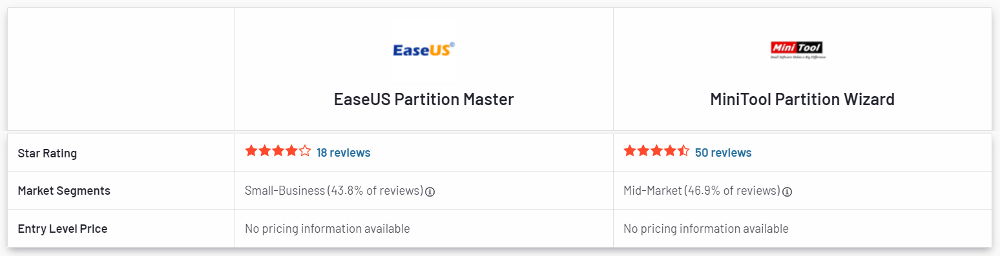
Here we will see a quick comparison and discuss the reviews given by the users. And according to them, Minitool Partition Wizard is more user-friendly, easier to set up, and easier to administrate. It is much better than other tools and is a better fit for business needs. The approach taken by Minitool or Partition Wizard in terms of product upgrades and roadmaps is much better. Furthermore, the technical support system is very good as it is handled by experienced ones.
Whereas EaseUS Partition Master does not offer much functionality and technical support is also limited.
Minimum System Requirements
Now let’s check if your system is compatible with this software:-
- Windows 10, 8, 7, Vista, XP are supported OS.
- Windows Server ( 2003, 2008, 2012, 2016, 2019 ) versions are supported for Server, Enterprise and Technician editions only.
- CPU of at least 1-GHz processor.
- Minimum memory required is 512 MB.
- Grpahics card at least 128 MB.
Now let’s move to the pros and cons part…
Minitool Partition Wizard Pros and Cons

Although, we have already talked much about the tools & features but here we will try to highlight them in more detail.
Pros
- Extensive features for partition management.
- All tasks can be completed using a simple interface.
- Free Version is also provided with good features.
- Variety of payment options are available.
Cons
- Annoying offers at the time of free version installation.
- Unable to handle dynamic disk management.
- Most features can be accessed with upgraded version.
- Attempts to install irrelevant apps during setup process.
Apart from the pros and cons, here I would like to answer one more question which is asked by plenty of users.
Is Minitool Partition Wizard Safe?
Yes, Minitool Partition Wizard is totally safe to use as a disk management tool. It is developed by a well-known software company that has a proven track record of success for past years. It is easy to use and very secure if you want to tamper with your hard drives with advanced features.
Minitool Partition Wizard Pricing Plans
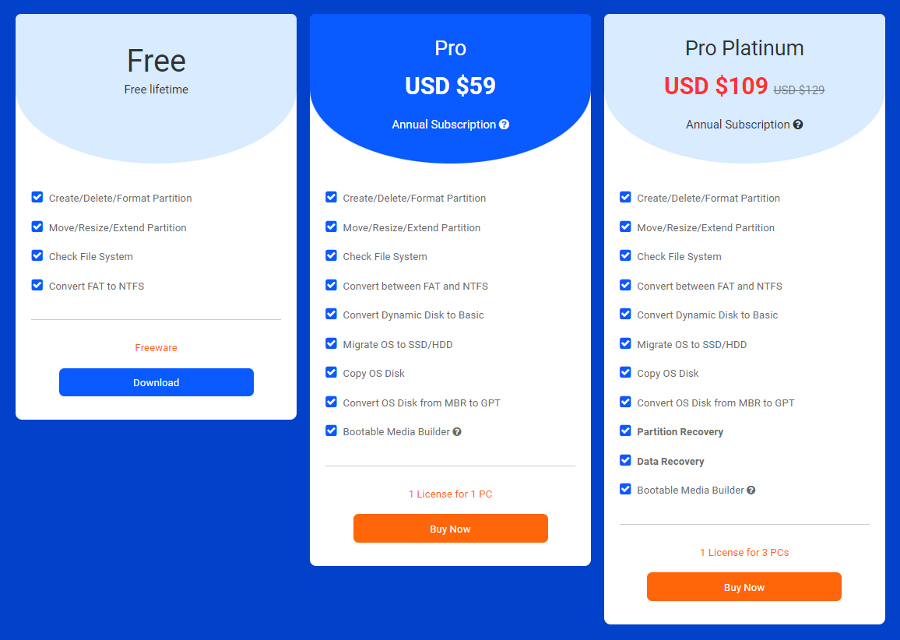
Talking about the pricing plans, then this tool comes in three subscriptions with different features which we have already discussed in the above section.
- Free Version: In this you get all basic features like create/Delete/Format/Move/Resize partition also including the convert FAT to NTFS feature.
- Pro for $59: This version includes all the features of Free Version and other additional features like Migrate OS to SSD/HDD, OS Disk from MBR to GPT, Convert Dynamic Disk to Basic and Copy OS Disk Convert.
- Pro-Platinum for $109: This version includes all the features of Pro Version and other additional features like Data Recovery, Partition Recovery and Bootable Media Builder.
And in my opinion, the Pro version is much better in terms of both features and pricing.
That’s it for now…
Conclusion
So, that’s all about this partition wizard tool by Minitool. And here I would like to conclude why this program is widely used in disc management. Basically, it provides a wide range of options and makes it easy to manage your partitions.
Moreover, the user interface is simple, and there is a safety net in place to prevent accidental changes to your hard drives. And there’s nothing to worry about whether or not you’re an avid computer user.
Stay tuned for the next post…
Feel free to share your thoughts via comments and also tell us about this post on MiniTool Partition Wizard Review: All in One Tool [ 2026 ].
If you liked this post, don’t forget to share it…

SOCIAL SHARE CARD GENERATOR