Microsoft rarely comes up with an interesting UX experiment for Windows 11 because it fears backlash, but it still moved ahead with a feature called “Drag Tray,” which sounded like a neat idea on paper until it started getting in the way of drag-and-drop.
I’ve mostly run into Drag Tray accidentally, and Microsoft has now decided to remove the feature from Windows 11 based on user feedback. A replacement is being considered, but it won’t be anything like the current Drag Tray experience.
If you don’t recognize “Drag Tray” by name, try dragging a file on the desktop toward the top of the screen, and you’ll see a Share tray that lets you send the file via WhatsApp, Outlook, or other apps.
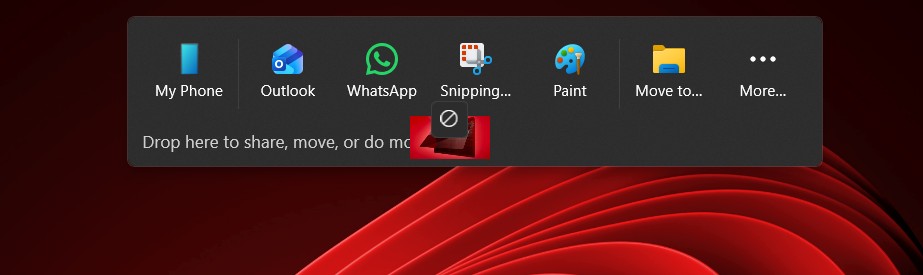
That thing is called Drag Tray, and it’s being rolled back in an upcoming Windows update until Microsoft comes up with a replacement. But what went wrong with Drag Tray? A lot, if you ask me. I’d call it a poor implementation rather than a terrible idea because it did make sense if it actually made sharing easier when you intended to share something.
In theory, Drag Tray is supposed to make sharing files easier than right-clicking a file and clicking Share, which does essentially the same thing. Microsoft hoped a drag-and-drop experience would be more productive, but in some situations, it ended up being counterproductive.
It’s clearly not designed for power users who like to reorganize their desktop all the time. At the same time, I think it was a great idea for those with a touchscreen, as you could simply hold a file and drag it to the top of the screen to share it via WhatsApp, for example.
Microsoft says it’s removing Drag Tray from Windows 11
In a in updated release notes.
“We’re continuing to explore improvements in this area and look forward to sharing more about a future replacement experience in a later update.”
How to disable the Drag Tray feature in Windows 11
Microsoft will be removing Drag Tray in a future release, but if you can’t wait, you can manually disable the feature.
Just open Settings, go to System > Nearby sharing, and you’ll find the toggle to turn off Drag Tray.
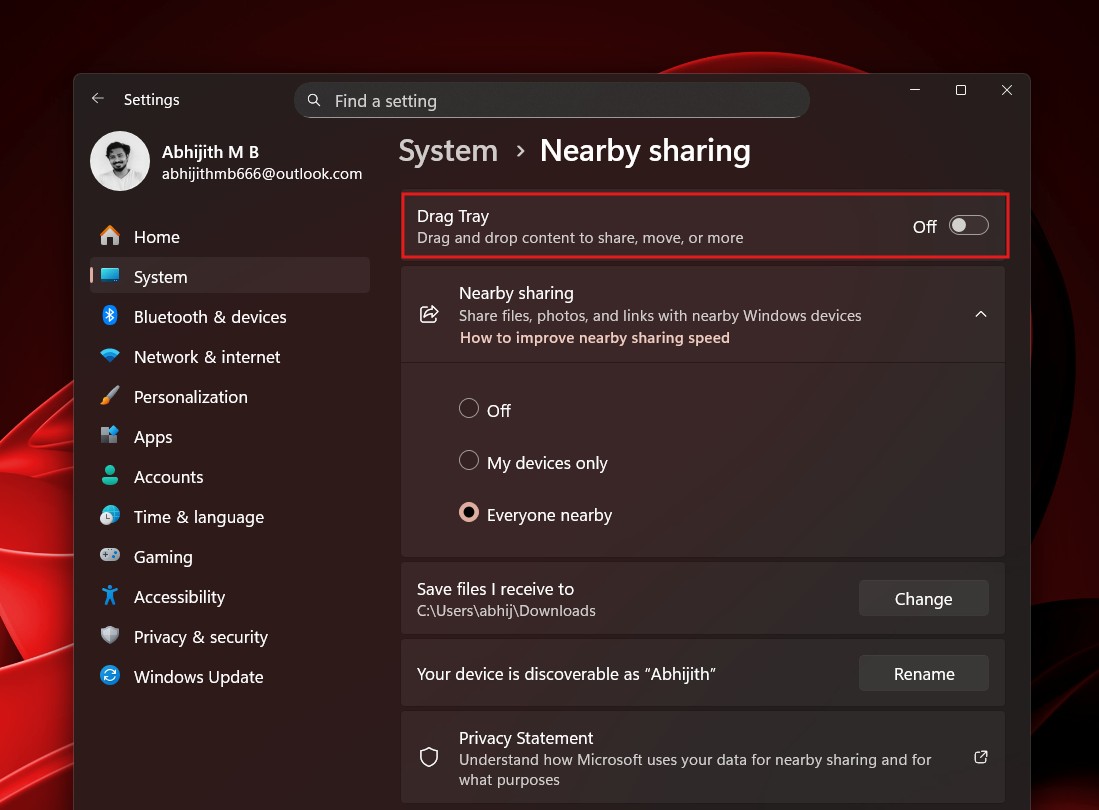
Now, if you set the toggle to “Off,” Windows will stop annoying you with Drag Tray until it’s fully removed from the OS. Remember that the feature is turned on by default, and you need to disable manually until it’s fully removed.
What about you? Do you think Drag Tray was a good idea? Let me know in the comments below.
The post

SOCIAL SHARE CARD GENERATOR