




Windows 11 KB5124010 is now rolling out, and it lets you try new features before the next Patch Tuesday release. This update significantly improves Bluetooth, makes File Explorer better, lets you remap the Copilot key, and more. Microsoft has published direct download links for the KB5124010 offline installer (.msu), but you can always (and should) use Windows Update if you can.
KB5124010 is an optional update, so it won’t download or install unless you manually choose to seek it. The update shows up as “2026-09 Preview Update (KB5124010) (26200.9550)” and advances PCs to Windows 11 Build 26200.9550 on version 25H2, and 26100.9550 on version 24H2.
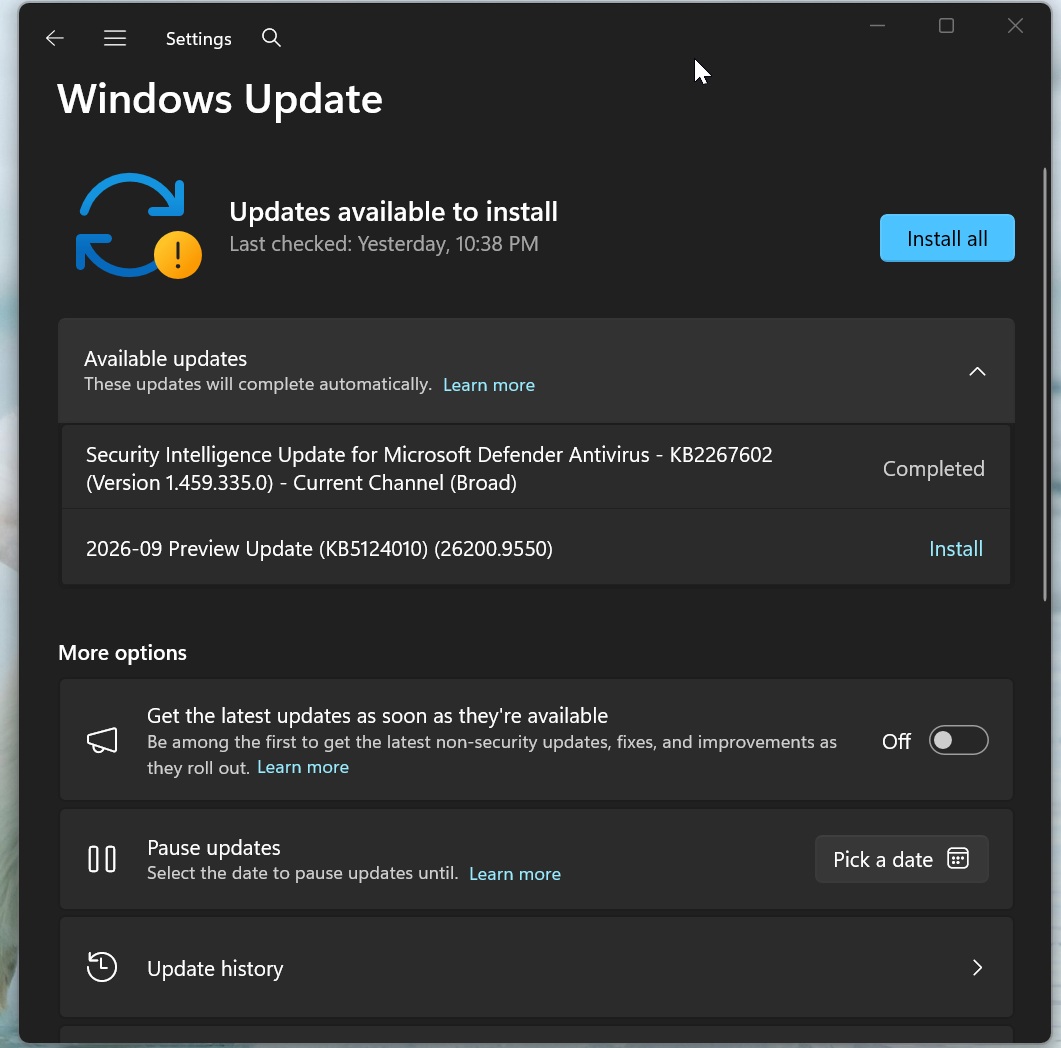
I also noticed that today’s optional update will download automatically in the background if you’ve turned on the “Get latest updates…” toggle on the Windows Update page.
As Microsoft’s Windows design and research boss previously noted, you should use the toggle if you want to try new features first, but at the same time, it also means your PC will download optional and other updates automatically.
Note: If you choose to skip today’s update, you’re not going to miss out on anything, as everything included in this release rolls out on October 13 as part of the Patch Tuesday cycle.
Download Links for Windows 11 KB5124010
Windows 11 KB5124010 Direct Download Links: 64-bit and ARM64 | Microsoft Update Catalog lets you grab offline installers (.msu) for all monthly Windows updates, including the one rolling out today. And you can use it if you’ve run into errors with Windows Update, but in all other cases, it’s better to stick to Windows Update.
Windows updates are now much larger in size, particularly those downloaded via Update Catalog. For example, today’s update is over 5GB if you use Update Catalog, and it’s a little under 1.5GB if you use Windows Update, assuming you’ve installed all recent Windows updates.
| Build Number | Size | OS Version | Architecture |
|---|---|---|---|
| 26200.9550 | 4981.5 MB | Windows 11 25H2 | x64-based |
| 26200.9550 | 4825.6 MB | Windows 11 25H2 | arm64-based |
| 26100.9550 | 4981.5 MB | Windows 11 24H2 | x64-based |
| 26100.9550 | 4825.6 MB | Windows 11 24H2 | arm64-based |
Windows 11 updates are cumulative, which means they include all previous missing changes.
What’s new in Windows 11 Build 26200.9550 (25H2) / Build 26100.9550 (24H2)?
Windows 11 Build 26200.9550 has a lot of interesting stuff to check out, but remember that everything is rolling out gradually, so it’s likely you won’t see anything visibly different other than a new build number.
Microsoft insists gradual rollout is necessary to ensure quality, but if you can’t wait, the company recommends turning on the “Get latest updates…” toggle on the Windows Update page and increasing the odds in your favour.
1. File Explorer is getting better, and now lets you easily view blocked files
If you remember, an update that rolled out last year made it difficult to preview files directly in File Explorer when downloaded from the internet. That means if you download a document from OneDrive, Google Drive, or even Microsoft Word web, and try to preview it in File Explorer’s Preview pane, you won’t be able to.
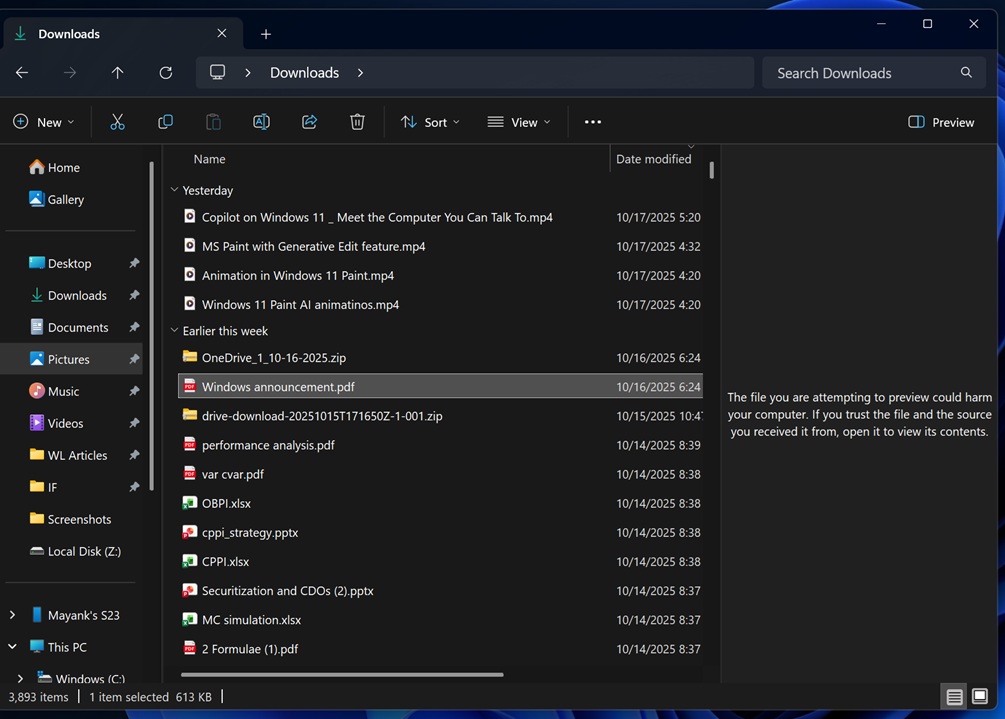
As you can see in the above screenshot, when I downloaded a PDF from my OneDrive and opened the Preview pane in File Explorer, it warned me that the file could harm my computer, but if I trust it, I can open it to view its content. There’s no option to preview the file right away.
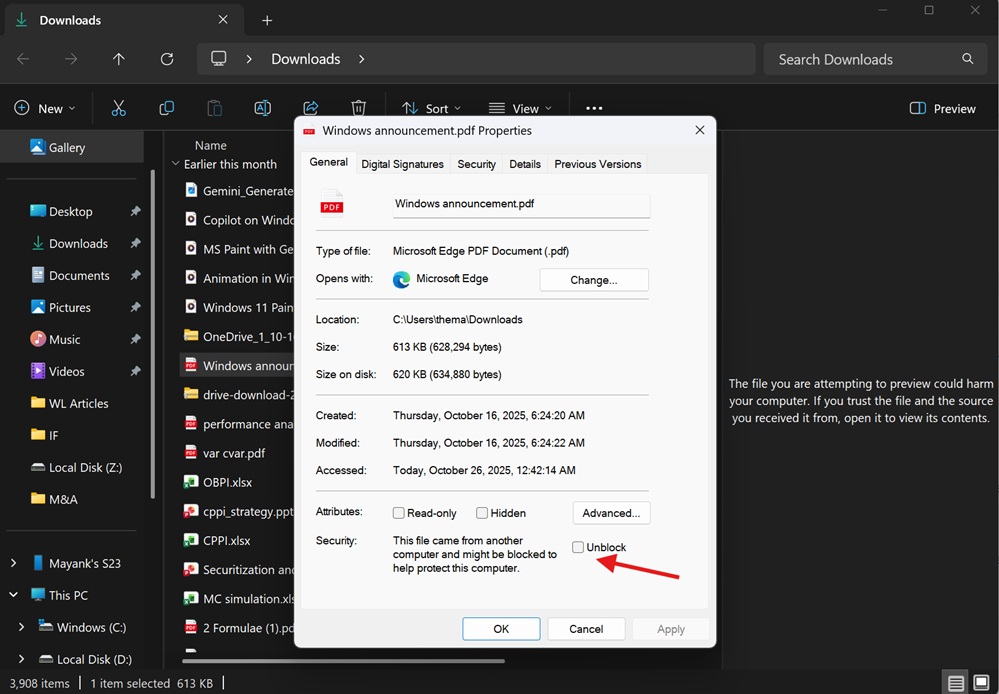
According to Microsoft, File Explorer started blocking previews for files downloaded from the web due to a vulnerability with NTLM. Microsoft requires you to manually unblock the file from Properties > General or use PowerShell scripts, but it’s being addressed today.
With Windows 11 KB5124010, Microsoft has added a new “Preview anyway” toggle that lets you immediately preview HTML files:
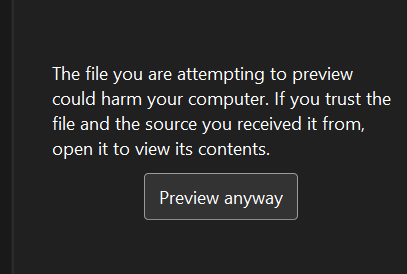
In the case of non-HTML files, such as PDFs, that restriction is now gone entirely, and all downloaded files are previewed automatically! So we’re sort of going back to the original behaviour, except for HTML files, which are anyway getting a “Preview” button.
In addition, Windows Latest noticed that the “Home” tab in File Explorer can now remember the state of sections. For example, if you collapsed the “Recent” section and opened File Explorer again, you’d notice that the section remains collapsed. Previously, it would always expand, which is the default state, and wouldn’t remember the preference.
Here’s everything else rolling out to File Explorer today:
- File Explorer now shows better thumbnail previews for cloud files, especially if you use the Details pane.
- Microsoft is also reorganizing the Details pane, so it’s easier to glance at it and learn more about the file without opening it.
- Finally, a bug that clears the address bar content when you try to edit it and go to another location has been fixed.
2. Emoji 17 now rolling out on Windows 11
Microsoft is adding Emoji 17.0 support to Windows 11, and it includes a couple of fun emojis, such as a distorted face and even a hairy creature.
These emojis arrived on mobile a little while ago, and they’re now rolling out on Windows.
Microsoft confirmed that these updated emojis can be accessed via Windows key + Period (.). Windows 11 KB5124010 also improves several existing emojis, so you can recognize them better.
Previously, Windows had a bug where emojis looked different from Android/iOS, but now, you’ll see some similarities, particularly with the kissing cat and lotus emojis.
3. Personalization is getting better
There has been a bug on Windows 11 where applying certain wallpapers or making some personalization changes does not work, including a bug where Windows shows a black wallpaper instead of the one you set up. This is finally getting fixed, and Microsoft has also made the Personalization > Background page in Settings more reliable.
Moreover, Windows 11 KB5124010 adds support for DIB image files, so if you’ve got an image in DIB, you can now set it as the desktop background instead of converting it to PNG or JPEG, for example.
Last but not least, Microsoft has added support for slideshow wallpapers in multiple desktop setups. That means if you switch back and forth between desktops, your slideshow wallpapers won’t switch back to Picture mode.
Here’s a list of other personalization-related fixes in today’s update:
- A bug has been fixed that hurts the quality of desktop background previews.
- A bug has been fixed where desktop wallpaper changes are not processed immediately.
4. Bluetooth is finally better on Windows 11
There’s no denying that Bluetooth has never been reliable on Windows 11, and it’s worse on some PCs than others. A lot of issues are due to drivers, including a bug where Bluetooth simply disappears like it never existed, and Microsoft is apparently aware of most of these issues.
Today’s Windows 11 KB5124010 is one of the biggest updates for Bluetooth, with bugs like unreliable connections finally getting patched. Likewise, a bug where the Windows volume flyout is out of sync with the actual volume of the Bluetooth device when volume is adjusted using the headset controls has been fixed.
Microsoft also patched a bug where Windows incorrectly shows that a device is connected or disconnected. The update also improves calling, including WhatsApp, Teams, and Google Meet calls. If you frequently run into unstable calls, you should see some improvements after today’s update.
Of course, it’s entirely possible that nothing changes because all these fixes are also gradually rolling out, so we don’t know when they’ll land on your PC.
Last but not least, a bug where the Bluetooth microphone has issues, specifically when you’re hearing audio using it, has been fixed.
5. You can now open apps maximized on Windows 11
By default, Windows 11 tries to remember the size and state of an app window when you close it. So if you close an app while it’s maximized, it will usually open maximized the next time. Likewise, if you close it in a smaller window, Windows may reopen it at roughly the same size.
But that behaviour isn’t always consistent, and apps can sometimes open in a smaller or different window size than you’d prefer. With today’s update, Microsoft is adding a new feature that lets you tell Windows to always open apps maximized, regardless of how you previously closed them.
In Windows 11 KB5124010, you can turn on the feature from Settings > Accessibility > Visual effects > Open apps maximized.
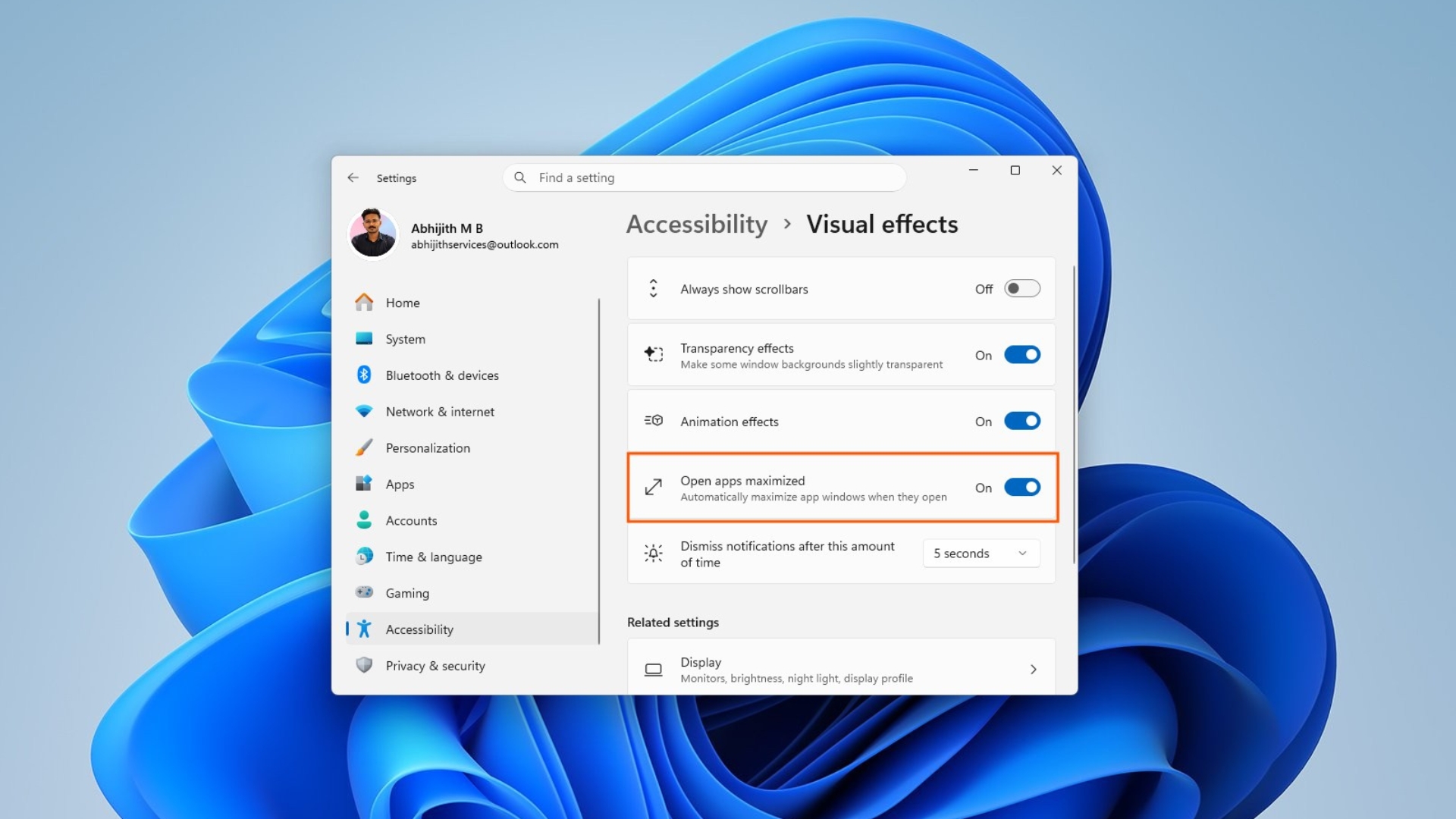
It’s a nifty change, if you ask me, because allowing Windows to always open apps maximized can help you become more productive, especially when you’ve got multiple monitors, and you’d like apps to open using the available screen space instead of manually resizing them all the time.
6. You can now remap the Copilot key

Earlier this year, Microsoft admitted that the Copilot key can get in the way because it replaces the Control key, right-click key, or accessibility key on some PCs.
The company also noted that the Copilot key could disrupt the experience and even productivity for some users, and listed accessibility workflows as being at a disadvantage when a regular Ctrl key is replaced with the Copilot key.

Windows 11 KB5124010 is rolling out with a new toggle that lets you remap the Copilot key to Ctrl or right-click, and I’m told that a future update will even let you set the AI key to “Do nothing.” Multiple options have been explored in the past, including the ability to open ChatGPT or other apps instead of Copilot when you press the key.
Ironically, the so-called Copilot key itself is now outdated because Microsoft recently updated Copilot’s logo, and upcoming PCs will use the new logo.
7. PC-to-PC migration tool is no longer available, as Microsoft pushes OneDrive-based solution
Microsoft quietly built a tool called “PC-to-PC” migration, which, as the name suggests, lets you move files between PCs, particularly to a new device, using a local Wi-Fi/LAN setup instead of uploading files to the cloud and syncing them using OneDrive.
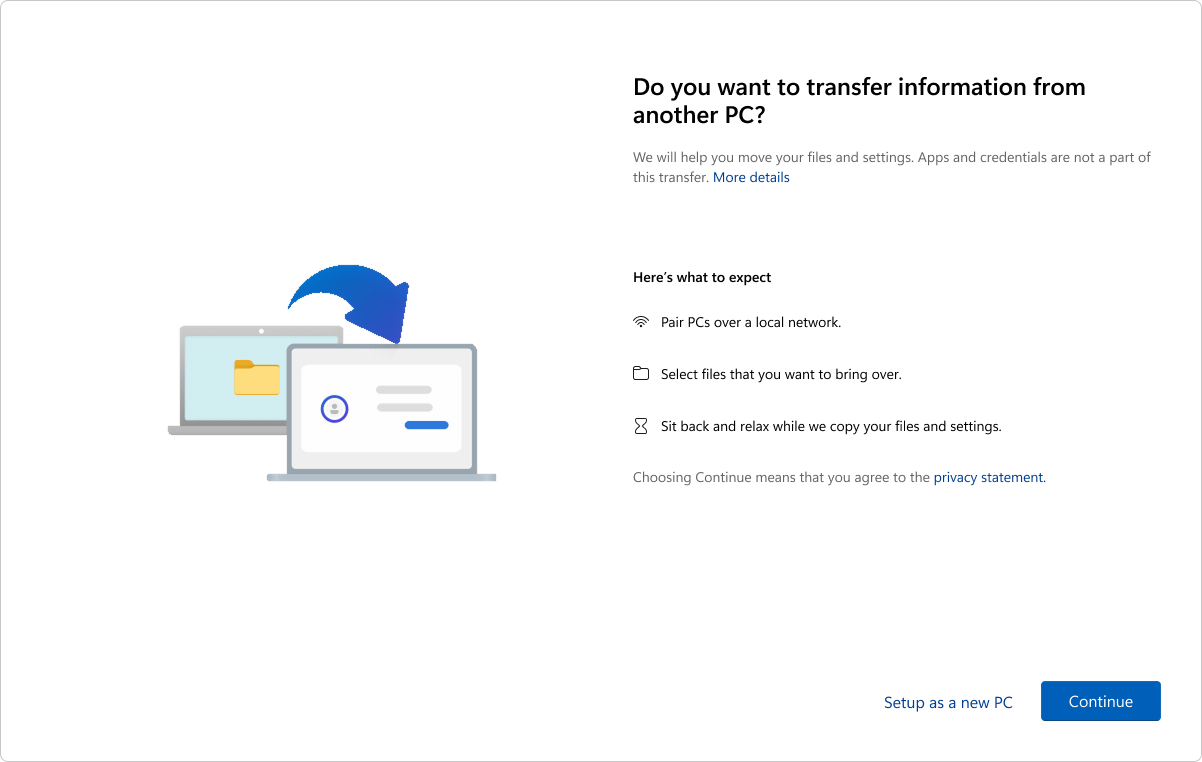
It was a great idea, but it’s being removed with Windows 11 KB5124010, and it’s unclear why Microsoft is taking away an offline solution that it never properly advertised. But I assume it’s because it could have hurt OneDrive’s growth on Windows.
Now, after the update, your only option is to use OneDrive to restore files, apps, or settings, unless you’re willing to manually transfer them using a USB, which can happen after you have finished setting up Windows.
The PC-to-PC offline feature worked during the setup itself, so when Windows booted to the desktop, it already felt familiar.
And that’s pretty much it. Unlike previous updates, today’s optional update is not huge, and there are no groundbreaking new features. At the same time, it can break audio on some PCs, particularly those that use USB audio, and Microsoft says it’s still looking into the root cause.
Microsoft says it’s not aware of any other issues beyond the audio bug.
The post Windows 11 KB5124010 is out with major changes, direct download links for offline installer (.msu) appeared first on Windows Latest
SOCIAL SHARE CARD GENERATOR