



Nmap comes pre-installed with Kali Linux. Not just Kali Linux Nmap comes pre-installed with every security focused operating system. We have already discussed how to use Nmap for active reconnaissance in our previous article "NMAP -- The Network Mapper".
But cybersecurity experts don't just use Nmap for scanning ports and services running on the target system, Nmap also can be used for vulnerability assessment and much more using NSE (Nmap Scripting Engine).

Penetration testers uses Nmap's most powerful and flexible features, which allows them to to write their own scripts and automate various tasks. NSE (Nmap Scripting Engine) was developed for following reasons:
- Network Discovery:- This is the primary purpose that most of the people utilize Nmap for network port discovery, which we had learned in our "Nmap - The Network Mapper" article.
- Classier version detection of a service:- There are tons of services with multiple version details for the same service, so Nmap makes it more easy to identify the service.
- Backdoor detection:- Some of the Nmap scripts are written to identify the pattern of backdoors. If there are any worms or malicious program infecting the network, it makes the attacker's job easy to short down and focus on taking over the machine remotely.
- Vulnerability Scanning:- Pen testers also uses Nmap for exploitation in combination with other tools such as Metasploit or write a custom reverse shell code and combine Nmap's capability with them for exploitation.
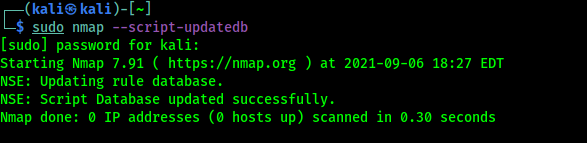
Before jumping in to finding vulnerabilities using Nmap we must need to update the database of scripts, so newer scripts will be added on our database. Then we are ready to scan for vulnerabilities with all Nmap scripts. To update the Nmap scripts database we need to apply following command on our terminal window:
sudo nmap --script-updatedbIn the following screenshot we can see that we have an updated Nmap scripts database.
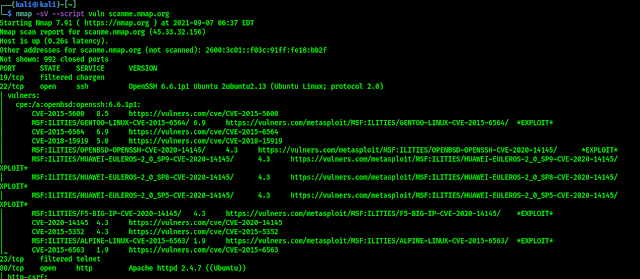
Now we are ready to scan any target for vulnerabilities. Well we can use following command to run all vulnerability scanning scripts against a target.
nmap -sV --script vuln <target>As we can see in the following screenshot:
When we are talking about Nmap Scripts then we need to know that, not only vulnerability scanning (vuln) there are lots of categories of Nmap scripts those are following:
- auth: This categorized scripts related to user authentication.
- broadcast: This is a very interesting category of scripts that use broadcast petitions to gather information.
- brute: This category is for scripts that help conduct brute-force password auditing.
- default: This category is for scripts that are executed when a script scan is executed ( -sC ).
- discovery: This category is for scripts related to host and service discovery.
- dos: This category is for scripts related to denial of service attacks.
- exploit: This category is for scripts that exploit security vulnerabilities.
- external: This category is for scripts that depend on a third-party service.
- fuzzer: This category is for Nmap scripts that are focused on fuzzing.
- intrusive: These scripts might crash system by generate lot of network noise, sysadmins considers it intrusive.
- malware: This category is for scripts related to malware detection.
- safe: This category is for scripts that are considered safe in all situations.
- version: This category is for NSE scripts that are used for advanced versioning.
- vuln: This category is for scripts related to security vulnerabilities.
So we can see that we can do various tasks using Nmap using Nmap Scripting Engine scripts. When we need to run all the scripts against single target we can use following command:
nmap -sV --script all <target>In the following screenshot we can see that all scripts are using against one target, but here every script will run so it will consume good amount of time.

That is all for this article. We will back again with Nmap. Hope this article helps our fellow Kali Linux users. Love our articles? Make sure to follow us on Twitter and GitHub, we post article updates there. To join our KaliLinuxIn family, join our Telegram Group. We are trying to build a community for Linux and Cybersecurity. For anything we always happy to help everyone on the comment section. As we know our comment section is always open to everyone. We read each and every comment and we always reply.
SOCIAL SHARE CARD GENERATOR